UTM Parameters Not Tracked in Single-Page Apps: Why They Break and How to Validate They Survive
UTM parameters "disappear" in single-page apps because client-side navigation — React Router, Vue Router, Next.js App Router, Nuxt 3, SvelteKit, and every other client-side routing library — re-renders the view without a full page load. When a visitor arrives at /landing?utm_source=linkedin&utm_medium=paid-social&utm_campaign=q3, the browser loads a fresh HTML document, gtag.js initialises, and a page_view event fires with the UTM parameters. That works correctly. But when the visitor clicks a <Link>, <router-link>, or goto() call, the router calls window.history.pushState — the URL changes, new content renders, and gtag.js fires nothing. GA4 attributes conversions on every downstream page to (direct)/(none). The universal client-side fix is to capture UTM parameters from location.search on first load, persist them to sessionStorage immediately, and attach them to each analytics event manually. But that fix only addresses your app's client-side layer — it does nothing to prove the campaign link you built actually delivers UTM parameters to the landing page in the first place. A redirect hop, a link shortener, or an edge rewrite can strip parameters before your SPA ever sees them, and your sessionStorage capture will be empty with no indication why. MissingLinkz's mlz preflight follows the full redirect chain and confirms UTM parameters reach the final URL — the pre-publish check that separates a broken link from a broken app.
The universal root cause: client-side routing does not reload the page
Traditional web apps use the browser's native navigation model: every link click sends a new HTTP request, the server returns a full HTML document, and the browser parses it from scratch. Every page load initialises gtag.js fresh, and GA4 reads UTM parameters from the new URL.
Single-page apps replace this model entirely. The initial HTML document loads once. After that, all navigation happens inside the JavaScript runtime using the History API — specifically window.history.pushState, which updates the URL bar without making a new HTTP request and without reloading the page. The script tags in <head>, including gtag.js, do not re-execute. GA4's automatic page_view event, which fires when gtag.js loads, fires exactly once per session.
The same mechanism underlies every affected framework in this cluster: React Router's <Link>, Vue Router's <RouterLink>, Next.js App Router's <Link>, Nuxt 3's <NuxtLink>, SvelteKit's <a> interception, Angular's RouterLink directive, and Remix's <Link>. The specific APIs differ; the underlying mechanism is identical.
Edge environments introduce a second class of breakage: middleware, CDN redirect rules, and consent gates that rewrite or intercept the URL before the SPA ever loads. The app's client-side routing is irrelevant here — the UTM parameters are gone before JavaScript runs.
The universal client-side fix: capture once, persist, attach at event time
Regardless of framework, the fix for SPA UTM attribution follows the same three-step pattern:
- Step 1 — Capture from
location.searchon first load - When the initial HTML document loads and JavaScript initialises, read UTM parameters from
window.location.searchusingURLSearchParams. This is the only moment the full URL including UTM parameters is guaranteed to be present. - Step 2 — Persist to
sessionStorageimmediately - Write the UTM parameters to
sessionStoragebefore any navigation occurs.sessionStoragepersists across client-side navigations within the same browser tab and is cleared when the tab closes — it is the correct storage primitive for UTM attribution within a single session. Do not uselocalStoragefor this purpose: it persists across sessions and will contaminate future visits with stale campaign data. - Step 3 — Read from
sessionStorageand attach to each analytics event - In your framework's route-change listener, read UTM parameters from
sessionStorageand include them in thepage_viewevent sent to GA4 viawindow.gtag('event', 'page_view', { page_path: location.pathname + location.search }). The routing listener implementation differs per framework — see the deep-dive guides below.
This pattern fixes attribution for pages visited after the initial landing. It does not affect the initial page_view event, which fires correctly with UTM parameters already present in the URL.
Validate the campaign link before you debug the app
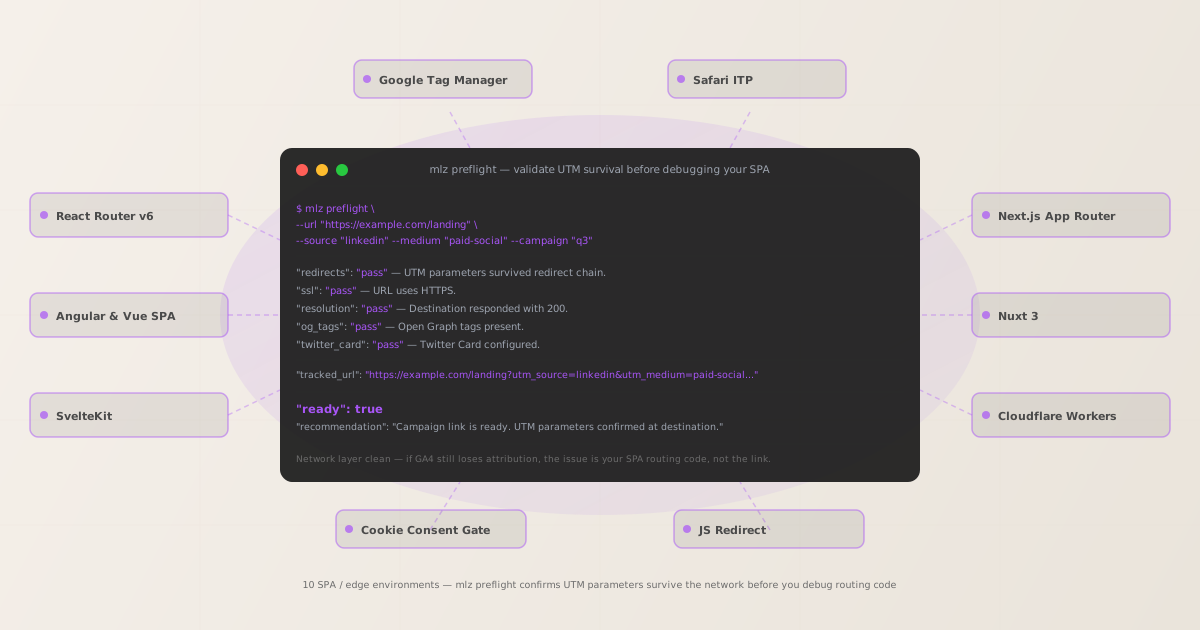
Before adding any framework-specific tracking code, verify that the campaign link you generated actually delivers UTM parameters to the landing page. MissingLinkz's mlz preflight follows every redirect hop in the chain and reports whether UTM parameters survive to the final URL.
This step catches the failure mode that client-side debugging cannot: a link shortener, a vanity domain redirect, a Cloudflare redirect rule, or an edge middleware rewrite that strips ?utm_source=... before the browser receives the HTML response. If the parameters are stripped at the network layer, your sessionStorage capture will always be empty regardless of how correctly you implement the framework-side fix.
mlz preflight --url "https://example.com/landing" --source "linkedin" --medium "paid-social" --campaign "q3-launch"
{
  "ready": true,
  "tracked_url": "https://example.com/landing?utm_source=linkedin&utm_medium=paid-social&utm_campaign=q3-launch",
  "checks": [
    { "check": "redirects",    "status": "pass", "message": "No redirects detected. UTM parameters intact." },
    { "check": "ssl",          "status": "pass", "message": "URL uses HTTPS." },
    { "check": "resolution",   "status": "pass", "message": "Destination responded with 200." },
    { "check": "og_tags",      "status": "pass", "message": "Open Graph tags present." }
  ],
  "recommendation": "All checks passed. Network layer clean — UTM parameters confirmed at destination."
}
A clean result means the network is not the problem: UTM parameters reach the browser, and the attribution loss is in the app's client-side routing code. Proceed to the framework-specific guide below. If "redirects": "fail" shows a dropped query string, fix the network layer first — see How to Check if a Redirect Strips UTM Parameters and How to Check if UTM Parameters Survive a 301 vs 302 Redirect for the common patterns.
Framework and environment deep dives
Each environment in this cluster breaks UTM attribution through a distinct mechanism. Select the guide that matches your stack:
- React Router v6 (standalone + Create React App)
- React Router's
<Link>callshistory.pushState. The fix usesuseLocationfromreact-router-dominside auseEffecthook to firepage_viewon every route change. Applies to any React app using React Router independently — not inside a framework like Next.js or Remix. - Next.js App Router
- Next.js App Router uses React Server Components on the server and client-side navigation via
<Link>in the browser. The fix uses a client component that subscribes tousePathnameanduseSearchParamsfromnext/navigationto re-fire GA4 events on each navigation. Applies to Next.js 13+ with the App Router directory structure. - Angular and Vue SPA
- Angular's
RouterLinkand Vue Router's<RouterLink>both usehistory.pushState. Angular's fix subscribes toRouter.eventsfiltered toNavigationEnd; Vue's fix callsrouter.afterEach()in theApp.vuemounted hook. Both persist UTMs tosessionStorageon first load. - SvelteKit
- SvelteKit intercepts anchor clicks and
goto()calls usinghistory.pushState. The fix uses theafterNavigatelifecycle function from$app/navigationinside the root+layout.sveltefile. This runs after every navigation including the initial page load. - Nuxt 3
- Nuxt 3's
<NuxtLink>uses Vue Router under the hood. The fix usesrouter.afterEach()inside a Nuxt plugin registered inplugins/analytics.client.ts, which runs only in the browser and firespage_viewon every route change. - Remix
- Remix is built on React Router v6 and uses the same
pushState-based navigation. The fix wrapsuseLocationanduseEffectin aPageViewTrackercomponent placed insideapp/root.tsx, which wraps every route in the application. - Gatsby
- Gatsby uses React Router internally and exposes a
gatsby-browser.jsAPI file with anonRouteUpdatehook. The fix exports anonRouteUpdatefunction that firespage_viewon every client-side navigation — or uses thegatsby-plugin-google-gtagplugin, which wires this hook automatically. - Google Tag Manager
- GTM's default GA4 configuration fires on the initial page load only. In an SPA, GTM must be configured with a custom History Change trigger that fires a GA4 event on every
pushStateorreplaceStatecall. Without this trigger, all client-side navigations are invisible to GA4 tags in GTM — including UTM attribution for downstream conversions. - Safari Intelligent Tracking Prevention (ITP)
- Safari ITP is not a routing problem — it is a browser privacy feature that caps JavaScript-set cookies at 7 days and restricts storage access after a "redirect-through-tracker" hop. If your campaign link passes through a link shortener or click tracker before the landing page, ITP may classify the referrer as a tracker and corrupt UTM attribution for 25–35% of mobile and desktop Safari traffic. The fix requires direct link delivery or server-set cookies.
- Cloudflare Workers and Edge Middleware
- Cloudflare Workers, Vercel Edge Middleware, and similar platforms execute before the HTML response reaches the browser. A misconfigured rewrite or redirect rule that drops the query string strips UTM parameters before your SPA ever initialises. The fix must be in the edge configuration, not the client-side app.
- Cookie Consent Gates
- Cookie consent managers (Cookiebot, OneTrust, Osano) can redirect users to a consent page and back before allowing the campaign URL to load. If that redirect drops the query string, all UTM parameters are lost before GA4's consent mode can read them. The fix ensures the consent redirect preserves the full original URL including query parameters.
- JavaScript Redirects
window.location.href = '...',window.location.replace(), andwindow.location.assign()are full-page navigations but they construct the destination URL in JavaScript. If the code omitswindow.location.searchwhen building the target URL, UTM parameters are stripped. The fix ensures any JS redirect carries the original query string to the destination.- Astro (View Transitions)
- Astro's View Transitions API intercepts anchor clicks and renders new pages inside the browser without a full reload — identical in effect to
pushState-based SPAs. UTM parameters captured on first load must be persisted tosessionStorageand re-attached inside anastro:page-loadevent listener. Without this, conversions on post-transition pages attribute to(direct)/(none). - SolidJS
- SolidJS Router uses the browser History API for client-side navigation. The fix wraps a
createEffectarounduseLocationfrom@solidjs/routerinside the root<App>component, firing a GA4page_viewevent on every location change with UTM parameters read fromsessionStorage. - WordPress (Caching & Redirect Rules)
- WordPress core does not strip UTM parameters — caching plugins (WP Rocket, W3 Total Cache) and
.htaccessredirect rules do. The fix is in plugin configuration or the redirect rule, not in JavaScript code. Runmlz checkto identify which hop in the redirect chain is stripping the query string. - Webflow (Publishing Redirect Rules)
- Webflow delivers pages from a CDN without modifying the query string. UTM parameters are lost only when a redirect rule in Webflow's Publishing settings matches the campaign URL and redirects to a destination without the query string. Remove or correct the conflicting redirect rule; the CDN layer itself is not the problem.
- Wix (URL Redirect Manager)
- Wix's URL Redirect Manager drops query strings by design. If a campaign URL matches a redirect rule, Wix rewrites it to the target path without the
?utm_*parameters. The fix is to update campaign links to bypass the redirect rule, or remove the conflicting entry from the Redirect Manager. - Squarespace (URL Redirects & Password Gates)
- Squarespace's URL Redirects tool, password-protected pages, and Member Areas each create redirect hops that strip UTM parameters. Remove conflicting URL Redirects rules and configure password protection to preserve the full original URL — including query parameters — after authentication.
- Framer (Redirect Rules)
- Framer is an SPA but its client-side routing is not the primary cause of UTM loss — platform-level redirect rules in Framer's publishing settings are. A redirect rule that matches the campaign URL and rewrites it to a destination without the query string is the common failure mode. Validate with
mlz checkbefore debugging client-side code. - Shopify (URL Redirects & App Conflicts)
- Shopify automatically redirects URLs that match deleted pages, product handles, or URL Redirects rules — all without preserving the query string. Remove conflicting URL Redirects entries and update campaign links to point directly to the live URL. Third-party apps that intercept traffic can also strip UTMs before the storefront script reads them.
- Netlify (_redirects & Edge Functions)
- Netlify's
_redirectsfile and Edge Functions are the two common UTM loss points. A redirect rule with an explicit destination URL replaces rather than appends to the original query string; an Edge Function that reconstructs the URL withouturl.searchsilently strips all query parameters. Both are diagnosed withmlz check. - Vercel (vercel.json Redirects & Edge Middleware)
- Vercel's
vercel.jsonredirectsrules and Edge Middleware are the two UTM loss points. A redirect rule without a:path*wildcard drops the query string; Edge Middleware usingNextResponse.redirect()without copyingurl.searchsilently strips all query parameters. - MPA vs SPA: Attribution Differences
- Multi-page apps (MPAs) get UTM attribution right by default — every navigation triggers a full page reload and
gtag.jsre-initialises with the new URL. Single-page apps break it because client-side routing bypassesgtag.js. This guide explains where the MPA/SPA threshold lies and how to diagnose which pattern your app uses. - AWS Amplify (Console Redirect Rules)
- AWS Amplify Hosting Console redirect rules intercept campaign URLs and redirect to the target path without preserving the query string. Unlike Netlify or Vercel, Amplify Hosting has no Edge Function layer — all UTM loss in Amplify is caused by Console redirect rules that lack a
?*query-string forwarding suffix. - Cloudflare Pages (_redirects & Pages Functions)
- Cloudflare Pages uses the same
_redirectsfile format as Netlify — with the same stripping behaviour when a rule specifies an explicit destination URL whose query parameters replace rather than append to the original. Pages Functions that rewrite URLs without copyingurl.searchalso strip UTMs silently. Diagnose withmlz checkbefore modifying function code.
Two diagnostic commands: when to use each
MissingLinkz exposes two commands useful for SPA UTM debugging:
mlz check <url>— network-layer validation- Validates URL format, HTTPS, HTTP resolution, redirect chain, and response time. Use this when you want a fast diagnostic of whether UTM parameters survive the redirect chain without running the full pre-publish suite. Useful during development when you want to confirm your landing URL resolves cleanly before building campaign links.
mlz preflight --url ... --source ... --medium ... --campaign ...— full pre-publish check- Builds the UTM-tagged link, validates the destination (SSL, resolution, redirects, UTM survival), and inspects the landing page for social sharing readiness (OG tags, Twitter Card, viewport). Returns a
ready: true/falseverdict. Use this before any campaign goes live — it confirms both the link structure and the destination in one command. See the mlz preflight comparison guide for what it checks that other tools miss.
For SPA debugging specifically: run mlz check first to rule out the network layer quickly. If the redirect chain is clean and UTM parameters survive, the problem is in your app's routing code — pick the relevant framework guide above. If mlz check shows a redirect that drops the query string, fix that first; see How to Check if a Redirect Strips UTM Parameters.
FAQ
- What exactly is "utm parameters not tracked in single page app"?
- It means GA4 receives a
page_viewevent on the initial landing page with correct UTM attribution, but all subsequent navigations within the same tab producepage_viewevents with no UTM data — or nopage_viewevents at all. Conversions on downstream pages appear as(direct)/(none)in GA4 reports. The cause is that single-page app routers usewindow.history.pushStateto change the URL without reloading the page, andgtag.jshas no listener forpushStatecalls by default. - Should I fix the network layer or the app code first?
- Network layer first, always. Run
mlz checkormlz preflighton your campaign URL before touching any app code. If UTM parameters are being stripped by a redirect, a link shortener, or an edge rule, no amount of client-side tracking code will recover them —sessionStoragewill be populated with an empty string. Only after confirming the network layer is clean should you proceed to framework-specific routing fixes. - Do all SPAs have exactly the same UTM tracking problem?
- They share the same root cause —
pushState-based navigation bypassesgtag.js— but the implementation details differ significantly. Gatsby exposesonRouteUpdateingatsby-browser.js; SvelteKit usesafterNavigatein+layout.svelte; Vue Router usesrouter.afterEach(); Angular subscribes toRouter.events. The fix pattern is universal but the specific code is framework-dependent. Edge environments like Cloudflare Workers and cookie consent gates break attribution through completely different mechanisms — they strip UTMs before JavaScript initialises, which no client-side fix can address. - Can mlz preflight validate UTM survival through a redirect chain before production?
- Yes.
mlz preflightfollows the complete redirect chain — including HTTP 301, 302, 307, and 308 redirects, link shorteners, and vanity domain redirects — and reports whether UTM parameters survive to the final destination. Run it against your staging or preview URL before deploying to production. If the network layer is clean in staging and clean in production, the attribution issue is definitively in the app's routing code, not the link. - Why does GA4 show
(direct)/(none)instead of my UTM source for some sessions? - Three common causes: (1) UTM parameters were stripped by a redirect before the browser loaded the page — run
mlz checkto verify. (2) The user visited a downstream page and GA4 could not attribute the session because nopage_viewevent with UTM data was fired on that navigation — fix with the framework-specific routing hook. (3) Safari ITP has restricted the cookie or storage access that would carry UTM attribution across a tracker redirect — see the Safari ITP guide for the specific mitigation.
Validate UTM survival before you debug your SPA routing
Rule out the network layer in one command. If mlz preflight shows UTM parameters intact at the destination, you know exactly where to look next.
1,000 links/month free. No credit card.
Your API key
Save this now — it won't be shown again.
npm install -g missinglinkz
Then: mlz preflight --url "https://your-landing-page.com" --source linkedin --medium paid-social --campaign q3