UTM Parameters Not Tracked in SvelteKit: How to Fix GA4 Attribution
SvelteKit intercepts qualifying anchor tag clicks and converts them to client-side navigations using window.history.pushState — the same technique that breaks GA4 UTM attribution in React, Vue, Angular, and Nuxt applications. When a visitor arrives at /landing?utm_source=google&utm_medium=cpc&utm_campaign=q3, the page loads normally and gtag.js fires a page_view event with the correct UTM parameters. But when they click an internal link or your code calls goto('/pricing'), SvelteKit navigates client-side without a page reload. gtag.js never fires again. If the conversion happens on /pricing, GA4 attributes it to (direct)/(none) and your campaign gets no credit. MissingLinkz's mlz check command is the right first step: it follows the full redirect chain and confirms whether UTM parameters reach the final URL — ruling out network-level stripping before you spend time debugging SvelteKit routing code. Once the network layer is confirmed clean, the fix is afterNavigate from $app/navigation in your root +layout.svelte, which fires page_view manually on every client-side navigation.
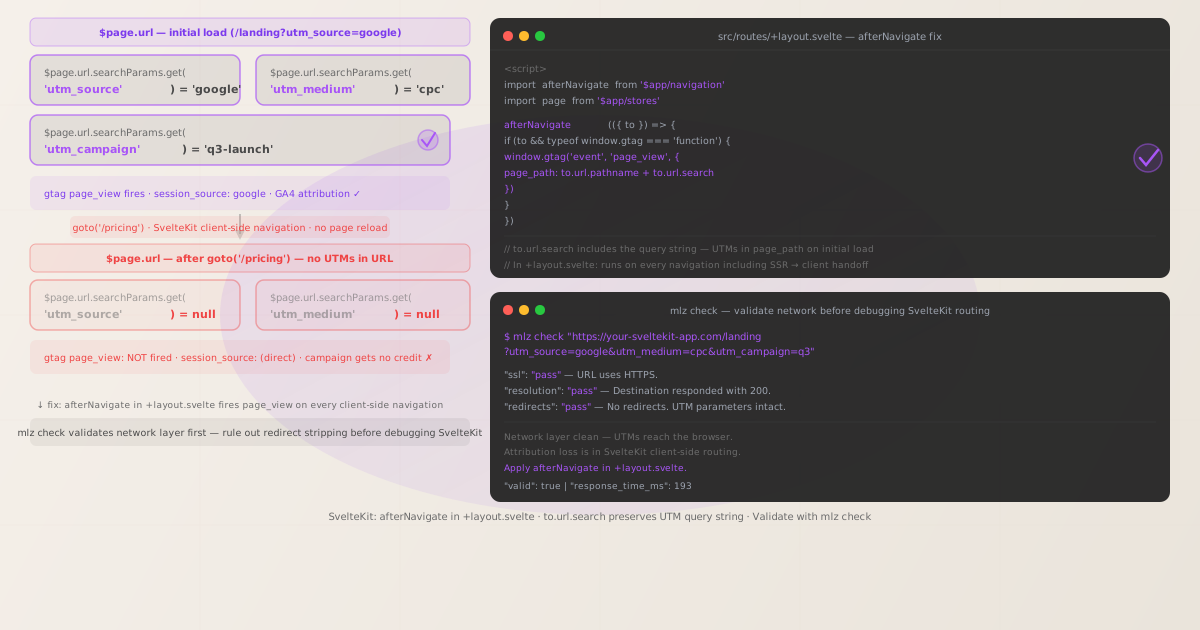
Why SvelteKit breaks GA4 UTM attribution on client-side navigation
SvelteKit's router automatically handles anchor tag navigation. When a user clicks an <a href="/pricing"> link inside a SvelteKit application, the router intercepts the click, fetches the new page data (or uses a preloaded version), and swaps the rendered content — all without a browser-level page reload. The same thing happens when application code calls goto('/pricing') from $app/navigation.
The UA-layer consequence is identical to other SPAs: gtag.js fires a page_view event exactly once — when the script loads on the initial page request. SvelteKit's client-side router doesn't reload scripts; it updates window.history and re-renders Svelte components. gtag.js has no hook into SvelteKit's navigation lifecycle, so it never fires another page_view.
The attribution damage compounds through multi-page conversion flows. A user who clicks a paid search ad lands on /landing?utm_source=google&utm_medium=cpc&utm_campaign=q3 — UTMs captured. They navigate to /pricing — no page_view. They sign up on /signup — conversion attributed to (direct)/(none). Your Google Ads campaign appears to have driven zero conversions.
SvelteKit also supports SSR mode, where the initial HTML is rendered on the server. The first page load fires page_view correctly after client-side hydration. But all subsequent navigations via SvelteKit's router are client-side regardless of SSR setting.
Step zero: confirm the network layer isn't stripping UTMs
Before writing any SvelteKit code, confirm that UTM parameters reach the browser intact. SvelteKit applications are commonly deployed on Vercel, Cloudflare Pages, or Netlify — all of which support edge functions, redirect rules, and URL rewriting that can strip query parameters at the network layer before the page ever loads.
MissingLinkz's mlz check command follows every redirect hop and reports whether UTM parameters survive to the final URL:
mlz check "https://your-sveltekit-app.com/landing?utm_source=google&utm_medium=cpc&utm_campaign=q3"
{
  "url": "https://your-sveltekit-app.com/landing?utm_source=google&utm_medium=cpc&utm_campaign=q3",
  "valid": true,
  "checks": [
    { "check": "url_format",   "status": "pass", "message": "URL format is valid." },
    { "check": "ssl",          "status": "pass", "message": "URL uses HTTPS." },
    { "check": "resolution",   "status": "pass", "message": "Destination responded with 200." },
    { "check": "redirects",    "status": "pass", "message": "No redirects detected." },
    { "check": "response_time", "status": "pass", "message": "Response time: 193ms." }
  ],
  "valid": true
}
All checks passing confirms UTM parameters reach the browser correctly. The attribution problem is in the SvelteKit routing layer. If you see "redirects": "fail" with a dropped query string, fix the network layer first — see How to Check if a Redirect Strips UTM Parameters and UTM Parameters Stripped by Cloudflare Workers or Edge Middleware.
The fix: afterNavigate in +layout.svelte
SvelteKit provides afterNavigate from $app/navigation — a lifecycle callback that runs in the browser after every navigation completes, including the initial page load transition from SSR to client-side rendering. This is the correct hook for firing page_view events on every route change.
Place the fix in your root src/routes/+layout.svelte — the layout component that wraps every route. Running it at the root level ensures it fires on every navigation regardless of which route the user is on:
<script>
  import { afterNavigate } from '$app/navigation'

  afterNavigate(({ to }) => {
    if (to && typeof window.gtag === 'function') {
      window.gtag('event', 'page_view', {
        page_path: to.url.pathname + to.url.search
      })
    }
  })
</script>

<!-- Rest of your layout template -->
<slot />
to.url.pathname gives the path (e.g., /landing) and to.url.search gives the query string (e.g., ?utm_source=google&utm_medium=cpc&utm_campaign=q3). On the initial landing page load, to.url.search contains the full UTM string. GA4 reads these from the page_path parameter and attributes the session accordingly. On subsequent navigations to /pricing, to.url.search will be empty — but GA4's session model carries the UTM attribution forward automatically.
You should also disable GA4's automatic page_view to avoid a duplicate event on the initial render. In your app.html or wherever you initialise gtag.js, add send_page_view: false:
gtag('config', 'G-XXXXXXXXXX', { send_page_view: false });
With send_page_view: false, every page_view GA4 receives comes from your afterNavigate hook — one per navigation, starting with the initial load. Verify in GA4 DebugView that exactly one event fires per page with the correct page_path.
Reading UTM parameters from the $page store
SvelteKit's $page store from $app/stores exposes the current URL as a standard URL object. You can read UTM parameters reactively from $page.url.searchParams. This is useful if you need to display campaign context in your UI or pass UTMs to a backend API call:
<script>
  import { page } from '$app/stores'

  // Reactive — updates whenever the route changes
  $: utm_source   = $page.url.searchParams.get('utm_source')
  $: utm_medium   = $page.url.searchParams.get('utm_medium')
  $: utm_campaign = $page.url.searchParams.get('utm_campaign')
</script>
Note that $page.url.searchParams.get('utm_source') returns null after navigating to a route that doesn't have UTM parameters in its URL — which is the normal case for internal navigations like /pricing or /signup. This is why you capture and store UTMs on the first load rather than reading them reactively from $page for analytics purposes.
Preserving UTMs across navigations for custom analytics pipelines
GA4's session model handles UTM attribution automatically. For standard GA4 reporting, you don't need to forward UTMs on every route change. However, if you're sending events to a custom backend, a CDP, or a data warehouse alongside GA4, you need the original UTMs available throughout the session.
The reliable pattern is to capture UTMs on first load in a SvelteKit layout or root +page.svelte and write them to sessionStorage:
<script>
  import { onMount } from 'svelte'
  import { afterNavigate } from '$app/navigation'
  import { page } from '$app/stores'

  const UTM_KEYS = ['utm_source', 'utm_medium', 'utm_campaign', 'utm_term', 'utm_content']

  onMount(() => {
    // Capture UTMs from the initial landing URL
    UTM_KEYS.forEach((key) => {
      const val = $page.url.searchParams.get(key)
      if (val && !sessionStorage.getItem(key)) {
        sessionStorage.setItem(key, val)
      }
    })
  })

  // Fire page_view on every navigation
  afterNavigate(({ to }) => {
    if (to && typeof window.gtag === 'function') {
      window.gtag('event', 'page_view', {
        page_path: to.url.pathname + to.url.search
      })
    }
  })
</script>
onMount runs only in the browser, after SSR hydration — so sessionStorage is always available inside it. The !sessionStorage.getItem(key) guard prevents subsequent navigations with UTMs in their URLs from overwriting the original session attribution. Call a helper function that reads from sessionStorage whenever you need the original UTMs later in the session.
Opting specific links out of SvelteKit's client-side router
Sometimes you want a full page reload — for example, if a campaign landing page is on a completely separate subdomain or if you need gtag.js to fire its automatic page_view on the target page. SvelteKit provides two ways to force full reloads:
data-sveltekit-reloadattribute- Adding
data-sveltekit-reloadto an anchor tag opts that link out of SvelteKit's router entirely — clicking it triggers a full browser navigation. Useful for links that point to pages that are not SvelteKit routes (e.g. a third-party checkout page). rel="external"attribute- SvelteKit treats links with
rel="external"as external navigations — they follow the standard browser navigation flow with a full page reload. The distinction fromdata-sveltekit-reloadis that this is semantically meaningful to other tools and screen readers.
For internal routes in your SvelteKit app, use the afterNavigate fix rather than opting links out of the router — the SPA routing behaviour is intentional and performant. The analytics gap is the problem to solve, not SvelteKit's navigation model.
Pre-launch validation with mlz preflight
After adding the afterNavigate hook, validate the full campaign URL before launch. mlz preflight builds the tracked URL, checks the redirect chain, SSL, Open Graph tags, Twitter Card metadata, and UTM parameter structure in one command:
mlz preflight --url "https://your-sveltekit-app.com/landing" --source "google" --medium "cpc" --campaign "q3-launch"
{
  "ready": true,
  "tracked_url": "https://your-sveltekit-app.com/landing?utm_source=google&utm_medium=cpc&utm_campaign=q3-launch",
  "checks": [
    { "check": "ssl",          "status": "pass", "message": "URL uses HTTPS." },
    { "check": "resolution",   "status": "pass", "message": "Destination responded with 200." },
    { "check": "redirects",    "status": "pass", "message": "No redirects detected." },
    { "check": "og_tags",     "status": "pass", "message": "All essential Open Graph tags present." },
    { "check": "twitter_card", "status": "pass", "message": "Twitter Card tags configured." }
  ],
  "summary": { "total": 12, "passed": 12, "warnings": 0, "failed": 0 },
  "recommendation": "All checks passed. Campaign link is ready to publish."
}
A clean preflight result confirms the network infrastructure is solid. Add mlz preflight to your SvelteKit deploy checklist — particularly when deploying to new environments or adding edge functions, which can introduce redirect rules that silently strip query parameters.
Frequently asked questions
- Does SvelteKit automatically track route changes in GA4?
- No. SvelteKit's router intercepts internal anchor clicks and
goto()calls, navigating viawindow.history.pushStatewithout a page reload.gtag.jsfirespage_viewonce at script load time and has no listener for SvelteKit's navigation events. UseafterNavigatefrom$app/navigationin your root+layout.svelteto firepage_viewmanually on every route change. - Why does the fix go in +layout.svelte instead of +page.svelte?
- The root
+layout.sveltewraps every route in your application. PlacingafterNavigatethere ensures it fires on navigation to any route, not just the specific page file it's defined in. If you placed it in+page.sveltefiles, you'd need to add it to every page separately — and you'd miss navigations that go from one page without the hook to another page. - Does afterNavigate fire on the initial page load?
- Yes.
afterNavigatefires after the initial client-side navigation from SSR to the client — the hydration step. This means the first call happens withtopointing to the current page, including any UTM parameters into.url.search. This replaces the automaticpage_viewthatgtag('config', 'G-XXXXXXXXXX')would have fired, which is why you should setsend_page_view: falseto avoid duplicates. - How is SvelteKit's routing different from React Router or Vue Router?
- The root cause is identical — all three use
history.pushStatefor client-side navigation, andgtag.jsdoesn't detect any of them automatically. The API differs: React Router usesuseLocation()+useEffect, Vue Router usesrouter.afterEach(), and SvelteKit uses theafterNavigatelifecycle hook from$app/navigation. Thepage_pathvalue constructed fromto.url.pathname + to.url.searchis the same concept across all three. - What if my SvelteKit app uses adapter-static with pre-rendered routes?
- Static pre-rendering doesn't change the client-side routing behaviour. Pre-rendered routes still load via SvelteKit's client-side router after the initial page load. The
afterNavigatefix applies equally to apps usingadapter-static,adapter-cloudflare-pages,adapter-vercel, or any other adapter. The adapter determines where the HTML files are served from, not how navigation works in the browser.
Validate your SvelteKit campaign links before debugging the router
Run mlz check first to confirm UTM parameters survive the network layer, then add afterNavigate in +layout.svelte to capture every client-side navigation.
1,000 links/month free. No credit card.
Your API key
Save this now — it won't be shown again.
npm install -g missinglinkz
Then: mlz check "https://your-sveltekit-app.com/landing?utm_source=google&utm_medium=cpc&utm_campaign=q3"