UTM Parameters Not Tracked in Angular and Vue SPAs: How to Fix GA4 Attribution
Angular and Vue SPAs fire GA4's page_view event automatically exactly once — on the initial full page load. Every subsequent navigation through Angular Router or Vue Router renders a new view without a browser navigation event, so gtag.js never registers a new page. UTM parameters from the original campaign URL are captured on that first page_view, but if a user converts on a page they reached via client-side routing, GA4 records the conversion with no UTM context — the session appears as (direct)/(none) and your LinkedIn or Google campaign gets no credit. The answer is a router event listener that manually fires page_view on every navigation. But before writing any code: run mlz check against your campaign landing URL first. If UTMs are being stripped at the network level — by a redirect, a Cloudflare Worker, or an nginx rule — fixing the router tracking won't help. mlz check rules that out in one command and confirms the problem is client-side before you spend time on router instrumentation.
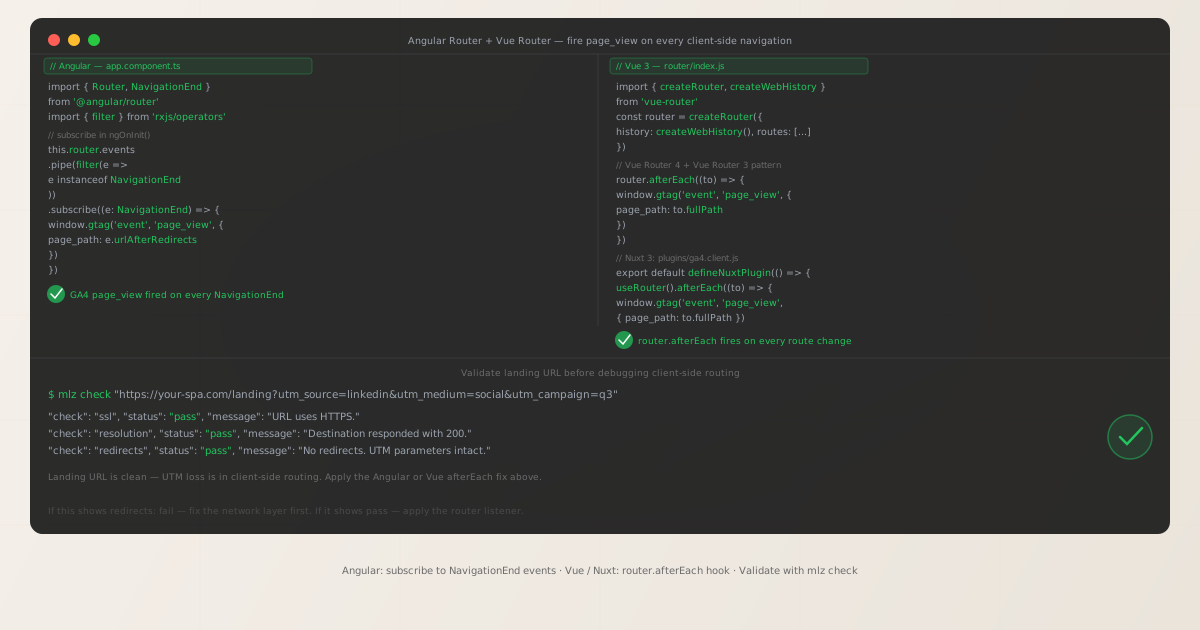
Why Angular Router and Vue Router don't fire GA4 page_view automatically
GA4's gtag.js initialises by listening to window.history.pushState and popstate browser events for automatic page tracking. The problem is that Angular Router and Vue Router's navigation does not reliably trigger GA4's built-in page-change detection in all configurations. When you navigate between routes in an Angular or Vue SPA, the router calls history.pushState internally — but the GA4 config option send_page_view: true (the default) only fires on the initial script load. Subsequent pushState calls may or may not trigger GA4 depending on script load order, framework version, and how the router initialises relative to gtag.js. The only reliable pattern is to disable GA4's automatic initial page_view with send_page_view: false and fire it manually in the router callback for every navigation — including the first.
This is the same root cause as the Next.js App Router SPA tracking issue. The implementation differs by framework: Next.js uses usePathname and useSearchParams hooks; Angular uses the Router events Observable with NavigationEnd; Vue uses router.afterEach. The principle is identical: intercept every client-side navigation event and manually tell GA4 a new page appeared.
The consequence of not doing this: campaign conversions that happen on routes beyond the landing page show no UTM attribution. A user arrives at /landing?utm_source=linkedin&utm_medium=social&utm_campaign=q3, GA4 records the session with UTMs correctly, then the user navigates to /pricing via the router. If the user converts on /pricing, GA4 records that conversion against session_source=(direct) — because no page_view was ever fired for /pricing, and the session attribution logic relies on the most recent page view.
Step zero: confirm the problem is in the router, not the network
Before implementing any router fix, confirm that your campaign URL's UTM parameters actually survive the network journey to the browser. Edge-level stripping — from a Cloudflare Worker, nginx proxy rule, or cookie consent redirect — happens before JavaScript runs. If UTMs are stripped at the network layer, a router-level fix won't recover them.
mlz check "https://your-angular-app.com/landing?utm_source=linkedin&utm_medium=social&utm_campaign=q3"
When the landing URL is clean and UTMs survive the redirect chain, mlz check returns all checks passing:
{
  "url": "https://your-angular-app.com/landing?utm_source=linkedin&utm_medium=social&utm_campaign=q3",
  "valid": true,
  "checks": [
    { "check": "url_format",   "status": "pass", "message": "URL format is valid." },
    { "check": "ssl",          "status": "pass", "message": "URL uses HTTPS." },
    { "check": "resolution",   "status": "pass", "message": "Destination responded with 200." },
    { "check": "redirects",    "status": "pass", "message": "No redirects detected." },
    { "check": "response_time", "status": "pass", "message": "Response time: 214ms." }
  ],
  "valid": true
}
All checks passing means the UTM parameters are intact at the network layer and reach the browser correctly. The attribution problem is in your client-side router. If you see "redirects": "fail" with "utm_present_at_final_url": false, fix the network layer first — see How to Check if a Redirect Strips UTM Parameters and UTM Parameters Stripped by Cloudflare Workers or Edge Middleware.
Angular fix: subscribe to Router events with NavigationEnd
Angular's Router exposes an Observable of navigation events. The NavigationEnd event fires after Angular Router completes each navigation — including the very first. Subscribe to it in AppComponent.ngOnInit() or in a dedicated injectable service, filter for NavigationEnd, and fire gtag('event', 'page_view') on each emission.
import { Component, OnInit } from '@angular/core'
import { Router, NavigationEnd } from '@angular/router'
import { filter } from 'rxjs/operators'

@Component({
  selector: 'app-root',
  template: '<router-outlet></router-outlet>'
})
export class AppComponent implements OnInit {
  constructor(private router: Router) {}

  ngOnInit(): void {
    this.router.events
      .pipe(filter(event => event instanceof NavigationEnd))
      .subscribe((event: NavigationEnd) => {
        (window as any).gtag('event', 'page_view', {
          page_path: event.urlAfterRedirects
        })
      })
  }
}
event.urlAfterRedirects gives the final URL after any Angular-internal route redirects, which is more accurate than event.url when you have redirect rules in your route configuration. For applications with lazy-loaded modules, the event fires after the module is resolved and the component is ready to render.
If you prefer not to couple this to AppComponent, create an injectable service and call it once from AppModule:
import { Injectable } from '@angular/core'
import { Router, NavigationEnd } from '@angular/router'
import { filter } from 'rxjs/operators'

@Injectable({ providedIn: 'root' })
export class Ga4TrackingService {
  constructor(private router: Router) {}

  init(): void {
    this.router.events
      .pipe(filter(e => e instanceof NavigationEnd))
      .subscribe((e: NavigationEnd) => {
        (window as any).gtag('event', 'page_view', {
          page_path: e.urlAfterRedirects
        })
      })
  }
}

// In AppModule constructor:
constructor(ga4: Ga4TrackingService) {
  ga4.init()
}
The service pattern is preferable for larger applications because it is instantiated once and persists across all route changes, whereas a component-based subscription depends on the component's lifecycle. Remember to also set send_page_view: false in your gtag('config', ...) call to prevent a duplicate initial page_view event.
Angular: preserve UTM parameters across route changes
When a user lands on /landing?utm_source=linkedin and then navigates to /pricing, the event.urlAfterRedirects will be /pricing with no query string — the UTMs are not attached to the new route URL. GA4 handles session-level attribution automatically: once UTMs are recorded on the first page_view event, GA4 attributes subsequent events in the same session to the same source and medium. You do not need to pass UTM parameters on every page_view call.
However, if you have custom analytics needs — or if you're sending page_view events to a dataLayer or a custom endpoint alongside GA4 — you may want to persist the initial UTMs in sessionStorage and attach them to each navigation event:
// Capture UTMs on first page load and persist them
private captureInitialUtms(): void {
  const params = new URLSearchParams(window.location.search)
  ['utm_source', 'utm_medium', 'utm_campaign',
   'utm_term', 'utm_content'].forEach(key => {
    const val = params.get(key)
    if (val) sessionStorage.setItem(key, val)
  })
}

// Helper to read persisted UTMs
private getStoredUtms(): Record<string, string> {
  const keys = ['utm_source', 'utm_medium', 'utm_campaign',
                'utm_term', 'utm_content']
  return Object.fromEntries(
    keys
      .map(k => [k, sessionStorage.getItem(k)])
      .filter(([, v]) => v !== null)
  ) as Record<string, string>
}
Call captureInitialUtms() on service initialisation (before subscribing to router events), then merge getStoredUtms() into your page_view event payload on each navigation if needed for custom pipelines.
Vue 3 fix: router.afterEach hook
Vue Router 4 (used with Vue 3) exposes a global navigation guard called router.afterEach. It fires after every completed navigation — including the initial load. Register it once after creating the router instance, before the app mounts:
import { createRouter, createWebHistory } from 'vue-router'

const router = createRouter({
  history: createWebHistory(),
  routes: [
    // your route definitions
  ]
})

router.afterEach((to) => {
  window.gtag('event', 'page_view', {
    page_path: to.fullPath
  })
})

export default router
to.fullPath includes the full path plus any query parameters present on the target route — so if the initial landing page still has UTMs in the URL when the first navigation fires, they appear in fullPath. For subsequent navigations to routes without UTMs (such as /pricing), fullPath will be /pricing — which is correct; GA4's session attribution handles the source/medium persistence automatically.
Also configure the initial gtag call with send_page_view: false to avoid doubling the first event:
gtag('config', 'G-XXXXXXXXXX', { send_page_view: false });
Vue 2 fix: router.afterEach with Vue Router 3
The router.afterEach pattern is identical in Vue 2 with Vue Router 3. Register it in main.js after creating the router:
import Vue from 'vue'
import VueRouter from 'vue-router'
import App from './App.vue'

Vue.use(VueRouter)

const router = new VueRouter({
  mode: 'history',
  routes: [ /* your routes */ ]
})

router.afterEach((to) => {
  window.gtag('event', 'page_view', {
    page_path: to.fullPath
  })
})

new Vue({
  router,
  render: h => h(App)
}).$mount('#app')
The API is identical between Vue Router 3 and Vue Router 4. The only difference is how the router is instantiated (new VueRouter() vs createRouter()). The afterEach callback shape and the to.fullPath property work the same way in both versions.
Nuxt 3 fix: client-only plugin
Nuxt 3 applications are server-side rendered, so you must ensure the GA4 tracking code only runs in the browser. Use a Nuxt plugin with the .client.js suffix — Nuxt automatically omits client-only plugins from the server-side render bundle:
export default defineNuxtPlugin(() => {
  const router = useRouter()

  router.afterEach((to) => {
    // window.gtag is available if you loaded GA4 via nuxt.config or a script tag
    if (typeof window !== 'undefined' && window.gtag) {
      window.gtag('event', 'page_view', {
        page_path: to.fullPath
      })
    }
  })
})
The typeof window !== 'undefined' guard is an extra safety check that prevents errors if the plugin file is ever imported in a server context. The .client.js suffix is the primary protection. If you are using @nuxtjs/gtag or a third-party Nuxt GA4 module, check whether the module already provides route tracking — some modules expose a trackRoutes option that does this automatically.
Vue: preserve UTM parameters across routes
Vue Router's navigation guards give you access to to.query — the query parameters of the destination route. On the initial navigation, to.query includes UTMs if they were in the campaign URL. On subsequent navigations (e.g. from /landing?utm_source=linkedin to /pricing), to.query will be empty for the new route.
GA4 handles session-level attribution automatically, so for standard GA4 tracking you do not need to manually forward UTMs on every route change. If you need UTMs for custom analytics, capture them in sessionStorage on the first navigation:
const UTM_KEYS = [
  'utm_source', 'utm_medium', 'utm_campaign',
  'utm_term', 'utm_content'
]
let utmsCaptured = false

router.afterEach((to) => {
  if (!utmsCaptured) {
    UTM_KEYS.forEach(key => {
      const val = to.query[key]
      if (val) sessionStorage.setItem(key, String(val))
    })
    utmsCaptured = true
  }

  window.gtag('event', 'page_view', {
    page_path: to.fullPath
  })
})
The utmsCaptured flag ensures the sessionStorage write only happens once per session, on the first navigation where UTMs are present. Reading from sessionStorage later — on form submissions or conversion events — lets you attach original UTM attribution to any custom analytics events even after multiple route changes.
Pre-launch validation with mlz preflight
After applying the router fix, confirm the full URL chain is clean before launch. mlz preflight validates the redirect chain, SSL, Open Graph tags, Twitter Card metadata, and UTM parameter integrity in a single command:
mlz preflight --url "https://your-spa.com/landing" --source "linkedin" --medium "social" --campaign "q3-launch"
{
  "ready": true,
  "tracked_url": "https://your-spa.com/landing?utm_source=linkedin&utm_medium=social&utm_campaign=q3-launch",
  "checks": [
    { "check": "ssl",          "status": "pass", "message": "URL uses HTTPS." },
    { "check": "resolution",   "status": "pass", "message": "Destination responded with 200." },
    { "check": "redirects",    "status": "pass", "message": "No redirects detected." },
    { "check": "og_tags",     "status": "pass", "message": "All essential Open Graph tags present." },
    { "check": "twitter_card", "status": "pass", "message": "Twitter Card tags configured." }
  ],
  "summary": { "total": 12, "passed": 12, "warnings": 0, "failed": 0 },
  "recommendation": "All checks passed. Campaign link is ready to publish."
}
A clean preflight result means the landing URL is solid at the infrastructure level. The router tracking fix you applied handles the client-side attribution. Add mlz preflight to your pre-launch checklist for every campaign — especially when deploying new SPA routes or updating Angular/Vue Router configuration, which can inadvertently affect how landing pages serve responses.
Framework quick reference
| Framework | Router event hook | Key property | Works with SSR? |
|---|---|---|---|
| Angular | Router events Observable + NavigationEnd filter |
event.urlAfterRedirects |
✗ Client-only (use isPlatformBrowser guard) |
| Vue 3 + Vue Router 4 | router.afterEach() |
to.fullPath |
✗ Client-only (check typeof window) |
| Vue 2 + Vue Router 3 | router.afterEach() |
to.fullPath |
✗ Client-only (check typeof window) |
| Nuxt 3 | useRouter().afterEach() in plugin |
to.fullPath |
✓ Use .client.js plugin suffix |
In all cases: set send_page_view: false in the gtag('config', ...) call to avoid doubling the first event when the router fires immediately on load. For UTM persistence across routes, GA4's session-level attribution handles it automatically — manual sessionStorage persistence is only needed for custom analytics pipelines that aren't GA4.
Frequently asked questions
- Does gtag.js automatically track route changes in Angular or Vue?
- No.
gtag.jshooks into browser navigation events at script load time. Angular Router and Vue Router use the HTML5 History APIpushStateinternally, but the GA4 configuration's automatic page tracking does not reliably intercept these SPA navigation events by default. The only reliable approach is to manually firepage_viewin the AngularNavigationEndsubscriber or Vuerouter.afterEachcallback on every navigation, including the first. - Will the manual page_view event duplicate the initial page load tracking?
- Only if you leave GA4's automatic
page_viewenabled. Setsend_page_view: falsein yourgtag('config', 'G-XXXXXXXXXX', { send_page_view: false })call to suppress the automatic initial event, then fire it manually in your router hook on every navigation including the first. This gives you full control and avoids any duplication in the GA4 DebugView. - How do UTM parameters appear in GA4 when using the router hook?
- GA4 associates UTM parameters with session data set on the first
page_viewevent in the session. Subsequentpage_viewevents within the same session inherit the session's UTM attribution automatically — you do not need to pass UTMs as parameters on every router-triggeredpage_viewcall, only on the first. This is GA4's standard session attribution model and works the same whether the first event fires from a full page load or from the first router callback invocation. - Does this fix work for Angular's hash router or Vue's hash mode?
- Yes. Both Angular's
HashLocationStrategyand Vue Router'screateWebHashHistorytrigger the same router navigation events. TheNavigationEndsubscriber andafterEachcallback fire regardless of whether history mode or hash mode is used. Theevent.urlAfterRedirectsandto.fullPathproperties include the hash fragment when using hash-based routing. - How is this different from the Next.js SPA tracking fix?
- The root cause is identical: SPA routing does not trigger GA4
page_viewautomatically. The implementation differs by framework. Next.js App Router usesusePathnameanduseSearchParamshooks inside a client component wrapped inSuspense. Angular uses the Router events Observable filtered toNavigationEnd. Vue usesrouter.afterEach, which is also the pattern for Vue 2 and Nuxt. See UTM Parameters Not Tracked in Next.js SPA for the Next.js implementation.
Validate your SPA campaign links before fixing the routing
Run mlz check first to confirm UTMs survive the redirect chain — then apply the Angular Router or Vue Router fix to capture them on every client-side navigation.
1,000 links/month free. No credit card.
Your API key
Save this now — it won't be shown again.
npm install -g missinglinkz
Then: mlz check "https://your-spa.com/landing?utm_source=linkedin&utm_medium=social&utm_campaign=q3"