UTM Parameters Stripped by Cloudflare Workers or Edge Middleware: How to Detect and Fix It
When a user clicks a campaign link with UTM parameters, those parameters must survive the entire journey from the ad platform to the final page load for GA4 to record accurate attribution. Most developers focus on JavaScript redirects or consent management platforms as the culprits when UTMs disappear — but there is an earlier, less visible place where query strings can be silently stripped: the edge layer. Cloudflare Workers, Next.js middleware, nginx reverse proxies, and AWS CloudFront origin rules all execute before your application code sees the request. A misconfigured URL rewrite at the edge drops the query string — and by the time the page renders in the browser, the UTM parameters are already gone. The browser DevTools Network tab shows the final resolved URL, so the stripping is invisible to manual inspection in a browser. MissingLinkz's mlz check detects it by following the full request chain from the origin and checking whether UTM parameters are present in the final resolved URL — catching edge-level stripping before you commit to campaign spend. This article covers the most common edge configurations that strip UTMs, how to detect each one, and the specific code fix for each.
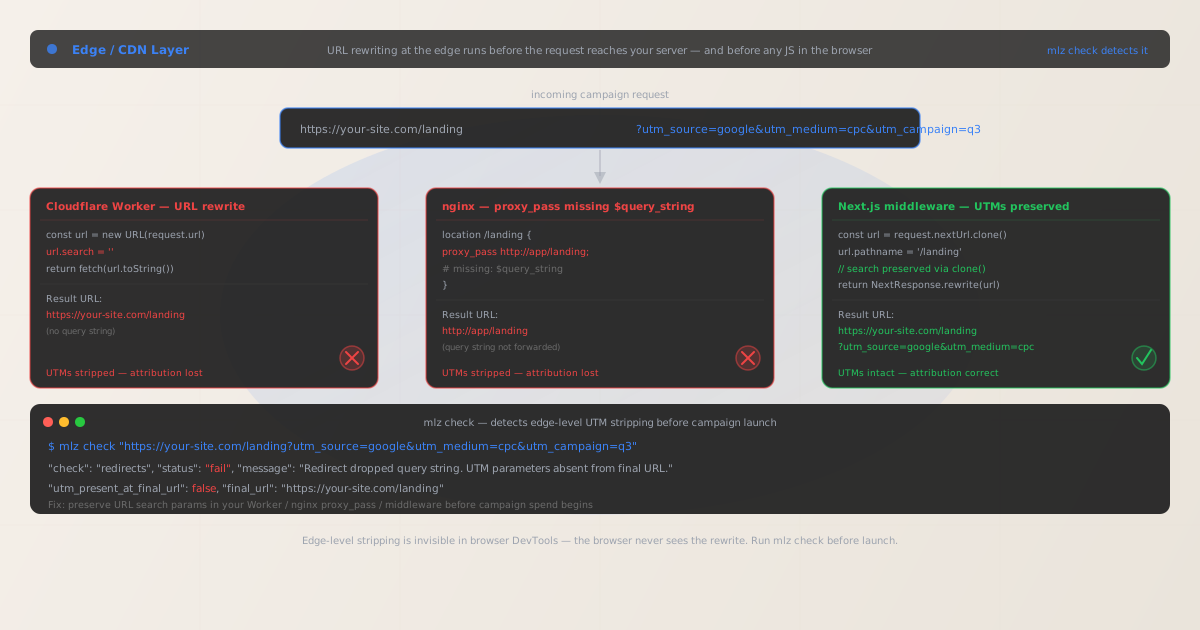
Why edge-level UTM stripping is harder to diagnose than redirect stripping
When a redirect drops a query string, you can usually spot it in the browser's Network tab: you see a 301 or 302 response where the Location header shows the destination URL without the query string. Edge-level rewriting is different. The rewrite happens at the infrastructure layer — the Cloudflare edge node, the nginx reverse proxy, or the Next.js middleware runtime — and the browser receives only the final resolved response. There is no visible redirect in DevTools. The page loads normally, the URL in the browser address bar shows the original UTM-tagged URL (if you're using a rewrite rather than a redirect), and everything looks correct — except GA4 sees a bare URL with no query string, because the rewrite dropped it before the application server rendered the response.
This class of problem is common in three scenarios:
- URL rewrites that reconstruct the URL without the query string
-
A URL rewrite changes the path the origin server sees but keeps the browser's address bar URL unchanged. If the rewrite constructs a new URL object and assigns a new pathname without copying the search params, the query string is silently dropped. The browser shows the original URL in the address bar, but the server processes a request with no query string — and the response has no UTM context for analytics.
- Proxy rules that forward a path without a query string variable
-
nginx, Apache, and load balancers let you specify the upstream URL explicitly. If you write
proxy_pass http://app/landing;(with a literal path), nginx does not automatically append the query string. The upstream receives/landingwith no query string. Onlyproxy_pass http://app$request_uri;or including$query_stringexplicitly preserves the query string. - Cloudflare Page Rules with forwarding URL patterns that omit the query string
-
Cloudflare Page Rules that use "Forwarding URL" or "URL Rewrite" can be configured with capture group syntax (
$1,$2). If the rule pattern captures the path but not the query string, the forwarded URL contains only the path. Cloudflare does not automatically append the query string to forwarding URL rules unless the pattern explicitly includes it or the rule is set to pass the full URL.
Detecting edge-level UTM stripping with mlz check
Because edge-level stripping is invisible in the browser, the reliable detection method is a server-side HTTP check that follows the full request chain and inspects what the origin actually receives. MissingLinkz's mlz check makes the request from the server side — exactly as a Googlebot or social media crawler would — and reports whether the UTM parameters are present in the final resolved URL.
mlz check "https://your-site.com/landing?utm_source=google&utm_medium=cpc&utm_campaign=q3-launch"
When edge middleware strips the query string, mlz check reports the failure in the redirects check:
{
  "url": "https://your-site.com/landing?utm_source=google&utm_medium=cpc&utm_campaign=q3-launch",
  "valid": false,
  "checks": [
    { "check": "ssl",          "status": "pass", "message": "URL uses HTTPS." },
    { "check": "resolution",   "status": "pass", "message": "Destination responded with 200." },
    {
      "check": "redirects",
      "status": "fail",
      "message": "Redirect dropped query string. UTM parameters absent from final URL.",
      "details": {
        "utm_present_at_final_url": false,
        "final_url": "https://your-site.com/landing"
      }
    }
  ]
}
The final_url in the response is the key diagnostic: it shows what URL the origin server received. If it differs from the input URL by the absence of the query string, the stripping is happening at the edge. Compare the final_url to the input URL — if the path matches but the query string is absent, the issue is an edge rewrite, not a server-side redirect or JavaScript redirect.
Fix: Cloudflare Workers
Cloudflare Workers execute as edge functions for every matching request. The most common way UTMs get stripped is when a Worker constructs a new URL object and modifies the pathname or hostname without preserving the search params:
// BROKEN: clears the entire query string
const url = new URL(request.url)
url.search = ''
return fetch(url.toString())

// BROKEN: new URL from path only, loses query string
const newUrl = new URL('https://origin.internal/landing')
return fetch(newUrl.toString())

// FIXED: clone the URL and modify only the pathname
const url = new URL(request.url)
url.hostname = 'origin.internal'
// url.search is preserved because we didn't clear it
return fetch(url.toString(), request)

// FIXED: explicitly preserve the search params when building a new URL
const origin = new URL('https://origin.internal/landing')
origin.search = new URL(request.url).search
return fetch(origin.toString(), request)
After deploying the fix, run mlz check again against the campaign URL. The redirects check should return "pass" and the final_url should include the full query string.
Cloudflare Page Rules forwarding URL fix
If you are using Cloudflare Page Rules with a "Forwarding URL" action rather than a Worker, the fix is in the forwarding URL pattern. Add $2 at the end to include the query string:
# BROKEN: pattern captures path only, query string lost
URL matches:   https://your-site.com/old-path/*
Forward to:    https://your-site.com/landing/$1

# FIXED: use query string forwarding option in the rule
URL matches:   https://your-site.com/old-path/*
Forward to:    https://your-site.com/landing/$1
Option:        "Pass query string" → ENABLED

# Or with explicit query string capture (Bulk Redirects)
Source:        https://your-site.com/old-path/*
Target:        https://your-site.com/landing/{request.path}?{query_string}
Fix: nginx reverse proxy
nginx has two behaviors depending on how proxy_pass is written. When the target URL includes a path (even just a trailing slash), nginx does not automatically append the query string unless you include $query_string or use $request_uri:
# BROKEN: explicit path, query string NOT forwarded automatically
location /landing {
  proxy_pass http://app-backend/landing;
}

# FIXED option 1: pass request_uri (path + query string)
location /landing {
  proxy_pass http://app-backend$request_uri;
}

# FIXED option 2: explicitly append query string
location /landing {
  proxy_pass http://app-backend/landing?$query_string;
}

# FIXED option 3: rewrite to include args
location /landing {
  rewrite ^/landing(.*)$ /landing$1 break;
  proxy_pass http://app-backend;
# nginx preserves query string when no explicit path in proxy_pass
}
The safest pattern in nginx is to pass $request_uri — the full path plus the query string, exactly as received. This ensures that any query parameter (not just UTMs) is always forwarded to the upstream application.
Fix: Next.js middleware
Next.js middleware runs at the edge before a request is processed by a route. URL rewrites in middleware can silently drop query strings if the new URL is constructed from a base path without copying the search parameters:
import { NextResponse } from 'next/server'
import type { NextRequest } from 'next/server'

export function middleware(request: NextRequest) {

  // BROKEN: new URL from base path — loses query string entirely
  const url = new URL('/landing', request.url)
  // url.search is empty — only base origin was passed
  return NextResponse.rewrite(url)

  // FIXED option 1: clone the incoming URL, change only pathname
  const url = request.nextUrl.clone()
  url.pathname = '/landing'
  // url.search is preserved from the original request
  return NextResponse.rewrite(url)

  // FIXED option 2: use NextResponse.next() with headers if no path change needed
  return NextResponse.next()

}
The key is request.nextUrl.clone(). The nextUrl property of the incoming request contains the full URL including the search params. Cloning it gives you a mutable copy that already has the query string — then you can modify only the pathname. A new URL constructed from a base path starts with an empty search string.
AWS CloudFront and other CDN origin rules
AWS CloudFront allows you to configure origin request policies that control which parts of the incoming request are forwarded to the origin. By default, CloudFront does not forward query strings unless explicitly configured to do so.
# BROKEN: default Cache Behavior — query strings NOT forwarded
QueryStringCacheKeys:
  Quantity: 0
  # CloudFront strips query string before forwarding to origin

# FIXED: Cache Behavior — forward all query strings
ForwardedValues:
  QueryString: true
  # CloudFront forwards the complete query string to origin

# Alternatively, use a managed origin request policy
OriginRequestPolicies:
  PolicyId: b689b0a8-53d0-40ab-baf2-68738e2966ac
  # "AllViewer" managed policy — forwards all query strings
The CloudFront console exposes this under "Cache behavior settings" → "Cache key and origin requests" → "Legacy cache settings" or under an origin request policy. Ensure "Query strings" is set to "All" or to a whitelist that includes utm_source, utm_medium, utm_campaign, utm_term, and utm_content.
Full preflight before campaign launch
After fixing the edge configuration, confirm the entire URL chain is clean with mlz preflight — it validates the redirect chain, SSL, OG tags, Twitter Card, and UTM parameter integrity in a single command:
mlz preflight --url "https://your-site.com/landing" --source "google" --medium "cpc" --campaign "q3-launch"
{
  "ready": true,
  "tracked_url": "https://your-site.com/landing?utm_source=google&utm_medium=cpc&utm_campaign=q3-launch",
  "checks": [
    { "check": "ssl",          "status": "pass", "message": "URL uses HTTPS." },
    { "check": "resolution",   "status": "pass", "message": "Destination responded with 200." },
    { "check": "redirects",    "status": "pass", "message": "No redirects detected. UTM parameters intact." },
    { "check": "og_tags",     "status": "pass", "message": "All essential Open Graph tags present." },
    { "check": "twitter_card", "status": "pass", "message": "Twitter Card tags configured." }
  ],
  "summary": { "total": 12, "passed": 12, "warnings": 0, "failed": 0 },
  "recommendation": "All checks passed. Campaign link is ready to publish."
}
Run mlz preflight as part of your campaign pre-launch checklist — especially after any deployment that touches edge configuration. Cloudflare Worker deployments, nginx config changes, and CloudFront distribution updates are easy points at which a working configuration can accidentally regress.
For the broader context of all classes of UTM tracking failure, see Campaign Link Validation — The Complete Guide and How to Check if a Redirect Strips UTM Parameters.
Edge platform quick reference
| Platform | Common stripping pattern | Fix |
|---|---|---|
| Cloudflare Worker | url.search = '' or new URL from path |
Clone request URL, modify pathname only |
| Cloudflare Page Rules | Forwarding URL without query string pass-through | Enable "Pass query string" option |
| nginx | proxy_pass to an explicit path without $query_string |
Use $request_uri or append ?$query_string |
| Next.js middleware | new URL('/path', request.url) — empty search |
request.nextUrl.clone() — preserves search |
| AWS CloudFront | Default behavior — query strings not forwarded | Set QueryString: true in cache behavior |
| Apache mod_proxy | ProxyPass to explicit path without query string | Use ProxyPass /landing http://app/landing?%{QUERY_STRING} |
In all cases, the detection method is the same: mlz check against the campaign URL with UTM parameters included. If utm_present_at_final_url is false in the output, there is stripping somewhere in the request chain. The final_url value identifies the URL as the origin received it — compare it to the input to diagnose the exact transformation that occurred.
Frequently asked questions
- How is edge-level stripping different from a JavaScript redirect stripping UTMs?
- A JavaScript redirect executes in the user's browser after the initial page load — the original URL was already received by the server with its UTM parameters. Edge-level stripping happens before the request reaches your application server: the UTM parameters never arrive at the server, and the application code and any JavaScript on the page never had access to them. Both show up as
(direct)/(none)in GA4, but the detection and fix are completely different. Usemlz checkto confirm whether thefinal_urlincludes the query string — if it doesn't, the stripping is at the edge. If it does, the issue is in-browser JS. See UTM Parameters Lost After JavaScript Redirect for the JS redirect case. - Does mlz check detect Cloudflare Worker rewrites or only redirect chains?
mlz checkfollows the full request chain and reports thefinal_url— the URL as resolved after all redirects and rewrites. It detects both explicit redirects (HTTP 301/302) that drop the query string and transparent rewrites (where the browser address bar stays the same but the backend received a different URL). Ifutm_present_at_final_urlisfalse, there is stripping somewhere in the chain regardless of whether it was a redirect or a rewrite.- My Cloudflare Worker doesn't rewrite URLs — could it still strip UTMs?
- Yes, if the Worker passes the request to an origin with a modified URL, or if it caches responses keyed on the URL without the query string and returns a cached response for a different URL. Check whether the Worker calls
fetch()with a URL other thanrequest.url— any URL construction that doesn't carry the originalrequest.url's search params will drop UTMs. - Does caching at the CDN level cause UTM loss?
- Caching does not directly strip UTM parameters from the user's URL. However, if a CDN is configured to cache responses keyed on the URL without the query string (normalizing the cache key by removing query strings), the cached response may have been generated from a request with no query string — and if the response includes any server-side rendering that references UTM params (like og:image URLs built from the current URL), those will be wrong. The UTM parameters in the user's browser URL bar are still present. For server-side analytics (as opposed to client-side GA4), CDN query-string normalization is a risk to watch. For client-side GA4, the issue is transparent.
- How do I include mlz check in a CI/CD pipeline to prevent this regression?
- Add a
mlz checkstep in your deployment pipeline that runs against your campaign landing pages after every deployment that touches edge configuration. A failingredirectscheck withutm_present_at_final_url: falseshould fail the build. See Automate Campaign Link Validation in GitHub Actions for a complete workflow template that gates deploys on link health.
Catch edge-level UTM stripping before campaigns launch
Run mlz check against every campaign landing page after any edge configuration change — Cloudflare Workers, nginx, middleware updates — to confirm UTM parameters survive the full request chain before you commit to campaign spend.
1,000 links/month free. No credit card.
Your API key
Save this now — it won't be shown again.
npm install -g missinglinkz
Then run: mlz check "https://your-site.com/landing?utm_source=google&utm_medium=cpc&utm_campaign=q3"