How to Check if UTM Parameters Survive a 301 vs 302 Redirect (from the CLI)
To check if UTM parameters survive a 301 or 302 redirect, run mlz check against the tracked URL — MissingLinkz follows every hop in the redirect chain and reports whether the UTM query string reaches the final destination intact. UTM parameters are usually preserved across a well-configured redirect, but they are silently dropped whenever a hop rewrites the URL to a bare domain, strips the query string, uses a meta-refresh, or when an intermediate service (a link shortener, consent gate, or geo-router) reconstructs the URL from scratch without copying the original parameters. The critical thing to understand is that the redirect status code — 301 (permanent) or 302 (temporary) — is not what determines whether UTMs survive. What matters is whether the Location header the server sends includes the original query string. A 301 that sends Location: https://shop.example.com (no query string) drops UTMs just as completely as a misconfigured 302. Checking this by hand — pasting the link into curl, following each hop, eyeballing the final URL — is error-prone across a campaign with dozens of links and tells you nothing at scale. This article shows how mlz check automates the check and catches every hop that silently strips your attribution data before the campaign launches.
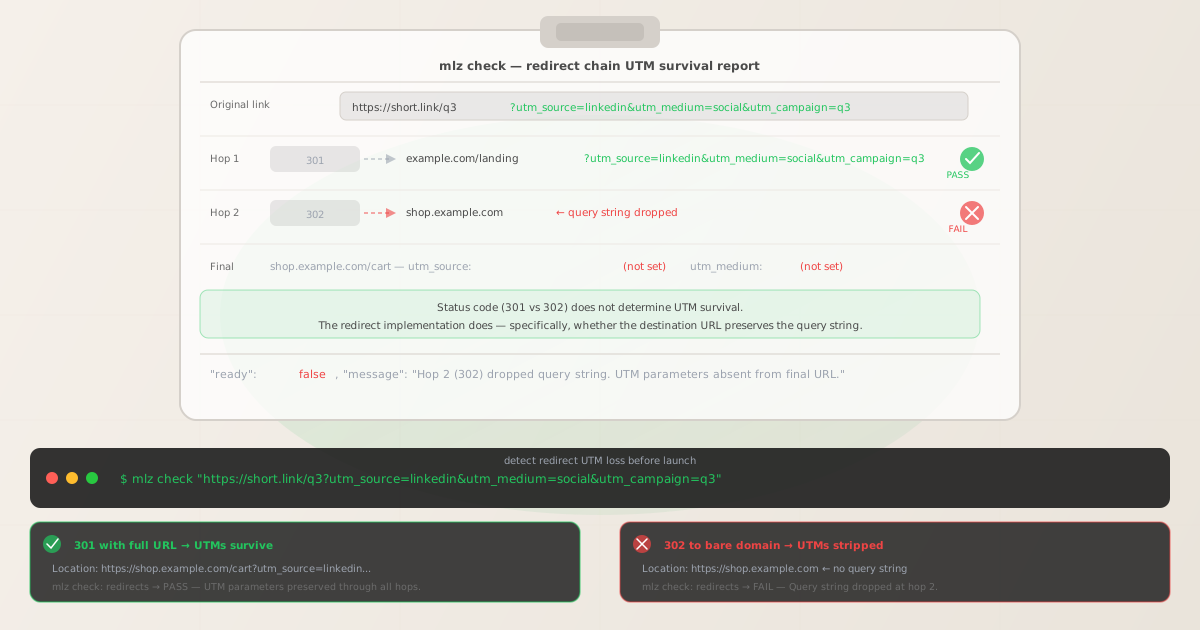
What 301 and 302 mean for marketers (and why neither one guarantees UTM survival)
A 301 (Moved Permanently) and a 302 (Found / Moved Temporarily) are both HTTP redirect responses — the server tells the browser "the resource you asked for is now somewhere else, go to this URL instead." The difference is caching: a 301 can be cached by the browser and by CDNs, so subsequent visits may not hit the server at all. A 302 is typically not cached, so the redirect check happens on every visit.
Neither status code has any bearing on query string preservation. The browser does not make that decision — the server does, by choosing what to put in the Location response header. If the server includes the original query string in the destination URL, UTM parameters survive. If the server sends only a path or a bare domain, the query string is gone — permanently, from the browser's perspective.
| Redirect type | Location header includes query string? | UTMs survive? |
|---|---|---|
| 301 — full URL with params | https://shop.example.com/cart?utm_source=linkedin... |
✓ Yes |
| 301 — bare domain | https://shop.example.com |
✗ No — query string absent |
| 302 — full URL with params | https://shop.example.com/cart?utm_source=linkedin... |
✓ Yes |
| 302 — bare domain / path | https://shop.example.com |
✗ No — query string absent |
| meta-refresh redirect | URL in content attribute must be manually written | ✗ No — unless written explicitly |
| Link shortener | Depends on shortener configuration | Usually yes, sometimes no |
This is why checking the status code alone tells you nothing. What you need to trace is the full redirect chain — every hop, the Location header at each one, and whether the query string is present in the final URL. That is exactly what mlz check does.
The four situations where redirect chains silently drop UTM parameters
These are the most common causes. All four are detectable with a single mlz check call before the campaign goes live.
- 1. The server redirects to a bare domain
-
A URL shortener or vanity domain sends a 301 with
Location: https://shop.example.comrather thanLocation: https://shop.example.com?utm_source=linkedin&utm_medium=social&utm_campaign=q3. The browser follows the redirect to the bare domain, query string gone. This is the most common cause and is trivial to introduce by mistake during campaign link setup. - 2. An intermediate service reconstructs the URL
-
Geo-routing services, consent management platforms, and some CDN redirect rules rewrite the URL from scratch based on their own logic. They know the destination path but don't know — or don't forward — the query string from the incoming request. The result is a 302 redirect to the correctly-served page but with all tracking parameters stripped. The page loads perfectly. No one notices until they check the GA4 acquisition report and see campaign traffic recorded as
(direct)/(none). - 3. A redirect chain passes through multiple hops
-
A short link redirects to a landing page (301, params preserved), which then redirects to a checkout subdomain (302, bare URL — params dropped). The first hop looks fine. The problem is hop two. Manually tracing a three-hop redirect chain with curl requires running the chain once for each hop, and it is easy to miss the query string state at an intermediate step.
mlz checkreports the query string state at every individual hop in one call. - 4. A meta-refresh or JavaScript redirect fires before the page stabilises
-
Some landing page builders use a
<meta http-equiv="refresh" content="0;url=/new-path">tag or a JavaScriptwindow.locationassignment to forward visitors. Neither carries the incoming query string automatically — the destination URL is hardcoded or constructed by the page code. Unless the developer explicitly appended the incoming search string to the destination, UTMs are lost at this step.mlz checkfollows both network-level and meta-refresh redirects and flags any hop that drops the query string.
Checking UTM survival with mlz check
MissingLinkz's mlz check validates a destination URL by tracing the full redirect chain, checking SSL, measuring response time, and reporting whether UTM query parameters survived every hop. Run it against the full tracked URL — with the UTM parameters included — and it will tell you exactly where in the chain the parameters are present or absent.
mlz check "https://short.link/q3?utm_source=linkedin&utm_medium=social&utm_campaign=q3"
When a redirect strips UTM parameters, the JSON output shows exactly where the failure occurs:
{
  "url": "https://short.link/q3?utm_source=linkedin&utm_medium=social&utm_campaign=q3",
  "valid": false,
  "checks": [
    { "check": "url_format", "status": "pass", "message": "URL format is valid." },
    { "check": "ssl",        "status": "pass", "message": "URL uses HTTPS." },
    { "check": "resolution", "status": "pass", "message": "Destination responded with 200." },
    {
      "check": "redirects",
      "status": "fail",
      "message": "Redirect at hop 2 (302) changed domain to shop.example.com. UTM query string dropped.",
      "details": {
        "hop_count": 2,
        "utm_present_at_final_url": false,
        "final_url": "https://shop.example.com/cart"
      }
    }
  ]
}
When the redirect chain is correctly configured and UTMs survive every hop, the output confirms the parameters are intact at the final URL:
{
  "url": "https://short.link/q3?utm_source=linkedin&utm_medium=social&utm_campaign=q3",
  "valid": true,
  "checks": [
    { "check": "url_format",   "status": "pass", "message": "URL format is valid." },
    { "check": "ssl",          "status": "pass", "message": "URL uses HTTPS." },
    { "check": "resolution",   "status": "pass", "message": "Destination responded with 200." },
    {
      "check": "redirects",
      "status": "pass",
      "message": "UTM parameters preserved through all redirect hops.",
      "details": { "hop_count": 2, "utm_present_at_final_url": true }
    },
    { "check": "response_time", "status": "pass", "message": "Response time: 312ms." }
  ]
}
Running a full preflight: build the tracked link, validate, and inspect in one step
If you want to go beyond redirect chain validation and also verify SSL, Open Graph tags, Twitter Card, and other destination metadata in a single call, use mlz preflight. It builds the UTM-tagged URL, checks the full redirect chain including UTM survival, and inspects the destination page — returning a single ready: true or ready: false verdict you can gate your campaign on.
mlz preflight --url "https://short.link/q3" --source "linkedin" --medium "social" --campaign "q3-launch"
The command builds https://short.link/q3?utm_source=linkedin&utm_medium=social&utm_campaign=q3-launch, follows the redirect chain, and reports whether UTMs and all other campaign readiness checks pass. A single "ready": false with a clear message about which hop dropped the query string is far more useful than spending 20 minutes manually curling through a redirect chain before a campaign launch.
To run mlz check across every link in a campaign config file in a shell loop:
#!/bin/bash
# campaign-links.txt: one tracked URL per line
while IFS= read -r url; do
  result=$(mlz check "$url" --format json)
  status=$(echo "$result" | jq -r '.checks[] | select(.check=="redirects") | .status')
  if [ "$status" != "pass" ]; then
    echo "FAIL: $url"
    echo "$result" | jq -r '.checks[] | select(.check=="redirects") | .message'
  fi
done < campaign-links.txt
What to do when the check fails
The fix depends on who controls the redirect:
- Server-side redirect (nginx, Apache, CloudFront)
-
Update the redirect rule to include a
$query_stringor equivalent variable in theLocationresponse. In nginx:return 301 https://shop.example.com$request_uri;rather thanreturn 301 https://shop.example.com;. The$request_uriincludes the original path and query string. In Apache: useRewriteRulewith%{QUERY_STRING}appended. After the change, re-runmlz checkto confirm the redirects check passes. - Link shortener or vanity URL service
-
Check whether the shortener has a "pass-through query parameters" setting. Bitly, Rebrandly, and most commercial shorteners preserve query strings by default — if yours is stripping them, look for a forwarding option in the URL settings. If the shortener has no such option, build the full tracked URL and shorten it only after appending the UTM parameters, so the short link's destination already contains them. Run
mlz checkon the short link with the UTM parameters attached to confirm preservation end-to-end. - Third-party intermediate (geo-router, consent gate, CDN rule)
-
Contact the provider or check their documentation for query string forwarding. Geo-routing tools typically have an "append query string" option. Consent management platforms that use a redirect gate may need to be configured to pass the original query parameters to the post-consent destination URL. If query string preservation is not supported, consider running the UTM-tagged URL directly to the destination (bypassing the intermediate) and adding the UTM parameters after any geo-routing or consent redirect fires on the receiving page via first-party JavaScript that reads
document.referreror a URL rewrite at the landing page layer.
Why manual curl checks miss this class of failure
A common approach is to curl -L -I the tracked URL and inspect the headers. This works for a single link when you know what you are looking for — but it breaks down in practice for three reasons.
First, multi-hop chains require a separate curl call for each hop to see the Location header at the intermediate step. When a three-hop chain drops the query string at hop two, a single curl -L -I shows you the first and last locations but collapses the intermediate ones unless you set --max-redirs carefully and parse the output.
Second, manual checks are not repeatable across a campaign. A campaign with forty links across four platforms requires forty separate manual checks before launch, each one taking a few minutes. In practice, teams skip most of them. mlz check runs as a shell loop or in CI/CD and produces machine-readable JSON so a single failing link is flagged automatically in the pipeline output.
Third, mlz check reports UTM parameter presence at the final destination URL, not just whether the redirect chain resolved. A curl check shows you the final URL, but determining whether the UTM query string is actually there requires manually inspecting the string — easy to miss in a long URL with encoded characters. The JSON output's utm_present_at_final_url field removes the ambiguity.
For a deeper look at the broader redirect-chain problem and how it affects campaign attribution, see How Redirect Chains Break Campaign Links and How to Check if a Redirect Strips UTM Parameters.
Adding redirect UTM checks to your CI/CD pipeline
The most reliable way to ensure UTMs survive your redirect chain is to run mlz check as a pre-launch step in your deployment pipeline. Every time a campaign config is updated, the pipeline validates every tracked link — including redirect chain integrity — and fails the build if any link drops UTM parameters.
- name: Validate campaign link redirect chains
  run: |
    npm install -g missinglinkz
    FAILED=0
    while IFS= read -r url; do
      result=$(mlz check "$url" --format json)
      redirect_status=$(echo "$result" | jq -r \
        '.checks[] | select(.check=="redirects") | .status')
      if [ "$redirect_status" = "fail" ]; then
        echo "::error::UTM parameters dropped: $url"
        FAILED=1
      fi
    done < campaign-links.txt
    exit $FAILED
For a complete CI/CD integration template including Slack notifications and caching, see Automate Campaign Link Validation in GitHub Actions and the broader Campaign Link Validation in CI/CD guide. For the full preflight check that combines redirect validation with OG tags, SSL, and UTM generation in one command, see mlz preflight: Check SSL, OG Tags, Twitter Cards, and UTM in One Command.
The parent pillar, Campaign Link Validation — The Complete Guide, covers all nine validation checks MissingLinkz runs before a campaign link is considered ready to publish.
Frequently asked questions
- Do UTM parameters survive a 301 redirect?
- Usually yes, if the server includes the original query string in the
Locationheader. A 301 redirect that sendsLocation: https://example.com(no query string) drops UTMs just as completely as any other redirect. The status code is not what determines UTM survival — the redirect implementation is. - Do UTM parameters survive a 302 redirect?
- The same rule applies as for 301. A 302 that preserves the query string in the
Locationheader passes UTMs through. A 302 that sends a bare domain or path drops them. Runningmlz checkwith the tracked URL shows you the result for each hop regardless of status code. - How do I check if a redirect strips UTM parameters?
- Run
mlz check "https://your-tracked-url.com?utm_source=...". MissingLinkz follows the full redirect chain and reports whether UTM parameters are present at the final destination URL. Theredirectscheck in the JSON output will be"pass"if UTMs survived, or"fail"with a message indicating which hop dropped the query string. - Why does a link shortener sometimes strip UTM parameters?
- Link shorteners typically send a 301 or 302 to a destination URL that was configured when the short link was created. If the short link was set up with only the base URL (without UTM parameters), the destination contains no UTM parameters regardless of what query string you append to the short link. Some shorteners do support forwarding incoming query parameters — check the shortener's settings. The safest approach is to append UTM parameters before shortening, so the short link's destination already includes them.
- Can I use
mlz preflightinstead ofmlz checkfor redirect validation? - Yes.
mlz preflightruns all the same checks asmlz checkplus OG tags, Twitter Card, SSL, and viewport inspection. Usemlz checkwhen you only need to validate URL resolution and redirect chains. Usemlz preflightwhen you want a full go/no-go report before publishing a campaign link. Both follow the complete redirect chain and report UTM parameter survival.
Check your redirect chains before the campaign launches
Stop guessing whether UTMs survive your redirect hops. MissingLinkz follows every hop in the chain and tells you exactly where your tracking data is lost — before you spend a dollar on the campaign.
1,000 links/month free. No credit card.
Your API key
Save this now — it won't be shown again.
npm install -g missinglinkz
Then run: mlz check "https://your-campaign-link.com?utm_source=..."