How Redirect Chains Break Campaign Links (and How to Detect Them)
A campaign link redirect chain occurs when a URL passes through two or more hops — a link shortener, a CDN rewrite, a landing page platform redirect — before reaching the destination. Each hop is an opportunity for the query string to be silently dropped. When that happens, your UTM parameters vanish and GA4 attributes the session to "direct / none" instead of your campaign. The page loads, the click happens, the conversion fires — and none of it is credited to the campaign that drove it. This guide explains exactly how redirect chains break campaign tracking and how to detect the failure before it corrupts live data.
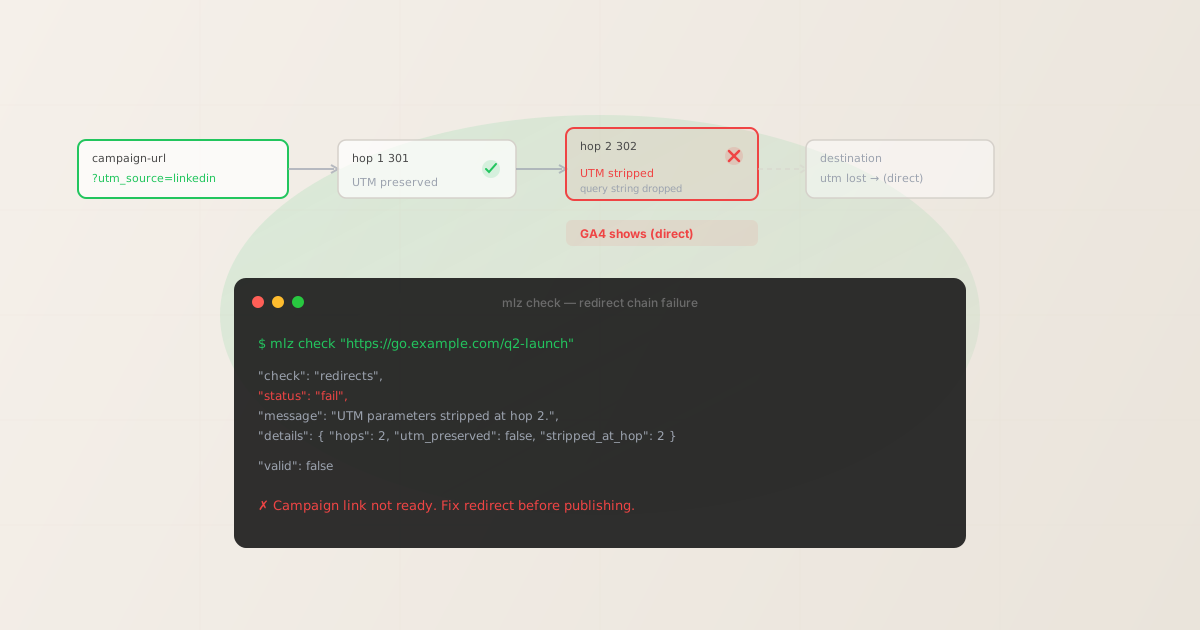
What is a redirect chain?
A redirect chain is a sequence of HTTP redirects that a browser follows before landing on the final destination page. The simplest form is a single redirect: URL A returns a 301 that points to URL B. A chain occurs when URL A redirects to B, which redirects to C, which is the actual destination.
In marketing, redirect chains are created almost everywhere:
- Link shorteners —
bit.ly/xyzorgo.example.com/campaignredirect to the actual landing page URL - Landing page builders — Unbounce, Instapage, and similar platforms often add their own redirect layer between the vanity URL and the served page
- CDN rewrites — Cloudflare and similar CDNs sometimes rewrite URLs for caching or routing, adding an HTTP-level redirect
- Ad platform click trackers — Google Ads, LinkedIn, and Meta all insert a click-tracking redirect before sending the user to your landing page
- Email platform tracking links — Mailchimp, HubSpot, and similar email tools wrap every link in a tracking redirect of their own
None of these are inherently broken. The problem arises when a redirect in the chain is implemented in a way that does not forward the original URL's query string to the next hop.
How redirect chains strip UTM parameters
When a server issues a redirect, it returns an HTTP response with a Location header pointing to the next URL. The value of that Location header is entirely under the server's control. A correctly implemented redirect preserves the original query string:
Location: https://example.com/landing?utm_source=linkedin&utm_medium=social&utm_campaign=q2
A broken redirect drops it:
Location: https://example.com/landing
The browser follows whichever Location header it receives. If the query string is gone from the header, the browser requests the destination URL without the UTM parameters. GA4 never sees them. The session is attributed as direct traffic regardless of the campaign that drove the click.
This failure is particularly insidious because it's invisible at the surface level. The ad appears to be performing. The landing page loads. Conversions are recorded. The only symptom is that campaign-attributed sessions appear in GA4 as "direct / none" — an anomaly that's easy to miss if you're not watching traffic source breakdowns carefully.
For a detailed walkthrough of how to diagnose this specific failure, see How to Check if a Redirect Strips UTM Parameters.
Redirect chains slow page loads
Beyond broken tracking, every hop in a redirect chain adds latency. Each redirect requires a full HTTP round-trip: the browser requests hop 1, waits for the response, follows the redirect to hop 2, waits again, and so on before the actual page content starts loading.
On mobile connections, where round-trip times can be 200–600ms per hop, a three-hop redirect chain adds 600ms–1.8 seconds of pure wait time before any content is rendered. Google's Core Web Vitals measure this: long chains directly harm Largest Contentful Paint (LCP) scores and can trigger ad quality penalties on some platforms.
The combination of broken attribution and degraded performance makes redirect chains one of the most damaging structural problems in campaign link infrastructure — and one of the easiest to miss because neither the click nor the page load fails visibly.
How to detect a broken redirect chain with mlz check
The only reliable way to detect UTM parameter stripping in a redirect chain is to follow the chain programmatically and inspect whether the query string is preserved at each hop. Browser developer tools can show you the redirect sequence, but doing this manually for every campaign link before launch is impractical.
mlz check follows the complete redirect chain for any URL, validates SSL at each step, and checks whether UTM parameters are preserved through to the final destination. Run it against the published campaign URL — the one you would put in an ad or email — before the campaign goes live:
mlz check "https://go.example.com/q2-launch"
When a redirect chain strips UTM parameters, the output shows a failure on the redirects check:
{
  "url": "https://go.example.com/q2-launch",
  "valid": false,
  "checks": [
    { "check": "url_format", "status": "pass",
      "message": "URL format is valid." },
    { "check": "ssl", "status": "pass",
      "message": "URL uses HTTPS." },
    { "check": "resolution", "status": "pass",
      "message": "Destination responded with 200." },
    { "check": "redirects", "status": "fail",
      "message": "UTM parameters stripped at hop 2.",
      "details": {
        "hops": 2,
        "utm_preserved": false,
        "stripped_at_hop": 2
      } }
  ],
  "valid": false
}
The "utm_preserved": false result on the redirects check is an unambiguous campaign-blocking defect. The destination page resolves — resolution: pass — but no UTM data arrives at GA4. The entire session will be attributed to direct traffic.
When the redirect chain is clean and UTM parameters are preserved through every hop, the output shows:
{
  "check": "redirects", "status": "pass",
  "message": "No redirects detected."
}
// or, when redirects exist but UTM is preserved:
{
  "check": "redirects", "status": "pass",
  "message": "2 redirects followed. UTM parameters preserved.",
  "details": { "hops": 2, "utm_preserved": true }
}
How to fix redirect chain problems
Once mlz check identifies which hop is stripping the query string, you have three options:
- Fix the redirect implementation
- If you control the redirect server, update it to forward the full URL including the query string. In Nginx, the fix is replacing
return 301 https://destination.comwithreturn 301 https://destination.com$request_uri. In Apache, update yourRewriteRuleto include the[QSA](Query String Append) flag. Most server-level redirect stripping can be resolved at the configuration level without changing your campaign URLs. - Replace the stripping redirect with a pass-through
- If the stripping hop is a link shortener or redirect service you don't control, the fix is to replace it with one that explicitly preserves query strings. Bit.ly and most URL shorteners do preserve query strings when correctly configured. Check the shortener's documentation for query string forwarding options — many have a setting that's off by default.
- Encode the full UTM URL before the redirect
- For email platforms and ad click trackers that wrap your destination URL as a parameter in their own tracking URL, you may need to percent-encode the full destination URL including UTM parameters before passing it to the platform. This approach ensures the platform's redirect passes the destination URL as a complete, intact string. Check your platform's documentation for the correct encoding behavior for destination URLs.
After making any fix, re-run mlz check against the updated URL to confirm UTM parameters are now preserved before the campaign goes live.
Redirect chains and link shorteners
Link shorteners are the most common source of redirect chains in social media campaigns. When you shorten a UTM-tagged URL, you create a two-hop chain: the short URL redirects to your full UTM-tagged destination. If the shortener strips the query string — or if a second redirect layer exists between the shortener and the landing page — the tracking is broken before GA4 sees the click.
The safe workflow is: build the UTM link first, validate it with mlz check, then shorten the validated URL — and run mlz check again against the shortened URL to confirm the redirect chain still preserves the UTM parameters end to end.
See UTM Links and Link Shorteners: How to Validate the Redirect Chain for a detailed walkthrough of this workflow.
FAQ
- How many redirects are too many?
- Browsers typically follow up to 20 redirects before displaying an error, but anything beyond 2–3 hops is worth investigating both for performance reasons (each hop adds round-trip latency) and for UTM preservation risk. Google's PageSpeed Insights flags redirect chains as a performance issue. For campaign links, keep the chain as short as possible — ideally one hop or none.
- Does a 301 vs 302 redirect affect UTM preservation?
- No. Whether the redirect is permanent (301) or temporary (302) has no effect on query string forwarding. The determining factor is whether the server's redirect implementation appends the original query string to the
Locationheader. Both 301 and 302 can strip or preserve the query string depending on how they're configured. - Can I check a redirect chain without installing anything?
- Browser developer tools (Network tab) show you the redirect sequence for any URL you load. You can manually verify whether the query string is present at each step. This works for one-off checks but isn't practical for pre-launch validation of multiple campaign links.
mlz checkautomates this as a single command with structured JSON output suitable for scripting and CI/CD pipelines. - My campaign URL has no redirects but UTM data is still missing in GA4. What else could it be?
- If
mlz checkshows the redirects check passing withutm_preserved: true, the tracking failure is happening after the HTTP layer — most commonly due to a JavaScript SPA router stripping query parameters client-side before the analytics script fires, or due to duplicate UTM parameters on the destination page overriding your campaign values. See Why Your UTM Parameters Are Not Working: 7 Common Causes for a full diagnosis guide. - Does mlz check work on redirect chains behind authentication or behind a VPN?
mlz checkfollows redirects over public HTTP/HTTPS. It cannot follow redirects that require authentication cookies or VPN access, since it makes requests from your terminal without a browser session. For authenticated redirects, validate the final destination URL directly rather than the redirect entry point.
Recommended posts
Detect redirect chain failures before they corrupt your campaign data
Install MissingLinkz and run mlz check against any campaign URL to validate the full redirect chain, confirm UTM parameter preservation, and catch failures before they hit your analytics.
1,000 links/month free. No credit card.
Your API key
Save this now — it won't be shown again.
npm install -g missinglinkz
Free plan: 1,000 links/month. No credit card. See all commands in the SKILL.md reference.