UTM Links and Link Shorteners: How to Validate the Redirect Chain
UTM links and link shorteners work together all the time — but the combination creates a redirect chain that can silently strip your tracking parameters before GA4 ever records the session. When a shortened URL redirects through an intermediate platform, there is no guarantee the destination receives your utm_source, utm_medium, and utm_campaign values intact. This guide explains why shorteners introduce risk, how to validate the full resolution chain before publishing, and how a single mlz check command tells you whether your UTM parameters survive every hop.
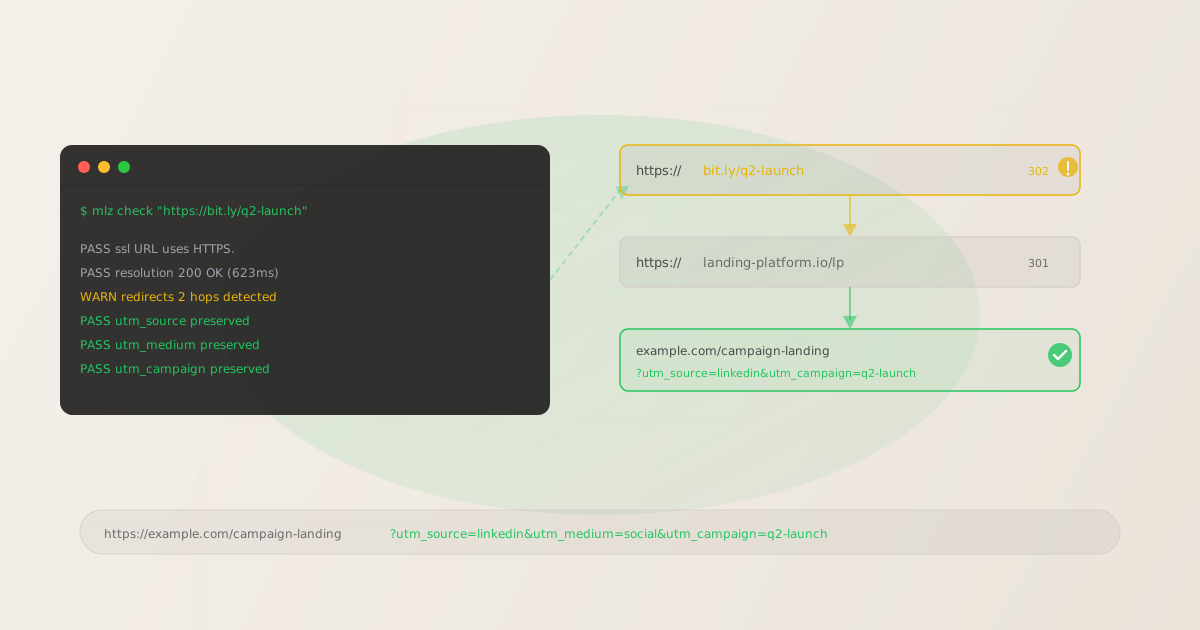
Why UTM links and link shorteners are risky together
A link shortener replaces your full UTM-tagged URL with a short alias (bit.ly/xyz, ow.ly/abc, etc.). When someone clicks the short link, the shortener issues an HTTP redirect — typically a 301 or 302 — to the destination. If that destination is itself behind another redirect (a landing page platform, a CDN rewrite, an HTTPS redirect from http://), you end up with a multi-hop chain.
Each hop in the chain is an opportunity for something to go wrong:
- UTM parameter stripping — some redirect configurations pass only the base URL, dropping the query string entirely. The destination receives a clean URL with no tracking parameters.
- Partial parameter loss — less common but possible: the redirect preserves some query parameters but drops others. Your analytics shows a source but no campaign, or a medium but no content variant.
- Double-encoding — when the UTM URL is encoded as a query parameter of the shortened URL itself, some shorteners decode it improperly on the other end, producing broken parameter values.
- Redirect count limits — browsers and HTTP clients follow redirects up to a limit. A chain of 5+ hops can time out or fail in certain environments, especially mobile webviews and email clients with aggressive link safety scanning.
The consequence is data you can't trust. A campaign that drove 1,000 clicks might appear as 600 sessions in GA4 with no source attribution, 300 in "Unassigned," and 100 correctly attributed to your UTM source. You can't retroactively fix session data already recorded.
The correct order: build, then shorten, then validate
The most common mistake is to shorten first and add UTM parameters afterward, or to assume that a working short link has preserved UTM parameters just because the destination page loaded. The correct sequence is:
- Step 1: Build the full UTM-tagged URL
- Start with the complete destination URL including all UTM parameters. Use
mlz buildto generate a consistently formatted link with enforced lowercase naming. Never add UTM parameters to the short URL itself — they belong on the destination URL before shortening. - Step 2: Shorten the full UTM URL
- Paste the complete UTM-tagged URL into your shortener. The shortener should redirect to the full URL with all parameters intact. Verify this by checking the link destination in your shortener's dashboard before saving it.
- Step 3: Validate the shortened URL's redirect chain
- Run
mlz checkagainst the shortened URL. This follows every hop in the redirect chain and reports whether UTM parameters are present at the final destination. Do this before the link goes into any campaign asset — email copy, social post, ad creative, or printed material.
The first two steps are familiar. The third is the one most teams skip — and it's the one that catches stripping before it affects real campaign data. For a detailed breakdown of how redirect chains interact with UTM attribution, see How to Check if a Redirect Strips UTM Parameters.
Validating a shortened UTM link with mlz check
The mlz check command follows the complete redirect chain from the shortened URL to the final destination and reports what it finds at each stage. Pass the short URL directly:
mlz check "https://bit.ly/q2-launch"
The JSON response covers five checks: URL format, SSL, HTTP resolution, redirect chain, and response time. For a shortened URL with two hops where UTM parameters are preserved, you'll see something like this:
{
  "url": "https://bit.ly/q2-launch",
  "valid": true,
  "checks": [
    { "check": "url_format", "status": "pass", "message": "URL format is valid." },
    { "check": "ssl", "status": "pass", "message": "URL uses HTTPS." },
    { "check": "resolution", "status": "pass", "message": "Destination responded with 200.",
      "details": { "status_code": 200, "response_time_ms": 623 } },
    { "check": "redirects", "status": "warn",
      "message": "2 redirects detected. UTM parameters preserved.",
      "details": { "hops": 2, "utm_preserved": true } },
    { "check": "response_time", "status": "warn",
      "message": "Response time: 623ms (elevated due to redirect chain).",
      "details": { "response_time_ms": 623 } }
  ],
  "status_code": 200,
  "response_time_ms": 623,
  "validated_at": "2026-04-24T10:30:00.000Z"
}
Two warnings here. The redirects check reports 2 hops — this is a warning, not a failure, because UTM parameters arrived at the destination intact ("utm_preserved": true). The response_time warning reflects the added latency from following the chain. Both are acceptable for a published link. What you want to avoid is "utm_preserved": false on the redirects check, which signals that your tracking parameters were stripped somewhere in the chain.
If the UTM parameters are stripped, the fix is to investigate each hop: check your shortener's redirect settings, confirm the destination URL was entered with parameters appended, and look for landing page platform rewrites that drop query strings.
What stripped UTM parameters look like in the output
For comparison, here is what the redirects check looks like when parameters do not survive:
{
  "check": "redirects",
  "status": "fail",
  "message": "UTM parameters stripped at hop 1. Destination received no tracking parameters.",
  "details": {
    "hops": 2,
    "utm_preserved": false,
    "stripped_at_hop": 1
  }
}
This failure means every click on the shortened link will arrive at the destination with no UTM attribution. GA4 will either attribute these sessions to direct/none or to whatever referral source the final redirect is, depending on how the redirect is configured. This is a campaign-breaking defect — and it's silent without active validation. See How Broken Campaign Links Waste Your Ad Budget for the real cost of undetected tracking failures.
Shell workflow: build, shorten, and validate in sequence
For teams building multiple campaign links at once, a consistent shell workflow keeps the process repeatable. The pattern below builds a UTM link, outputs the full URL for shortening, and then validates the shortened result:
# Step 1: Build the UTM-tagged URL
$ mlz build \
  --url "https://example.com/campaign-landing" \
  --source "linkedin" \
  --medium "social" \
  --campaign "q2-2026-launch" \
  --format json | jq -r '.tracked_url'

https://example.com/campaign-landing?utm_source=linkedin&utm_medium=social&utm_campaign=q2-2026-launch

# Step 2: Shorten this URL in your shortener, note the result
# SHORT_URL="https://bit.ly/q2-launch"

# Step 3: Validate the redirect chain
$ mlz check "https://bit.ly/q2-launch"

# If valid=true and utm_preserved=true: link is ready to publish
# If utm_preserved=false: fix the redirect chain before publishing
For bulk link generation where you need to validate multiple shortened URLs at once, the pattern extends to a loop reading from a CSV or config file — calling mlz check for each shortened URL and parsing the JSON response to gate on "valid": true and "utm_preserved": true. Any failure stops the loop and flags the problematic link for investigation before any go live.
To validate the full link including OG tags and SSL on the destination, use mlz preflight which combines the check and inspect steps in one command and returns a single "ready" flag.
Common shortener behaviors and their UTM risk
- Bit.ly (and most major shorteners)
- Generally pass UTM parameters through correctly. The redirect is a standard 301/302 that includes the full query string. Risk is low for direct shortened links — risk increases when the destination URL is itself a redirect (landing page platforms, tracking pixels, CDN rewrites). Always validate the full chain, not just whether bit.ly redirects to the right domain.
- Branded shorteners via link management platforms
- Platforms like Rebrandly and short.io preserve query strings in standard configurations but may strip them when features like click tracking or geo-routing are enabled. These features often rewrite the redirect response, and some implementations drop the query string in the process. Check the platform's documentation for query string handling, then validate with
mlz check. - Email platform link tracking
- Many email platforms (Mailchimp, Klaviyo, HubSpot) wrap your links in their own tracking redirects. This adds an extra hop to the chain — your UTM link becomes
tracking.emailplatform.com/r?url=YOUR_UTM_LINK. When configured correctly, the query string passes through. When not, your UTM parameters end up encoded inside the tracking URL parameter and may not reach the destination correctly. Always test email links before send, not just web links. - Social platform link wrapping
- LinkedIn, X (Twitter), and Facebook wrap external links in their own redirect handlers (lnkd.in, t.co, l.facebook.com). These wrappers generally preserve query strings, but they add an extra hop and sometimes slow response times.
mlz checkwill follow through these platform wrappers to confirm the UTM parameters reach your destination.
FAQ
- Do link shorteners break UTM tracking?
- Not always, but they can. Most major shorteners (bit.ly, Rebrandly, short.io) preserve query strings in their standard redirect configuration. The risk comes from the destination side: if the URL you shortened is itself behind another redirect that drops the query string, your UTM parameters are lost at that hop, not at the shortener. Validate the full redirect chain with
mlz checkto confirm what actually reaches the final destination. - Should I add UTM parameters before or after shortening?
- Always before. Build the full UTM-tagged URL first, then paste that complete URL into your shortener. Never add UTM parameters to the short URL — the shortener redirects to whatever URL you initially registered as the destination, so parameters added to the short link won't be forwarded. See the campaign link validation guide for a complete pre-publish checklist.
- How many redirects are too many?
- There is no universal limit, but chains of 4 or more hops are worth investigating. Each hop adds latency — 100-200ms per hop is typical — and increases the risk that some browser or email client will stop following the chain before reaching your destination. GA4 measures session start from when the destination page loads, so slow redirect chains also inflate your average session load time metrics. Two to three hops (shortener → optional platform redirect → destination) is reasonable; more than that warrants investigation into whether any intermediate hops can be eliminated.
- Can I use mlz check with any shortener or just bit.ly?
mlz checkfollows HTTP redirects from any URL — bit.ly, Rebrandly, custom branded domains, email platform wrappers, or any other URL that issues redirects. Pass the full shortened URL as the argument and it will trace the complete chain. The output tells you how many hops were followed, whether the chain resolved successfully, and whether UTM parameters arrived intact at the final destination.- What if the redirect chain check passes but GA4 still shows no UTM data?
- If
mlz checkreports UTM parameters preserved but GA4 shows no tracking, the issue is usually on the page itself: a JavaScript redirect that overrides the landing URL before GA4 fires, a single-page application router that strips the query string from the URL, or a Google Tag Manager configuration issue.mlz checkvalidates the HTTP-level redirect chain. Client-side JavaScript running after page load is a separate category of failure that requires in-browser debugging tools.
Recommended posts
Validate your shortened UTM links before they go live
Install MissingLinkz and run mlz check against any shortened URL to confirm UTM parameters survive the full redirect chain.
1,000 links/month free. No credit card.
Your API key
Save this now — it won't be shown again.
npm install -g missinglinkz
Free plan: 1,000 links/month. No credit card. See all commands in the SKILL.md reference.