How to Check if a Redirect Strips UTM Parameters
To check whether a redirect strips UTM parameters, run mlz preflight against the link — MissingLinkz follows every hop in the redirect chain and reports which UTM parameters survive to the final URL. If any parameter is dropped between hops, the check fails with a clear message naming the specific parameters lost and the hop that caused the loss. That direct, automated answer is the fastest way to catch UTM stripping before a campaign goes live. When you share a campaign link, the URL passes through one or more redirects before the visitor's browser reaches the final page. Those redirects — URL shorteners, landing page builders, CDN configurations, and CMS rewrites — don't always preserve your UTM parameters. The result: GA4 records the session as "direct" with no campaign attribution, and you've spent your budget with no proof of which channel drove the traffic.
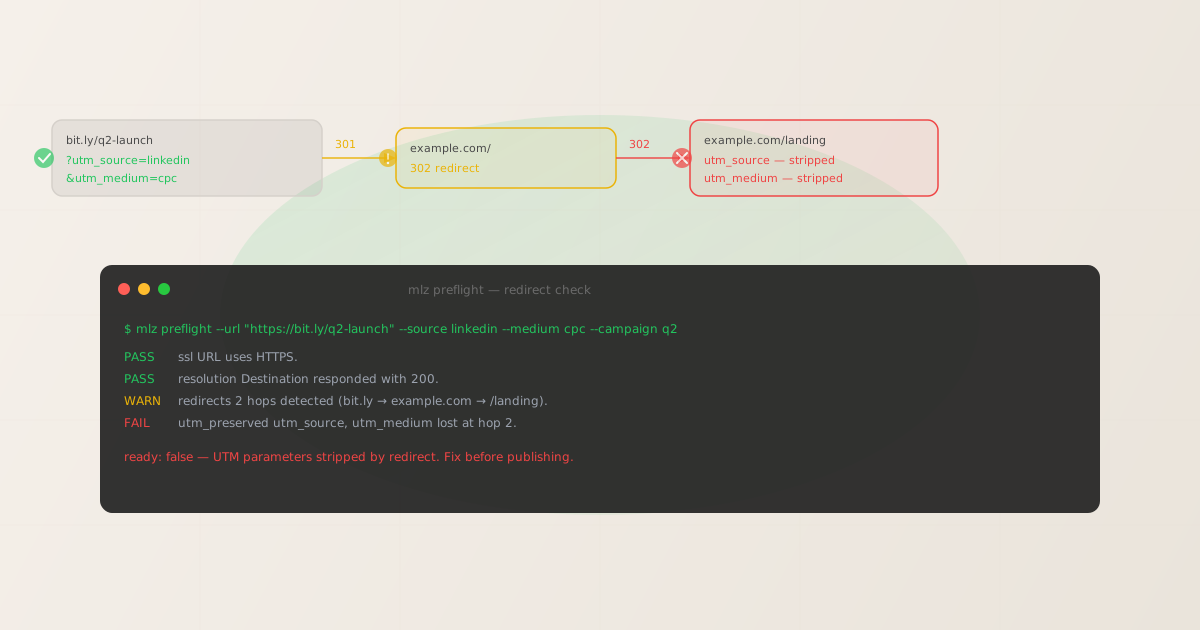
Why redirects strip UTM parameters
UTM parameters are query string values appended to the destination URL: ?utm_source=linkedin&utm_medium=cpc&utm_campaign=q2-launch. They travel with the URL as long as each server in the redirect chain explicitly forwards query strings to the next destination. When a server doesn't forward query strings — either by configuration or by design — the parameters are dropped.
This happens in several common situations:
- HTTP to HTTPS redirect
- A web server configured to redirect all
http://traffic tohttps://may be set up to forward to the root URL without appending query strings. One hop, parameters gone. - URL shorteners
- Services like Bitly, TinyURL, and custom shorteners issue a redirect from the short URL to the destination. Most reputable shorteners preserve query strings, but some configurations or URL encoding issues cause them to be dropped or double-encoded.
- Landing page builder rewrites
- Platforms like Unbounce, Leadpages, and HubSpot sometimes redirect canonical URLs internally. If the rewrite rule strips query parameters, your UTMs disappear before the page fires its analytics event.
- CMS slug canonicalization
- WordPress and similar CMS platforms redirect trailing-slash variants (
/pagevs./page/) and may not forward query strings in those rewrites. - CDN or proxy configurations
- Cloudflare, Fastly, and other CDN proxy layers can be configured with redirect rules that don't preserve query strings. This is particularly common in legacy configurations and security-focused setups.
In every case, the failure is silent. The user arrives at the correct page. The page looks fine. The ad is running. But GA4 logs "direct (none)" instead of your campaign data — and you don't find out until you pull the attribution report.
How to detect redirect-based UTM stripping manually
Manual detection requires checking the full redirect chain and inspecting what parameters survive at each hop. Two approaches work reliably:
Method 1: Browser DevTools
Open Chrome DevTools (F12), go to the Network tab, and navigate to your campaign URL. Enable "Preserve log" before navigating so you can see the full chain. Look at each redirect entry in the log and check the URL column at each hop. If you see your UTM parameters in the first request but not in a subsequent hop's URL, that redirect is stripping them.
This works but requires manual inspection of every redirect hop, and it's easy to miss parameters when the URL is long or the chain has multiple hops.
Method 2: curl with verbose output
Run curl -L -v "https://bit.ly/q2-launch?utm_source=linkedin&utm_medium=cpc&utm_campaign=q2" in your terminal. The -L flag follows redirects, and -v shows each hop's request URL. Look at the Location: header in each redirect response — if the query string disappears between hops, that's your problem.
This is more reliable than DevTools but requires careful reading of the verbose output and still doesn't give you a clear pass/fail verdict or structured data you can act on in CI/CD or agent workflows. For the automated alternative, see below.
How mlz preflight detects UTM stripping automatically
The mlz preflight command handles redirect detection as part of its standard campaign link validation suite. It follows the complete redirect chain from your initial URL to the final destination, with your UTM parameters attached, and checks whether they survive every hop. The result is a clear pass or fail — no manual chain-reading required.
mlz preflight --url "https://bit.ly/q2-launch" --source linkedin --medium cpc --campaign q2-launch
When the redirect chain strips UTM parameters, the output looks like this:
ready:       false
tracked_url: https://bit.ly/q2-launch?utm_source=linkedin&utm_medium=cpc&utm_campaign=q2-launch

checks:
  PASS  ssl              URL uses HTTPS.
  PASS  resolution       Destination responded with 200.
  WARN  redirects        2 hops detected (bit.ly → example.com → /landing).
  FAIL  utm_preserved    utm_source, utm_medium lost at hop 2.
  PASS  og_tags          All essential Open Graph tags present.
  PASS  twitter_card     Twitter Card tags configured.
  PASS  response_time    Page loaded in 310ms.

summary:     5 passed, 1 warning, 1 failed
verdict:     Do not publish. Fix the redirect chain before launching this campaign.
The utm_preserved check tells you specifically which parameters were stripped and at which hop. After you fix the redirect configuration on your server or CDN to preserve query strings, you re-run the same command:
ready:       true
tracked_url: https://bit.ly/q2-launch?utm_source=linkedin&utm_medium=cpc&utm_campaign=q2-launch

checks:
  PASS  ssl              URL uses HTTPS.
  PASS  resolution       Destination responded with 200.
  PASS  redirects        2 hops detected. Query strings preserved throughout.
  PASS  utm_preserved    All UTM parameters present at final destination.
  PASS  og_tags          All essential Open Graph tags present.
  PASS  twitter_card     Twitter Card tags configured.
  PASS  response_time    Page loaded in 295ms.

summary:     7 passed, 0 warnings, 0 failed
verdict:     All checks passed. Campaign link is ready to publish.
The JSON output format is equally usable in scripts and CI/CD pipelines. Pass --format json to get structured output you can pipe to jq or parse in any language:
{
  "ready": false,
  "tracked_url": "https://bit.ly/q2-launch?utm_source=linkedin&utm_medium=cpc&utm_campaign=q2-launch",
  "checks": [
    { "check": "ssl", "status": "pass", "message": "URL uses HTTPS." },
    { "check": "resolution", "status": "pass", "message": "Destination responded with 200." },
    { "check": "redirects", "status": "warn", "message": "2 hops detected." },
    { "check": "utm_preserved", "status": "fail", "message": "utm_source, utm_medium lost at hop 2." }
  ],
  "summary": { "total": 7, "passed": 5, "warnings": 1, "failed": 1 }
}
How to fix a redirect that strips UTM parameters
The fix depends on where the stripping occurs. Use the hop number in the utm_preserved failure message to identify the offending redirect, then apply the appropriate fix:
- Apache (.htaccess)
- Replace a hard redirect like
Redirect 301 /page https://example.com/newwith aRewriteRulethat preserves query strings:RewriteRule ^page$ /new [QSA,R=301,L]. TheQSAflag (Query String Append) ensures query parameters are carried through. - Nginx
- In your
returnorrewritedirective, include$is_args$argsin the target URL:return 301 https://example.com/new$is_args$args;. Without this, Nginx strips the query string from the redirected URL. - Cloudflare Page Rules / Redirect Rules
- When creating a redirect rule in the Cloudflare dashboard, use the dynamic redirect target and include
${http.request.uri.query}in the URL field. Static redirect targets discard query strings by default. - URL shortener configuration
- If you control the shortener (custom domain with Bitly, your own redirect service), verify that query string forwarding is enabled in the settings. If you don't control the shortener, test every short URL individually with
mlz preflightbefore using it in a live campaign. - Landing page builder
- Check the platform's URL settings for "query string pass-through" or "parameter forwarding" options. Most major platforms (Unbounce, HubSpot) support this, but it may not be enabled by default. Contact platform support if the option isn't visible.
After applying any fix, always re-run mlz preflight against the same URL to confirm the utm_preserved check returns pass before launching the campaign. This is a critical step in any pre-publish UTM validation workflow.
Adding redirect checks to your campaign launch process
Running a redirect check manually before every campaign launch is good practice. Automating it is better. The campaign link validation in CI/CD guide covers how to wire mlz preflight into GitHub Actions so that every change to a campaign config file triggers a validation run before the campaign ships. For teams using AI agents to build and validate links, mlz preflight is callable as an MCP tool — your agent can detect redirect-based stripping the same way it detects missing OG tags.
The core principle from the UTM tracking best practices guide applies here: validation is not optional. A UTM parameter that doesn't survive the redirect chain is the same as a UTM parameter you never set. The campaign appears to have no measurable attribution, and every decision made on that data is wrong. Catching it before launch costs seconds. Catching it after launch costs your entire campaign budget.
Recommended posts
FAQ
- How do I check if a redirect strips UTM parameters?
- Run
mlz preflight --url "https://your-link.com" --source linkedin --medium social --campaign q3— MissingLinkz follows every hop in the redirect chain and checks whether your UTM parameters (utm_source,utm_medium,utm_campaign) survive to the final destination URL. If any parameter is dropped at any redirect hop, the check returnsready: falsewith autm_preserved: failresult naming the specific hop and parameters lost. No browser inspection required — one command gives you a structured pass/fail result you can use in scripts or CI/CD pipelines. - Why do redirects drop UTM parameters?
- Redirects drop UTM parameters when the server or service handling the redirect is configured to forward traffic to a base URL without appending the query string from the incoming request. This happens in Apache
Redirectdirectives (as opposed toRewriteRulewith theQSAflag), Nginxreturnstatements missing$is_args$args, Cloudflare Page Rules using static redirect targets, and landing page builders with query-string pass-through disabled. URL shorteners can also drop parameters when configured to redirect to a canonical destination URL rather than the full incoming URL with its query string intact. - Does GA4 detect UTM stripping automatically?
- No. GA4 records whatever parameters are present on the final page URL when the page view event fires. If the parameters were stripped by a redirect before the browser reached the page, GA4 sees no UTM values and attributes the session to "direct." There is no built-in detection for parameter loss during redirects.
- How many redirect hops is too many?
- One hop (e.g., HTTP to HTTPS) is acceptable and common. Two or more hops are worth investigating: each additional hop adds latency and increases the risk of parameter stripping.
mlz preflightwarns on chains with two or more hops regardless of whether parameters survive, so you can investigate even when stripping isn't happening yet. - Can I check UTM preservation without building a tracked URL first?
- Yes. If you already have a fully built campaign URL, use
mlz check "https://your-url.com?utm_source=linkedin&utm_medium=cpc"to validate the redirect chain and parameter preservation independently of the UTM building step. - Does mlz preflight work with custom short domains?
- Yes. Pass any URL as the
--urlargument.mlz preflightfollows the complete redirect chain from that URL to the final destination, regardless of whether the initial URL is a short link, a branded redirect, or a raw destination URL. - What if the redirect only strips some parameters but not others?
- The
utm_preservedcheck reports specifically which parameters were lost. Ifutm_sourcesurvives bututm_campaignis stripped, the failure message names the missing parameters explicitly. This happens when a redirect partially encodes or transforms the query string rather than dropping it entirely.
Check your redirect chains before the next campaign
Run mlz preflight on every campaign link before publishing. One command checks SSL, redirects, UTM preservation, OG tags, and more — and tells you exactly what to fix before you spend the budget.
1,000 links/month free. No credit card.
Your API key
Save this now — it won't be shown again.
npm install -g missinglinkz
mlz preflight --url "https://your-url.com" --source linkedin --medium social --campaign q2-launch
See the full list of campaign link checks in the Campaign Link Validation guide.