Why Your UTM Parameters Are Not Working: 7 Common Causes
If your UTM parameters are not working — showing up as "unassigned" in GA4, fragmenting into duplicate source entries, or disappearing entirely after a click — one of seven root causes is almost certainly responsible. Most of these failures are invisible without active validation: the link resolves correctly, the destination page loads, and everything looks fine until you open your analytics report. This guide names each failure mode, explains why it happens, and shows how to detect it before it corrupts live campaign data.
1. Case sensitivity
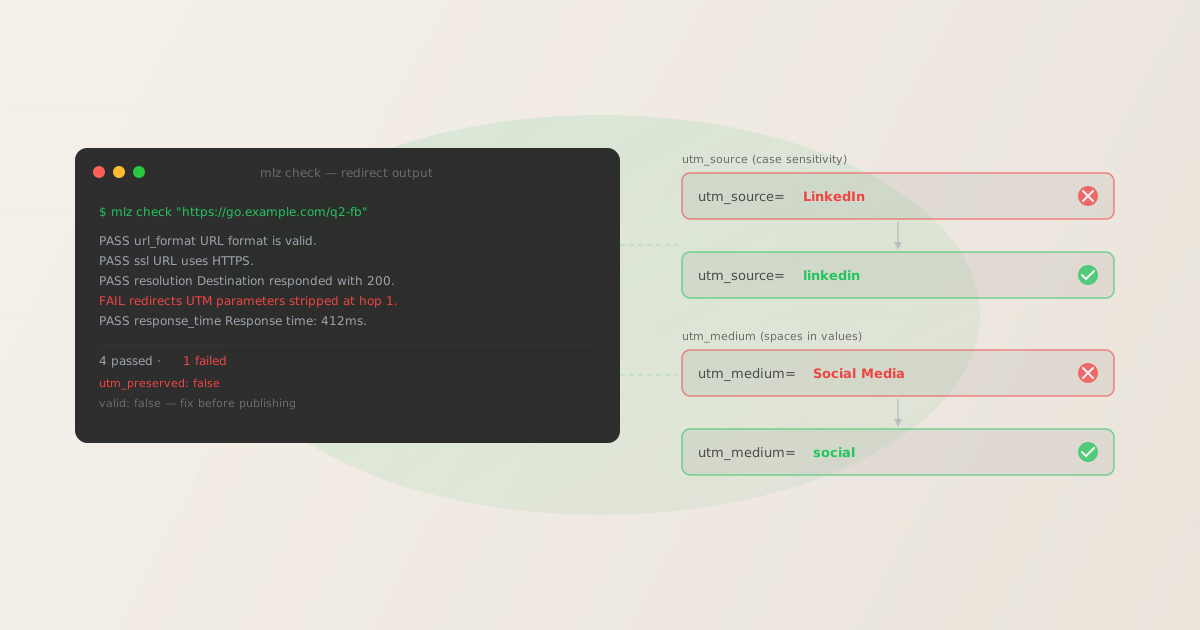
GA4 treats utm_source=LinkedIn and utm_source=linkedin as two different traffic sources. They appear as separate rows in your acquisition reports, splitting the attributed sessions between them. A campaign that drove 1,000 clicks might appear as 600 from "linkedin" and 400 from "LinkedIn," making it look like two different traffic sources with mediocre performance.
The fix is enforced lowercase, applied at the point of link generation. mlz build normalizes all parameter values to lowercase automatically, so the problem can't occur when links are built through the tool. For links built manually or imported from other systems, run mlz check after building to catch mixed-case values before they ship.
See UTM Naming Conventions: The Complete Guide for the full lowercase + hyphen convention that eliminates this category of failure entirely.
2. Spaces and special characters in parameter values
Spaces in UTM parameter values (utm_campaign=Q2 Launch) are URL-unsafe and must be encoded as %20 or replaced with hyphens. When a URL is copied and pasted directly into a social post, email tool, or ad platform, the space may be preserved as a literal space, encoded inconsistently, or stripped altogether depending on the receiving system.
The consequences vary: some platforms encode the space as + (which some analytics tools interpret as a literal plus sign rather than a space), others encode it as %20 (correct), and others drop everything after the space, truncating the parameter value. If your GA4 report shows campaign names like "Q2" instead of "Q2-launch," spaces are the likely cause.
The pattern to enforce: lowercase, hyphens, no spaces, no special characters. utm_campaign=q2-launch-2026, not utm_campaign=Q2 Launch 2026.
3. Redirect chain stripping
This is the most common cause of complete UTM parameter loss. When a campaign URL passes through a redirect — a link shortener, a landing page platform, a CDN rewrite, or an ad tracking wrapper — each hop in the chain is an opportunity for the query string to be dropped. If the redirect implementation forwards only the path component and not the query string, your UTM parameters are silently discarded.
The destination page loads, the session is recorded in GA4, but no source, medium, or campaign information arrives. The session is attributed to "direct / none" or whatever default attribution applies.
To detect this, run mlz check against the live URL before publishing:
mlz check "https://go.example.com/q2-launch"
When stripping is detected, the output shows a failure on the redirects check:
{
  "url": "https://go.example.com/q2-launch",
  "valid": false,
  "checks": [
    { "check": "url_format", "status": "pass", "message": "URL format is valid." },
    { "check": "ssl", "status": "pass", "message": "URL uses HTTPS." },
    { "check": "resolution", "status": "pass",
      "message": "Destination responded with 200." },
    { "check": "redirects", "status": "fail",
      "message": "UTM parameters stripped at hop 1.",
      "details": { "hops": 2, "utm_preserved": false, "stripped_at_hop": 1 } }
  ],
  "valid": false
}
A "utm_preserved": false result on the redirects check is a campaign-blocking defect. See How to Check if a Redirect Strips UTM Parameters for a detailed walkthrough of this failure and how to fix it at each point in the chain.
4. URL encoding and double-encoding
When a UTM URL is used as a parameter inside another URL — as happens with email platform tracking wrappers, affiliate platforms, and ad click-tracking systems — the entire query string must be percent-encoded. This turns ?utm_source=linkedin into %3Futm_source%3Dlinkedin.
When the outer system decodes the URL and redirects, the inner UTM string should be decoded back to its original form. But if the encoding is applied twice (double-encoding), the final decoded value is still encoded rather than plain text. GA4 receives utm_source=%2522linkedin%2522 instead of utm_source=linkedin and cannot match it to any known source.
This failure is most common with email platforms that add their own click-tracking redirect. If you see garbled UTM values in GA4 with percent signs and numbers instead of clean parameter values, double-encoding is the likely cause. Check your email platform's documentation for query parameter handling — most have a setting to control whether the destination URL is encoded once or twice.
5. Duplicate UTM parameters
If the destination URL already has UTM parameters hardcoded (e.g., a CMS page template that appends ?utm_source=website to all outbound links), and you add additional UTM parameters to the campaign link pointing to that page, the URL will contain duplicate parameter names. The result is a URL like:
https://example.com/landing?utm_source=website&utm_campaign=q2&utm_source=linkedin&utm_medium=social
GA4 uses the first value for each parameter when duplicates exist — in this case, utm_source=website wins and your campaign attribution is lost. The destination page loads normally, no error is visible, and the problem only appears in your acquisition data.
The fix: remove hardcoded UTM parameters from destination pages, or audit the destination URL before building your campaign link. mlz build flags UTM conflicts detected in the destination URL when the --validate flag is used.
6. Missing required parameters
GA4 requires utm_source to attribute a session to a channel. Without it, the session falls into "unassigned" or "direct" regardless of what other UTM parameters are present. Partial tagging — adding utm_campaign but forgetting utm_source and utm_medium — produces data that is less useful than no tracking at all, because it suggests a structured campaign without providing the dimensions needed for channel attribution.
The minimum complete UTM tag requires three parameters: utm_source, utm_medium, and utm_campaign. Missing any of these creates attribution gaps. mlz build requires all three before generating a link, which prevents this failure at the point of generation.
7. JavaScript SPA routing strips the query string
Single-page applications (SPAs) built with React, Vue, Angular, or similar frameworks handle navigation client-side. When a user lands on an SPA with UTM parameters in the URL, the client-side router often takes over before the analytics script has fully initialized. Some router configurations strip query parameters from the URL as part of their routing logic — the page "looks" like the target URL, but by the time GA4 fires, the utm_* parameters are gone.
This failure is not detectable by mlz check or any server-side tool, because the stripping happens in the browser after the HTTP response arrives. The redirect chain check will show UTM parameters present at the HTTP level. The problem only appears in your GA4 data.
Diagnosis: use the GA4 DebugView in your browser's developer tools to confirm whether UTM parameters are being passed to GA4 on page load. If the hit shows no UTM data while the URL bar shows the parameters, the router is stripping them before gtag fires. The fix is usually a router configuration option to preserve query strings, or a workaround using sessionStorage to carry parameters through the navigation.
How to diagnose UTM parameter failures with mlz check
For causes 1–6 above, mlz check can detect or help prevent the failure before it affects live campaigns. The most useful pattern is to run mlz check against the campaign URL — including the UTM parameters — before the link goes into any campaign asset:
# Step 1: Build the link with enforced lowercase
$ mlz build \
  --url "https://example.com/landing" \
  --source "linkedin" \
  --medium "social" \
  --campaign "q2-2026-launch" \
  --format json

# Step 2: Check the destination URL for redirect issues
$ mlz check "https://example.com/landing"

# If valid=true and utm_preserved=true: link is ready
# If utm_preserved=false: fix the redirect before publishing
Cause 7 (SPA routing) requires in-browser debugging with GA4 DebugView — no command-line tool can detect client-side parameter stripping. All other causes can be caught or prevented through mlz build (enforced lowercase naming, required parameters) and mlz check (redirect chain validation, UTM preservation check).
For a complete pre-publish workflow that combines link building and destination validation in one step, see the campaign link validation guide.
FAQ
- Why are my UTM parameters showing up as "unassigned" in GA4?
- "Unassigned" in GA4 typically means the session arrived with no UTM parameters at all — usually because of redirect stripping (cause 3) or a missing
utm_source(cause 6). Runmlz checkagainst the destination URL to confirm whether the redirect chain is preserving parameters. If it is, check whetherutm_sourceis included in the campaign URL and that it's spelled correctly with no leading/trailing spaces. - Why do I see two rows for the same traffic source in GA4 (e.g., "LinkedIn" and "linkedin")?
- This is case sensitivity (cause 1). GA4 is case-sensitive on UTM parameter values. Both values exist in your data because links were built inconsistently — some with uppercase and some with lowercase. Going forward, enforce lowercase at the point of link generation with
mlz build. Historical data cannot be retroactively merged — the two rows will remain for campaigns already run. - My link resolves correctly but GA4 shows no campaign data. What's wrong?
- If the destination page loads but campaign attribution is missing, the most common causes are: (1) the redirect chain stripped UTM parameters — run
mlz checkto confirm; (2) a SPA router is stripping parameters client-side — use GA4 DebugView to check; or (3) duplicate UTM parameters on the destination URL are overriding your campaign values (cause 5). - Can utm_source contain uppercase letters?
- It can, but it will create separate rows in GA4 compared to the lowercase version. Best practice is to always use lowercase for all UTM parameter values. GA4's default channel groupings also expect specific lowercase values (e.g.,
utm_medium=socialmaps to "Organic Social") — uppercase values may not match these rules and will land in "Unassigned." - How many UTM parameters do I actually need?
- The minimum for meaningful attribution is three:
utm_source,utm_medium, andutm_campaign. Without all three, sessions either go unassigned or produce incomplete channel groupings.utm_termandutm_contentare optional and used for paid search keyword targeting and creative variant testing respectively.
Recommended posts
Catch broken UTM parameters before they hit your analytics
Install MissingLinkz and run mlz check against any campaign URL to detect redirect stripping, case errors, and encoding issues before they corrupt your data.
1,000 links/month free. No credit card.
Your API key
Save this now — it won't be shown again.
npm install -g missinglinkz
Free plan: 1,000 links/month. No credit card. See all commands in the SKILL.md reference.