GitHub Actions Workflow for Campaign Link Validation (Complete Template)
A marketing link validation GitHub Actions workflow catches broken campaign destinations, missing OG tags, and redirect failures before they ship — not after a campaign has been running for two hours with a 404. This guide provides the complete .github/workflows/campaign-link-validation.yml file, explains each step, shows how to validate multiple links from a config file, and covers branch protection so a failing check blocks the PR from merging.
Why gate deployments on campaign link validation?
Campaign links fail in ways that don't show up as build errors. A redirect that silently drops UTM parameters, a landing page that returns 200 but has no og:image, a destination that worked in staging but times out in production — none of these register in your test suite. By the time your analytics team notices the attribution gap, the campaign has already burned budget.
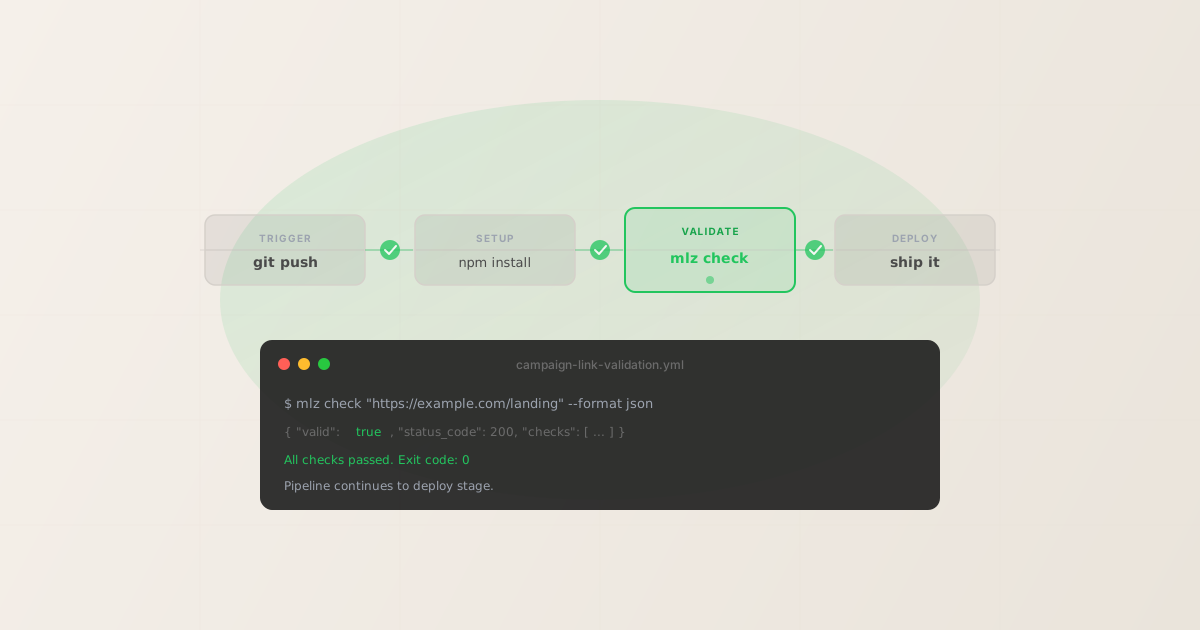
Adding mlz check as a GitHub Actions step gives you a pass/fail gate based on structured JSON output from the destination URL itself. The step exits 0 on pass and 1 on failure, which is exactly how GitHub Actions decides whether to block the pipeline. No custom logic required.
The workflow below handles three scenarios: validating a single campaign URL on every push, looping over a JSON file of campaign links, and running a weekly scheduled check against production URLs. Choose the one that fits your deployment model.
The complete workflow file
Save this as .github/workflows/campaign-link-validation.yml in your repository. It triggers on pushes to main and on pull requests that touch campaign-related files, and runs a weekly scheduled check every Monday morning.
name: Campaign Link Validation

on:
  push:
    branches: [main]
    paths:
      - 'campaigns/**'
      - 'src/campaigns/**'
  pull_request:
    paths:
      - 'campaigns/**'
      - 'src/campaigns/**'
  schedule:
    - cron: '0 9 * * 1'

jobs:
  validate-campaign-links:
    runs-on: ubuntu-latest
    steps:
      - name: Checkout
        uses: actions/checkout@v4

      - name: Set up Node.js
        uses: actions/setup-node@v4
        with:
          node-version: '20'

      - name: Cache npm global
        uses: actions/cache@v4
        with:
          path: ~/.npm
          key: npm-global-mlz-${{ hashFiles('**/package-lock.json') }}

      - name: Install MissingLinkz
        run: npm install -g missinglinkz

      - name: Validate campaign link
        id: validate
        run: |
          RESULT=$(mlz check "$LANDING_URL" --format json)
          echo "$RESULT" | jq '.'
          echo "$RESULT" | jq -e '.valid == true'
        env:
          LANDING_URL: ${{ vars.CAMPAIGN_LANDING_URL }}
          MLZ_API_KEY: ${{ secrets.MLZ_API_KEY }}

      - name: Notify Slack on failure
        if: failure()
        run: |
          curl -s -X POST "$SLACK_WEBHOOK" \
            -H 'Content-type: application/json' \
            --data '{"text":"Campaign link validation failed on ${{ github.ref_name }}"}'
        env:
          SLACK_WEBHOOK: ${{ secrets.SLACK_WEBHOOK_URL }}
What this workflow does when it runs: checks out the repo, installs mlz, runs mlz check against your campaign landing URL, prints the full JSON output to the Actions log, and evaluates whether .valid == true. If the check fails, jq -e exits with status 1, the step fails, and the Slack notification fires. If everything passes, the pipeline continues to your deploy steps.
Step-by-step: what each part does
Trigger: paths filter keeps it fast
The paths filter limits when the workflow runs. Without it, every commit — including unrelated documentation changes — would kick off a network validation job. Restrict it to directories that contain campaign URL configuration: campaigns/**, src/campaigns/**, or wherever your team stores landing page URLs. Adjust the paths to match your repo structure.
The schedule trigger runs a weekly check against production URLs regardless of code changes. This catches cases where a landing page goes down or OG tags are removed after the initial campaign link was validated — common when a site is restructured mid-campaign.
Cache step saves time on repeated runs
The actions/cache@v4 step caches the npm global directory. The mlz install is fast (<10 seconds), but on large teams running dozens of PRs per day, the cumulative time adds up. The cache key uses the package-lock.json hash so it invalidates when dependencies change.
The validation step: mlz check explained
mlz check makes an HTTP request to the destination URL and returns a structured JSON object. Here is what a passing result looks like:
{
  "url": "https://example.com/landing",
  "valid": true,
  "checks": [
    { "check": "url_format", "status": "pass", "message": "URL format is valid." },
    { "check": "ssl", "status": "pass", "message": "URL uses HTTPS." },
    { "check": "resolution", "status": "pass",
      "message": "Destination responded with 200.",
      "details": { "status_code": 200, "response_time_ms": 241 } },
    { "check": "redirects", "status": "pass",
      "message": "No redirects detected. UTM parameters preserved.",
      "details": { "hops": 0, "utm_preserved": true } },
    { "check": "response_time", "status": "pass",
      "message": "Response time: 241ms." }
  ],
  "status_code": 200,
  "response_time_ms": 241,
  "validated_at": "2026-04-27T09:00:00.000Z"
}
The jq -e '.valid == true' command evaluates the expression and returns exit code 0 if true, exit code 1 if false. This is all GitHub Actions needs to decide whether to pass or fail the step. The preceding echo "$RESULT" | jq '.' prints the full JSON to the Actions log so you can see which specific check failed.
Failure notification via Slack webhook
The if: failure() condition ensures the Slack step only runs when a preceding step has already failed. The curl command posts a simple message to your incoming webhook URL. Store the webhook URL as a GitHub Actions secret (see below) — never hardcode it in the workflow file.
Adding OG tag and social preview validation
mlz check validates URL resolution, SSL, and the redirect chain. To also verify that your landing page has the Open Graph tags required for social previews — og:title, og:description, og:image — use mlz publish-check instead. It combines URL validation with a full OG tag inspection and returns a single ready boolean:
      - name: Full pre-publish validation
        run: |
          RESULT=$(mlz publish-check \
            --url "$LANDING_URL" \
            --source "linkedin" \
            --medium "social" \
            --campaign "q2-2026" \
            --format json)
          echo "$RESULT" | jq '.'
          echo "$RESULT" | jq -e '.ready == true'
        env:
          LANDING_URL: ${{ vars.CAMPAIGN_LANDING_URL }}
          MLZ_API_KEY: ${{ secrets.MLZ_API_KEY }}
Use mlz check when you only care about whether the destination resolves correctly. Use mlz publish-check when you also need to confirm that social previews will render — for example, if your PR deploys a new landing page that needs OG tags before any campaign link goes live pointing to it.
For a full description of what each command validates, see the campaign link validation guide and why every campaign link needs a preflight check.
Storing MLZ_API_KEY as a GitHub secret
The MLZ_API_KEY environment variable is optional for mlz check — the command validates URLs without an API key. An API key is required only if you want check results stored in the MissingLinkz dashboard for tracking over time. For CI use, the choice is yours.
To store either secret in GitHub Actions:
- Go to your repository on GitHub
- Navigate to Settings › Secrets and variables › Actions
- Click New repository secret
- Name:
MLZ_API_KEY— Value: your key frommlz auth status - Repeat for
SLACK_WEBHOOK_URLif using Slack notifications
To get your API key if you don't have one yet:
mlz auth register --email [email protected]
The landing URL is stored as a repository variable (vars.CAMPAIGN_LANDING_URL) rather than a secret because it's not sensitive — it's a public URL. Set it under Settings › Secrets and variables › Actions › Variables. Alternatively, hardcode the URL directly in the workflow YAML if you prefer a simpler setup.
Validating multiple campaign links in one run
For teams managing multiple campaigns simultaneously, store your landing URLs in a JSON config file and loop over them in the validation step. Create a campaigns.json in your repository:
[
  { "name": "q2-launch", "url": "https://example.com/q2-landing" },
  { "name": "brand-awareness", "url": "https://example.com/brand" },
  { "name": "product-launch", "url": "https://example.com/product" }
]
Then replace the single validation step with a loop:
      - name: Validate all campaign links
        run: |
          FAILED=0
          for row in $(jq -c '.[]' campaigns.json); do
            NAME=$(echo "$row" | jq -r '.name')
            URL=$(echo "$row" | jq -r '.url')
            echo "Checking: $NAME ($URL)"
            RESULT=$(mlz check "$URL" --format json)
            if ! echo "$RESULT" | jq -e '.valid == true' > /dev/null 2>&1; then
              echo "FAIL: $NAME"
              echo "$RESULT" | jq '.checks[] | select(.status == "fail")'
              FAILED=$((FAILED + 1))
            fi
          done
          if [ "$FAILED" -gt 0 ]; then
            echo "$FAILED campaign link(s) failed validation."
            exit 1
          fi
          echo "All $( jq length campaigns.json ) campaign links validated."
        env:
          MLZ_API_KEY: ${{ secrets.MLZ_API_KEY }}
This loop checks all URLs, accumulates failures, and exits with a non-zero code only after all checks have run — so you see the full list of failures in one pipeline run rather than stopping at the first failure. The Actions log shows each campaign name alongside its result, making it easy to locate which landing page needs attention.
For a deeper look at what makes campaign links fail in production, see how to validate UTM links before publishing and the redirect chain guide.
Gating PR merges with branch protection
Running the workflow is not enough on its own — a developer can still merge a PR with a failing check unless branch protection rules require status checks to pass before merging.
To configure this:
- Go to Settings › Branches in your repository
- Under Branch protection rules, add or edit the rule for
main - Enable Require status checks to pass before merging
- Search for and select
validate-campaign-links(the job name from your workflow) - Save changes
After this, GitHub will block the Merge button on any PR where the validation job has not passed. Contributors see a clear status check on the PR page, and the failure message from jq is visible in the Actions log linked directly from the PR.
Note: the validation workflow only runs when the paths filter is triggered. If a PR doesn't touch files matching campaigns/**, the job is skipped rather than required. If you want validation on every PR regardless of changed files, remove the paths filter from the pull_request trigger.
FAQ
- Does mlz check need an API key to run in GitHub Actions?
- No.
mlz checkvalidates URLs — SSL, resolution, redirect chain — without an API key. The key is only needed if you want results persisted to the MissingLinkz dashboard. For CI/CD, setMLZ_API_KEYas a secret if you want stored results; omit it if you only need the exit code and JSON output in the Actions log. - What exit code does mlz check return on failure?
mlz checkwith--format jsonreturns exit code 0 in all cases — it always outputs JSON. The pass/fail gate in this workflow comes fromjq -e '.valid == true', which returns exit code 1 when the expression is false. If you wantmlz checkitself to exit non-zero on a failed destination, omit the--format jsonflag and use the human-readable output mode, which exits 1 on any failed check.- How do I validate OG tags in CI before a deploy?
- Use
mlz publish-checkinstead ofmlz check. It adds Open Graph tag inspection, Twitter Card verification, viewport, canonical, and favicon checks alongside the URL validation. Gate on.ready == truein the jq expression. One caveat:mlz inspectchecks the live URL — if your landing page hasn't deployed yet, point the check at your staging URL, not production. - How do I handle campaign links that go through a redirect?
mlz checkfollows the full redirect chain and reports the number of hops and whether UTM parameters are preserved at each hop. If your links are expected to redirect (through a shortener or vanity URL), parse the JSON output and check for"utm_preserved": truein the redirects check rather than using a blanket pass/fail. See how to check if a redirect strips UTM parameters for the detailed walkthrough.- Should I validate on every push or just nightly?
- For active campaign periods — when links are being created or landing pages are being modified — validate on push. For stable campaigns where pages don't change, a weekly scheduled run (the
schedule: crontrigger in the workflow above) is sufficient and avoids burning pipeline minutes on every commit. Many teams run both: per-push for PRs that touch campaign files, plus a nightly or weekly health check against all production landing URLs.
Recommended posts
Add campaign link validation to your next GitHub Actions workflow
Install MissingLinkz, register for a free account, and copy the workflow above into your repository. The first 1,000 validations per month are free — no credit card needed.
1,000 links/month free. No credit card.
Your API key
Save this now — it won't be shown again.
npm install -g missinglinkz
mlz auth register --email [email protected]
Free plan: 1,000 validations/month. See all commands in the SKILL.md reference.