UTM Parameters Lost in Cookie Consent Gates: How Developers Detect and Fix It
When a user clicks a campaign link with UTM parameters and your site shows a GDPR or CCPA cookie consent banner, the consent management platform (CMP) typically stores the user's choice and then redirects them to the destination page. If the CMP is configured to redirect to a bare URL — without the original query string — every UTM parameter the user arrived with is silently dropped. GA4 fires against the clean URL and records the session as (direct)/(none). No error, no broken page, no warning: just a systematic attribution failure that affects every campaign click from visitors in GDPR-regulated regions until someone notices the discrepancy in the reports. The problem compounds with CCPA, because US visitors in privacy-act states are increasingly subject to similar consent gates. In markets where CMPs are mandatory, this class of tracking loss can misattribute the majority of paid campaign traffic. To detect it before your campaign launches, MissingLinkz's mlz check follows the full redirect chain — including the CMP hop — and reports whether UTM parameters survive to the final destination URL. This article explains exactly how CMPs break UTM tracking, which CMP implementations are most prone to the problem, and two developer-level approaches to fix it.
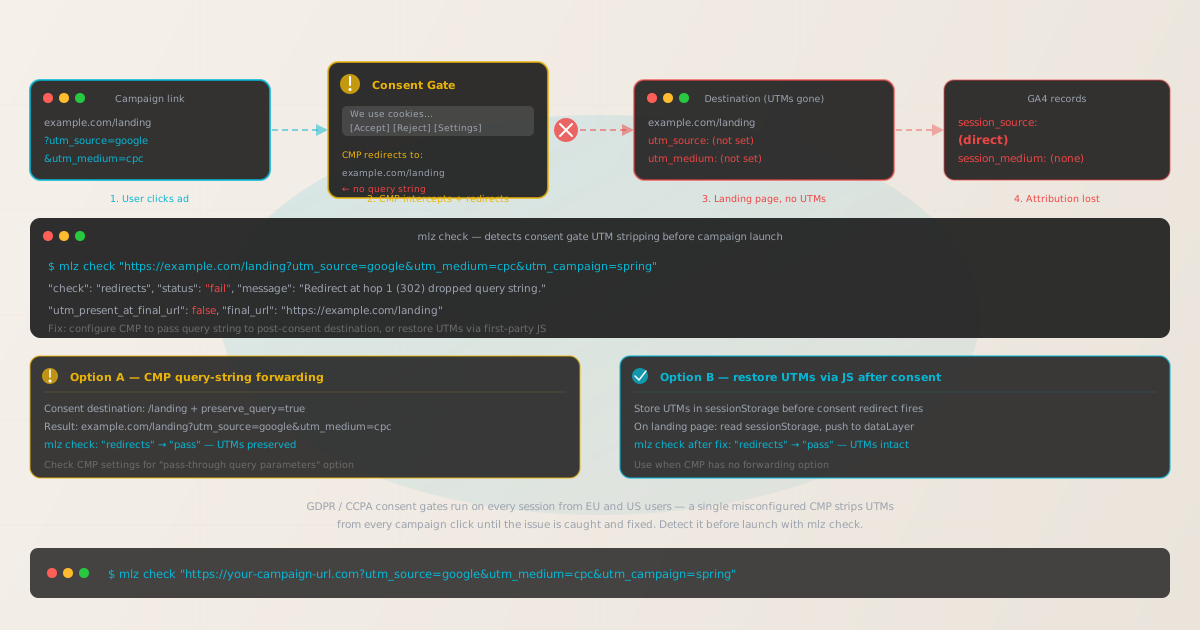
How consent management platforms break UTM tracking
A consent management platform intercepts the user's first page load to present the cookie consent banner. After the user makes a choice — accept, reject, or configure — the CMP needs to deliver them to the page they originally requested. There are two ways CMPs handle this handoff, and one of them systematically breaks UTM tracking.
- Pattern A: CMP stores choice in a cookie, page reloads (UTMs survive)
-
The CMP stores the consent choice in a first-party cookie on the current domain. The page does not redirect — it either reloads with the consent flag set, or the CMP JavaScript updates the page state dynamically. The original URL (including its query string) is never changed. UTM parameters survive because the user stays on the same URL throughout the interaction. This pattern is safe for attribution.
- Pattern B: CMP redirects to a consent endpoint, then back to destination (UTMs at risk)
-
The CMP redirects the user to a consent-recording endpoint — often on a different subdomain or domain — where the choice is registered, then issues a second redirect back to the destination page. The destination URL for this final redirect is configured in the CMP settings. If it is configured as a bare path (
/landing) rather than the full original URL including query string, UTMs are lost at the second redirect. The user lands on the destination page but with no attribution data.
The redirect-based pattern is common in enterprise CMPs like OneTrust, Cookiebot (with certain configurations), Quantcast Choice, and some Didomi setups — particularly when the CMP is deployed as a separate consent domain. The bare-URL misconfiguration is easy to introduce during CMP setup because the configuration UI typically asks for a destination URL, not a "destination URL with all query parameters preserved" — the distinction is invisible unless someone specifically tests campaign links through the consent flow.
The scale of the problem: if 30% of your campaign traffic comes from EU markets and 100% of those sessions hit the consent banner on first visit, and the CMP is stripping UTMs, you are misattributing 30% of your campaign-attributed conversions as direct traffic. For a high-spend campaign, this can represent a meaningful error in reported ROAS and campaign-level attribution.
Detecting CMP UTM stripping with mlz check
MissingLinkz's mlz check follows the complete redirect chain for a URL and reports whether UTM parameters are present at the final destination. Run it against your campaign landing page URL with UTM parameters included — the same URL a user would click from an ad. If the CMP intercepts the request and issues a redirect that drops the query string, mlz check flags the specific hop where the parameters were lost.
mlz check "https://example.com/landing?utm_source=google&utm_medium=cpc&utm_campaign=spring-2026"
When a CMP redirect strips the query string, the output shows the failure at the affected hop:
{
  "url": "https://example.com/landing?utm_source=google&utm_medium=cpc&utm_campaign=spring-2026",
  "valid": false,
  "checks": [
    { "check": "url_format",   "status": "pass", "message": "URL format is valid." },
    { "check": "ssl",          "status": "pass", "message": "URL uses HTTPS." },
    { "check": "resolution",   "status": "pass", "message": "Destination responded with 200." },
    {
      "check": "redirects",
      "status": "fail",
      "message": "Redirect at hop 1 (302) dropped query string. UTM parameters absent from final URL.",
      "details": {
        "hop_count": 2,
        "utm_present_at_final_url": false,
        "final_url": "https://example.com/landing"
      }
    }
  ]
}
Important note: mlz check makes the request from the server side and may not see a CMP banner in the way a real browser does. If your CMP shows the consent banner only on the first visit (via a cookie check), the server-side request may resolve through the CMP redirect without a consent-choice step, depending on the CMP's implementation. If mlz check reports the redirects check passing but you still see attribution gaps in GA4, test from an incognito browser with network logging to observe the full request chain from a first-time visitor's perspective.
Using mlz preflight for full pre-launch validation
For a complete campaign readiness check that validates the redirect chain, UTM preservation, SSL, Open Graph tags, and Twitter Card in a single command, use mlz preflight. It builds the UTM-tagged URL, follows the redirect chain, and returns a unified ready: true or ready: false verdict.
mlz preflight --url "https://example.com/landing" --source "google" --medium "cpc" --campaign "spring-2026"
{
  "ready": false,
  "tracked_url": "https://example.com/landing?utm_source=google&utm_medium=cpc&utm_campaign=spring-2026",
  "checks": [
    { "check": "ssl",        "status": "pass" },
    { "check": "resolution", "status": "pass" },
    { "check": "redirects",  "status": "fail", "message": "Hop 1 dropped query string." },
    { "check": "og_tags",    "status": "pass" },
    { "check": "twitter_card", "status": "pass" }
  ],
  "recommendation": "1 check failed. Fix redirect configuration before publishing."
}
Two approaches to fix CMP UTM stripping
Option A: Configure the CMP to forward the original query string
Most enterprise CMPs have a setting that controls the post-consent redirect destination. The simplest fix is to configure this destination to include the original query string from the incoming request. In practice, this is often a toggle or a template variable:
# OneTrust — redirect destination setting
# BROKEN: hardcoded path drops incoming query string
Redirect after consent: /landing

# FIXED: use the original URL from the referrer or a pass-through param
Redirect after consent: /landing + preserve_query_string: true

# Cookiebot — redirect URL setting
# BROKEN
CookiebotCallback_OnAccept: window.location = "/landing";

# FIXED
CookiebotCallback_OnAccept: window.location = "/landing" + window.location.search;
After making the change, verify with mlz check. The redirects check should now return "pass" with "utm_present_at_final_url": true.
Option B: Preserve UTMs via JavaScript before the redirect fires
When the CMP does not support query string forwarding — or when you don't control the CMP configuration — the developer approach is to capture the UTM parameters before the consent redirect fires, store them in sessionStorage, and restore them after the user is returned to the destination page.
// Step 1: Run BEFORE the CMP loads (inline script at page top)
(function() {
  const utmParams = ['utm_source', 'utm_medium', 'utm_campaign', 'utm_term', 'utm_content'];
  const params = new URLSearchParams(window.location.search);
  const captured = {};
  utmParams.forEach(function(key) {
    if (params.has(key)) captured[key] = params.get(key);
  });
  if (Object.keys(captured).length > 0) {
    sessionStorage.setItem('mlz_utm_backup', JSON.stringify(captured));
  }
})();

// Step 2: On landing page (after consent redirect), restore UTMs to dataLayer
(function() {
  const backup = sessionStorage.getItem('mlz_utm_backup');
  if (backup && !window.location.search.includes('utm_source')) {
    const utms = JSON.parse(backup);
    window.dataLayer = window.dataLayer || [];
    window.dataLayer.push({
      event: 'utm_restored',
      utm_source: utms.utm_source,
      utm_medium: utms.utm_medium,
      utm_campaign: utms.utm_campaign
    });
    sessionStorage.removeItem('mlz_utm_backup');
  }
})();
This approach is less reliable than Option A because it depends on JavaScript executing before the CMP redirect fires, and sessionStorage is cleared when the tab is closed. It is a developer workaround, not a configuration fix. Option A is always preferable when the CMP supports it.
After implementing either option, validate the fix from both mlz check and a real browser in incognito mode to confirm UTMs survive the full consent flow end-to-end.
Which consent management platforms are most affected
| CMP | Default redirect pattern | UTM risk level |
|---|---|---|
| OneTrust (banner mode) | Stores choice in cookie, page state updated in-place | ✓ Low — no redirect |
| OneTrust (consent domain mode) | Redirects through consent.example.com to destination | ✗ High — query string at risk |
| Cookiebot | JavaScript callback, typically in-page | Medium — depends on callback config |
| Quantcast Choice | In-page banner, no redirect by default | ✓ Low |
| Didomi | In-page banner or redirect, configurable | Medium — verify per deployment |
| Usercentrics | In-page banner, typically no redirect | ✓ Low |
The safest approach regardless of CMP is to test every campaign landing page URL through mlz check before launch. CMP configuration varies by deployment and by region — a configuration that works without redirecting in one market may use redirect mode in another (for example, when different CMPs are deployed per locale). Do not assume your CMP is safe because the CMP vendor says it "supports GDPR" — run the check against the actual URL with UTM parameters.
Consent gates in the broader context of campaign tracking failures
CMP redirect stripping is one of several classes of tracking failure that cause GA4 to record paid campaign traffic as (direct)/(none). The other common causes include server-side redirect chains that drop the query string, JavaScript redirects using window.location without window.location.search, cross-domain attribution without the GA4 linker parameter, and link shorteners that reconstruct the URL without the original query string.
If you have confirmed that your CMP is not the cause but are still seeing unexplained direct traffic in GA4, the broader diagnostic sequence covers all four causes: see Why GA4 Shows Campaign Traffic as Direct: A Developer's Prevention Checklist.
For the specific 301 vs 302 redirect stripping case (distinct from CMP), see How to Check if UTM Parameters Survive a 301 vs 302 Redirect and How to Check if a Redirect Strips UTM Parameters.
For the JavaScript redirect variant — where window.location is set to a bare path in React Router, Next.js, or plain JS — see UTM Parameters Lost After JavaScript Redirect: How to Detect and Fix It.
All of these are surfaced by the same command: mlz check against the full tracked URL with UTM parameters included. A passing redirects check means the parameters survive the full chain, regardless of the cause. A failing check gives you the exact hop number and the message you need to diagnose the root cause.
The parent reference for all campaign link validation checks is Campaign Link Validation — The Complete Guide.
Frequently asked questions
- Does a cookie consent banner always break UTM tracking?
- No. CMPs that display the consent banner in-page (via a JavaScript overlay) and store the user's choice in a cookie without issuing a redirect do not affect UTM parameters at all. The problem is specific to CMPs that redirect the user through a separate consent endpoint before delivering them to the destination. Run
mlz checkagainst your landing page URL with UTM parameters to determine which pattern your CMP uses. - How do I know if my CMP is breaking UTM tracking?
- Run
mlz check "https://your-landing-page.com?utm_source=google&utm_medium=cpc&utm_campaign=test". If theredirectscheck returns"fail"with a message about a dropped query string, the CMP is the likely cause. Additionally, check GA4 for an unusually high proportion of(direct)/(none)traffic from EU or privacy-act regions compared to other geographies — a significant discrepancy is a strong signal that a consent gate is stripping UTMs for those users. - Does storing UTMs in sessionStorage work across consent redirects?
- Partially.
sessionStoragepersists for the lifetime of the browser tab, so it survives a same-tab redirect. If the CMP redirect opens in a new tab or window,sessionStoragewill not carry over. Additionally, if the consent redirect takes the user out of the original origin (same-site but different subdomain),sessionStoragemay not be accessible on the destination. Option A (configuring the CMP to forward the query string) is always more reliable. - Do I need to run
mlz checkfor every campaign landing page? - Yes, if you have multiple landing pages or if different pages may be handled by different CMP configurations. In practice, the CMP redirect behavior is usually consistent across an entire domain, so checking one representative landing page URL per domain is a good starting point. For campaigns with multiple landing pages across different domains, check one URL per domain. Automating this with a shell loop or in CI/CD is the reliable way to ensure coverage across all campaign links.
- Why does mlz check say the redirects check passes but GA4 still shows attribution loss?
- This can happen if the CMP shows a consent banner only on first visit (using a cookie to track whether consent has already been given). The
mlz checkrequest is a headless HTTP request that carries no cookies — it may skip the consent redirect entirely if the CMP checks for a consent cookie before deciding whether to redirect. Test from a real incognito browser window to see what a first-time visitor experiences. Enable network logging (DevTools, Network tab) and look for any 302 redirects that drop the query string during the page load.
Catch consent gate UTM stripping before campaigns go live
Run mlz check against every campaign landing page before launch to confirm UTM parameters survive the full redirect chain — including any consent management redirects — before you spend on paid traffic.
1,000 links/month free. No credit card.
Your API key
Save this now — it won't be shown again.
npm install -g missinglinkz
Then run: mlz check "https://your-landing-page.com?utm_source=google&utm_medium=cpc&utm_campaign=spring"