UTM Parameters Not Tracked in Next.js SPA: How to Fix Client-Side Routing Attribution
A user clicks your LinkedIn campaign link — https://your-app.com/landing?utm_source=linkedin&utm_medium=social&utm_campaign=q3-launch — and GA4 records the session with the correct attribution. They browse the site, navigate to the pricing page, click through to checkout, and convert. GA4 records the conversion as (direct)/(none). The UTM attribution was captured once and then immediately lost. This is the canonical SPA attribution problem: Next.js and React single-page applications use client-side routing (history.pushState) for page-to-page navigation, and client-side navigation does not trigger a page reload — which means GA4's gtag.js script does not re-fire, no new page_view event is sent, and no UTM parameters are re-captured for the new page context. If the conversion happens on a different route from the landing route, GA4 attributes the conversion to the session's last known state — which, because no page_view fired after the landing, often resolves to (direct). The fix requires explicitly firing a page_view event on every client-side route change. MissingLinkz's mlz check validates that your landing pages are reachable and that the URLs your campaigns point to resolve correctly — catching redirect issues before launch, though the SPA routing fix itself requires code changes in your analytics layer.
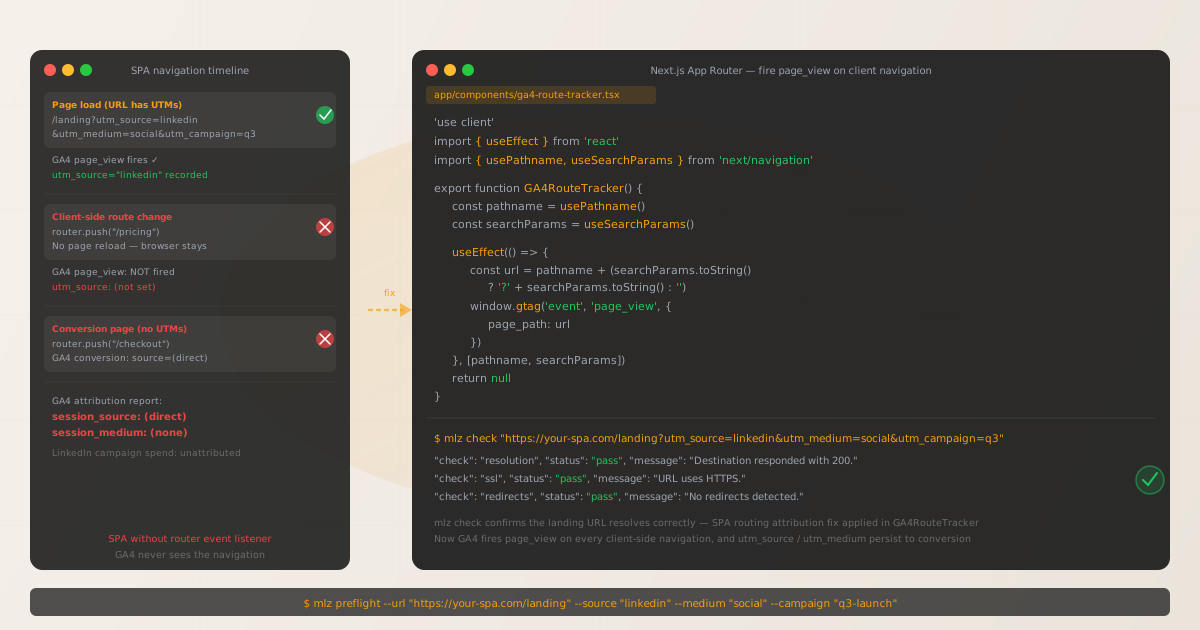
Why client-side routing breaks GA4 UTM attribution
Traditional multi-page applications (MPAs) reload the browser for every page navigation. Each reload fires the gtag.js config call with the current URL, and GA4 reads the UTM parameters from that URL for each new page view. Attribution is automatic because every navigation triggers a full HTTP request.
Single-page applications work differently. The JavaScript bundle loads once, and all subsequent navigation is handled in JavaScript using the History API (history.pushState). The URL in the browser address bar changes, the component tree renders the new page, but the browser never makes a new HTTP request and the page never reloads. gtag.js does not re-initialize, and no new page_view event is sent to GA4.
The impact on UTM attribution depends on where in the user journey the conversion event fires:
- Conversion on the landing route (safe)
- If the user converts on the same route they landed on — for example, a landing page with an inline signup form at
/landing— the initialpage_viewcarries the UTM parameters and the conversion is correctly attributed. This is the only SPA scenario where UTM attribution works without any fix. - Conversion after any client-side navigation (attribution lost)
- If the user navigates to any other route before converting —
/pricing,/features,/checkout— no newpage_viewfires. The conversion event's session attribution falls back to the last recorded state, which in many implementations defaults to(direct)/(none). Even a single intermediate page visit can break the attribution chain for that session. - Deep-linked campaigns to non-landing routes (partially affected)
- If your campaign links point directly to
/pricing?utm_source=linkedin, the UTMs are captured on initial load. Navigation away from/pricingthen suffers the same breakage as above. The initial attribution is correct but the conversion attribution depends on where the conversion event fires.
Confirming you have the SPA attribution problem
Before implementing a fix, verify that the SPA routing issue is actually causing your attribution loss — not a redirect chain or other URL rewriting issue. Use mlz check to rule out redirect-based stripping first:
mlz check "https://your-app.com/landing?utm_source=linkedin&utm_medium=social&utm_campaign=q3"
{
  "url": "https://your-app.com/landing?utm_source=linkedin&utm_medium=social&utm_campaign=q3",
  "valid": true,
  "checks": [
    { "check": "ssl",          "status": "pass", "message": "URL uses HTTPS." },
    { "check": "resolution",   "status": "pass", "message": "Destination responded with 200." },
    { "check": "redirects",    "status": "pass", "message": "No redirects detected." },
    { "check": "response_time", "status": "pass", "message": "Response time: 312ms." }
  ]
}
If all checks pass — especially redirects — the landing URL is clean. The attribution gap is happening inside the browser after page load, not in the HTTP request chain. The SPA routing fix applies.
If the redirects check fails, fix that first — see How to Check if UTM Parameters Survive a 301 vs 302 Redirect and UTM Parameters Lost After JavaScript Redirect.
To confirm the SPA routing issue specifically, open GA4 DebugView, navigate through your app in a browser, and observe whether page_view events fire for each route change or only for the initial load.
Fix: Next.js App Router (Next.js 13+)
The App Router uses React Server Components and a new navigation model. Client-side route changes can be detected via the usePathname and useSearchParams hooks, which update whenever the route changes. Create a client component that listens to these changes and fires a GA4 page_view event:
'use client'

import { useEffect } from 'react'
import { usePathname, useSearchParams } from 'next/navigation'

declare const gtag: Function

export function GA4RouteTracker() {
  const pathname = usePathname()
  const searchParams = useSearchParams()

  useEffect(() => {
    const qs = searchParams.toString()
    const url = pathname + (qs ? '?' + qs : '')

    // Fire page_view on every client-side navigation
    if (typeof gtag !== 'undefined') {
      gtag('event', 'page_view', {
        page_path: url,
        page_title: document.title
      })
    }
  }, [pathname, searchParams])

  return null
}
Add this component to your root layout so it runs on every page:
import { GA4RouteTracker } from './components/ga4-route-tracker'

export default function RootLayout({ children }) {
  return (
    <html lang="en">
      <body>
        <GA4RouteTracker />
        {children}
      </body>
    </html>
  )
}
The GA4RouteTracker component skips the initial render (the initial page_view fires via the gtag.js config call in your <Script> tag). It fires only on subsequent navigation events triggered by pathname or searchParams changes.
Important: wrap the GA4RouteTracker component in a Suspense boundary if you use useSearchParams in layouts or pages that are statically rendered — Next.js requires this to prevent build-time errors:
import { Suspense } from 'react'
import { GA4RouteTracker } from './components/ga4-route-tracker'

// In your root layout:
<Suspense fallback={null}>
  <GA4RouteTracker />
</Suspense>
Fix: Next.js Pages Router (Next.js 12 and earlier)
The Pages Router exposes router events via next/router. Listen to routeChangeComplete to fire a page_view event on every successful navigation:
import { useEffect } from 'react'
import { useRouter } from 'next/router'
import type { AppProps } from 'next/app'

declare const gtag: Function

export default function App({ Component, pageProps }: AppProps) {
  const router = useRouter()

  useEffect(() => {
    const handleRouteChange = (url: string) => {
      if (typeof gtag !== 'undefined') {
        gtag('event', 'page_view', {
          page_path: url,
          page_title: document.title
        })
      }
    }

    router.events.on('routeChangeComplete', handleRouteChange)
    return () => {
      router.events.off('routeChangeComplete', handleRouteChange)
    }
  }, [router.events])

  return <Component {...pageProps} />
}
The routeChangeComplete event fires with the full URL (including the query string) of the page the user navigated to. If they navigate to /pricing?utm_source=linkedin, the url argument includes the query string and GA4 captures the UTM parameters for that navigation.
Fix: Plain React SPA with React Router
For a React application using React Router (v6), listen to location changes and fire page_view on each:
import { useEffect } from 'react'
import { useLocation } from 'react-router-dom'

declare const gtag: Function

export function GA4Tracker() {
  const location = useLocation()

  useEffect(() => {
    if (typeof gtag !== 'undefined') {
      gtag('event', 'page_view', {
        page_path: location.pathname + location.search,
        page_title: document.title
      })
    }
  }, [location])

  return null
}

// In your App.tsx, place inside the Router:
// <Router>
//   <GA4Tracker />
//   <Routes>...</Routes>
// </Router>
The location.search property contains the query string including any UTM parameters, so GA4 receives the full URL context including attribution data on every navigation.
GTM-based implementation (no code deploy required)
If your analytics are managed through Google Tag Manager rather than direct gtag.js integration, the configuration is in GTM rather than your application code.
- Enable History Change trigger in GTM
-
In GTM, create a new trigger of type History Change. This trigger fires whenever the browser's History API is updated — which is exactly what Next.js and React Router do on client-side navigation. Add your GA4 Configuration tag to fire on this trigger, which sends a
page_viewevent to GA4 on every route change without requiring any code changes in your Next.js application. - Verify the trigger captures UTM parameters
-
In GTM Preview mode, navigate through your application and confirm that the History Change trigger fires on each route change and that the GA4 event payload includes the correct
page_location(which should contain any UTM parameters in the URL at the time of navigation).
Pre-launch validation with mlz preflight
The SPA routing fix is a code change that ensures GA4 receives page_view events for client-side navigation. Before any campaign goes live, MissingLinkz's mlz preflight validates the landing page URL — confirming that the destination is reachable, that the SSL certificate is valid, that the OG tags are present for social sharing, and that there are no redirect chains stripping the query string before the user's browser even loads your SPA.
mlz preflight --url "https://your-app.com/landing" --source "linkedin" --medium "social" --campaign "q3-launch"
{
  "ready": true,
  "tracked_url": "https://your-app.com/landing?utm_source=linkedin&utm_medium=social&utm_campaign=q3-launch",
  "checks": [
    { "check": "ssl",          "status": "pass", "message": "URL uses HTTPS." },
    { "check": "resolution",   "status": "pass", "message": "Destination responded with 200." },
    { "check": "redirects",    "status": "pass", "message": "No redirects detected." },
    { "check": "og_tags",     "status": "pass", "message": "All essential Open Graph tags present." },
    { "check": "twitter_card", "status": "pass", "message": "Twitter Card tags configured." }
  ],
  "summary": { "total": 12, "passed": 12, "warnings": 0, "failed": 0 },
  "recommendation": "All checks passed. Campaign link is ready to publish."
}
mlz preflight validates the infrastructure layer — it confirms the URL the user will click resolves correctly, the query string is preserved through any redirect chain, and the landing page has the correct OG metadata for social sharing. It does not and cannot check the in-browser SPA analytics layer — that is verified by watching GA4 DebugView in a real browser session after deploying the router event listener fix.
Use both: mlz preflight before launch to confirm the URL is clean, and GA4 DebugView after deploying the SPA fix to confirm page_view fires on client-side navigation.
SSR, static export, and GA4 initialization timing
Next.js supports server-side rendering (SSR), static site generation (SSG), and hybrid modes. For GA4 attribution purposes, one additional consideration applies when using server-side rendering or static export:
- SSR:
windowis undefined on the server -
Any gtag.js call that references
windowordocumentwill throw during server-side rendering. The'use client'directive in the App Router example above prevents the component from rendering on the server. For Pages Router, theuseEffecthook only runs in the browser, so it is automatically safe. Never callgtag()outside of a browser-only context (useEffect,typeof window !== 'undefined'guard, or a'use client'component). - Static export: GA4 measurement ID must match the deployed domain
-
If you run
next exportand deploy to a CDN, confirm that the GA4 measurement ID in your gtag.js config matches the property configured for the deployment domain. Misconfigured measurement IDs silently swallow all events includingpage_view. - Strict mode double-render in development
-
React Strict Mode (
<React.StrictMode>) intentionally renders components twice in development to detect side effects. This means yourpage_viewevent will fire twice per navigation in development. This is expected behavior and does not affect production builds where Strict Mode's double-render is disabled.
Frequently asked questions
- Why does GA4 DebugView show page_view only once for my Next.js app?
- This confirms the SPA routing problem. GA4 DebugView shows events in real time. If navigating through the app produces no additional
page_viewevents after the first page load, the router event listener is not in place. Add theGA4RouteTrackercomponent (App Router) or therouteChangeCompletelistener (_app.tsx) and reload — DebugView should then show a newpage_viewevent for each client-side navigation. - Does Next.js with full SSR (every page server-rendered) still have this problem?
- If every navigation in your Next.js app triggers a full server request and a page reload — no client-side navigation at all — GA4 attribution is not affected by the SPA routing issue. However, most Next.js applications use a hybrid model: the first page loads server-side, and subsequent navigations are client-side. In this case, the fix still applies to all client-side navigations. You can verify by watching the Network tab in DevTools while navigating — if navigation produces no new document requests, it is client-side.
- Will the router event listener cause GA4 to double-count the landing page view?
- No. The initial
page_viewfires from the gtag.js config call when the page loads. The router event listener fires only on subsequent navigation events (routeChangeComplete,usePathnamechanges). There is no overlap because the listener is registered after the initial page load and does not fire for the initial URL. - How do I validate that UTM parameters are reaching GA4 after the fix?
- Open GA4 DebugView, navigate to your landing page from a URL with UTM parameters, then navigate through the app. Each navigation should produce a
page_viewevent. Check the event parameters in DebugView — for the first navigation, you should seesession_sourceandsession_mediummatching your UTM values. Usemlz checkto confirm the landing URL resolves without redirects, which rules out server-side stripping as a confounding factor. - Does this issue affect Google Analytics 4 specifically, or also Universal Analytics?
- Both. Universal Analytics (GA3) had the same SPA routing problem, which is why
ga('send', 'pageview')calls on route changes were a standard implementation requirement for many years. GA4 has the same architecture: the measurement script fires once on page load unless explicitly told to fire again. The fix described here is the GA4 equivalent of the Universal Analyticsga('send', 'pageview')pattern.
Validate your SPA landing pages before campaigns launch
Use mlz check to rule out server-side redirect issues before investigating the SPA routing layer — and mlz preflight to get a complete go/no-go check on every campaign link before it goes live.
1,000 links/month free. No credit card.
Your API key
Save this now — it won't be shown again.
npm install -g missinglinkz
Then run: mlz check "https://your-app.com/landing?utm_source=linkedin&utm_medium=social&utm_campaign=q3"