UTM Parameters Not Tracked in React Router: How to Fix GA4 Attribution
React Router navigates between routes using window.history.pushState — which changes the URL without a full page reload. gtag.js fires a page_view event exactly once, when it first loads on the initial page request. Every subsequent navigation via a <Link> component or useNavigate() call updates the URL silently: no reload, no new page_view, no UTM capture. If a user arrives at /landing?utm_source=google&utm_medium=cpc&utm_campaign=q3 and then clicks through to /pricing where they convert, GA4 records that conversion as (direct)/(none) and your paid campaign gets no attribution credit. The fix is a RouteChangeTracker component that fires page_view manually on every navigation. But before writing any code: run mlz check against the campaign URL first. If a network-level redirect or edge middleware is stripping UTMs before they reach the browser, a client-side router fix will not recover them. MissingLinkz's mlz check command follows the full redirect chain and confirms whether UTM parameters survive to the final URL — ruling out the network layer in one command before you spend time debugging client-side code.
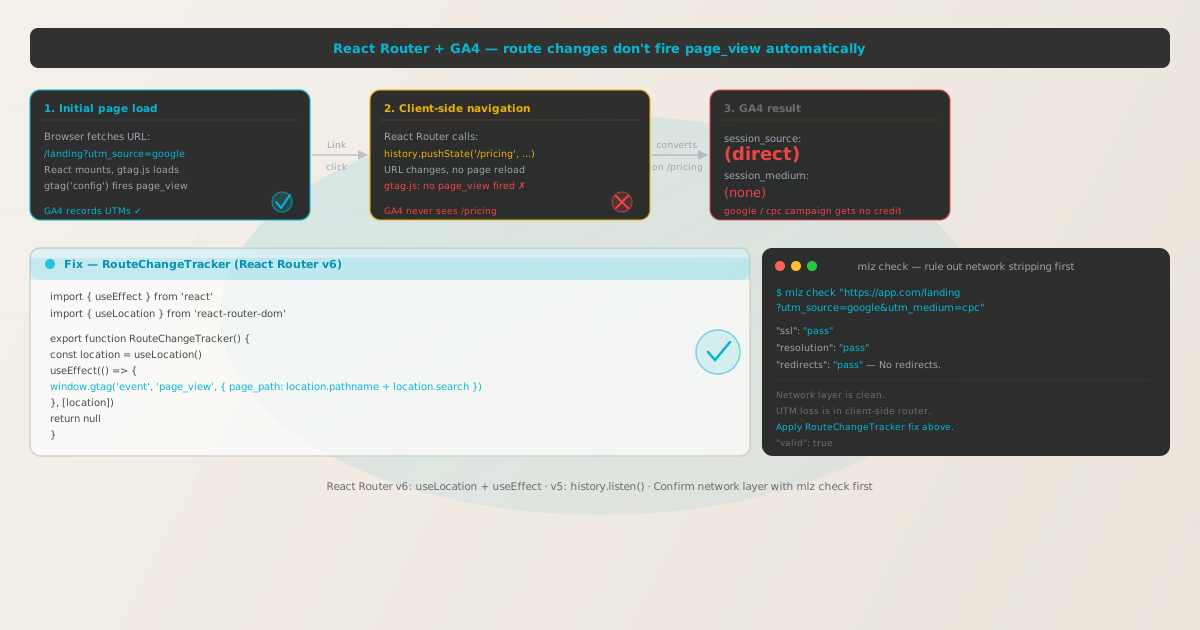
Why React Router breaks GA4 UTM attribution
When gtag.js is loaded on a page, it immediately fires a page_view event using the current URL — including any UTM parameters. This is the automatic first-event capture that attributes the session to a traffic source. The problem is that gtag.js only does this once, at script load time. React Router's navigation does not reload the page or reload scripts; it calls window.history.pushState to update the URL and re-renders React components in place. gtag.js has no listener for pushState calls — it never knows a new page appeared.
The consequence is asymmetric. The initial landing page fires page_view correctly and GA4 attributes the session to the UTM source and medium. But every subsequent page view — every route the user visits after the landing page — is invisible to GA4. Conversions that happen on those subsequent routes are attributed to the session's last known source. If no page_view ever fired for /pricing, GA4 treats the conversion as occurring without a recognised navigation event and may attribute it to (direct), misassigning credit away from the originating campaign.
This is particularly damaging for React SPAs used as campaign landing pages with multi-step flows: a user lands on /landing (UTMs captured), reads pricing on /pricing (no page_view), signs up on /signup (no page_view, conversion attributed to (direct)). The entire campaign conversion path is invisible to GA4 beyond the first page.
Step zero: confirm the network layer isn't stripping UTMs
Before implementing any router fix, confirm that the campaign URL's UTM parameters actually reach the browser intact. Edge-level rewrites — from a Cloudflare Worker, nginx proxy rule, or a redirect from an ad platform — happen before JavaScript runs and before React Router ever sees the URL. If UTMs are stripped at the network layer, a client-side RouteChangeTracker component won't help.
MissingLinkz's mlz check command follows the complete redirect chain and reports whether UTM parameters survive to the final destination:
mlz check "https://your-react-app.com/landing?utm_source=google&utm_medium=cpc&utm_campaign=q3"
When the URL is clean and UTM parameters survive the redirect chain:
{
  "url": "https://your-react-app.com/landing?utm_source=google&utm_medium=cpc&utm_campaign=q3",
  "valid": true,
  "checks": [
    { "check": "url_format",   "status": "pass", "message": "URL format is valid." },
    { "check": "ssl",          "status": "pass", "message": "URL uses HTTPS." },
    { "check": "resolution",   "status": "pass", "message": "Destination responded with 200." },
    { "check": "redirects",    "status": "pass", "message": "No redirects detected." },
    { "check": "response_time", "status": "pass", "message": "Response time: 198ms." }
  ],
  "valid": true
}
All checks passing confirms the UTM parameters reach the browser correctly. The attribution problem is client-side — the React Router layer. If you see "redirects": "fail" with a dropped query string, fix the network layer first. See How to Check if a Redirect Strips UTM Parameters and UTM Parameters Stripped by Cloudflare Workers or Edge Middleware.
React Router v6 fix: RouteChangeTracker with useLocation
React Router v6 exposes useLocation() — a hook that returns the current location object and re-renders the component whenever the location changes. Wrap it in a useEffect that depends on the location and fire gtag('event', 'page_view') inside. Because the effect runs on every location change — including the first render — it captures every route including the initial landing page.
Create a RouteChangeTracker component and render it once inside your <Router> wrapper:
import { useEffect } from 'react'
import { useLocation } from 'react-router-dom'

export function RouteChangeTracker() {
  const location = useLocation()

  useEffect(() => {
    if (typeof window.gtag === 'function') {
      window.gtag('event', 'page_view', {
        page_path: location.pathname + location.search
      })
    }
  }, [location])

  return null
}
Then render it once inside <BrowserRouter> or <RouterProvider> — it needs to be inside the router context to call useLocation():
import { BrowserRouter, Routes, Route } from 'react-router-dom'
import { RouteChangeTracker } from './RouteChangeTracker'

export default function App() {
  return (
    <BrowserRouter>
      <RouteChangeTracker />  // renders null, fires page_view on every route change
      <Routes>
        <Route path="/" element={<Landing />} />
        <Route path="/pricing" element={<Pricing />} />
        <Route path="/signup" element={<Signup />} />
      </Routes>
    </BrowserRouter>
  )
}
location.search includes the query string — so the first page_view event for /landing?utm_source=google&utm_medium=cpc&utm_campaign=q3 passes the full path with UTMs as page_path. GA4 reads the UTMs from that first event and associates them with the session. Subsequent page_view events for /pricing and /signup have no UTMs in location.search, but GA4's session attribution model carries the source forward automatically.
Also disable GA4's automatic initial page_view to avoid a duplicate event on first load:
gtag('config', 'G-XXXXXXXXXX', { send_page_view: false });
With send_page_view: false set, the only page_view events GA4 receives are the ones fired by RouteChangeTracker — one per navigation, starting with the initial render. No duplication, full coverage of every route.
React Router v5 fix: history.listen callback
React Router v5 uses a separate history package for navigation. You have two options: a hook-based approach using useHistory() (available in v5) or registering a listener on the history object you create and pass to <Router>.
The hook-based approach creates a component inside the router, similar to the v6 pattern:
import { useEffect } from 'react'
import { useHistory, useLocation } from 'react-router-dom'

export function RouteChangeTracker() {
  const history = useHistory()
  const location = useLocation()

  useEffect(() => {
    // Fire on initial mount with the landing URL
    if (typeof window.gtag === 'function') {
      window.gtag('event', 'page_view', {
        page_path: location.pathname + location.search
      })
    }

    // Subscribe to subsequent route changes
    return history.listen((loc) => {
      if (typeof window.gtag === 'function') {
        window.gtag('event', 'page_view', {
          page_path: loc.pathname + loc.search
        })
      }
    })
    // history.listen returns an unlisten function — return it to clean up on unmount
  }, []) // eslint-disable-line react-hooks/exhaustive-deps

  return null
}
The history.listen return value is an unlisten function — returning it from useEffect ensures the listener is cleaned up if the component ever unmounts. In practice, RouteChangeTracker lives at the root and never unmounts during a session, but this keeps the implementation correct.
If you maintain your own history instance (common in older v5 setups using createBrowserHistory()), you can register the listener directly on it without needing a component:
import { createBrowserHistory } from 'history'

export const history = createBrowserHistory()

history.listen(({ location }) => {
  if (typeof window.gtag === 'function') {
    window.gtag('event', 'page_view', {
      page_path: location.pathname + location.search
    })
  }
})

// Then pass to your router: <Router history={history}>
Note the listener signature difference: in history v4 (used by React Router v5), the listener receives (location, action); in history v5 (used by React Router v6 internally), it receives ({ location, action }). Use the appropriate destructuring for your version.
Preserving UTM parameters across route changes
GA4 handles session-level UTM attribution automatically: once UTMs are recorded on the first page_view event in a session, GA4 attributes subsequent events in the same session to the same source and medium. You do not need to forward UTMs on every page_view call for standard GA4 reporting to work.
However, if you have a custom analytics pipeline — sending events to a dataLayer, a custom backend, or a CDP alongside GA4 — you may need the original UTMs available throughout the session. The reliable approach is to capture them from the URL on first load and store them in sessionStorage:
const UTM_KEYS = [
  'utm_source', 'utm_medium', 'utm_campaign',
  'utm_term', 'utm_content'
]

export function captureInitialUtms() {
  const params = new URLSearchParams(window.location.search)
  UTM_KEYS.forEach(key => {
    const val = params.get(key)
    if (val && !sessionStorage.getItem(key)) {
      sessionStorage.setItem(key, val)
    }
  })
}

export function getStoredUtms() {
  return Object.fromEntries(
    UTM_KEYS
      .map(k => [k, sessionStorage.getItem(k)])
      .filter(([, v]) => v !== null)
  )
}

// Call captureInitialUtms() before rendering your app
// Call getStoredUtms() anywhere you need UTM context later
Call captureInitialUtms() in your app's entry point (in index.jsx before ReactDOM.createRoot().render()) so it runs immediately on the first page load before React Router initialises. The !sessionStorage.getItem(key) guard prevents subsequent navigations that might have UTM params in their URLs from overwriting the original session attribution.
Use getStoredUtms() when you need to attach original UTM context to a custom conversion event — for example, when a user submits a signup form after navigating from the landing page to the signup page.
Pre-launch validation with mlz preflight
After implementing the router fix, validate the full campaign URL before launch. mlz preflight checks the redirect chain, SSL, Open Graph tags, Twitter Card metadata, and UTM parameter structure in a single command — giving you a ready: true/false verdict:
mlz preflight --url "https://your-react-app.com/landing" --source "google" --medium "cpc" --campaign "q3-launch"
{
  "ready": true,
  "tracked_url": "https://your-react-app.com/landing?utm_source=google&utm_medium=cpc&utm_campaign=q3-launch",
  "checks": [
    { "check": "ssl",          "status": "pass", "message": "URL uses HTTPS." },
    { "check": "resolution",   "status": "pass", "message": "Destination responded with 200." },
    { "check": "redirects",    "status": "pass", "message": "No redirects detected." },
    { "check": "og_tags",     "status": "pass", "message": "All essential Open Graph tags present." },
    { "check": "twitter_card", "status": "pass", "message": "Twitter Card tags configured." }
  ],
  "summary": { "total": 12, "passed": 12, "warnings": 0, "failed": 0 },
  "recommendation": "All checks passed. Campaign link is ready to publish."
}
A clean preflight result confirms the infrastructure is solid. The router tracking fix you applied handles the client-side attribution layer. Add mlz preflight to your React SPA deploy checklist — particularly when deploying new routes or changing routing configuration, which can inadvertently affect how the server responds to the landing page URL.
React Router version quick reference
| Version | Route change hook / listener | page_path value | Works with SSR? |
|---|---|---|---|
| React Router v6 | useLocation() + useEffect([location]) |
location.pathname + location.search |
✗ Client-only — guard with typeof window |
| React Router v5 | useHistory() + history.listen() |
loc.pathname + loc.search |
✗ Client-only — guard with typeof window |
| Remix (v2) | useLocation() from @remix-run/react — same pattern |
location.pathname + location.search |
✓ Use a ClientOnly wrapper or check typeof window |
| React Router in Next.js | Use Next.js usePathname + useSearchParams instead |
pathname + search |
✓ See the Next.js SPA guide |
In all cases: set send_page_view: false in the gtag('config', 'G-XXXXXXXXXX', { send_page_view: false }) call to avoid a duplicate event on the initial render when your tracker component mounts. GA4's session-level attribution handles UTM persistence across routes automatically — manual sessionStorage is only needed for custom analytics pipelines beyond GA4.
Frequently asked questions
- Does React Router automatically track route changes in GA4?
- No.
gtag.jsfirespage_viewonce when it loads on the initial page. React Router's<Link>navigation callswindow.history.pushStatewithout a page reload, sogtag.jsnever detects subsequent navigations. The fix is to listen to router changes and firepage_viewmanually — usinguseLocation()in v6 orhistory.listen()in v5. - Will the manual page_view event duplicate the initial page load?
- Only if you leave GA4's automatic
page_viewenabled. Setsend_page_view: falsein yourgtag('config', 'G-XXXXXXXXXX', { send_page_view: false })call. With that set, the onlypage_viewevents GA4 receives come from yourRouteChangeTrackercomponent — one per navigation, starting with the initial mount. Check the GA4 DebugView to confirm a single event fires per page. - How do UTM parameters appear in GA4 after this fix?
- GA4 reads UTM parameters from the
page_pathpassed in the firstpage_viewevent and associates them with the session. All subsequent events in the same session inherit that session's UTM attribution automatically. You do not need to pass UTM parameters on every route change — only on the first render where the landing URL with UTMs is the current location. GA4's session attribution model handles the rest. - Does this fix work for hash-based routing (createHashRouter / HashRouter)?
- Yes. Both hash-based and history-based routing trigger the same
useLocation()re-renders andhistory.listen()callbacks. Thelocation.pathnameandlocation.searchvalues include the path and query string from within the hash fragment when using hash-based routing. Thepage_pathpassed togtagwill include the hash content as-is, which GA4 accepts. - How is this different from the Next.js SPA tracking fix?
- The root cause is identical — SPA routing doesn't trigger
page_viewautomatically. The implementation differs: Next.js App Router requires a client component usingusePathname()anduseSearchParams()inside aSuspenseboundary, because those hooks throw during SSR. React Router apps are typically fully client-rendered, so a plainuseLocation()insideuseEffectworks without SSR guards. See UTM Parameters Not Tracked in Next.js SPA for the Next.js implementation.
Validate your React campaign links before debugging the router
Run mlz check first to confirm UTM parameters survive the redirect chain, then apply the RouteChangeTracker fix to capture them on every client-side navigation.
1,000 links/month free. No credit card.
Your API key
Save this now — it won't be shown again.
npm install -g missinglinkz
Then: mlz check "https://your-react-app.com/landing?utm_source=google&utm_medium=cpc&utm_campaign=q3"