UTM Parameters Not Tracked in Nuxt.js: How to Fix GA4 Attribution
Nuxt.js applications use Vue Router for navigation. When a visitor arrives at /landing?utm_source=google&utm_medium=cpc&utm_campaign=q3, the first request is server-rendered (SSR) and gtag.js fires a page_view event on hydration — capturing the UTMs correctly. But when they click a <NuxtLink> to navigate to /pricing, Vue Router calls window.history.pushState without a page reload. gtag.js has no listener for pushState calls, so it never fires another page_view. If a conversion happens on /pricing, GA4 attributes it to (direct)/(none) rather than your paid campaign. The fix is a client-only Nuxt plugin that hooks into Vue Router's afterEach lifecycle and fires page_view manually on every navigation. But before writing any plugin code, confirm that the campaign URL's UTM parameters actually survive the network — a redirect at the edge, a CDN rewrite, or a cookie consent gate can strip UTMs before the browser ever loads them. MissingLinkz's mlz check command follows the full redirect chain and reports whether UTM parameters reach the final URL intact, ruling out the network layer in one command before you debug Vue Router code.
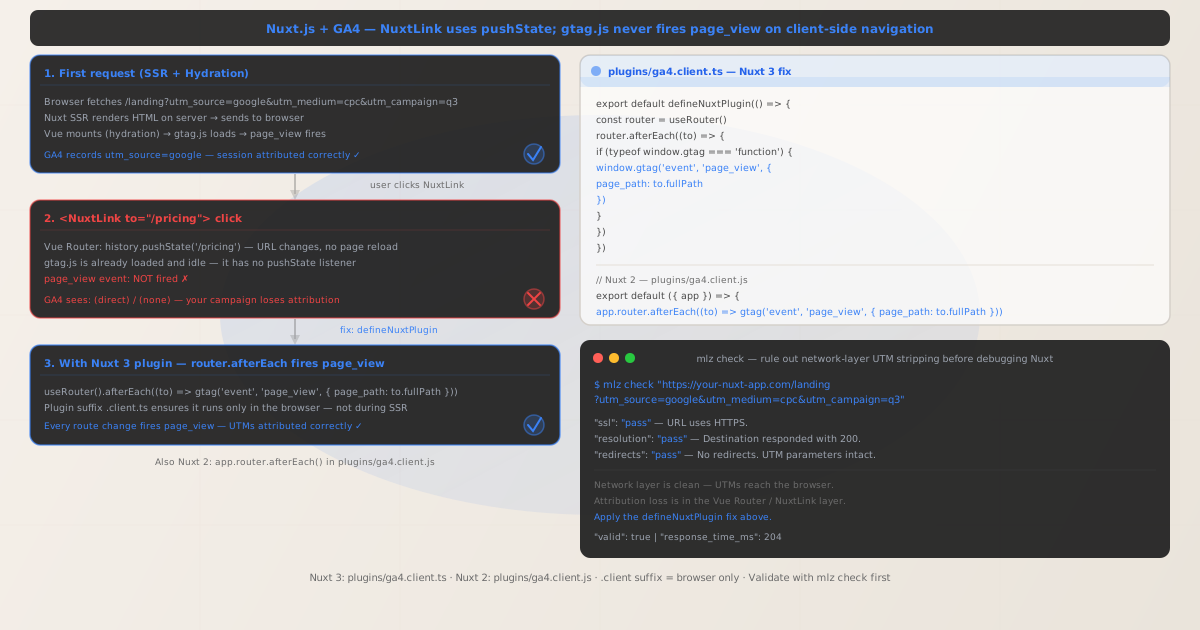
Why Nuxt.js breaks GA4 UTM attribution on client-side navigation
In Universal mode (the default for Nuxt), the first page request is handled on the server. Nuxt renders the HTML, sends it to the browser, and Vue then hydrates the page — attaching event listeners and making it interactive. Part of this hydration process is loading gtag.js, which immediately fires a page_view event using the current URL. This correctly captures any UTM parameters present in the initial URL.
After hydration, the application is fully client-side. When a user clicks a <NuxtLink>, Vue Router intercepts the click, calls window.history.pushState to update the URL, and re-renders the relevant route components — all without a page reload. gtag.js fired once at load time; it has no automatic awareness of Vue Router's navigation events. The script sits idle while the URL changes around it.
The result: every route a user visits after the initial landing page is invisible to GA4. Conversions on /pricing, /signup, or any other route are attributed to (direct)/(none) because no page_view ever signalled those pages to GA4. The campaign that drove the initial click gets no credit for the conversion.
This problem exists in all Nuxt rendering modes: Universal (SSR), Static (SSG), and even SPA mode. In SSR and SSG, the first page fires page_view correctly; subsequent navigations don't. In SPA mode, the first client-side render also fires correctly at load; subsequent navigations don't.
Step zero: confirm the network layer isn't stripping UTMs
Before implementing a router plugin, confirm that the campaign URL's UTM parameters actually reach the browser. Nuxt applications are often deployed behind Cloudflare, Vercel Edge Functions, or Nginx proxies. Any of those can rewrite or strip query parameters before the request arrives at Nuxt — meaning even your initial page_view would be losing UTMs.
MissingLinkz's mlz check command follows every redirect hop and reports whether UTM parameters survive to the final URL:
mlz check "https://your-nuxt-app.com/landing?utm_source=google&utm_medium=cpc&utm_campaign=q3"
{
  "url": "https://your-nuxt-app.com/landing?utm_source=google&utm_medium=cpc&utm_campaign=q3",
  "valid": true,
  "checks": [
    { "check": "url_format",   "status": "pass", "message": "URL format is valid." },
    { "check": "ssl",          "status": "pass", "message": "URL uses HTTPS." },
    { "check": "resolution",   "status": "pass", "message": "Destination responded with 200." },
    { "check": "redirects",    "status": "pass", "message": "No redirects detected." },
    { "check": "response_time", "status": "pass", "message": "Response time: 211ms." }
  ],
  "valid": true
}
All checks passing means the UTM parameters reach the browser correctly. The attribution problem is in the Vue Router layer. If you see "redirects": "fail" with a dropped query string, fix the network layer first. See How to Check if a Redirect Strips UTM Parameters and UTM Parameters Stripped by Cloudflare Workers or Edge Middleware.
Nuxt 3 fix: defineNuxtPlugin with router.afterEach
Nuxt 3 exposes a plugin API specifically designed for this kind of browser-only code. Create a plugin file with a .client.ts (or .client.js) suffix — Nuxt automatically runs these only in the browser, never during SSR. Inside it, use useRouter() to access the Vue Router instance and register an afterEach hook.
export default defineNuxtPlugin(() => {
  const router = useRouter()

  router.afterEach((to) => {
    if (typeof window.gtag === 'function') {
      window.gtag('event', 'page_view', {
        page_path: to.fullPath
      })
    }
  })
})
The .client.ts suffix is the key: it tells Nuxt's build system to include this plugin only in the client-side bundle. During SSR, the plugin is never imported. This means you don't need any typeof window !== 'undefined' guards around useRouter() — it's guaranteed to run in the browser.
to.fullPath includes the complete path and query string — for example, /landing?utm_source=google&utm_medium=cpc&utm_campaign=q3. GA4 reads UTM parameters from the page_path on the first page_view event in a session and attributes all subsequent events in that session to the same source and medium automatically. You do not need to pass UTMs on every subsequent route change — only the initial landing page URL needs them.
You should also disable GA4's automatic page_view to avoid a duplicate event on the first render. In your Nuxt configuration or the script tag where you load gtag.js, add send_page_view: false:
gtag('config', 'G-XXXXXXXXXX', { send_page_view: false });
With send_page_view: false, the only page_view events GA4 receives come from your plugin's afterEach hook — one per route change, starting with the initial hydration. Verify in GA4 DebugView that exactly one page_view fires per navigation with no duplicates.
Nuxt 2 fix: app.router.afterEach in a client plugin
Nuxt 2 uses a different plugin API. The same .client.js suffix convention applies — a plugin file named with .client.js runs only in the browser. The router is accessed via the app context object injected by Nuxt:
export default ({ app }) => {
  app.router.afterEach((to) => {
    if (typeof window.gtag === 'function') {
      window.gtag('event', 'page_view', {
        page_path: to.fullPath
      })
    }
  })
}
In Nuxt 2, you also need to register the plugin in your nuxt.config.js:
export default {
  plugins: [
    '~/plugins/ga4.client.js'
    // The .client.js suffix tells Nuxt to skip this during SSR
  ]
}
Nuxt 3 plugins in the plugins/ directory are auto-imported — no nuxt.config.ts registration needed. Nuxt 2 requires explicit registration. In both versions, the .client.js naming convention prevents the plugin from running during server-side rendering, which would throw a window is not defined error.
Preserving UTMs across route changes for custom analytics pipelines
GA4's session model handles UTM attribution automatically once the first page_view event with UTMs is recorded. For standard GA4 reporting you do not need to forward UTMs on every subsequent navigation. However, if you have a custom analytics pipeline — sending events to a CDP, a custom backend, or Mixpanel alongside GA4 — you need the original UTMs available throughout the session.
The reliable pattern is to capture UTMs from the URL on first load and store them in sessionStorage. In a Nuxt 3 plugin or a Nuxt composable:
const UTM_KEYS = ['utm_source', 'utm_medium', 'utm_campaign', 'utm_term', 'utm_content']

export function useUtmCapture() {
  const route = useRoute()

  // Call once on app load — captures UTMs from initial landing URL
  function captureUtms() {
    UTM_KEYS.forEach((key) => {
      const val = route.query[key]
      if (val && !sessionStorage.getItem(key)) {
        sessionStorage.setItem(key, String(val))
      }
    })
  }

  function getStoredUtms() {
    return Object.fromEntries(
      UTM_KEYS
        .map(k => [k, sessionStorage.getItem(k)])
        .filter(([, v]) => v !== null)
    )
  }

  return { captureUtms, getStoredUtms }
}
Call captureUtms() in your root layout's onMounted hook — this runs in the browser after SSR hydration. The !sessionStorage.getItem(key) guard prevents subsequent navigations that might contain UTMs in their URLs from overwriting the original session attribution.
Pre-launch validation with mlz preflight
After adding the router plugin, validate the full campaign URL before launch. mlz preflight builds the tracked URL, checks the redirect chain, SSL, Open Graph tags, Twitter Card metadata, and UTM parameter structure — returning a single ready: true/false verdict:
mlz preflight --url "https://your-nuxt-app.com/landing" --source "google" --medium "cpc" --campaign "q3-launch"
{
  "ready": true,
  "tracked_url": "https://your-nuxt-app.com/landing?utm_source=google&utm_medium=cpc&utm_campaign=q3-launch",
  "checks": [
    { "check": "ssl",          "status": "pass", "message": "URL uses HTTPS." },
    { "check": "resolution",   "status": "pass", "message": "Destination responded with 200." },
    { "check": "redirects",    "status": "pass", "message": "No redirects detected." },
    { "check": "og_tags",     "status": "pass", "message": "All essential Open Graph tags present." },
    { "check": "twitter_card", "status": "pass", "message": "Twitter Card tags configured." }
  ],
  "summary": { "total": 12, "passed": 12, "warnings": 0, "failed": 0 },
  "recommendation": "All checks passed. Campaign link is ready to publish."
}
A clean preflight result confirms the infrastructure is solid before any traffic hits your Nuxt application. Add mlz preflight to your Nuxt deploy checklist — particularly when deploying to new environments or changing Nuxt rendering mode, both of which can change how the server responds to the landing URL.
Nuxt version and rendering mode quick reference
| Mode / Version | First page_view | Subsequent navigations | Fix |
|---|---|---|---|
| Nuxt 3 — Universal (SSR) | Fires on hydration ✓ | ✗ NuxtLink = pushState, no page_view | plugins/ga4.client.ts + useRouter().afterEach() |
| Nuxt 3 — Static (SSG) | Fires on initial mount ✓ | ✗ Same pushState issue as SSR | Same plugin — pushState is the same regardless of rendering |
| Nuxt 3 — SPA mode | Fires on first render ✓ | ✗ No SSR, but client routing still uses pushState | Same plugin — SPA mode doesn't change Vue Router's behaviour |
| Nuxt 2 — Universal | Fires on hydration ✓ | ✗ NuxtLink = pushState, no page_view | plugins/ga4.client.js + app.router.afterEach() |
The root cause is identical across all Nuxt versions and rendering modes: Vue Router's pushState-based navigation doesn't trigger page_view automatically. The fix API differs (Nuxt 3's defineNuxtPlugin + useRouter() vs Nuxt 2's context-based app.router), but the hook is the same: afterEach.
Frequently asked questions
- Does Nuxt.js automatically track route changes in GA4?
- No. Nuxt uses Vue Router for client-side navigation —
<NuxtLink>callswindow.history.pushStatewithout a page reload.gtag.jsfirespage_viewonce at script load (on the initial SSR hydration) and has no listener for Vue Router's navigation events. Every subsequent route change after the landing page is invisible to GA4 without a router plugin. - Why does the Nuxt plugin use .client.ts and not .ts?
- The
.client.tssuffix tells Nuxt's build system to bundle this plugin only for the browser. If you named itga4.tswithout the suffix, Nuxt would attempt to run it during server-side rendering — wherewindowdoesn't exist and theuseRouter()composable behaves differently. The client suffix is the correct and idiomatic Nuxt way to write browser-only side effects. - Does to.fullPath in afterEach include UTM parameters?
- Yes.
to.fullPathreturns the complete path including the query string — for example,/landing?utm_source=google&utm_medium=cpc&utm_campaign=q3. When the firstpage_viewevent fires withpage_pathset to this value, GA4 reads the UTM parameters and attributes the session accordingly. Subsequent route changes (e.g./pricing) won't have UTMs into.fullPath, but GA4's session model carries the attribution forward automatically. - How is the Nuxt fix different from the Vue Router afterEach approach?
- They're functionally the same — Nuxt uses Vue Router under the hood. The Nuxt-specific addition is the
defineNuxtPluginwrapper and the.client.tsfile naming convention, which Nuxt uses to scope the plugin to the browser. In a plain Vue 3 app without Nuxt, you'd callrouter.afterEach()directly in your app setup. In Nuxt 3,defineNuxtPlugingives you access to the Nuxt plugin context and auto-imports likeuseRouter(). - What if my Nuxt app uses a third-party GA4 module like nuxt-gtag?
- Third-party GA4 modules for Nuxt vary in their SPA tracking support. Some handle
afterEachautomatically; others only load the script. Check your module's documentation forpageTrackeror SPA tracking configuration options. If the module supports it, enable it in the module config. If it doesn't, the manualplugins/ga4.client.tsapproach above works alongside any GA4 module — just ensuresend_page_view: falseis set in the basegtag('config', ...)call to prevent duplicate events.
Validate your Nuxt campaign links before debugging Vue Router
Run mlz check first to confirm UTM parameters survive the network layer, then add the defineNuxtPlugin router hook to capture every client-side navigation.
1,000 links/month free. No credit card.
Your API key
Save this now — it won't be shown again.
npm install -g missinglinkz
Then: mlz check "https://your-nuxt-app.com/landing?utm_source=google&utm_medium=cpc&utm_campaign=q3"