UTM Parameters in MPA vs SPA: Why Attribution Breaks Differently and How to Diagnose It
UTM attribution breaks in both multi-page apps and single-page apps, but through entirely different mechanisms — and the fix for one will not help the other. In an MPA (any server-rendered app: WordPress, Rails, Django, PHP, Next.js Pages Router with full server navigation), attribution loss is almost always caused by a redirect that strips the query string before the browser loads the landing page. GA4 fires correctly on every page load; it just never received the UTM parameters. In an SPA (React Router, Vue Router, Next.js App Router, SvelteKit, Nuxt 3, Angular), the landing page loads correctly with UTM parameters, GA4 fires on the initial load, and then — when the visitor navigates using the framework's client-side router — GA4 fires nothing, attributing all downstream page views and conversions to (direct)/(none). The network layer is not the problem. Before spending hours debugging your framework routing code or your redirect rules, run mlz preflight once. It follows every redirect hop and reports whether UTM parameters survive to the final URL. The result tells you definitively which failure mode you're dealing with — and which guide to read next.
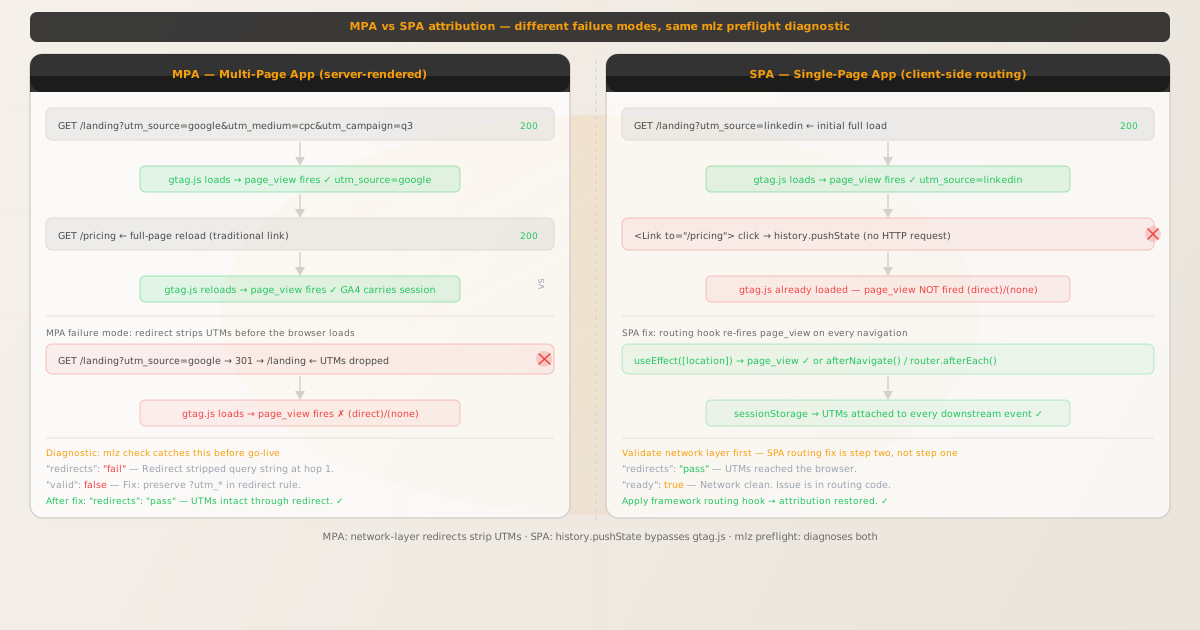
Two architectures, two failure modes, one diagnostic tool
Understanding which failure mode affects your app saves significant debugging time. The observable symptom is identical in both cases — UTM parameters do not appear in GA4 reports — but the root cause and fix are completely different.
- MPA failure mode: the network strips UTM parameters before GA4 sees them
- In a multi-page app, every link click triggers a full HTTP request and a full page reload. The browser requests
/landing?utm_source=google&utm_medium=cpc&utm_campaign=q3, the server responds, the HTML page loads from scratch, andgtag.jsinitialises and reads UTM parameters fromdocument.location.search. This part works correctly. The failure happens when the campaign URL passes through a redirect: a link shortener, a CDN redirect rule, a vanity domain, or an HTTPS upgrade that drops?utm_*from the query string before the final200response. GA4 fires apage_viewevent with the correct page path but no UTM data. The fix is in the redirect configuration, not the app code. - SPA failure mode: client-side navigation never re-initialises GA4
- In a single-page app, the initial HTML document loads once. All navigation thereafter uses
window.history.pushState— the URL changes but no HTTP request is made and no page reload occurs. The script tags in<head>, includinggtag.js, do not re-execute. GA4's automaticpage_viewevent, which fires whengtag.jsloads, fires exactly once per session — on the initial page load. Every subsequent client-side navigation is invisible to GA4. The UTM parameters were delivered to the browser correctly; the problem is that no code sends them to GA4 on downstream navigations. The fix is a framework-specific routing hook that re-firespage_viewevents manually.
How to tell which failure mode you have in 60 seconds
Open browser DevTools, go to the Network tab, and reload your campaign URL (?utm_source=your_source&utm_medium=your_medium&utm_campaign=your_campaign). Watch for two things:
- Check 1: does the URL in the final Network request still contain UTM parameters?
- If the final document request (the
200response) has a URL without?utm_source=..., a redirect stripped them. This is the MPA failure mode — the problem is in the link or redirect chain, not the JavaScript. Runmlz checkon your campaign URL to see exactly which hop dropped the query string. - Check 2: does your app use client-side routing?
- Click a navigation link in your app. If the URL changes in the browser bar without the page reloading (no full document reload in the DevTools Network tab), you have an SPA using
pushState. Check the GA4 DebugView — if nopage_viewevent fires after the navigation, this is the SPA failure mode. The fix is a routing hook, not a redirect rule. - Check 3: run
mlz preflight— it does both checks in one command mlz preflightfollows every redirect hop, reports whether UTM parameters survive to the final URL, and validates the landing page (SSL, OG tags, response time). If"redirects": "pass", the network layer is clean and the failure is in your app's routing code. If"redirects": "fail", the fix is in the redirect configuration. See below.
Using mlz preflight as the universal first diagnostic
MissingLinkz's mlz preflight runs the network-layer check for you. It constructs the UTM-tagged URL, follows every redirect in the chain, and reports whether UTM parameters survive.
mlz preflight --url "https://example.com/landing" --source "google" --medium "cpc" --campaign "q3-launch"
Result A — redirects pass (SPA failure mode):
{
  "ready": true,
  "tracked_url": "https://example.com/landing?utm_source=google&utm_medium=cpc&utm_campaign=q3-launch",
  "checks": [
    { "check": "redirects", "status": "pass", "message": "No redirects. UTM parameters intact." },
    { "check": "ssl",       "status": "pass", "message": "URL uses HTTPS." }
  ],
  "recommendation": "Network layer clean. If GA4 loses attribution, the issue is in your SPA routing code."
}
A clean result confirms the SPA failure mode: UTM parameters reach the browser, but the framework's client-side router is not forwarding them to GA4 on subsequent navigations. See the SPA UTM hub article for the framework-specific fix.
Result B — redirects fail (MPA/network failure mode):
{
  "ready": false,
  "checks": [
    { "check": "redirects", "status": "fail",
      "message": "Redirect at hop 1 dropped query string. UTM parameters lost." }
  ],
  "recommendation": "Fix the redirect rule to preserve the query string before debugging app code."
}
A "redirects": "fail" result identifies the network failure mode. No amount of SPA routing hook code will recover UTM parameters that were stripped before the browser received the HTML response. Fix the redirect first — see How to Check if a Redirect Strips UTM Parameters for the common patterns by platform.
Fixing MPA UTM attribution: preserve the query string in redirect rules
When mlz preflight shows a redirect that drops the query string, the fix is in the redirect configuration. Common patterns by platform:
- Nginx: use
$request_urior$is_args$args - A common mistake in Nginx redirect rules is
return 301 https://example.com$uri;— this copies the path but discards the query string. The correct form isreturn 301 https://example.com$request_uri;which preserves the full original URL including query parameters. Alternatively:return 301 https://example.com$uri$is_args$args;. - Cloudflare redirect rules: use
Preserve query stringoption - In the Cloudflare dashboard under
Rules > Redirect Rules, the redirect target URL has aPreserve query stringcheckbox. When this is unchecked, query strings including UTM parameters are silently dropped on every redirect. Enable it and redeploy the rule. Also check Cloudflare Workers scripts for anyResponse.redirect(url)calls that construct the URL without appendingrequest.url's query string. - Netlify: use the splat redirect pattern
- Netlify's
_redirectsfile andnetlify.tomlredirect rules must use the:splatpattern or?*suffix to pass the query string:/landing/:splat /landing/:splat 301. Without this, a redirect from/landingto/landingdrops all query parameters. - Link shorteners and vanity domains: configure query string passthrough
- Many link shorteners (Bitly, Rebrandly, custom short domains) have a query string passthrough setting. By default, some append UTM parameters to the destination URL; others strip them. Verify in the shortener's redirect configuration. If the shortener does not support query string passthrough, deliver the UTM-tagged URL directly rather than through a short link.
After making the redirect fix, re-run mlz preflight to confirm "redirects": "pass" before deploying to production.
Fixing SPA UTM attribution: choose the right framework guide
When mlz preflight confirms the network layer is clean, the fix is framework-specific. Each SPA routing library exposes a different hook for firing code on every client-side navigation:
- React Router v6 (standalone)
- Use
useLocationfromreact-router-domin auseEffecthook. The dependency array must be[location](not just[location.pathname]) so the effect re-runs when the query string changes without a path change. See the full implementation in the React Router UTM guide. - Next.js App Router
- Use
usePathnameanduseSearchParamsfromnext/navigationin a client component inside the root layout. TheuseSearchParamshook requires aSuspenseboundary as of Next.js 14. See the full implementation in the Next.js UTM guide. - SvelteKit
- Use
afterNavigatefrom$app/navigationin the root+layout.sveltefile. This lifecycle function runs after every navigation including the initial load, so there is no need for a separate initial-load handler. See the full implementation in the SvelteKit UTM guide. - Nuxt 3
- Use
router.afterEach()in aplugins/analytics.client.tsNuxt plugin. The.client.tssuffix ensures the plugin only runs in the browser. See the full implementation in the Nuxt UTM guide. - Angular
- Subscribe to
Router.eventsfiltered toNavigationEndin the rootAppComponent. Unsubscribe inngOnDestroyto avoid memory leaks. See the full implementation in the Angular & Vue UTM guide. - Vue Router
- Use
router.afterEach()in theApp.vuemounted lifecycle hook or in a dedicated composable. See the full implementation in the Angular & Vue UTM guide. - Gatsby, Remix, and GTM
- Gatsby exposes
exports.onRouteUpdateingatsby-browser.js. Remix usesuseLocation + useEffectinapp/root.tsx. Google Tag Manager requires a History Change trigger wired to the GA4 configuration tag. See the SPA UTM hub article for links to all framework-specific guides.
Diagnostic decision tree: where to start
- Step 1 — Run
mlz preflighton your campaign URL - This is always the first step, regardless of whether you think you have an MPA or SPA. It takes 10 seconds and tells you definitively whether the problem is in the network layer or the app code.
- Step 2a — If
"redirects": "fail" - Fix the redirect rule to preserve the query string (see platform-specific patterns above). Re-run
mlz preflightto confirm. No framework routing code is needed — GA4's automaticpage_viewevent will pick up UTM parameters from the URL once the redirect is fixed. - Step 2b — If
"redirects": "pass"and you have client-side routing - Select the framework-specific guide from the SPA cluster. Implement the routing hook that fires
page_viewon every navigation. Verify with GA4 DebugView: navigate to a second page in your app and confirm apage_viewevent fires with the correct page path. - Step 2c — If
"redirects": "pass"and GA4 still shows(direct)/(none) - Check for secondary failure modes: Safari ITP may be restricting storage if your link passes through a tracker domain (see the Safari ITP guide), a cookie consent gate may be redirecting users through a consent page that drops the query string (see the cookie consent guide), or a JavaScript redirect on the landing page may be reconstructing the URL without the query string (see the JS redirect guide).
FAQ
- What is the difference between MPA and SPA in terms of UTM tracking?
- In an MPA (multi-page application), every navigation triggers a full HTTP request and a full HTML document reload.
gtag.jsre-initialises on every page, reads UTM parameters from the URL, and sends apage_viewevent automatically. In an SPA (single-page application),gtag.jsinitialises once on the first load and is never re-initialised. Client-side navigations usehistory.pushState, which changes the URL without triggering a page reload or re-executing any script tags. Automaticpage_viewevents do not fire on SPA navigations. - Can an SPA also have the MPA failure mode (redirect stripping UTMs)?
- Yes. An SPA can experience both failure modes simultaneously. The initial load of the SPA's HTML document goes through the network — including any redirect rules. If a redirect strips UTM parameters before the HTML response, the SPA receives no UTM parameters in the URL and has nothing to persist to
sessionStorageor fire to GA4. The SPA routing fix is still needed, but it will operate on an empty state. Runmlz preflightfirst to rule out the network layer before adding routing hooks. - Does Next.js have both failure modes?
- Yes. Next.js Pages Router with traditional server-side navigation behaves like an MPA for tracked pages — each page request is a full HTTP round-trip. Next.js App Router with
<Link>components uses client-side navigation and is an SPA for the purposes of UTM tracking. Additionally, Next.js applications are often deployed behind Vercel's CDN, which may have redirect or rewrite rules that strip query strings. Runmlz preflightto determine which layer is causing the issue. See the Next.js UTM guide for the routing hook implementation. - Why does mlz preflight catch UTM stripping when browser DevTools doesn't always show it clearly?
- Browser DevTools shows the redirect chain in the Network tab, but reading the query string across multiple redirect hops requires expanding each request manually.
mlz preflightfollows the entire chain automatically, compares the query string at the start and end of the chain, and reports whether UTM parameters survived — including partial stripping where some parameters survive and others do not. It also checks for UTM parameter encoding issues and case-sensitivity problems that can cause GA4 to misattribute sessions.
Diagnose MPA vs SPA UTM failure in one command
Run mlz preflight before you touch any redirect rules or framework routing code. The output tells you which layer is broken and which guide to read next.
1,000 links/month free. No credit card.
Your API key
Save this now — it won't be shown again.
npm install -g missinglinkz
Then: mlz preflight --url "https://your-landing-page.com" --source google --medium cpc --campaign q3