UTM Parameters and Safari ITP: How Developers Prevent Attribution Loss
Safari ITP (Intelligent Tracking Prevention) silently corrupts UTM attribution for 25–35% of your web traffic. Two mechanisms are responsible: first, JavaScript-set cookies that store UTM data expire in 7 days maximum under ITP 2.1 — even if you wrote a 30-day expiry. Second, when a campaign link bounces through an intermediate domain that Safari classifies as a tracker (bit.ly, t.co, most link shorteners), Safari applies a 24-hour storage restriction window to your site for that user. Both cause returning Safari visitors to appear as (direct) in GA4 after their cookie expires or is restricted. Before you touch any client-side code, you need to know whether your UTM parameters even survive the redirect chain to the landing page. Run mlz check against your campaign URL first. If the output shows utm_present_at_final_url: true, UTMs are arriving at the page — the problem is client-side storage restriction, and the fixes in this article address that. If utm_present_at_final_url: false, you have a network-level strip (a different problem entirely). This diagnostic saves hours of misdirected debugging.
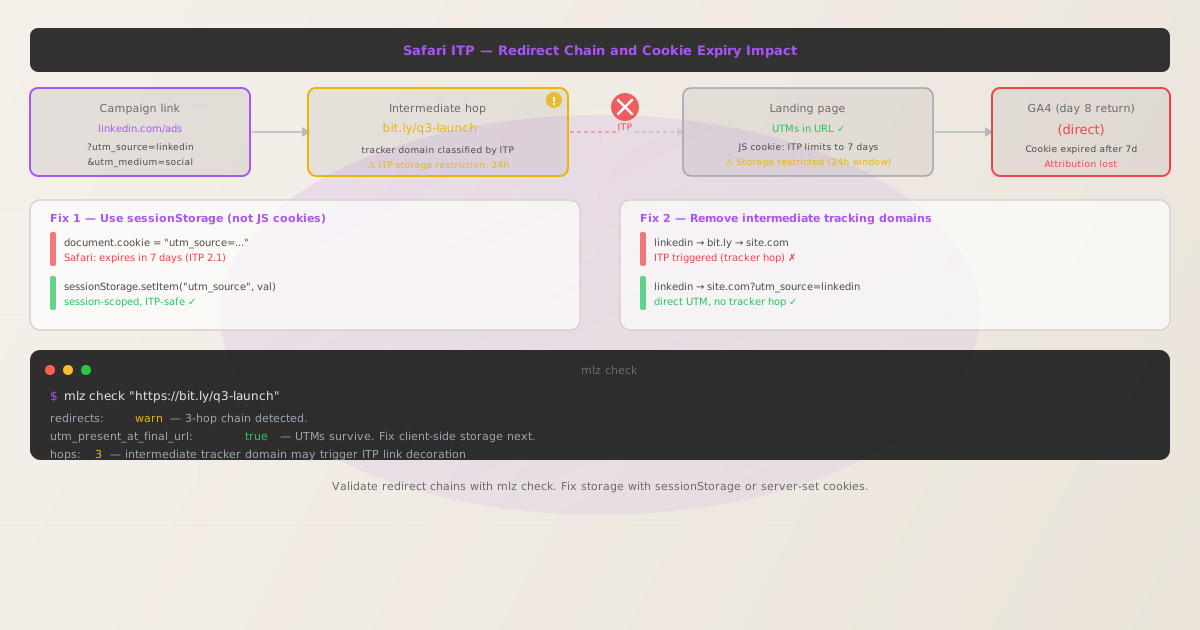
How Safari ITP affects UTM tracking: three behaviors
WebKit's Intelligent Tracking Prevention has evolved through several iterations, each adding new restrictions. Three behaviors directly affect UTM attribution.
- ITP 2.1 (2018) — JS cookie expiry cap
- Any cookie set via JavaScript's
document.cookieAPI is capped at a 7-day expiry, regardless of themax-ageorexpiresvalue you write. Most GA4 implementations usinggtag.jswrite UTM attribution cookies with a 30-day lifetime. Safari silently overrides this to 7 days. A user who clicks your LinkedIn ad, visits the landing page, and converts 10 days later appears as(direct)in GA4 — the attribution cookie expired before they returned. - ITP 2.2 (2019) — link decoration restriction
- If a user arrives at your site via a link from a domain that WebKit has classified as a tracker, and that link contains query parameters (like UTMs), Safari restricts all client-side storage on your domain to a 24-hour window for that browsing session. This is the "link decoration" prevention. Domains are classified by ITP based on cross-site tracking history — widely used link shorteners and redirect services are typical candidates.
- Cross-site referrer stripping
- Safari strips the
Refererheader for cross-site navigations in certain contexts. Server-side implementations that capture UTM source from the referrer header — rather than from URL query parameters — can fail silently in Safari. This is distinct from the cookie problem but compounds the attribution gap.
The result: a measurable fraction of your campaign traffic — often 15–25% of Safari sessions depending on campaign structure — leaks into the (direct) / (none) bucket in GA4, making paid campaign ROI look worse than it is.
Step 1: Diagnose with mlz check before touching any code
The most common debugging mistake is going straight to client-side code changes without confirming where attribution actually breaks. If UTMs are being stripped at the network level (by a redirect, edge middleware, or a misconfigured proxy), no amount of sessionStorage rewriting will fix it.
Run mlz check against your campaign URL — including any intermediate redirect hop — to see the full picture:
$ mlz check "https://bit.ly/q3-launch"

{
  "url": "https://bit.ly/q3-launch",
  "valid": true,
  "checks": [
    {
      "check": "redirects",
      "status": "warn",
      "message": "3 redirects detected. UTM parameters present at final URL.",
      "details": {
        "hops": 3,
        "utm_present_at_final_url": true,
        "final_url": "https://example.com/landing?utm_source=linkedin&utm_medium=social&utm_campaign=q3-launch"
      }
    }
  ]
}
Reading this output: utm_present_at_final_url: true confirms UTMs survive the redirect chain and arrive at the landing page. The "hops": 3 warning matters for ITP — a multi-hop chain through an intermediate domain like bit.ly is exactly the pattern that triggers ITP link decoration restrictions. Your UTMs are in the URL, but the client-side storage that JavaScript then tries to write may be restricted to 24 hours.
Contrast with the network-level failure case, where mlz check would show:
{
  "check": "redirects",
  "status": "fail",
  "message": "Redirect dropped query string. UTM parameters absent from final URL.",
  "details": {
    "utm_present_at_final_url": false
  }
}
If you see this — stop. The problem is in your redirect configuration, not in ITP. See how to diagnose redirect chains that strip UTM parameters before continuing here.
If utm_present_at_final_url: true, proceed to the client-side fixes below.
Fix 1: Use sessionStorage instead of JS-set cookies
The most widespread ITP impact is the 7-day cookie expiry cap on JavaScript-set cookies. The fix for same-session attribution is straightforward: store UTM values in sessionStorage rather than document.cookie. Session storage is not subject to ITP's 7-day expiry limit because it is scoped to the browser tab and session — it does not persist cross-session, so ITP has no cross-site tracking concern about it.
Here is a before-and-after comparison of a UTM capture snippet:
// ❌ Affected by ITP 7-day expiry cap
const params = new URLSearchParams(window.location.search);
const source = params.get('utm_source');
if (source) {
    document.cookie = `utm_source=${source}; max-age=2592000; path=/`;
    // max-age=2592000 is 30 days — Safari caps this at 7 days silently
}

// ✓ Session-scoped — not subject to ITP expiry limits
const params = new URLSearchParams(window.location.search);
const utmKeys = ['utm_source', 'utm_medium', 'utm_campaign', 'utm_term', 'utm_content'];
utmKeys.forEach(key => {
  const val = params.get(key);
  if (val) sessionStorage.setItem(key, val);
});
Trade-off to understand: sessionStorage persists for the duration of a single browser session only — it is cleared when the tab is closed. This is appropriate for same-session attribution (user clicks ad, converts in same session). For cross-session attribution (user clicks ad, returns two weeks later to convert), you need server-set cookies (Fix 3 below). Using sessionStorage alone will not solve the 7-day expiry problem for users who return in a new session.
When you read UTM values back for form submissions or analytics events, read from sessionStorage first, falling back to URL parameters:
function getUtm(key) {
  return sessionStorage.getItem(key)
    || new URLSearchParams(window.location.search).get(key)
    || null;
}

const utmSource = getUtm('utm_source'); // 'linkedin', 'google', etc.
Fix 2: Remove intermediate tracking domains from your redirect chain
The ITP 2.2 link decoration restriction is triggered specifically by the combination of (a) arriving via a link from a classified tracker domain, and (b) that link containing query parameters. Eliminating the intermediate tracker domain eliminates the trigger entirely.
The redirect chain patterns to avoid versus prefer:
| Chain pattern | ITP behavior | Recommendation |
|---|---|---|
linkedin → bit.ly/q3 → site.com |
✗ Tracker hop — 24h storage restriction | Avoid |
linkedin → t.co/q3 → site.com |
✗ Tracker hop — 24h storage restriction | Avoid |
linkedin → go.example.com/q3 → site.com |
✓ First-party domain — no ITP restriction | Use this |
linkedin → site.com?utm_source=linkedin |
✓ Direct UTM link — no tracker hop | Best option |
The key insight: ITP's tracker classification is domain-based, not URL-based. bit.ly, t.co, ow.ly, and similar third-party link shorteners have been classified by WebKit because they are used cross-site for tracking at scale. Your own domain — including a subdomain you control like go.example.com — is first-party in the context of your site and is not classified as a tracker.
Practical path for campaigns that need short links: Set up a CNAME redirect on a subdomain of your own domain (e.g., go.example.com pointing to your redirect infrastructure). Many campaign link tools support custom domains. This gives you the URL shortening you need for character-limited channels (X/Twitter) without the ITP trigger.
If you are using an intermediate redirect service and cannot change it immediately, you can run mlz check to get the hop count and confirm UTMs survive — and then prioritize eliminating the tracker domain from the chain.
Fix 3: Server-set cookies bypass ITP expiry limits
For cross-session attribution — users who click an ad today and convert days or weeks later — sessionStorage is not sufficient. The ITP-resilient solution is to capture UTM parameters server-side and set cookies via the Set-Cookie HTTP response header. Cookies set by the server are treated as first-party storage by ITP and are not subject to the 7-day JavaScript cookie cap.
Here is an Express.js landing page handler that captures UTMs from URL query parameters and sets them as server-side cookies:
// Express.js — capture UTMs server-side on landing page request
app.get('/landing', (req, res) => {
  const utmKeys = ['utm_source', 'utm_medium', 'utm_campaign', 'utm_term', 'utm_content'];

  utmKeys.forEach(key => {
    const val = req.query[key];
    if (val) {
      res.cookie(`mlz_${key}`, val, {
        maxAge: 30 * 24 * 60 * 60 * 1000, // 30 days — ITP respects server-set cookies
        httpOnly: true,
        secure: true,
        sameSite: 'Lax'
      });
    }
  });

  res.render('landing');
});
On a subsequent page request (e.g., a form submission or conversion endpoint), read the UTM values from the incoming cookies and pass them to your analytics pipeline:
app.post('/convert', (req, res) => {
  const attribution = {
    source: req.cookies.mlz_utm_source || '(direct)',
    medium: req.cookies.mlz_utm_medium || '(none)',
    campaign: req.cookies.mlz_utm_campaign || '(not set)',
  };
  // Pass attribution to your CRM or analytics event
  recordConversion({ ...req.body, attribution });
  res.json({ ok: true });
});
Why this works: The Set-Cookie response header is generated by your server (a first-party context) in response to a direct navigation to your domain. ITP does not restrict first-party server-set cookies in the same way it restricts JavaScript-written cookies. The 30-day maxAge is honored. This is the most ITP-resilient approach for cross-session attribution and is appropriate for any server-rendered or API-backed application.
Note: httpOnly: true means the cookie is not readable by client-side JavaScript — you can only read it server-side. If you need UTM values accessible in the browser (for client-side event tracking), set httpOnly: false, but understand that removes the JS-access restriction. For a layered approach, set two cookies: one httpOnly for server-side conversion tracking, one without for client-side analytics.
Pre-launch validation: run mlz preflight before any campaign goes live
Applying the fixes above (direct UTM links, sessionStorage or server-set cookie capture) addresses the client-side problem. Before spend begins, validate that the network-level campaign infrastructure is sound with mlz preflight. This confirms HTTPS, page resolution, redirect chain cleanliness, and that UTM parameters are appended correctly in a single command:
$ mlz preflight --url "https://example.com/landing" --source "linkedin" --medium "social" --campaign "q3-launch"

{
  "ready": true,
  "tracked_url": "https://example.com/landing?utm_source=linkedin&utm_medium=social&utm_campaign=q3-launch",
  "checks": [
    { "check": "url_format", "status": "pass", "message": "URL format is valid." },
    { "check": "ssl", "status": "pass", "message": "URL uses HTTPS." },
    { "check": "resolution", "status": "pass", "message": "Destination responded with 200.",
      "details": { "status_code": 200, "response_time_ms": 183 } },
    { "check": "redirects", "status": "pass", "message": "No redirects detected." },
    { "check": "response_time", "status": "pass", "message": "Response time: 183ms." }
  ],
  "summary": { "total": 12, "passed": 12, "warnings": 0, "failed": 0 },
  "recommendation": "All checks passed. Campaign link is ready to publish."
}
A clean mlz preflight output — zero hops in the redirect check, 200 response, valid UTMs — gives you confidence that the network layer is sound. Pair this with the client-side storage fixes (sessionStorage or server-set cookies) and you have addressed both layers of ITP-related attribution loss.
For campaigns running on multiple channels, add mlz preflight to your pre-launch checklist or CI pipeline. See campaign link validation infrastructure for patterns on integrating validation into automated workflows.
Frequently asked questions
- Does Safari ITP strip UTM parameters from the URL itself?
- No. ITP does not modify URLs or strip query parameters from links. UTM parameters arrive intact in the browser's address bar. ITP restricts what your JavaScript can write to cookies and storage after the page loads. Run
mlz checkto confirm UTMs are present in the final URL — if they are, the issue is storage restriction, not URL stripping. Ifutm_present_at_final_url: false, that is a network-level problem unrelated to ITP. - Does switching from cookies to
localStoragehelp with ITP? - Not for cross-session attribution. ITP 2.3 introduced restrictions on cross-site
localStorageaccess as well.sessionStorageis session-scoped and not directly subject to ITP's cross-site expiry restrictions, making it appropriate for same-session attribution. For cross-session UTM storage, server-set cookies via theSet-Cookieresponse header are the most ITP-resilient option and carry no ITP expiry penalty. - Do all link shorteners trigger ITP link decoration restrictions?
- Not all. WebKit maintains a classification of domains observed engaging in cross-site tracking based on telemetry from Safari users. Widely deployed link shorteners such as
bit.ly,t.co, andow.lyare more likely to appear in this list due to their pervasive cross-site use. Custom shorteners on your own domain (e.g.,go.example.com) are treated as first-party in the context of your site and are not classified as trackers. The safest approach is direct UTM links with no intermediate redirect. - Does
mlz checkdetect ITP-related issues? mlz checkvalidates the network-level redirect chain and confirms whether UTM parameters survive all hops to the final URL. It does not simulate browser-side ITP behavior — that happens in the client after page load. Usemlz checkto confirm UTMs arrive at the destination URL, then address client-side storage (the fixes in this article) as a separate concern. The two-step diagnostic approach — network first, then client-side — prevents wasted debugging effort.- What is the most common ITP-related UTM attribution issue?
- The 7-day JavaScript cookie expiry cap is the most widespread. Standard GA4 implementations using
gtag.jswrite UTM data to cookies with a 30-day lifetime. Safari silently overrides this to 7 days without any warning or error. Users who engage with a campaign, visit the site, but do not convert within 7 days and return later appear as(direct) / (none)in GA4. For many B2B campaigns with longer buying cycles, this affects a significant percentage of pipeline attribution. The fix —sessionStoragefor same-session, server-set cookies for cross-session — directly addresses this.
Validate your redirect chain before UTMs are lost to ITP
Run mlz check to verify your campaign URLs resolve without redirect-chain patterns that trigger Safari ITP storage restrictions — before campaign spend begins.
1,000 links/month free. No credit card.
Your API key
Save this now — it won't be shown again.
npm install -g missinglinkz
Then: mlz check "https://your-campaign-url.com?utm_source=linkedin&utm_medium=social&utm_campaign=q3"