UTM Parameters Not Tracked in SolidJS: How to Fix GA4 Attribution
SolidJS has a fundamental difference from React and Vue that affects analytics: components mount once and are never re-rendered. SolidJS's fine-grained reactivity model means that only the specific DOM nodes that depend on changed signals are updated — not whole components. When a user navigates from /landing?utm_source=linkedin&utm_medium=paid-social&utm_campaign=q3 to /pricing via a Solid Router <A> link, the router calls window.history.pushState, updates its internal location signal, and re-renders only the outlet that maps to the new route. gtag.js loaded once when the app first mounted — it has no listener for SolidJS's reactive navigation and fires no page_view. Conversions on downstream pages appear in GA4 as (direct)/(none). MissingLinkz's mlz check is the right first step: it confirms that UTM parameters survive the full redirect chain to the browser, ruling out network-level stripping before you add a createEffect listener inside the Router context.
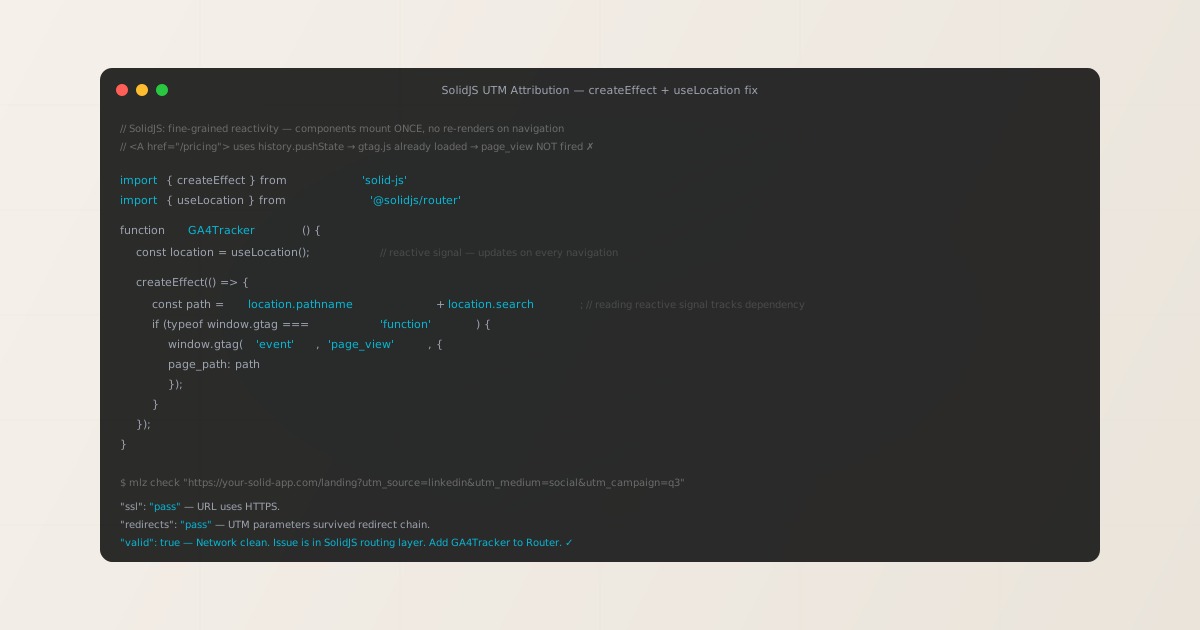
Why SolidJS's reactivity model breaks GA4 UTM attribution
React and Vue developers debugging analytics typically reach for lifecycle hooks that re-run on every render: useEffect with a route dependency in React, or a watcher on the current route in Vue. These work because React and Vue re-render entire component trees when state changes. SolidJS does not. Its fine-grained reactivity model compiles templates into DOM operations that target only changed nodes — components in SolidJS are functions that run once, produce DOM, and never run again.
This has a direct consequence for analytics. In a React app, a route change causes the router to update state, React schedules a re-render of the affected subtree, and a useEffect([location]) dependency fires because the component function ran again. In SolidJS, the router updates an internal location signal, and only the <Routes> outlet — the specific DOM slot for the matched route component — re-evaluates. Any code outside of a reactive context that depended on the location does not re-run.
A gtag.js script tag in your HTML loads once and sets up the analytics library. The automatic page_view that fires when gtag('config', 'G-XXXXXXXXXX') executes happens once at startup. There is no mechanism in plain gtag.js to detect SolidJS's reactive location changes — it would need to be wrapped in a SolidJS reactive primitive (createEffect) that tracks the location signal.
The fix uses exactly that: createEffect from solid-js combined with useLocation from @solidjs/router. useLocation returns a reactive object whose properties (pathname, search, hash) are signals. Reading them inside a createEffect registers them as dependencies — SolidJS automatically re-runs the effect whenever any read signal changes. Each Solid Router navigation updates the location signal, which triggers the effect and fires page_view.
Step zero: confirm UTM parameters reach the browser
SolidJS apps deploy to Netlify, Vercel, Cloudflare Pages, and other platforms that may apply redirect rules before your app's JavaScript ever runs. A trailing-slash redirect, a canonical-domain redirect, or an edge middleware rewrite can drop query parameters silently. This produces identical GA4 symptoms to a missing createEffect listener — zero attribution on downstream pages — but has an entirely different fix.
MissingLinkz's mlz check command follows the complete redirect chain from the campaign URL to the final destination and reports whether UTM parameters survive:
mlz check "https://your-solid-app.com/landing?utm_source=linkedin&utm_medium=paid-social&utm_campaign=q3"
{
  "url": "https://your-solid-app.com/landing?utm_source=linkedin&utm_medium=paid-social&utm_campaign=q3",
  "valid": true,
  "checks": [
    { "check": "url_format",   "status": "pass", "message": "URL format is valid." },
    { "check": "ssl",          "status": "pass", "message": "URL uses HTTPS." },
    { "check": "resolution",   "status": "pass", "message": "Destination responded with 200." },
    { "check": "redirects",    "status": "pass", "message": "No redirects detected." },
    { "check": "response_time", "status": "pass", "message": "Response time: 214ms." }
  ],
  "valid": true
}
All checks passing means UTM parameters reach the SolidJS app intact. The attribution problem is in the reactive tracking layer — continue to the fix below. If "redirects": "fail" shows a dropped query string, fix the platform redirect rule first. See How to Check if a Redirect Strips UTM Parameters for diagnostic steps specific to Netlify, Vercel, and Cloudflare Pages hosting configurations.
The fix: createEffect + useLocation
Create a GA4Tracker component that reads the Solid Router location signal inside a createEffect. Reading a signal inside createEffect registers an automatic subscription — SolidJS re-runs the effect whenever any accessed signal updates. This is the correct SolidJS pattern for reacting to location changes:
import { createEffect } from 'solid-js'
import { useLocation } from '@solidjs/router'

declare const gtag: (...args: unknown[]) => void

export function GA4Tracker() {
  const location = useLocation()

  createEffect(() => {
    // Reading location.pathname + location.search tracks them as reactive dependencies.
    // SolidJS re-runs this effect on every navigation that changes either value.
    const path = location.pathname + location.search

    if (typeof gtag !== 'undefined') {
      gtag('event', 'page_view', {
        page_path: path
      })
    }
  })

  return null
}
Place <GA4Tracker /> inside the Router component in your application root. It must be inside <Router> (or its equivalent in your SolidJS setup) because useLocation depends on the Router context — calling it outside the Router throws an error:
import { Router, Route } from '@solidjs/router'
import { GA4Tracker } from './components/GA4Tracker'
import Home from './pages/Home'
import Pricing from './pages/Pricing'

export default function App() {
  return (
    <Router>
      {/* GA4Tracker must be inside Router for useLocation to work */}
      <GA4Tracker />
      <Route path="/" component={Home} />
      <Route path="/pricing" component={Pricing} />
    </Router>
  )
}
The createEffect runs once on component mount (the initial page load) and again on every navigation that changes location.pathname or location.search. This means page_view fires correctly for: the initial landing page (with UTM parameters in location.search), every subsequent <A> link navigation, and programmatic navigations via useNavigate().
Prevent the automatic page_view that gtag('config', ...) fires on initialisation to avoid a duplicate on the first page load. Add send_page_view: false to the config call in your HTML:
<script async src="https://www.googletagmanager.com/gtag/js?id=G-XXXXXXXXXX"></script>
<script>
  window.dataLayer = window.dataLayer || [];
  function gtag() { dataLayer.push(arguments); }
  gtag('js', new Date());
  gtag('config', 'G-XXXXXXXXXX', { send_page_view: false });
  // GA4Tracker's createEffect sends page_view for every navigation including the first
</script>
SolidStart: the same fix in a meta-framework context
SolidStart is the official meta-framework for SolidJS, providing file-based routing, SSR, and server functions on top of SolidJS primitives. Its routing is built on @solidjs/router, which means useLocation and createEffect work identically. The difference is where you place GA4Tracker.
In SolidStart, the application root is src/app.tsx. The <Router> component is set up by SolidStart's FileRoutes helper. Place GA4Tracker as a child of the root layout component inside the router context:
import { Router } from '@solidjs/router'
import { FileRoutes } from '@solidjs/start/router'
import { GA4Tracker } from '~/components/GA4Tracker'
import './app.css'

export default function App() {
  return (
    <Router>
      <GA4Tracker />
      <FileRoutes />
    </Router>
  )
}
SolidStart supports SSR, and createEffect only runs in the browser — it is not called during server-side rendering. This means GA4Tracker is safe to include in an SSR application: the createEffect body runs client-side only after hydration, which is exactly when window.gtag is available. No server-side guard is needed.
- SSR hydration timing
- In SolidStart SSR mode, the server renders the initial HTML and sends it to the browser. The browser hydrates the application, mounting components including
GA4Tracker. ThecreateEffectruns after hydration completes, at which pointwindow.gtagfrom the inline<script>tag is already available. Thetypeof gtag !== 'undefined'guard handles any edge case wherecreateEffectfires slightly beforegtag.jsfinishes loading on a slow connection. - File-based routing with dynamic segments
- SolidStart's file-based routing supports dynamic segments like
[id].tsx. When a user navigates between two routes that match the same pattern but with different IDs (e.g.,/product/123to/product/456),location.pathnamechanges andcreateEffectfires correctly. Bothpage_viewevents are recorded with the correct paths.
Persisting UTMs across Solid Router navigations
If you send events to a custom backend or a customer data platform alongside GA4, extend GA4Tracker to capture UTM parameters from the initial landing URL into sessionStorage:
import { createEffect } from 'solid-js'
import { useLocation } from '@solidjs/router'

const UTM_KEYS = ['utm_source', 'utm_medium', 'utm_campaign', 'utm_term', 'utm_content']

export function GA4Tracker() {
  const location = useLocation()

  createEffect(() => {
    const path = location.pathname + location.search

    // Fire page_view on every navigation
    if (typeof gtag !== 'undefined') {
      gtag('event', 'page_view', { page_path: path })
    }

    // Persist landing UTMs for the full session
    const params = new URLSearchParams(location.search)
    UTM_KEYS.forEach((key) => {
      const val = params.get(key)
      if (val && !sessionStorage.getItem(key)) {
        sessionStorage.setItem(key, val)
      }
    })
  })

  return null
}
The !sessionStorage.getItem(key) guard preserves original landing UTMs if the user navigates mid-session to a URL that also carries UTM parameters. Read stored values with sessionStorage.getItem('utm_source') from any SolidJS component or signal. createEffect always runs in the browser, so sessionStorage access is safe with no additional guard.
Pre-launch validation with mlz preflight
After adding GA4Tracker to your application, validate the full campaign URL before launch. MissingLinkz's mlz preflight command builds the tracked URL, follows the redirect chain, checks SSL, Open Graph tags, Twitter Card metadata, and UTM parameter formatting:
mlz preflight --url "https://your-solid-app.com/landing" --source "linkedin" --medium "paid-social" --campaign "q3-launch"
{
  "ready": true,
  "tracked_url": "https://your-solid-app.com/landing?utm_source=linkedin&utm_medium=paid-social&utm_campaign=q3-launch",
  "checks": [
    { "check": "ssl",          "status": "pass", "message": "URL uses HTTPS." },
    { "check": "resolution",   "status": "pass", "message": "Destination responded with 200." },
    { "check": "redirects",    "status": "pass", "message": "No redirects detected." },
    { "check": "og_tags",     "status": "pass", "message": "All essential Open Graph tags present." },
    { "check": "twitter_card", "status": "pass", "message": "Twitter Card tags configured." }
  ],
  "summary": { "total": 12, "passed": 12, "warnings": 0, "failed": 0 },
  "recommendation": "All checks passed. Campaign link is ready to publish."
}
The mlz preflight check validates conditions that GA4Tracker's client-side reactive tracking cannot: that the campaign URL resolves, that no redirect hop strips UTM parameters before SolidJS receives the request, that the landing page has Open Graph tags for social sharing, and that SSL is configured. These are network-layer and metadata issues — entirely separate from SolidJS's reactivity model.
Frequently asked questions
- Does SolidJS automatically track route changes in GA4?
- No. SolidJS's
<A>component from@solidjs/routeruseswindow.history.pushStatefor client-side navigation without a page reload.gtag.jsfirespage_viewonce on the initial load and has no awareness of SolidJS's reactive navigation signal. Add aGA4Trackercomponent usingcreateEffectanduseLocationinside the Router context to firepage_viewon every route change. - Why does createEffect work where useEffect would in React?
- SolidJS's
createEffectuses fine-grained reactivity: it automatically tracks which reactive signals are read during its execution and re-runs when any of them change.useLocation()from@solidjs/routerreturns a reactive object — readinglocation.pathnameorlocation.searchinsidecreateEffectregisters those as dependencies. When the router navigates and updates the location signal, SolidJS schedules and runs the effect. React'suseEffectrequires an explicit dependency array ([location]) to achieve the same result because React does not have automatic dependency tracking. - Does createEffect fire on the initial page load?
- Yes.
createEffectruns once when the component mounts — this corresponds to the initial page load in the browser. To avoid sending a duplicatepage_viewalongside the one thatgtag('config', ...)sends automatically, addsend_page_view: falseto thegtag('config', 'G-XXXXXXXXXX', { send_page_view: false })call. ThecreateEffectinGA4Trackerthen becomes the single source ofpage_viewevents for all page loads, initial and navigated. - Does this work with programmatic navigation via useNavigate?
- Yes. SolidJS's
useNavigate()returns a function that triggers the router's navigation logic, which updates the internal location signal. This signal change re-runs anycreateEffectthat readlocation.pathnameorlocation.search— includingGA4Tracker. Programmatic navigation viauseNavigatefirespage_viewidentically to a user clicking a<A>link. - How do I validate UTM parameters survive a SolidJS hosting redirect?
- Run
mlz check "https://your-solid-app.com/landing?utm_source=linkedin&utm_medium=cpc&utm_campaign=q3"before debugging the reactive layer. Netlify and Vercel can apply trailing-slash redirects or redirect rules that drop query parameters. Ifmlz checkreports"redirects": "fail"with a dropped query string, fix the hosting platform's redirect configuration first —createEffectinGA4Trackerwill never receive UTM parameters that were stripped before the browser's initial HTML load.
Validate your SolidJS campaign links before debugging the reactive layer
Run mlz check first to confirm UTM parameters survive the network layer, then add GA4Tracker with createEffect and useLocation inside your Router to capture every SolidJS navigation in GA4.
1,000 links/month free. No credit card.
Your API key
Save this now — it won't be shown again.
npm install -g missinglinkz
Then: mlz check "https://your-solid-app.com/landing?utm_source=linkedin&utm_medium=paid-social&utm_campaign=q3"