UTM Parameters Not Tracked in Astro: How to Fix GA4 Attribution
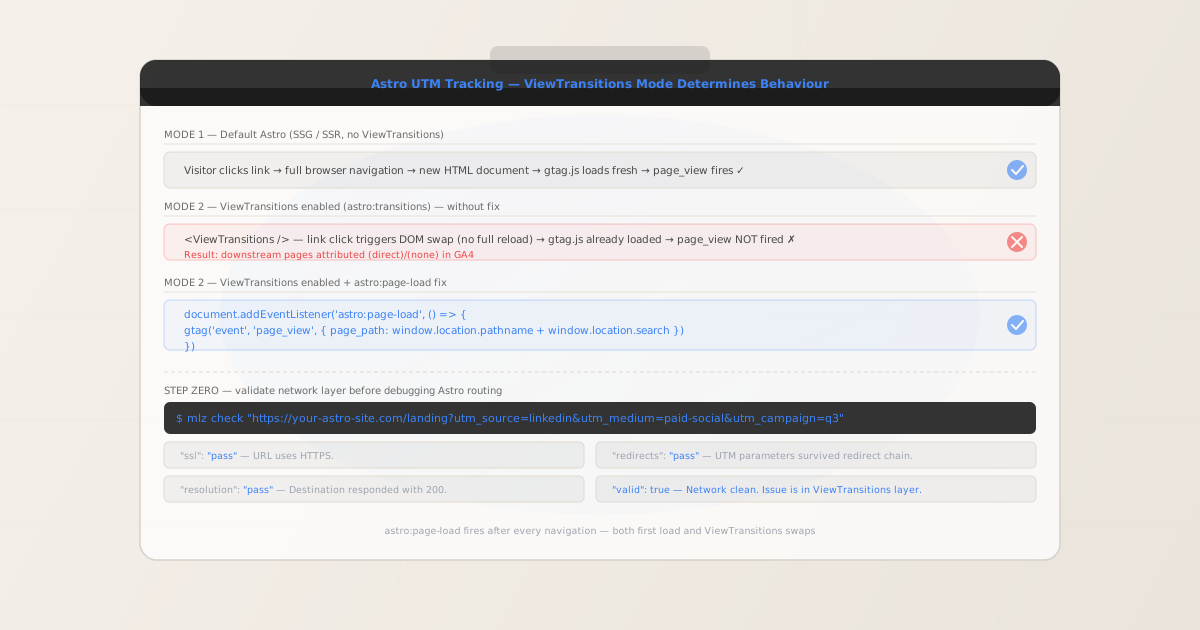
Astro without <ViewTransitions /> works fine with GA4 — every page is a full browser navigation and gtag.js fires page_view automatically. The attribution problem appears the moment you add <ViewTransitions /> (Astro 3.x) or <ClientRouter /> (Astro 4.x) to your base layout. These components implement client-side navigation: instead of a full page reload, Astro fetches the next page in the background, swaps the <body> content in the DOM, and updates the URL. The browser never unloads the current page, so gtag.js never reloads and never fires another page_view. A visitor who lands on /landing?utm_source=linkedin&utm_medium=paid-social&utm_campaign=q3 and then navigates to /pricing via an Astro link shows up in GA4 with one attributed page view and a conversion on (direct)/(none). Before debugging Astro's routing layer, run MissingLinkz's mlz check command to confirm UTM parameters reach the final URL intact — a redirect hop on your CDN or hosting platform can strip query strings before Astro ever sees the request, and that network-level fix is entirely separate from adding a page-load listener.
Why Astro's ViewTransitions breaks GA4 UTM attribution
Standard Astro projects render every page as a distinct HTML document. When a visitor navigates between pages — clicking a link, submitting a form — the browser performs a full navigation: the current page unloads, the network fetches the new URL, and the browser parses and renders a fresh HTML document. gtag.js loads from the <script> tag in the new page's <head>, executes the gtag('config', 'G-XXXXXXXXXX') call, and fires an automatic page_view event. UTM parameters in the URL are read from document.location.search at that moment. Attribution works correctly.
The <ViewTransitions /> component (introduced in Astro 3.0, and continued as <ClientRouter /> in Astro 4.x) changes this model entirely. When ViewTransitions is enabled, Astro intercepts link clicks — specifically, clicks on links whose href points to another page on the same origin. Instead of letting the browser navigate, Astro fetches the new page's HTML over fetch(), extracts the <body> content and any updated <head> elements, and swaps them into the current document using the View Transitions API (or a polyfill on browsers that don't support it natively).
The crucial consequence is that gtag.js is already running — it loaded when the user first arrived at any page on your Astro site. The script is not re-executed on a ViewTransitions navigation. Even if the new page's <head> contains the same gtag.js script tag, browsers typically deduplicate scripts when swapping head content. Either way, the gtag('config', 'G-XXXXXXXXXX') initialisation call does not re-execute, and no automatic page_view event fires.
The result in GA4 is familiar to anyone who has debugged SPA attribution: the first page of a session shows correct UTM attribution. Every subsequent page shows (direct)/(none) because GA4 either sees no page_view for that URL at all, or receives a manually triggered page_view without UTM parameters attached.
Step zero: confirm UTM parameters reach your Astro app
Astro sites deploy to a wide range of hosting platforms: Vercel, Netlify, Cloudflare Pages, Fly.io, AWS Amplify. Each platform can apply redirect rules, edge middleware, or CDN rewrite rules that modify URLs before your Astro server ever processes the request. A common pattern is a trailing-slash redirect (/landing → /landing/) or a canonical-domain redirect that drops query parameters. These network-level stripping issues produce the same GA4 symptoms as a missing ViewTransitions event listener, but have a completely different fix.
MissingLinkz's mlz check command follows the complete redirect chain and reports whether UTM parameters survive to the final URL. Run this before adding any client-side tracking code:
mlz check "https://your-astro-site.com/landing?utm_source=linkedin&utm_medium=paid-social&utm_campaign=q3"
{
  "url": "https://your-astro-site.com/landing?utm_source=linkedin&utm_medium=paid-social&utm_campaign=q3",
  "valid": true,
  "checks": [
    { "check": "url_format",   "status": "pass", "message": "URL format is valid." },
    { "check": "ssl",          "status": "pass", "message": "URL uses HTTPS." },
    { "check": "resolution",   "status": "pass", "message": "Destination responded with 200." },
    { "check": "redirects",    "status": "pass", "message": "No redirects detected." },
    { "check": "response_time", "status": "pass", "message": "Response time: 198ms." }
  ],
  "valid": true
}
All checks passing means UTM parameters reach the browser. The attribution problem is in Astro's ViewTransitions layer — continue to the fix below. If "redirects": "fail" shows a dropped query string, fix the platform-level redirect first. A trailing-slash redirect on Netlify or Vercel is a common culprit — see How to Check if a Redirect Strips UTM Parameters for diagnostic steps.
The fix: astro:page-load event listener
Astro exposes a set of lifecycle events on document specifically for ViewTransitions. The most important for analytics is astro:page-load — it fires both after the initial page load and after every ViewTransitions navigation completes. This makes it the single event you need to fire page_view consistently across all navigations, whether the user arrived on the first page or navigated there via a link.
Add the following inline script to your base layout's <head> element. Place it after the gtag.js script tag:
<!-- Google tag (gtag.js) -->
<script async src="https://www.googletagmanager.com/gtag/js?id=G-XXXXXXXXXX"></script>
<script>
  window.dataLayer = window.dataLayer || [];
  function gtag(){ dataLayer.push(arguments); }
  gtag('js', new Date());
  gtag('config', 'G-XXXXXXXXXX', { send_page_view: false });
  // send_page_view: false — delegate all page_view events to the listener below
</script>

<script is:inline>
  document.addEventListener('astro:page-load', () => {
    if (typeof gtag !== 'undefined') {
      gtag('event', 'page_view', {
        page_path: window.location.pathname + window.location.search
      });
    }
  });
</script>
Two details matter here. First, the send_page_view: false option in gtag('config', ...) prevents GA4 from firing an automatic page_view when the config call executes — this avoids a potential double-fire on the initial page load, since astro:page-load also fires immediately after the first load. Second, is:inline tells Astro not to bundle or deduplicate this script — inline scripts are re-executed after ViewTransitions swaps the <head>, whereas bundled Astro scripts are deduplicated and only run once.
window.location.search contains the full query string at the time the event fires. On the initial landing page, this includes UTM parameters (?utm_source=linkedin&utm_medium=paid-social&utm_campaign=q3). GA4 reads these from page_path and attributes the session. On subsequent ViewTransitions navigations to pages without UTM parameters, location.search is empty and GA4 carries the session attribution forward.
Astro 4.x: ClientRouter and the same fix
Astro 4.0 introduced <ClientRouter /> from astro:transitions as the updated name for what was previously <ViewTransitions />. The component name changed; the lifecycle events did not. astro:page-load, astro:after-swap, and astro:before-preparation all work identically regardless of whether you import ViewTransitions or ClientRouter.
If you are on Astro 4.x and using <ClientRouter />, the astro:page-load event listener above applies unchanged. The import in your layout changes:
{/* Astro 3.x */}
import { ViewTransitions } from 'astro:transitions';
<ViewTransitions />

{/* Astro 4.x */}
import { ClientRouter } from 'astro:transitions';
<ClientRouter />

{/* astro:page-load event listener — same for both versions */}
Astro's documentation recommends ClientRouter for new projects on Astro 4.x and above. Both components produce the same client-side navigation behaviour and emit the same set of lifecycle events, so the astro:page-load fix applies to both.
Persisting UTMs across ViewTransitions navigations
If you send events to a custom analytics backend or a customer data platform alongside GA4, extend the astro:page-load listener to capture UTM parameters from the initial landing URL into sessionStorage. Read these stored values from anywhere in your Astro site's client-side scripts:
<script is:inline>
  const UTM_KEYS = ['utm_source', 'utm_medium', 'utm_campaign', 'utm_term', 'utm_content'];

  document.addEventListener('astro:page-load', () => {
    // Fire page_view on every load and transition
    if (typeof gtag !== 'undefined') {
      gtag('event', 'page_view', {
        page_path: window.location.pathname + window.location.search
      });
    }

    // Persist UTMs from the landing URL for the whole session
    const params = new URLSearchParams(window.location.search);
    UTM_KEYS.forEach((key) => {
      const val = params.get(key);
      if (val && !sessionStorage.getItem(key)) {
        sessionStorage.setItem(key, val);
      }
    });
  });
</script>
The !sessionStorage.getItem(key) guard preserves the original landing UTMs if a user navigates mid-session to a URL that also carries UTM parameters — which happens when a user shares an attributed link from your site or follows a second ad campaign during the same session. Read stored values with sessionStorage.getItem('utm_source') from any client-side Astro component or script.
Because astro:page-load fires after every navigation, the code runs on every page transition. The !sessionStorage.getItem(key) check ensures UTMs are only written once per session — on the first page that contains them.
Pre-launch validation with mlz preflight
After adding the astro:page-load listener to your base layout, validate the full campaign URL before launch. MissingLinkz's mlz preflight command builds the tracked URL, follows the redirect chain, checks SSL, Open Graph tags, Twitter Card metadata, and confirms UTM parameter formatting — all in one command:
mlz preflight --url "https://your-astro-site.com/landing" --source "linkedin" --medium "paid-social" --campaign "q3-launch"
{
  "ready": true,
  "tracked_url": "https://your-astro-site.com/landing?utm_source=linkedin&utm_medium=paid-social&utm_campaign=q3-launch",
  "checks": [
    { "check": "ssl",          "status": "pass", "message": "URL uses HTTPS." },
    { "check": "resolution",   "status": "pass", "message": "Destination responded with 200." },
    { "check": "redirects",    "status": "pass", "message": "No redirects detected." },
    { "check": "og_tags",     "status": "pass", "message": "All essential Open Graph tags present." },
    { "check": "twitter_card", "status": "pass", "message": "Twitter Card tags configured." }
  ],
  "summary": { "total": 12, "passed": 12, "warnings": 0, "failed": 0 },
  "recommendation": "All checks passed. Campaign link is ready to publish."
}
mlz preflight validates the network-level conditions that the astro:page-load listener cannot check: that the link resolves, that no redirect hop strips the query string, that the landing page has proper Open Graph tags for social sharing, and that SSL is configured. Catching a broken OG image or a trailing-slash redirect before activating a campaign is faster than diagnosing missing GA4 data after spend has run.
Frequently asked questions
- Does Astro automatically track route changes in GA4?
- Only without ViewTransitions. Standard Astro (SSG or SSR without
<ViewTransitions />or<ClientRouter />) performs full browser navigations on every link click, sogtag.jsloads fresh on each page and firespage_viewautomatically. Once you enable ViewTransitions or ClientRouter, Astro intercepts link clicks and performs client-side DOM swaps —gtag.jsis already loaded and no newpage_viewfires. Add adocument.addEventListener('astro:page-load', ...)listener to restore tracking. - What is the astro:page-load event and when does it fire?
astro:page-loadis a custom event dispatched ondocumentby Astro's ViewTransitions engine. It fires in two situations: after the initial HTML document fully loads (equivalent toDOMContentLoaded), and after every subsequent ViewTransitions navigation completes — that is, after Astro finishes fetching the new page, swapping the DOM, and running anytransition:animatedirectives. This makes it the ideal hook for analytics: a single listener fires for all page loads, initial and subsequent.- Why use is:inline on the script tag?
- Astro processes script tags in
.astrofiles by default — bundling, deduplicating, and hoisting them. A bundled script tagged with<script>runs once per browser session and is deduped across ViewTransitions navigations, so theaddEventListenercall would only execute once. Theis:inlinedirective tells Astro to leave the script as a raw inline script in the HTML output. Inline scripts are re-evaluated each time they appear in a page's<head>after a ViewTransitions swap, but the event listener persists ondocumentbecausedocumentitself is never replaced — only<body>is swapped. - Does this work with Astro's prefetch feature?
- Yes. Astro's prefetch feature (
prefetchattribute on links, orprefetch: trueinastro.config.mjs) fetches page content in the background before the user clicks, making ViewTransitions feel instant. The actual navigation and DOM swap still happen when the user clicks, andastro:page-loadstill fires after the swap completes. Prefetch only changes when the background fetch happens — not whenpage_viewshould be recorded. - How do I validate UTM parameters survive an Astro redirect?
- Run
mlz check "https://your-astro-site.com/landing?utm_source=linkedin&utm_medium=cpc&utm_campaign=q3"before debugging the routing layer. Astro sites on Netlify or Vercel often have automatic trailing-slash redirects that can drop query parameters depending on the platform's redirect implementation. Ifmlz checkreports"redirects": "fail"with a dropped query string, fix the platform-level redirect rule first — theastro:page-loadlistener will never see UTM parameters that were stripped before the page loaded.
Validate your Astro campaign links before debugging ViewTransitions
Run mlz check first to confirm UTM parameters survive the network layer, then add the astro:page-load listener to your base layout to capture every ViewTransitions navigation in GA4.
1,000 links/month free. No credit card.
Your API key
Save this now — it won't be shown again.
npm install -g missinglinkz
Then: mlz check "https://your-astro-site.com/landing?utm_source=linkedin&utm_medium=paid-social&utm_campaign=q3"