UTM Parameters Not Tracked in WordPress: Caching & Redirect Fixes
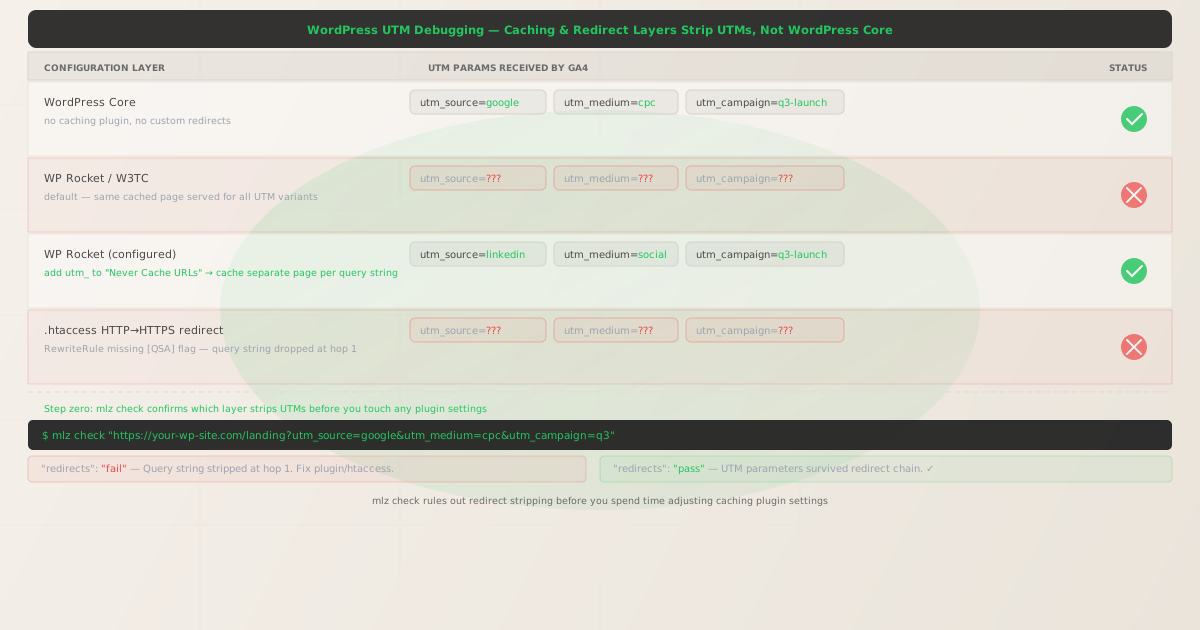
WordPress is a server-rendered MPA. Every page request hits PHP and returns a full HTML document, so UTM parameters in the URL should survive to the landing page intact — GA4's gtag.js reads them directly from window.location.search on that initial load. If your UTM parameters are not tracked in WordPress, WordPress core is almost certainly not the culprit.
The two actual causes are: caching plugins that serve a single cached page to all visitors regardless of query string, and .htaccess redirect rules that strip query strings when bouncing HTTP to HTTPS (or www to non-www). Both are infrastructure layers sitting in front of the PHP process — they consume the request before WordPress ever sees it.
Before adjusting any plugin settings, run mlz check to confirm which layer is stripping your parameters. A five-second command tells you whether the issue is in the redirect chain or at the caching layer, so you fix the right thing on the first attempt.
Step zero: diagnose with mlz check
Install the CLI and run it against your actual WordPress landing URL with UTM parameters appended:
npm install -g missinglinkz
$ mlz check "https://your-wp-site.com/landing?utm_source=google&utm_medium=cpc&utm_campaign=q3"
mlz check follows the full redirect chain and reports whether the query string survived each hop. The JSON output tells you exactly where to look:
{
  "url": "https://your-wp-site.com/landing?utm_source=google&utm_medium=cpc&utm_campaign=q3",
  "ssl": "pass",
  "redirects": "fail",
  "redirectDetails": "Query string stripped at hop 1 (301). Fix .htaccess RewriteRule.",
  "valid": false
}
If "redirects" is "pass", the issue is not in the redirect chain — move to the caching layer section below. If it is "fail", fix .htaccess first, then re-run the check.
Cause 1: .htaccess redirect missing the [QSA] flag
WordPress installations on Apache use .htaccess for the HTTP-to-HTTPS and www-to-non-www redirect. A common default configuration looks like this:
RewriteEngine On
RewriteCond %{HTTPS} off
RewriteRule ^ https://%{HTTP_HOST}%{REQUEST_URI} [L,R=301]
The %{REQUEST_URI} variable includes the path but not always the query string in all Apache versions and configurations. The correct pattern is to explicitly append the query string with the [QSA] (Query String Append) flag:
RewriteEngine On
RewriteCond %{HTTPS} off
RewriteRule ^(.*)$ https://%{HTTP_HOST}/$1 [QSA,L,R=301]
The [QSA] flag tells Apache to append the original query string to the rewritten URL. After making this change, run mlz check again to confirm the fix:
{
  "url": "https://your-wp-site.com/landing?utm_source=google&utm_medium=cpc&utm_campaign=q3",
  "ssl": "pass",
  "redirects": "pass",
  "valid": true
}
Cause 2: Caching plugin serving a single cached page per URL path
WordPress caching plugins (WP Rocket, W3 Total Cache, WP Super Cache) dramatically improve page load times by storing a rendered HTML snapshot of each page. The default behavior is to cache based on the URL path only — meaning /landing, /landing?utm_source=google, and /landing?utm_source=linkedin all receive the same cached HTML. GA4 reads UTM parameters from the current URL, not the cached HTML, so the parameters do survive — but only if the visitor actually lands on the URL with the parameters present.
The real risk is subtler: some caching configurations serve a redirect from the parameterized URL to the clean URL to improve cache hit rate. In that scenario, your UTMs are stripped before GA4 can read them.
Fix in WP Rocket
Go to WP Rocket → Advanced Rules → Never Cache URLs and add a pattern that matches any URL with UTM parameters:
(utm_source|utm_medium|utm_campaign|utm_term|utm_content)=
This is a regex pattern. WP Rocket will pass any request whose URL matches this pattern directly to PHP, bypassing the cache. Each UTM variant gets a live PHP render, and the parameters reach GA4 intact.
Alternatively, go to WP Rocket → Advanced Rules → Cache Query Strings and add each UTM parameter name (utm_source, utm_medium, utm_campaign, utm_term, utm_content). This tells WP Rocket to maintain separate cache entries per query string value, which preserves cache performance while ensuring each UTM combination gets its own cached page.
Fix in W3 Total Cache
Go to Performance → Page Cache → Advanced → Ignored query stems — this setting tells W3TC which query string parameters should be considered cache-busting. Add all five UTM parameter names. Each distinct UTM combination will be stored as a separate cache entry.
Fix in WP Super Cache
Enable Advanced → Extra homepage checks and add UTM parameters to the Rejected URL Strings list. Requests with those strings bypass the cache entirely and are served fresh from PHP.
Verify the full stack with mlz preflight
After fixing whichever layers were stripping parameters, run a full pre-launch check before deploying any campaign. mlz preflight validates SSL, the redirect chain, and the UTM parameter structure in one pass:
$ mlz preflight \
    --url "https://your-wp-site.com/landing" \
    --source "google" \
    --medium "cpc" \
    --campaign "q3-launch"
{
  "url": "https://your-wp-site.com/landing?utm_source=google&utm_medium=cpc&utm_campaign=q3-launch",
  "ssl": "pass",
  "redirects": "pass",
  "utm": {
    "source": "google",
    "medium": "cpc",
    "campaign": "q3-launch"
  },
  "valid": true
}
mlz preflight is the command to run in CI before any paid campaign goes live. If it returns "valid": false, the campaign URL is broken and no ad spend should be deployed until the check passes.
Why manual checks miss intermittent caching failures
The deceptive part of WordPress UTM failures is that they are intermittent. A cached page might be served to 90% of visitors but not to the first visitor who primes the cache after a purge. If you test by opening the URL in a browser, you might be that first visitor — you see the parameters in the address bar, GA4 records the attribution correctly, and you conclude the tracking works. The next 50 visitors get the cached redirect and lose their UTMs.
mlz check makes multiple requests to the same URL and follows the redirect chain deterministically. It does not rely on being the first or last visitor to a cached page. If the caching layer is stripping parameters on any request, the redirect check will catch it. That reproducibility is what makes it a reliable pre-launch gate rather than a spot check.
Automating WordPress campaign validation in CI
If you deploy WordPress via a pipeline (WP Engine deployments, Buddy, GitHub Actions with SSH), add mlz check as a post-deploy validation step:
- name: Validate campaign landing pages
  run: |
    npm install -g missinglinkz
    mlz check "https://your-wp-site.com/landing?utm_source=google&utm_medium=cpc&utm_campaign=q3"
A non-zero exit code from mlz check fails the workflow, preventing a broken campaign URL from shipping. This is the same pattern used with MPA vs SPA attribution — validate the infrastructure, not just the code.
Related reading
- UTM Parameters in Astro: View Transitions and Island Hydration
- UTM Parameters in SolidJS: createEffect and useLocation
- MPA vs SPA UTM Attribution: How pushState Breaks GA4
- FAQ
- Does WordPress core strip UTM parameters?
- No. WordPress core is a PHP application that generates HTML on request. It does not touch the URL's query string. UTM stripping in WordPress setups is always caused by infrastructure layers: caching plugins,
.htaccessredirects, CDN rules, or hosting-level canonicalization. - How do I tell if WP Rocket is stripping my UTMs?
- Run
mlz check "https://your-site.com/landing?utm_source=test". If"redirects"returns"fail", something in the request chain is stripping the query string. If"redirects"is"pass"but GA4 still misses the attribution, the issue is in GA4 configuration rather than the URL chain. - What is the
[QSA]flag in.htaccess? - QSA stands for "Query String Append." When added to an Apache
RewriteRule, it instructs Apache to append the original request's query string to the rewritten URL. Without it, the query string is dropped during the redirect — taking your UTM parameters with it. - Should I use "Never Cache URLs" or "Cache Query Strings" in WP Rocket?
- "Never Cache URLs" bypasses the cache entirely for matching requests, which guarantees fresh PHP renders but reduces cache efficiency. "Cache Query Strings" maintains separate cache entries per UTM combination, preserving performance while keeping attribution intact. For high-traffic landing pages, "Cache Query Strings" is the better choice.
- Can I validate multiple WordPress landing pages at once?
- Yes —
mlz checkaccepts any URL and can be looped in a shell script or CI step. Run it against each landing page URL with representative UTM parameters before any campaign launch. The MissingLinkz UTM builder can generate the parameterized URLs, andmlz checkvalidates each one.
Validate your WordPress campaign URLs before they go live
Stop discovering broken UTM tracking in GA4 after the ad spend. Run mlz check against your landing pages and catch caching and redirect issues in under five seconds.
1,000 links/month free. No credit card.
Your API key
Save this now — it won't be shown again.
npm install -g missinglinkz
One command. Zero guesswork. Fix WordPress UTM tracking before your campaign goes live.