UTM Parameters Not Tracked in Framer: Redirect Rules Drop Query Strings
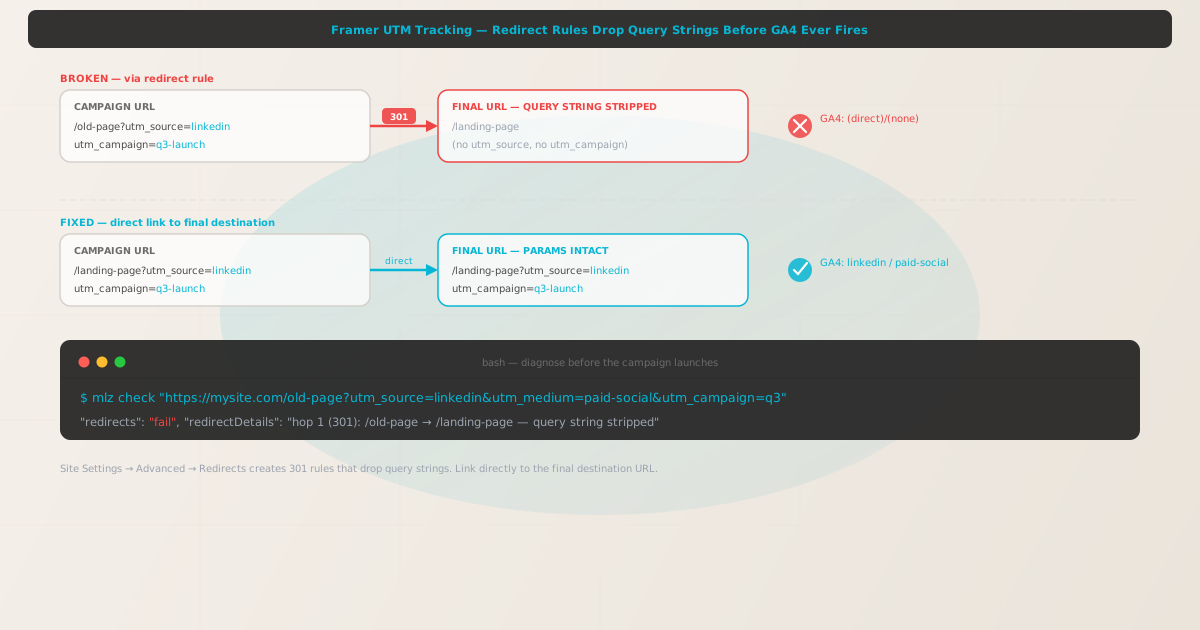
UTM parameters not tracked in Framer is almost never a client-side rendering problem. Framer publishes React-based sites, and GA4's gtag.js reads UTM parameters directly from window.location.search when the initial page load fires. If the query string is present in the final URL delivered to the browser, attribution is recorded correctly.
When UTM parameters go missing on a Framer site, the cause is virtually always a redirect happening before the page reaches the browser. Framer has three sources of redirects that drop query strings: redirect rules created automatically when a page is renamed or moved, manual redirect rules added in Site Settings → Advanced → Redirects, and domain-level redirects during custom domain setup (HTTP to HTTPS, or the transition from a framer.website subdomain to a custom domain).
Before changing any Framer settings, run mlz check from MissingLinkz against the full campaign URL. MissingLinkz follows the complete redirect chain and shows exactly where — and at which hop — the query string is dropped. That diagnosis takes seconds and tells you which redirect source to address.
Step zero: diagnose with mlz check
Install MissingLinkz and run mlz check against the campaign URL exactly as it appears in your ad, email, or social post — including all UTM parameters:
npm install -g missinglinkz
$ mlz check "https://mysite.com/old-page?utm_source=linkedin&utm_medium=paid-social&utm_campaign=q3"
If the campaign URL matches a redirect rule in Framer, the output shows a redirect failure with the exact hop where the query string is dropped:
{
  "url": "https://mysite.com/old-page?utm_source=linkedin&utm_medium=paid-social&utm_campaign=q3",
  "ssl": "pass",
  "redirects": "fail",
  "redirectDetails": "hop 1 (301): /old-page → /landing-page — query string stripped",
  "finalUrl": "https://mysite.com/landing-page",
  "valid": false
}
A "redirects": "fail" result with a redirectDetails entry confirms a redirect is consuming the query string. The path in redirectDetails identifies the source and destination of the redirect — this maps directly to an entry in Framer's redirect list.
If "redirects": "pass" but GA4 attribution is still missing, the problem is not a network redirect. Look instead at your GA4 configuration: the data stream, cookie settings, or whether gtag.js is firing before a client-side navigation overrides the URL.
Cause 1: Automatic redirects from renamed or moved pages
Framer automatically creates a redirect whenever a page's URL slug changes. If you rename a page — even by changing one character in the slug — Framer silently adds a 301 redirect from the old path to the new path. This is intended to protect SEO equity, but it drops the incoming query string.
A campaign link pointing to /product-launch that was later renamed to /launch in Framer will land on /launch without any UTM parameters. GA4 records the session as (direct)/(none).
These auto-generated redirects accumulate over the life of a site. Framer does not surface them prominently — you find them in Site Settings → Advanced → Redirects. Scan that list for any path your current campaign links target.
Cause 2: Manual redirect rules in Site Settings
Framer's Site Settings → Advanced → Redirects panel lets you define custom redirect rules. These are 301 redirects from one path to another. Like the automatic redirects created on page rename, these rules do not forward the incoming query string to the destination path.
If a redirect rule exists for /pricing → /plans, a campaign link to /pricing?utm_source=google&utm_medium=cpc&utm_campaign=q3 will redirect to /plans with no UTM parameters. The rule itself gives no indication it will strip the query string — it simply does.
The fix is the same as for automatic redirects: update the campaign link to point directly to the final destination path, bypassing the redirect entirely. Do not remove the redirect rule — it may exist for SEO or structural reasons. Instead, update the campaign URL.
Cause 3: Custom domain and HTTPS redirect
When you connect a custom domain to a Framer site, several domain-level redirects are created automatically. Framer enforces HTTPS, so any HTTP request is redirected to HTTPS. If the domain is configured with a www variant, a redirect from www.mysite.com to mysite.com (or vice versa) is also added. Both of these redirects drop query strings.
Additionally, if visitors were ever given links to the Framer-hosted domain (mysite.framer.website) and the site has since moved to a custom domain, those old links redirect through Framer's infrastructure to the new domain — and the query string is lost at that hop.
Confirm which domain configuration your site uses, then ensure all campaign links use the canonical form — https://mysite.com/landing, not http://mysite.com/landing, not https://www.mysite.com/landing, not https://mysite.framer.website/landing. Run mlz check against each variant if unsure which canonical form avoids the redirect.
The fix: link campaign URLs to the final destination directly
For all Framer campaign links, build the URL against the exact path the page lives on after all redirects — the finalUrl returned by mlz check. Every redirect hop is a risk point for UTM loss, and Framer has no configuration option to forward query strings through its redirect rules.
$ mlz check "https://mysite.com/landing-page?utm_source=linkedin&utm_medium=paid-social&utm_campaign=q3"
{
  "url": "https://mysite.com/landing-page?utm_source=linkedin&utm_medium=paid-social&utm_campaign=q3",
  "ssl": "pass",
  "redirects": "pass",
  "valid": true
}
Run a full pre-launch check with mlz preflight
For any Framer campaign landing page, run mlz preflight before the campaign launches. This validates SSL, redirect chain integrity, UTM parameter structure, Open Graph tags, and Twitter Card tags in one command:
$ mlz preflight \
    --url "https://mysite.com/landing-page" \
    --source "linkedin" \
    --medium "paid-social" \
    --campaign "q3-launch"
{
  "ready": true,
  "tracked_url": "https://mysite.com/landing-page?utm_source=linkedin&utm_medium=paid-social&utm_campaign=q3-launch",
  "checks": [
    { "check": "ssl",        "status": "pass", "message": "URL uses HTTPS." },
    { "check": "resolution", "status": "pass", "message": "Destination responded with 200." },
    { "check": "redirects",  "status": "pass", "message": "No redirects detected." },
    { "check": "og_tags",    "status": "pass", "message": "All essential Open Graph tags present." }
  ],
  "recommendation": "All checks passed. Campaign link is ready to publish."
}
Framer vs other design-to-code platforms
Framer shares the redirect-based UTM loss pattern with server-rendered website builders like Webflow, Wix, and Squarespace. On all of these platforms, UTM parameters survive by default when the campaign URL lands directly on the final page — the problem appears only when a redirect rule intercepts the URL before the page loads.
Framer's specific risk is its automatic redirect creation on page rename. Other platforms require you to manually create redirect rules; Framer creates them silently as part of its page management workflow. This means a campaign that worked last week can fail silently after a page is renamed, even without any deliberate redirect configuration.
Unlike the SPA framework attribution issues that affect React Router, Next.js, or Nuxt apps, Framer's UTM loss is a server-side redirect problem — not a client-side navigation problem. The fix is to target the correct destination path in the campaign URL, not to instrument client-side routing. The mlz check output will make clear which case applies: a redirect failure means the URL itself needs updating; a clean pass means the issue is in client-side tracking configuration.
For any campaign link validation workflow, mlz check works identically across all hosting platforms — it follows the actual network response chain and reports exactly where a query string is dropped.
- FAQ
- Does Framer strip UTM parameters by default?
- No. Framer delivers the full URL — including the query string — to the browser on every server-rendered page load. GA4 reads UTM parameters from the URL on load. UTM parameters are only dropped when a redirect rule intercepts the request before the page loads. Without a redirect in the path, UTMs arrive intact.
- How do I find which Framer redirect is stripping my UTMs?
- Run
mlz checkagainst the full campaign URL. If"redirects"is"fail", the"redirectDetails"field shows the source path and destination path of the redirect hop. Open Framer → Site Settings → Advanced → Redirects and find the rule whose source matches the path inredirectDetails. - Can I configure Framer to pass query strings through redirect rules?
- No. Framer's redirect rules — both automatic and manual — do not support query string forwarding. There is no wildcard or append syntax to carry the original query string to the redirect destination. The only fix is to update your campaign URLs to point directly to the final destination path and bypass the redirect entirely.
- Framer renamed my page and now my UTMs are broken. What happened?
- When a page slug changes in Framer, Framer automatically creates a 301 redirect from the old path to the new path. This redirect drops the query string. Any campaign URL pointing to the old path now lands on the new path without UTM parameters. Update the campaign link to use the new path directly.
- Why do my Framer UTMs work in my browser but not in GA4?
- If you test by typing the URL into a browser, the browser may follow the redirect and the page loads correctly — but the UTMs are already gone before the page loads. GA4 fires against the final URL, which has no query string. Run
mlz checkagainst the campaign URL to confirm whether a redirect is in the path — the check follows the network hops and reports the exact behavior, regardless of what the browser appears to show.
Confirm your Framer campaign URLs are redirect-free before launch
One mlz check command follows the full redirect chain and tells you whether your campaign URL will deliver UTM parameters to the final Framer page — before a single dollar of ad spend is committed.
1,000 links/month free. No credit card.
Your API key
Save this now — it won't be shown again.
npm install -g missinglinkz
Five seconds to confirm your Framer landing page is redirect-free and ready for campaign traffic.