UTM Parameters Not Tracked in Squarespace: URL Redirects and Password Gates
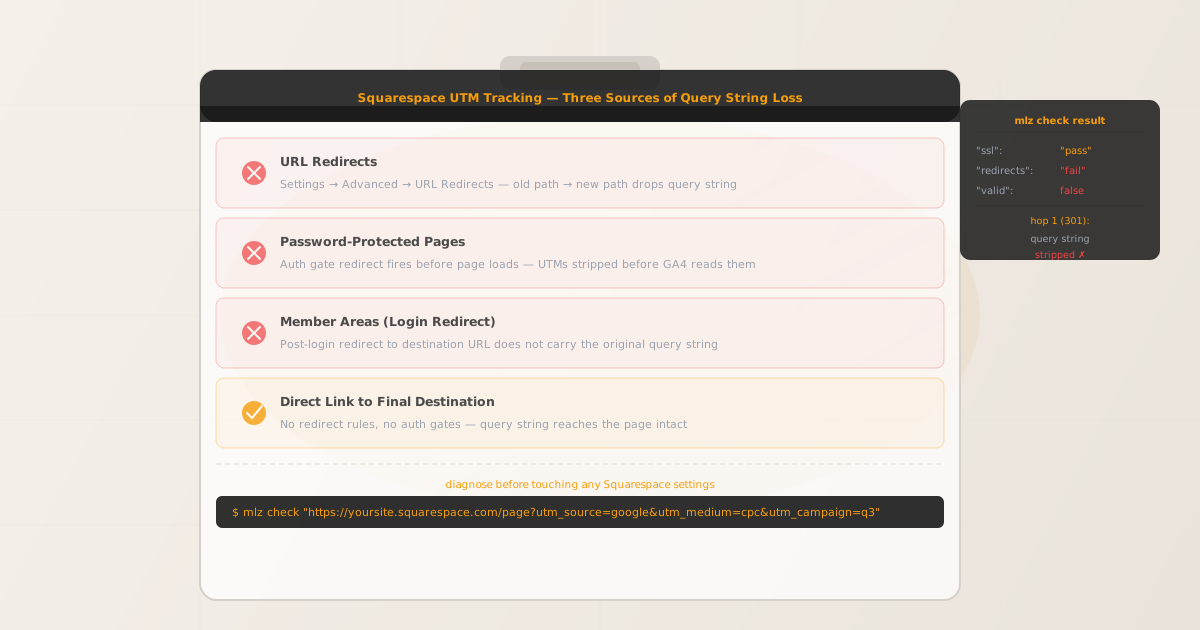
UTM parameters not tracked in Squarespace is almost never a rendering problem. Squarespace is a fully-hosted, server-rendered platform. GA4's gtag.js reads UTM parameters directly from document.location.search when the page loads — if the query string is present in the final URL, attribution is recorded correctly with no special Squarespace configuration required.
When UTM parameters go missing on a Squarespace site, there are three specific platform features to check: URL Redirects (Settings → Advanced → URL Redirects), password-protected pages, and Member Areas. Each of these inserts a redirect hop before the visitor reaches the destination page, and that redirect drops the query string.
Before adjusting any Squarespace settings, run mlz check from MissingLinkz against the campaign URL. The output follows the full redirect chain and shows exactly where the query string is dropped. That diagnosis takes five seconds and tells you which of the three causes applies — so you fix the right thing on the first attempt.
Step zero: diagnose with mlz check
Install MissingLinkz and run mlz check against the full campaign URL as it appears in your ad or email — including UTM parameters:
npm install -g missinglinkz
$ mlz check "https://yoursite.squarespace.com/campaign-page?utm_source=linkedin&utm_medium=paid-social&utm_campaign=q3"
If the campaign URL is hitting a URL redirect rule, the output shows a redirect failure:
{
  "url": "https://yoursite.squarespace.com/campaign-page?utm_source=linkedin&utm_medium=paid-social&utm_campaign=q3",
  "ssl": "pass",
  "redirects": "fail",
  "redirectDetails": "hop 1 (301): /campaign-page → /new-landing — query string stripped",
  "finalUrl": "https://yoursite.squarespace.com/new-landing",
  "valid": false
}
A "redirects": "fail" result confirms a redirect is stripping the query string. The "redirectDetails" field identifies the exact hop — match the source path to your URL Redirects list to locate the rule.
If "redirects": "pass" but attribution is still missing, the problem is upstream of the URL layer — likely a consent gate, GA4 configuration issue, or a cookie restriction — not a Squarespace redirect.
Cause 1: URL Redirects in Settings → Advanced
Squarespace's URL Redirects tool (Settings → Advanced → URL Redirects) lets you define 301 or 302 redirect rules mapping old paths to new paths. These are useful for preserving SEO equity after a redesign, but they silently drop query strings from incoming URLs.
A redirect rule from /old-campaign to /landing will strip any query string from the request. A visitor arriving at /old-campaign?utm_source=linkedin&utm_medium=paid-social is redirected to /landing with no UTM parameters. GA4 records the session as (direct)/(none).
Squarespace does not support dynamic query string passthrough in its URL Redirects tool. You cannot write a wildcard rule that preserves the original query string at the destination. The only fix is to update your campaign URLs to point directly to the final destination — bypassing the redirect entirely.
Cause 2: Password-protected pages
Squarespace allows you to password-protect individual pages or sections. When a campaign link targets a password-protected page, Squarespace redirects the visitor to a password entry form before the destination page loads. This redirect drops the UTM query string.
After the visitor enters the password, Squarespace redirects them to the destination — but without the original query string. GA4's page_view event fires against the final URL without UTM parameters. Attribution is lost.
The fix is straightforward: do not send paid campaign traffic to password-protected pages. If the page must be gated, consider using a different access mechanism that does not interrupt the URL chain before the page loads.
Cause 3: Member Areas (login redirect)
Squarespace's Member Areas feature restricts pages to logged-in members. When a campaign link targets a Member Areas page, Squarespace redirects unauthenticated visitors to the login page. After authentication, Squarespace returns the visitor to the destination — but without the original query string.
This is the same redirect-stripping pattern as password protection. The authentication redirect does not carry UTM parameters forward to the final page. Do not use Member Areas pages as campaign landing page destinations for paid traffic.
The fix: link campaign URLs to the final destination directly
For all Squarespace campaign links, the correct approach is to use the actual URL of the page visitors should land on — with no redirect rules, no password gates, and no member authentication walls in the path. Every redirect hop is a risk point for UTM loss.
Validate the final destination URL before any campaign launches:
$ mlz check "https://yoursite.squarespace.com/new-landing?utm_source=linkedin&utm_medium=paid-social&utm_campaign=q3"
{
  "url": "https://yoursite.squarespace.com/new-landing?utm_source=linkedin&utm_medium=paid-social&utm_campaign=q3",
  "ssl": "pass",
  "redirects": "pass",
  "valid": true
}
Run a full pre-launch check with mlz preflight
For any Squarespace campaign landing page, run mlz preflight before launch. This validates the SSL certificate, redirect chain integrity, UTM parameter structure, and OG tags for social sharing in one command:
$ mlz preflight \
    --url "https://yoursite.squarespace.com/new-landing" \
    --source "linkedin" \
    --medium "paid-social" \
    --campaign "q3-launch"
{
  "ready": true,
  "tracked_url": "https://yoursite.squarespace.com/new-landing?utm_source=linkedin&utm_medium=paid-social&utm_campaign=q3-launch",
  "checks": [
    { "check": "ssl",        "status": "pass", "message": "URL uses HTTPS." },
    { "check": "resolution", "status": "pass", "message": "Destination responded with 200." },
    { "check": "redirects",  "status": "pass", "message": "No redirects detected." },
    { "check": "og_tags",    "status": "pass", "message": "All essential Open Graph tags present." }
  ],
  "recommendation": "All checks passed. Campaign link is ready to publish."
}
Auditing multiple Squarespace campaign URLs
If you are managing several active campaigns, run mlz check across all destination URLs to surface any that currently hit a redirect rule:
URLS=(
  "https://yoursite.squarespace.com/page-a?utm_source=google&utm_medium=cpc&utm_campaign=q3"
  "https://yoursite.squarespace.com/page-b?utm_source=linkedin&utm_medium=paid-social&utm_campaign=q3"
  "https://yoursite.squarespace.com/page-c?utm_source=email&utm_medium=newsletter&utm_campaign=q3"
)

for url in "${URLS[@]}"; do
  mlz check "$url"
done
Any URL returning "valid": false is a broken campaign link. Identify the final destination URL for that page and update the campaign before the next ad flight.
Squarespace vs other hosted website platforms
Squarespace shares the same fundamental UTM tracking architecture as Webflow and Wix: the platform is server-rendered, so UTM parameters survive by default. The distinction is in which platform features can trigger redirects that strip the query string.
Squarespace has three such features — URL Redirects, password protection, and Member Areas — compared to Webflow's single redirect mechanism (Publishing settings redirect table) and Wix's URL Redirect Manager. The diagnostic approach is the same on all three platforms: run mlz check against the campaign URL to confirm whether a redirect is stripping the query string, then update the campaign URL to bypass the redirect.
Unlike WordPress, Squarespace provides no server-level access and no caching plugin layer. There is no .htaccess file to edit, no plugin configuration to adjust. The only UTM loss vectors on Squarespace are the three redirect-triggering features listed above — which makes the diagnosis straightforward once you have confirmed the redirect chain with mlz check.
For any campaign link validation workflow, mlz check works identically across hosted platforms — it follows the actual network hops and reports exactly where the query string is dropped, regardless of platform.
- FAQ
- Does Squarespace strip UTM parameters by default?
- No. Squarespace serves pages server-side and delivers the full query string to the browser. UTM parameters are only dropped when a platform feature — URL Redirects, password protection, or Member Areas — inserts a redirect hop before the page loads. Without those features in the path, UTMs arrive intact.
- How do I find which redirect rule is breaking my Squarespace UTMs?
- Run
mlz checkagainst the campaign URL. If"redirects"is"fail", the output includes a"redirectDetails"field with the source path, destination path, and status code of the redirect. Match the source path to your URL Redirects list in Settings → Advanced → URL Redirects to identify the specific rule. - Can I fix Squarespace URL Redirects to pass query strings through?
- Squarespace's URL Redirects tool does not support dynamic query string forwarding — you cannot write a rule that appends the original query string to the destination. The correct fix is to update your campaign URLs to point directly to the final destination URL rather than to a path covered by a redirect rule.
- Why do my Squarespace UTMs work in testing but fail in production?
- Testing is typically done with direct browser access to the final URL, which bypasses any redirect rules in the path. In production, campaign traffic often arrives via a different URL — an old path from a site migration, a short link, or a branded landing page path — that is covered by a redirect rule. Run
mlz checkagainst the exact URL used in your campaign ad or email, not against the page URL in your browser. - Does Squarespace's built-in analytics track UTMs differently from GA4?
- Squarespace Analytics has its own traffic source attribution separate from GA4. The UTM tracking issue described in this article applies specifically to GA4 and any third-party analytics platform reading UTM parameters from the URL. Squarespace's own analytics may appear to record attribution correctly even when GA4 does not — the two systems read attribution from different sources.
Confirm your Squarespace campaign URLs are redirect-free before launch
One mlz check command follows the full redirect chain and tells you whether your campaign URL will deliver UTMs to the final page — before you spend a single dollar on ad spend.
1,000 links/month free. No credit card.
Your API key
Save this now — it won't be shown again.
npm install -g missinglinkz
Five seconds to confirm your Squarespace landing page is redirect-free and ready for campaign traffic.