UTM Parameters Not Tracked in Webflow: Redirect Rules in Publishing Settings
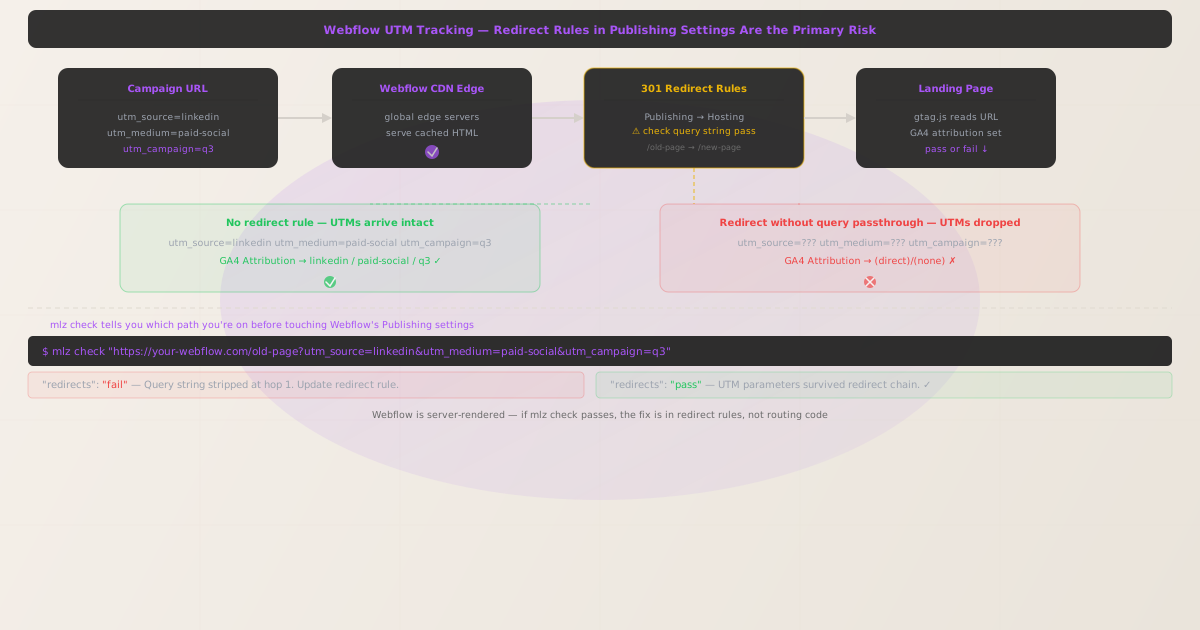
Webflow is a hosted platform built on a global CDN. It renders pages server-side and delivers static HTML to the browser — the same fundamental architecture as any other server-rendered site. That means UTM parameters appended to a Webflow URL should survive to the landing page without any special configuration. GA4's gtag.js reads them directly from document.location.search on page load.
When UTM parameters are not tracked in Webflow, the cause is almost always a 301 redirect rule defined in Site Settings → Publishing → 301 Redirects that does not pass query strings through to the destination URL. Webflow's redirect rules accept a source path and a destination path — if a visitor lands on the source path with UTM parameters, the redirect sends them to the destination without appending the query string.
The fix is a one-step diagnosis followed by an update to the redirect rule. Run mlz check to confirm whether the redirect chain is stripping your parameters before you touch anything in Webflow's interface.
Step zero: diagnose with mlz check
Install the CLI and run it against the old URL (the source path in your redirect rule) with UTM parameters appended:
npm install -g missinglinkz
$ mlz check "https://your-webflow-site.com/old-page?utm_source=linkedin&utm_medium=paid-social&utm_campaign=q3"
The output shows whether the query string survived each redirect hop:
{
  "url": "https://your-webflow-site.com/old-page?utm_source=linkedin&utm_medium=paid-social&utm_campaign=q3",
  "ssl": "pass",
  "redirects": "fail",
  "redirectDetails": "Query string stripped at hop 1 (301). Update redirect destination to include query passthrough.",
  "valid": false
}
If "redirects" is "fail", the Webflow redirect rule is the culprit. If "redirects" is "pass" but GA4 is not recording the attribution, the problem is in your GA4 configuration or custom code integration — not the URL chain.
How Webflow redirect rules work
Webflow's Site Settings → Publishing → 301 Redirects accepts pairs of Old Path and New Path. The old path is a URL pattern (path only, no domain). Webflow matches incoming requests against these patterns and issues a 301 redirect to the new path.
The critical limitation: Webflow does not automatically forward query strings from the old path to the new path. A redirect rule like /old-page → /new-page will strip any query string from the incoming URL. A visitor arriving at /old-page?utm_source=linkedin is redirected to /new-page — UTMs gone.
Fix: update the redirect destination to include a query string
Webflow allows you to include a static query string in the destination path. To pass UTM parameters through, you need to either:
- Remove the redirect rule if the old URL is an active campaign destination and UTM tracking matters for it
- Update your campaign URLs to point directly to the final destination URL instead of the old path
- If the redirect is required for SEO purposes, audit all active campaigns using the old path and update them to point directly to the new page
Webflow does not support dynamic query string passthrough in its redirect rules (i.e., you cannot write /old-page?{query} → /new-page?{query} as a wildcard). This is a Webflow platform limitation. The correct fix is to stop sending campaign traffic to URLs that redirect.
The right approach: direct links to final destination URLs
Campaign URLs should always point to the page you actually want the visitor to land on. Every redirect hop is a risk point for UTM loss, and Webflow's redirect layer does not pass query strings through. The campaign link infrastructure rule is: one URL, one destination, no intermediate hops.
Use the MissingLinkz UTM builder to generate parameterized URLs targeting the final destination directly. Then validate each URL with mlz check before the campaign launches:
$ mlz check "https://your-webflow-site.com/new-page?utm_source=linkedin&utm_medium=paid-social&utm_campaign=q3"
{
  "url": "https://your-webflow-site.com/new-page?utm_source=linkedin&utm_medium=paid-social&utm_campaign=q3",
  "ssl": "pass",
  "redirects": "pass",
  "valid": true
}
Run a full pre-launch check with mlz preflight
Before any Webflow campaign goes live, validate the full stack — SSL, redirect chain, and UTM structure — with a single command:
$ mlz preflight \
    --url "https://your-webflow-site.com/new-page" \
    --source "linkedin" \
    --medium "paid-social" \
    --campaign "q3-launch"
{
  "url": "https://your-webflow-site.com/new-page?utm_source=linkedin&utm_medium=paid-social&utm_campaign=q3-launch",
  "ssl": "pass",
  "redirects": "pass",
  "utm": {
    "source": "linkedin",
    "medium": "paid-social",
    "campaign": "q3-launch"
  },
  "valid": true
}
Webflow vs other server-rendered platforms
Unlike WordPress, which can strip UTMs at the caching plugin layer or in .htaccess, Webflow has a simpler and more constrained hosting model. There is no caching plugin configuration and no server-level redirect file to edit. The only place UTMs can be stripped is in Webflow's own redirect rules interface.
That constraint makes Webflow easier to debug: if mlz check shows "redirects": "fail", the cause is always in Site Settings → Publishing → 301 Redirects. There is no other layer to investigate.
Auditing existing campaigns against Webflow redirects
If you manage a large number of campaign URLs, run mlz check against each one to identify which URLs are currently hitting a redirect. Pipe the output to identify failed checks:
URLS=(
  "https://your-webflow-site.com/page-a?utm_source=google&utm_medium=cpc&utm_campaign=q3"
  "https://your-webflow-site.com/page-b?utm_source=linkedin&utm_medium=paid-social&utm_campaign=q3"
  "https://your-webflow-site.com/page-c?utm_source=facebook&utm_medium=paid-social&utm_campaign=q3"
)

for url in "${URLS[@]}"; do
  mlz check "$url"
done
Any URL returning "valid": false is a broken campaign link — update it to point directly to the final destination before the next ad flight.
- FAQ
- Does Webflow strip UTM parameters by default?
- No. Webflow's CDN delivers pages without touching the query string. UTM parameters are only stripped when a 301 redirect rule is configured in Site Settings → Publishing → 301 Redirects and the destination does not include a matching query string.
- Can Webflow forward query strings in redirect rules?
- No. Webflow's redirect rule interface does not support dynamic query string passthrough. If you define
/old-page→/new-page, any query string on the old URL is dropped. The correct fix is to update campaign URLs to point directly to the new page. - How do I find which redirect rules are breaking my UTMs?
- Run
mlz checkagainst the campaign URL. If"redirects"is"fail", follow the URL chain in the output to identify the hop where the query string is dropped. That hop corresponds to a specific redirect rule in Webflow's publishing settings. - Does this affect Webflow's JavaScript interactions or CMS collections?
- No. JavaScript interactions and CMS collections do not affect URL routing or query string handling. The UTM tracking issue is purely in the URL/redirect layer, not in any Webflow feature that runs after the page loads.
- Can I use mlz check in a Webflow deploy pipeline?
- Yes. Webflow supports webhooks on publish events. You can configure a GitHub Actions workflow that triggers on the Webflow publish webhook, runs
mlz checkagainst your key landing pages, and sends an alert if any check fails. This catches redirect-related UTM failures immediately after each Webflow publish.
Catch Webflow redirect issues before your campaign launches
A single mlz check command tells you whether your Webflow landing page will receive UTM parameters. No manual click-through testing required.
1,000 links/month free. No credit card.
Your API key
Save this now — it won't be shown again.
npm install -g missinglinkz
Five seconds to confirm your Webflow landing page is ready for campaign traffic.