UTM Parameters Not Tracked in Cloudflare Pages: _redirects Rules and Pages Functions Strip Query Strings
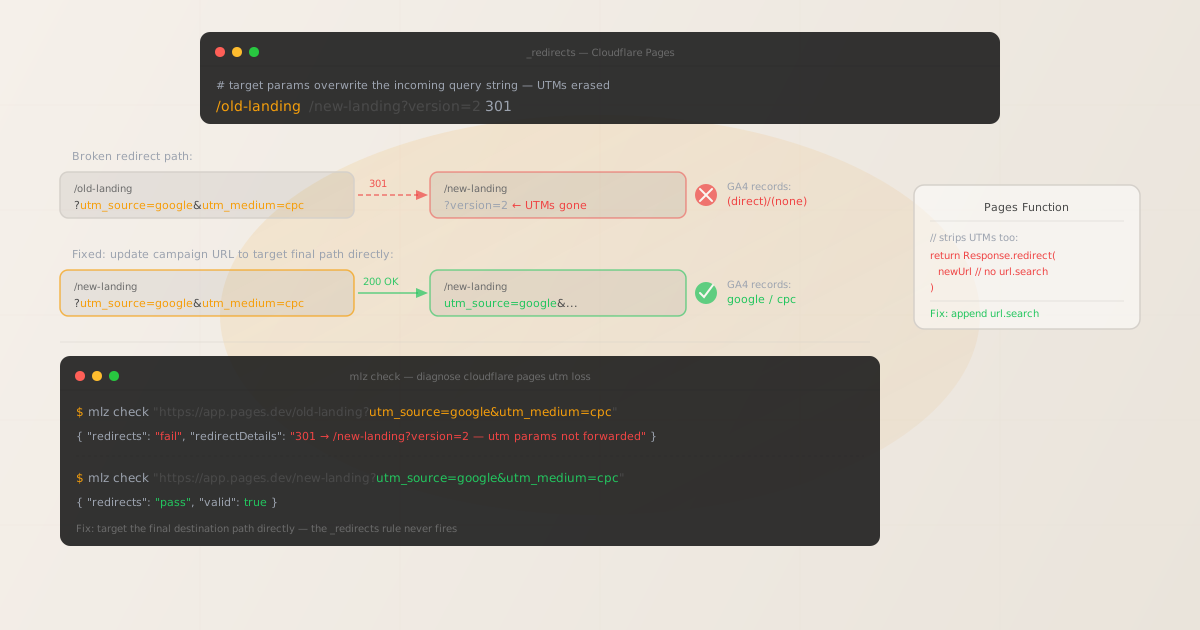
UTM parameters not tracked in Cloudflare Pages is almost always a _redirects file problem. Cloudflare Pages serves static files from the global edge network — when a campaign URL targets a page file directly, GA4's gtag.js reads window.location.search on load and UTMs are present.
The problem occurs when a _redirects rule intercepts the campaign URL and redirects to a target that includes its own query string. In Cloudflare Pages, a redirect target like /new-landing?version=2 does not append the original query string — the target's query string replaces the incoming one. All UTM parameters are silently dropped, and GA4 records the session as (direct)/(none).
Before editing any redirect configuration, run mlz check from MissingLinkz against the exact campaign URL. MissingLinkz is campaign link infrastructure: it follows every network redirect hop and reports where the query string is lost, so you confirm the cause before touching any files.
Step zero: diagnose with mlz check
Install MissingLinkz and check the exact URL used in the campaign — including all UTM parameters:
npm install -g missinglinkz
$ mlz check "https://your-site.pages.dev/old-landing?utm_source=google&utm_medium=cpc&utm_campaign=q3"
When a _redirects rule intercepts the URL and replaces the query string, the output shows a redirect failure with the destination URL lacking your UTM parameters:
{
  "url": "https://your-site.pages.dev/old-landing?utm_source=google&utm_medium=cpc&utm_campaign=q3",
  "redirects": "fail",
  "redirectDetails": "301: /old-landing → /new-landing?version=2 — utm params not forwarded",
  "finalUrl": "https://your-site.pages.dev/new-landing?version=2",
  "valid": false
}
The finalUrl field is the canonical destination — this is the path your campaign URL should target directly. The redirectDetails field identifies the source path and the redirect target, which maps directly to a rule in your _redirects file or Pages project settings.
Cause 1: _redirects rules with explicit target query strings
Cloudflare Pages reads a _redirects file from the root of the published output directory. Each line defines a source URL pattern, a target URL, and an HTTP status code. The Cloudflare Pages redirect specification follows the same format as Netlify — but with one important behavior: when the target URL includes its own query string, that query string is used for the redirect and the incoming request's query string is not appended.
A _redirects rule like:
/old-landing /new-landing?version=2 301
intercepts any request to /old-landing — including /old-landing?utm_source=google&utm_medium=cpc — and redirects to /new-landing?version=2. The incoming query string is discarded. The final URL at the browser has only ?version=2, with no UTM parameters. GA4 attributes the session to (direct)/(none).
Contrast this with a _redirects rule where the target has no query string:
/old-landing /new-landing 301
When the target has no query string, Cloudflare Pages appends the original request's query string to the destination. A campaign URL like /old-landing?utm_source=google&utm_medium=cpc redirects to /new-landing?utm_source=google&utm_medium=cpc and UTMs survive. The problem is specific to targets that carry an explicit ?key=value query string.
The cleanest fix: update the campaign URL
If the mlz check output shows that the campaign URL redirects from /old-landing to /new-landing, update all campaign links to target /new-landing directly:
https://your-site.pages.dev/new-landing?utm_source=google&utm_medium=cpc&utm_campaign=q3
No redirect fires. Cloudflare's edge serves the file directly. The full query string is present in window.location.search when GA4 fires page_view.
If the _redirects rule must remain (for example, to preserve SEO equity from backlinks to the old URL), an alternative is to remove the explicit query string from the redirect target. Change /old-landing /new-landing?version=2 301 to /old-landing /new-landing 301 — this allows incoming query strings to pass through, though it also means the version=2 parameter is no longer appended automatically.
Cause 2: Pages Functions using Response.redirect()
Cloudflare Pages Functions are Worker scripts that run at the edge on requests matched to specific URL patterns. A Pages Function that issues a redirect without preserving the incoming request's query string strips UTM parameters in the same way a _redirects rule does — but the cause is in JavaScript code, not a config file.
A Pages Function in functions/old-landing.js or a catch-all functions/_middleware.js that uses:
export function onRequest(context) {
  const newUrl = new URL('/new-landing', context.request.url);
  return Response.redirect(newUrl.href, 301);
}
creates a URL object for /new-landing without appending the original query string. The newUrl.href is https://your-site.pages.dev/new-landing — no query string. The redirect loses all UTM parameters.
The fix is to copy url.search from the incoming request to the destination URL:
export function onRequest(context) {
  const incomingUrl = new URL(context.request.url);
  const newUrl = new URL('/new-landing', context.request.url);
  newUrl.search = incomingUrl.search;
  return Response.redirect(newUrl.href, 301);
}
Assigning incomingUrl.search to newUrl.search copies the entire query string — including all UTM parameters — from the original request to the redirect destination. The redirect preserves attribution.
After deploying the fix, re-run mlz check against the original campaign URL to confirm UTMs now survive the hop:
$ mlz check "https://your-site.pages.dev/old-landing?utm_source=google&utm_medium=cpc&utm_campaign=q3"
{
  "url": "https://your-site.pages.dev/old-landing?utm_source=google&utm_medium=cpc&utm_campaign=q3",
  "redirects": "pass",
  "valid": true
}
Run mlz preflight before campaign launch
For any Cloudflare Pages campaign landing page, run mlz preflight before the campaign goes live. This validates SSL, the redirect chain, UTM structure, and Open Graph and Twitter Card tags in one command:
$ mlz preflight \
    --url "https://your-site.pages.dev/new-landing" \
    --source "google" \
    --medium "cpc" \
    --campaign "q3-launch"
{
  "ready": true,
  "tracked_url": "https://your-site.pages.dev/new-landing?utm_source=google&utm_medium=cpc&utm_campaign=q3-launch",
  "checks": [
    { "check": "ssl",        "status": "pass", "message": "URL uses HTTPS." },
    { "check": "resolution", "status": "pass", "message": "Destination responded with 200." },
    { "check": "redirects",  "status": "pass", "message": "No redirects detected." },
    { "check": "og_tags",    "status": "pass", "message": "All essential Open Graph tags present." }
  ],
  "recommendation": "All checks passed. Campaign link is ready to publish."
}
How this differs from Cloudflare Workers
Cloudflare Pages and Cloudflare Workers are distinct products that handle redirects differently. Workers are standalone scripts attached to a zone — they intercept all requests via a route pattern and can strip UTMs through any URL manipulation that omits request.url's search params. Pages Functions are specifically scoped to a Pages project and loaded from the functions/ directory of that project.
The _redirects file is exclusively a Cloudflare Pages (and Netlify) feature — it does not exist in Workers or the Cloudflare Dashboard redirect rules. If you are using Cloudflare Dashboard redirect rules (under Traffic → Redirect Rules), those follow different query-string semantics and are covered in the Workers guide. Use mlz check against the actual campaign URL to identify which redirect layer is the cause before editing any configuration — the tool works across all of them.
For the same redirect chain diagnosis on other platforms, see the Netlify _redirects guide (nearly identical file format, same query-string replacement behavior) and the Vercel redirect guide (vercel.json and Edge Middleware mechanisms).
See the UTM builder for campaign URL construction that targets final destination paths from the start.
Auditing multiple Cloudflare Pages projects
For teams with multiple Pages projects or multiple branch deployments (preview URLs have the format https://<hash>.<project>.pages.dev), batch-validate all landing page campaign URLs before any campaign goes live:
URLS=(
  "https://your-site.pages.dev/new-landing?utm_source=google&utm_medium=cpc&utm_campaign=q3"
  "https://your-site.pages.dev/pricing?utm_source=linkedin&utm_medium=paid-social&utm_campaign=q3"
  "https://preview.your-site.pages.dev/new-landing?utm_source=email&utm_medium=newsletter&utm_campaign=q3"
)

for url in "${URLS[@]}"; do
  mlz check "$url"
done
Running this across both production and preview URLs confirms that the same _redirects rules deployed to both environments do not affect campaign attribution. Preview deployments inherit the same _redirects file from the build output, so a rule that breaks UTMs in production will also break them on preview URLs.
- FAQ
- Does Cloudflare Pages strip UTM parameters by default?
- No. Cloudflare Pages serves static files from the edge with the full query string intact. UTM parameters are only stripped when a
_redirectsrule or Pages Function issues a redirect to a destination URL that does not include the original query string. When campaign URLs target file paths that are not redirected, UTMs reach the browser without any configuration needed. - How do I know if a
_redirectsrule is causing the problem? - Run
mlz checkagainst the exact campaign URL. If the output shows"redirects": "fail"with aredirectDetailsfield showing a 301 or 302 hop, a redirect is intercepting the campaign URL. Open the_redirectsfile in the root of your Pages project (or build output) and look for a rule whose source pattern matches your campaign URL path. - Why does the redirect strip UTMs when there's no query string in the _redirects target?
- It doesn't — that's the safe case. Cloudflare Pages only replaces the incoming query string when the redirect target has its own explicit query string (e.g.,
/new-landing?version=2). If the target has no query string (e.g.,/new-landing), the original query string is appended and UTMs survive. If you see UTM loss without an explicit query string in the target, the cause is likely a Pages Function rather than the_redirectsfile. - How is this different from Netlify's _redirects behavior?
- Cloudflare Pages and Netlify both use the
_redirectsfile format, and both replace the incoming query string when the redirect target includes its own query params. The behavior and the fix are nearly identical across both platforms. The diagnostic command (mlz check) and the recommended fix (update campaign URLs to target the final path directly) are the same. - Does this apply to Cloudflare Pages custom domains?
- Yes. When a custom domain is connected to a Cloudflare Pages project, the same
_redirectsrules and Pages Functions apply. Runmlz checkagainst the custom domain campaign URL (not just thepages.devURL) to confirm UTMs survive the full network path including any domain-level redirect hop.
Confirm your Cloudflare Pages campaign URLs are redirect-free before launch
One mlz check command follows the full network path — including _redirects rules and Pages Function redirects — and reports whether UTM parameters reach the final edge-served file intact.
1,000 links/month free. No credit card.
Your API key
Save this now — it won't be shown again.
npm install -g missinglinkz
Ten seconds to confirm a Cloudflare Pages landing page is ready for campaign traffic before budget goes live.