UTM Parameters Not Tracked in AWS Amplify: Console Redirect Rules Strip Query Strings
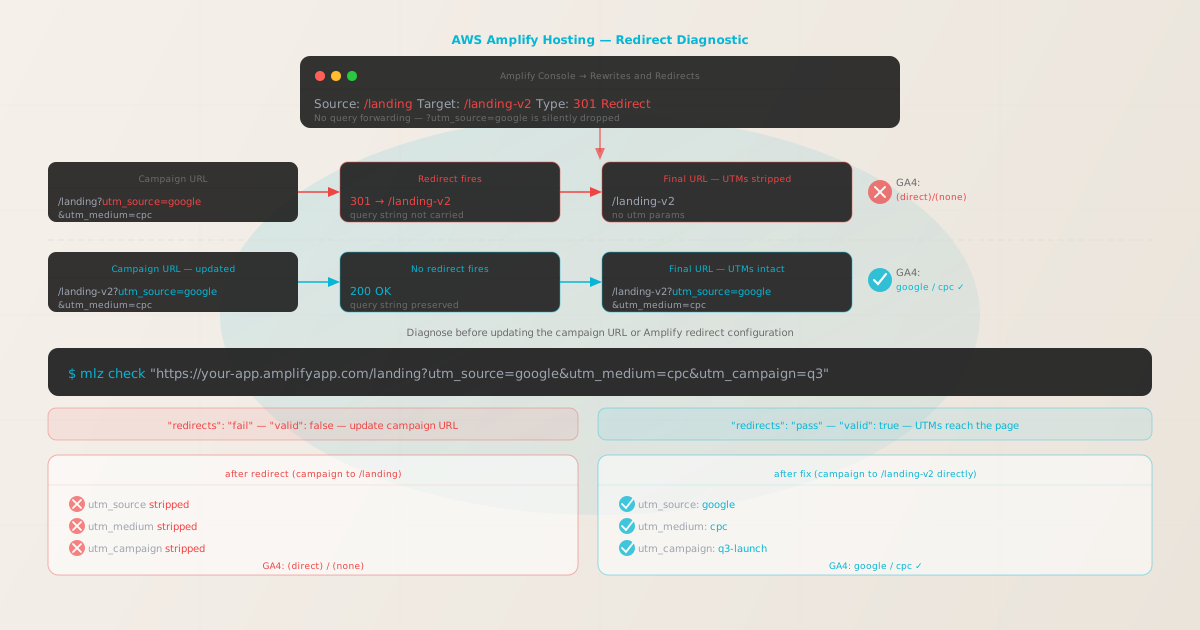
UTM parameters not tracked in AWS Amplify is a redirect problem, not a hosting problem. Amplify Hosting serves content from CloudFront's global edge network — GA4's gtag.js reads the query string from window.location.search on page load, and UTMs reach the browser intact when no redirect intercepts the request.
When UTM parameters go missing on an Amplify deployment, the cause is almost always a redirect rule configured in the Amplify Console under "Rewrites and Redirects" whose target URL does not include query-string forwarding. The campaign URL matches the source pattern, Amplify issues the redirect, and the browser lands on the destination URL without any query string — so GA4 records the session as (direct)/(none).
Before changing any Amplify configuration, run mlz check from MissingLinkz against the exact campaign URL you are using. MissingLinkz is campaign link infrastructure: it follows the full network redirect chain and reports which hop drops the query string, so you fix the right configuration on the first attempt instead of guessing and redeploying.
Step zero: diagnose with mlz check
Install MissingLinkz and run mlz check against the exact campaign URL — the same URL used in the ad, email, or social post:
npm install -g missinglinkz
$ mlz check "https://your-app.amplifyapp.com/landing?utm_source=google&utm_medium=cpc&utm_campaign=q3"
If an Amplify redirect rule is intercepting the campaign URL and stripping the query string, the output shows a redirect failure:
{
  "url": "https://your-app.amplifyapp.com/landing?utm_source=google&utm_medium=cpc&utm_campaign=q3",
  "redirects": "fail",
  "redirectDetails": "301: /landing → /landing-v2 — utm params not forwarded",
  "finalUrl": "https://your-app.amplifyapp.com/landing-v2",
  "valid": false
}
The redirectDetails field shows the source path (/landing) and the destination path (/landing-v2). The finalUrl is the canonical destination — this is the URL your campaign should target directly. Look for a matching redirect rule in the Amplify Console under Hosting → Rewrites and Redirects.
Cause: Amplify Console redirect rules without query-string forwarding
In the AWS Amplify Console, the Rewrites and Redirects section lets you define redirect rules by specifying a source pattern, a target URL, and a redirect type (301 Permanent, 302 Temporary, or others). When Amplify evaluates an incoming request against these rules, it redirects to the target URL exactly as configured — the query string from the incoming request is not appended to the target by default.
A redirect rule configured as:
Source:  /landing
Target:  /landing-v2
Type:    301 (Permanent Redirect)
intercepts any request to /landing and redirects to /landing-v2 — period. The query string from the original request, including all UTM parameters, is not included. A campaign URL like https://your-app.amplifyapp.com/landing?utm_source=google&utm_medium=cpc lands at https://your-app.amplifyapp.com/landing-v2 with no query string. GA4 attributes the session to (direct)/(none).
Amplify's redirect configuration also accepts the ?query* syntax in both the source and target to match and forward query strings:
Source:  /landing?query*
Target:  /landing-v2?query*
Type:    301 (Permanent Redirect)
Adding ?query* to both the source and target causes Amplify to match requests that include a query string and pass the query string through to the target. However, for campaign traffic the simpler and more reliable fix is to update the campaign URL to point directly to the final destination path, bypassing the redirect rule entirely.
The cleanest fix: update the campaign URL
If the mlz check output shows that the redirect goes from /landing to /landing-v2, update every campaign link to target /landing-v2 directly. The campaign URL becomes:
https://your-app.amplifyapp.com/landing-v2?utm_source=google&utm_medium=cpc&utm_campaign=q3
No redirect fires. CloudFront serves the page from the final path with the full query string intact. GA4 records google / cpc / q3.
Avoid modifying the redirect rule to add query forwarding unless you also control the SEO implications. A /landing to /landing-v2 301 redirect may exist for page consolidation or backlink preservation — changing it to forward query strings is correct for UTM tracking but should be treated as a configuration change that requires review, not a one-line fix.
Cause 2: Custom domain redirect hop
Amplify Hosting assigns every app a default URL at *.amplifyapp.com. When you connect a custom domain, Amplify creates a redirect from the Amplify default URL to the custom domain. If campaign links use the amplifyapp.com URL and you have not verified that this redirect preserves the query string, UTM parameters can be lost at the domain redirect hop before any page-level redirect fires.
Use mlz check against the amplifyapp.com URL to verify the hop:
$ mlz check "https://main.d1abcdefghij.amplifyapp.com/landing?utm_source=google&utm_medium=cpc"
If UTMs survive this hop, the redirect is not the cause. If they are stripped, the fix is to use the custom domain directly in all campaign links — not the default Amplify URL.
Validate the fixed campaign URL before launch
After updating campaign URLs to the final destination path, re-run mlz check to confirm the fix works before the campaign goes live:
$ mlz check "https://your-app.amplifyapp.com/landing-v2?utm_source=google&utm_medium=cpc&utm_campaign=q3"
{
  "url": "https://your-app.amplifyapp.com/landing-v2?utm_source=google&utm_medium=cpc&utm_campaign=q3",
  "redirects": "pass",
  "valid": true
}
Run a full pre-launch check with mlz preflight
For Amplify campaign landing pages, run mlz preflight before launch. This validates the redirect chain, SSL certificate, UTM parameter structure, and Open Graph and Twitter Card tags in one command:
$ mlz preflight \
    --url "https://your-app.amplifyapp.com/landing-v2" \
    --source "google" \
    --medium "cpc" \
    --campaign "q3-launch"
{
  "ready": true,
  "tracked_url": "https://your-app.amplifyapp.com/landing-v2?utm_source=google&utm_medium=cpc&utm_campaign=q3-launch",
  "checks": [
    { "check": "ssl",        "status": "pass", "message": "URL uses HTTPS." },
    { "check": "resolution", "status": "pass", "message": "Destination responded with 200." },
    { "check": "redirects",  "status": "pass", "message": "No redirects detected." },
    { "check": "og_tags",    "status": "pass", "message": "All essential Open Graph tags present." }
  ],
  "recommendation": "All checks passed. Campaign link is ready to publish."
}
Auditing multiple Amplify landing pages
For Amplify applications with multiple campaign landing pages or multiple deployment branches (production, staging, feature branches), batch-validate all destination URLs before any campaign launches:
URLS=(
  "https://your-app.amplifyapp.com/landing-v2?utm_source=google&utm_medium=cpc&utm_campaign=q3"
  "https://your-app.amplifyapp.com/pricing?utm_source=linkedin&utm_medium=paid-social&utm_campaign=q3"
  "https://your-app.amplifyapp.com/signup?utm_source=email&utm_medium=newsletter&utm_campaign=q3"
)

for url in "${URLS[@]}"; do
  mlz check "$url"
done
Run this against both the default amplifyapp.com URL and any custom domain connected to the Amplify app. The Amplify Console's redirect rules apply globally across all domains configured on the app, so a rule that strips UTMs on amplifyapp.com will also strip them on the custom domain.
Amplify vs other CloudFront-served platforms
Amplify Hosting is built on top of CloudFront and S3. The UTM tracking story is identical to other CloudFront-backed platforms: query strings reach the browser intact when the campaign URL targets the final destination directly, and are lost when a redirect intercepts the request at the CDN edge.
The Amplify Console's Rewrites and Redirects configuration is different from the redirect mechanisms on Netlify (_redirects file) and Vercel (vercel.json and Edge Middleware), but the diagnostic tool and the fix pattern are the same. mlz check works identically across all of these platforms — it follows the actual network hops and reports where the query string is lost.
For applications hosted on Amplify with a React or Next.js SPA frontend, also check the SPA tracking hub — client-side routing can discard the initial query string independently of server-side redirects, and is a separate issue not visible in mlz check output.
For a broader reference on campaign link validation, including pre-launch checklists and CI/CD integration, see the main validation guide.
- FAQ
- Does AWS Amplify strip UTM parameters by default?
- No. AWS Amplify Hosting serves content through CloudFront and preserves the full query string when delivering files to the browser. UTM parameters are only lost when a redirect rule configured in the Amplify Console or in
amplify.ymlintercepts the request and redirects to a target that does not include the query string. - Where are Amplify redirect rules configured?
- In the AWS Amplify Console, navigate to your app, then choose Hosting → Rewrites and redirects. You can also define redirect rules in a
customRulessection ofamplify.yml— check both locations when diagnosing UTM loss. - How do I forward query strings through an Amplify redirect?
- Add
?query*to both the source pattern and the target URL in the Amplify Console (e.g., source:/landing?query*, target:/landing-v2?query*). This tells Amplify to match requests with a query string and forward the query to the destination. For campaign traffic, updating the campaign URL to point to the final destination directly is simpler and avoids the need to modify the redirect rule. - Can an Amplify rewrite (not a redirect) strip UTM parameters?
- No. Amplify rewrites are URL transformations that resolve the request to a different backend path without changing the browser's address bar. The visitor's browser retains the original URL — including all UTM parameters — so GA4 reads the correct query string. The query string loss problem is specific to redirect rules, not rewrites. Run
mlz checkto confirm: a rewrite will show"redirects": "pass"because no redirect hop occurs. - Does this apply to Amplify's CI/CD build pipeline?
- No. The Amplify CI/CD pipeline (builds, deployments, branch previews) does not affect how HTTP requests are handled by the CDN edge. UTM loss in Amplify is always a runtime redirect issue, not a build issue. The redirect rules that strip UTMs exist in the Amplify Console's Rewrites and Redirects section and take effect after the build is deployed.
Confirm your Amplify campaign URLs pass mlz check before launch
One command follows the full network redirect chain — including Amplify Console redirect rules and custom domain hops — and reports whether your UTM parameters reach the final CloudFront deployment intact.
1,000 links/month free. No credit card.
Your API key
Save this now — it won't be shown again.
npm install -g missinglinkz
Ten seconds to confirm an Amplify landing page is redirect-free and ready for campaign traffic.