UTM Parameters Not Tracked in Vercel: vercel.json Redirects and Middleware Strip Query Strings
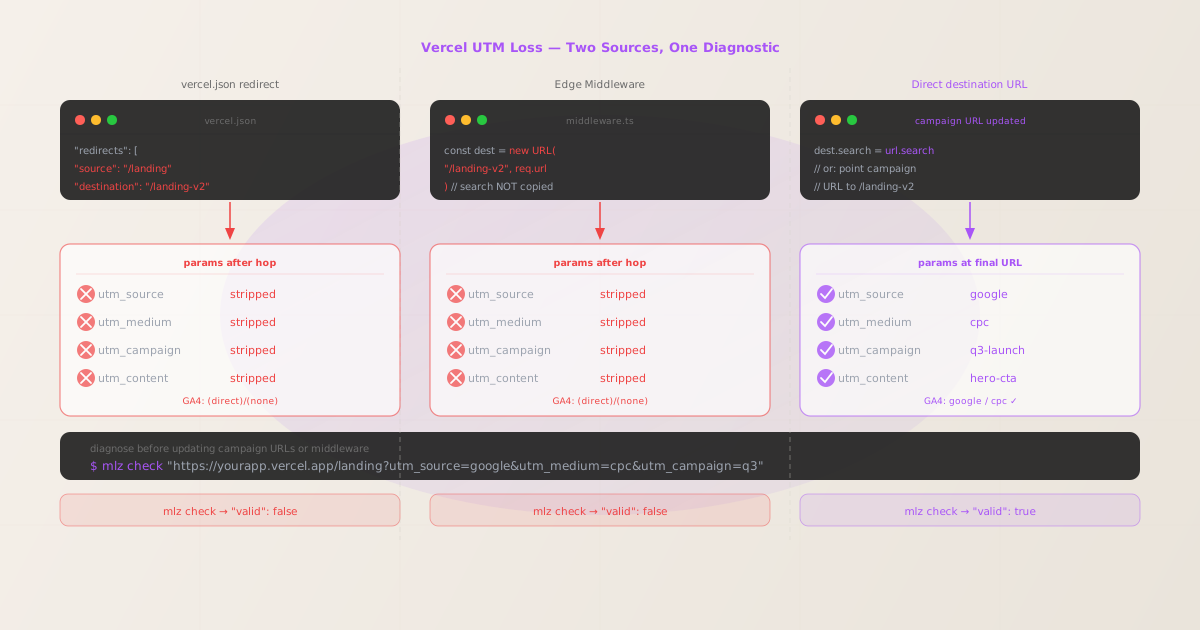
UTM parameters not tracked in Vercel is a redirect problem, not a framework problem. Vercel's edge network serves responses with the full incoming query string when no configuration intercepts the request — GA4's gtag.js reads window.location.search on page load and records attribution correctly.
When UTM parameters go missing on a Vercel deployment, the cause is one of two places: a vercel.json redirects array entry whose destination field captures the campaign URL path and does not carry forward the query string, or a Next.js Edge Middleware file (middleware.ts or middleware.js) that calls NextResponse.redirect(new URL('/path', req.url)) without copying url.search to the new URL object.
Before changing any Vercel configuration or middleware code, run mlz check from MissingLinkz against the exact campaign URL. MissingLinkz follows the redirect chain at the network level and reports which hop drops the query string, so you fix the right file on the first attempt rather than committing changes to middleware, redeploying to Vercel's edge, and testing again.
Step zero: diagnose with mlz check
Install MissingLinkz and run mlz check against the exact URL used in the ad, email, or social post:
npm install -g missinglinkz
$ mlz check "https://yourapp.vercel.app/landing?utm_source=google&utm_medium=cpc&utm_campaign=q3"
If a vercel.json redirect or Edge Middleware hop is stripping the query string, the output shows:
{
  "url": "https://yourapp.vercel.app/landing?utm_source=google&utm_medium=cpc&utm_campaign=q3",
  "redirects": "fail",
  "redirectDetails": "307: /landing → /landing-v2 — utm params not forwarded",
  "finalUrl": "https://yourapp.vercel.app/landing-v2",
  "valid": false
}
The redirectDetails field shows the source path (/landing) and the destination path (/landing-v2) — look for a matching rule in your vercel.json redirects array, or a middleware.ts condition on the source path. The finalUrl is the canonical destination — this is the path the campaign URL should target directly.
Cause 1: vercel.json redirects array
Vercel's vercel.json configuration file supports a redirects array where each entry specifies a source pattern and a destination URL. When a campaign URL matches the source pattern, Vercel redirects to the destination. The query string from the incoming request is not carried forward to the destination by default.
{
  "redirects": [
    {
      "source": "/landing",
      "destination": "/landing-v2",
      "permanent": false
    }
  ]
}
A campaign URL like https://yourapp.vercel.app/landing?utm_source=google&utm_medium=cpc will be redirected to https://yourapp.vercel.app/landing-v2 — the query string is not appended to the destination. GA4 records the session as (direct)/(none).
Note that Vercel's redirects array is different from its rewrites array. Rewrites are URL transformations that don't change the browser's address bar, and they do preserve the query string. If the vercel.json uses rewrites instead of redirects, UTM tracking may work correctly depending on how the rewrite resolves. Run mlz check to confirm either way.
The cleanest fix for campaign traffic is to update the campaign URL to the final destination path, bypassing the redirect entirely. Do not modify vercel.json to add query-string forwarding — the redirect rule may be needed for SEO purposes or legacy path handling, and adding ?:query* to the destination can have unintended effects on other routes.
Cause 2: Next.js Edge Middleware without searchParams forwarding
Next.js applications deployed on Vercel can define an Edge Middleware file at the root of the project (middleware.ts or middleware.js). This file runs on every matching request at the CDN edge before any page or API route handles it. When middleware performs a redirect using NextResponse.redirect() without explicitly copying the query string, UTM parameters are lost before the page renders.
The incorrect pattern that causes UTM loss:
import { NextResponse } from 'next/server'
import type { NextRequest } from 'next/server'

export function middleware(request: NextRequest) {
  const url = request.nextUrl.clone()
  if (url.pathname === '/landing') {
    // BUG: new URL creates a clean URL — search is empty
    const dest = new URL('/landing-v2', request.url)
    return NextResponse.redirect(dest)
  }
}
The new URL('/landing-v2', request.url) call creates a URL object with the correct host and pathname but no query string. Any UTM parameters in the incoming request's query string are not present on the dest object. The redirect sends the browser to /landing-v2 without them.
The correct implementation copies search explicitly:
import { NextResponse } from 'next/server'
import type { NextRequest } from 'next/server'

export function middleware(request: NextRequest) {
  const url = request.nextUrl.clone()
  if (url.pathname === '/landing') {
    const dest = new URL('/landing-v2', request.url)
    dest.search = url.search // preserve all query params including UTMs
    return NextResponse.redirect(dest)
  }
}
Alternatively, use request.nextUrl.clone() and mutate the pathname — the nextUrl object preserves the original query string automatically when you clone it:
export function middleware(request: NextRequest) {
  if (request.nextUrl.pathname === '/landing') {
    const dest = request.nextUrl.clone()
    dest.pathname = '/landing-v2'
    // dest.search is automatically preserved from the original request
    return NextResponse.redirect(dest)
  }
}
Using request.nextUrl.clone() and updating only pathname is the idiomatic Next.js approach and the pattern least likely to silently drop query parameters across future middleware changes. Use it as the default in any new middleware that performs path-based redirects.
Identify which configuration is stripping UTMs
When mlz check shows a redirect failure, use the HTTP status code in redirectDetails to determine which configuration is responsible:
- 307 or 308
- Temporary or permanent redirects from
vercel.jsonredirectsentries. Vercel uses 307 when"permanent": falseand 308 when"permanent": true. Checkvercel.jsonfor aredirectsrule matching the source path. - 302
- Often indicates Edge Middleware using
NextResponse.redirect(). The default status forNextResponse.redirect(url)is 307, but some implementations pass a second argument:NextResponse.redirect(url, 302). Checkmiddleware.tsfor a condition that matches the campaign URL path. - 301
- A permanent redirect. Could be a
vercel.jsonredirectsentry with"permanent": true, or a Next.js page-levelredirect()call. Runmlz check— if the source path maps to a Next.js page, check the page'sgetServerSidePropsor the app router's equivalent for a redirect.
Validate the fixed campaign URL before launch
After updating the campaign URL to the final destination path (or after fixing middleware to copy search), re-run mlz check to confirm the fix works before the campaign goes live:
$ mlz check "https://yourapp.vercel.app/landing-v2?utm_source=google&utm_medium=cpc&utm_campaign=q3"
{
  "url": "https://yourapp.vercel.app/landing-v2?utm_source=google&utm_medium=cpc&utm_campaign=q3",
  "redirects": "pass",
  "valid": true
}
Run a full pre-launch check with mlz preflight
For Vercel campaign landing pages, run mlz preflight before the campaign launches. This validates the redirect chain, SSL certificate, UTM parameter structure, and Open Graph and Twitter Card tags in one command:
$ mlz preflight \
    --url "https://yourapp.vercel.app/landing-v2" \
    --source "google" \
    --medium "cpc" \
    --campaign "q3-launch"
{
  "ready": true,
  "tracked_url": "https://yourapp.vercel.app/landing-v2?utm_source=google&utm_medium=cpc&utm_campaign=q3-launch",
  "checks": [
    { "check": "ssl",        "status": "pass", "message": "URL uses HTTPS." },
    { "check": "resolution", "status": "pass", "message": "Destination responded with 200." },
    { "check": "redirects",  "status": "pass", "message": "No redirects detected." },
    { "check": "og_tags",    "status": "pass", "message": "All essential Open Graph tags present." }
  ],
  "recommendation": "All checks passed. Campaign link is ready to publish."
}
Auditing multiple Vercel campaign URLs
For applications with multiple landing pages or multiple Vercel deployment environments (production, preview, development), batch-validate all destination URLs before any campaign launches:
URLS=(
  "https://yourapp.com/landing-v2?utm_source=google&utm_medium=cpc&utm_campaign=q3"
  "https://yourapp.com/pricing?utm_source=linkedin&utm_medium=paid-social&utm_campaign=q3"
  "https://yourapp.com/docs?utm_source=email&utm_medium=newsletter&utm_campaign=q3"
)

for url in "${URLS[@]}"; do
  mlz check "$url"
done
Run this against both the production Vercel URL and any custom domain assigned to the deployment — Edge Middleware can behave differently depending on the host header, and redirect configurations in vercel.json apply to all custom domains associated with the project.
Vercel vs other edge-deployed platforms
Vercel's UTM tracking story is the same as other edge-deployed platforms: query strings reach the browser intact when the campaign URL targets the final destination directly, and are lost when a redirect intercepts the request. The Vercel-specific configurations that cause the problem — vercel.json redirects and Next.js Edge Middleware — are different from the mechanisms on Netlify (_redirects file and Netlify Edge Functions) and on Cloudflare Workers, but the diagnostic tool and the fix are identical.
For any campaign link validation workflow, mlz check works identically across all platforms — it follows the actual network hops and reports where the query string is lost, regardless of which platform or edge runtime is serving the request.
Next.js-specific: if the application uses the App Router and a Next.js SPA tracking setup, confirm that the client-side router does not discard the query string when transitioning between pages after the initial load. This is a separate issue from server-side redirects and is not visible in mlz check output.
- FAQ
- Does Vercel strip UTM parameters by default?
- No. Vercel's edge network delivers the full incoming query string to the origin function or static file when no redirect configuration intercepts the request. UTM parameters are only lost when a
vercel.jsonredirect rule or an Edge Middleware redirect fires for the campaign URL path. - How do I tell if middleware or vercel.json is causing the UTM loss?
- Run
mlz checkand look at the HTTP status code inredirectDetails. A 307 or 308 typically indicates avercel.jsonredirect entry. A 302 often indicates Edge Middleware. But the surest method is to check yourvercel.jsonfor aredirectsentry matching the source path, and check yourmiddleware.tsfor a condition matching the same path — one of the two will match. - Can I add query-string forwarding to a
vercel.jsonredirect rule? - Vercel's
vercel.jsondoes not support a built-in option to forward the source query string to the destination in all cases. The documented approach for preserving query strings across Vercel redirects is to use Edge Middleware, where you can explicitly copyurl.searchto the destination URL. For campaign traffic specifically, the simpler fix is to use the final destination URL in the campaign link, bypassing the redirect rule entirely. - My Next.js middleware uses
NextResponse.rewrite()instead ofNextResponse.redirect()— do UTMs survive? - Rewrites modify the URL the application sees internally but do not change the browser's address bar. The visitor's browser retains the original URL — including all UTM parameters — throughout the page load. GA4 reads from
window.location.search, which reflects the browser address bar, so UTMs are preserved. The query string loss problem is specific toNextResponse.redirect(). - Does this apply to Vercel's Edge Config or KV storage?
- No. Edge Config and KV storage are data stores; they do not intercept or modify HTTP requests. If middleware reads from Edge Config to make a routing decision and then calls
NextResponse.redirect(), the UTM loss is caused by the redirect call — not by the data store lookup. Fix theNextResponse.redirect()call to copyurl.search.
Confirm your Vercel campaign URLs pass mlz check before launch
One command follows the full network redirect chain — including vercel.json rules and Edge Middleware hops — and reports whether your UTM parameters reach the final Vercel deployment intact.
1,000 links/month free. No credit card.
Your API key
Save this now — it won't be shown again.
npm install -g missinglinkz
Ten seconds to confirm a Vercel landing page is redirect-free and ready for campaign traffic.