UTM Parameters Not Tracked in Netlify: _redirects File and Edge Functions Strip Query Strings
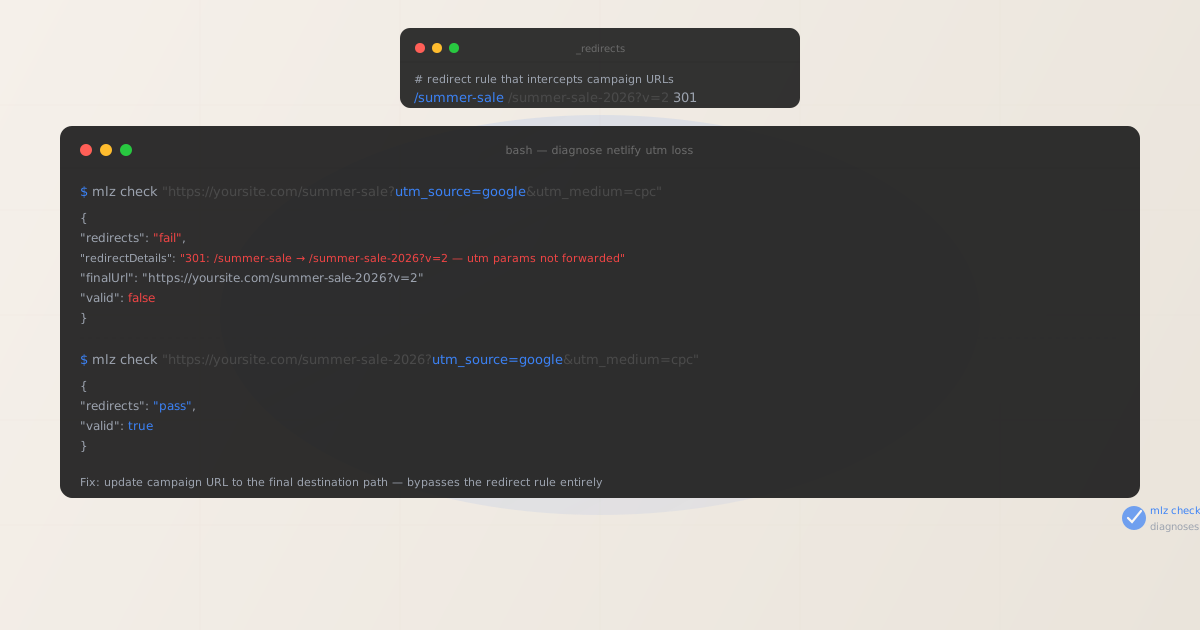
UTM parameters not tracked in Netlify is almost always a configuration problem, not a platform limitation. Netlify delivers files from its global CDN edge network, and GA4's gtag.js reads UTM parameters directly from window.location.search on page load — when the final URL carries the query string, attribution is recorded correctly.
When UTM parameters go missing on a Netlify site, the cause is typically one of three things: a _redirects file rule whose destination URL includes explicit query parameters (which override the incoming query string instead of merging with it), a netlify.toml [[redirects]] entry with the same behavior, or a Netlify Edge Function that reconstructs a URL without copying searchParams.
Before adjusting any Netlify configuration, run mlz check from MissingLinkz against the exact campaign URL — including all UTM parameters. MissingLinkz follows the full redirect chain and reports precisely where the query string is dropped. That diagnosis takes one command and identifies which of the three causes applies, so you update the right thing on the first attempt rather than guessing at configuration.
Step zero: diagnose with mlz check
Install MissingLinkz and run mlz check against the campaign URL exactly as it appears in the ad, email, or social post:
npm install -g missinglinkz
$ mlz check "https://yoursite.com/summer-sale?utm_source=google&utm_medium=cpc&utm_campaign=q3"
If the campaign URL path matches a _redirects rule that has an explicit query parameter in the destination, the output shows a redirect failure:
{
  "url": "https://yoursite.com/summer-sale?utm_source=google&utm_medium=cpc&utm_campaign=q3",
  "redirects": "fail",
  "redirectDetails": "301: /summer-sale → /summer-sale-2026?v=2 — utm params not forwarded",
  "finalUrl": "https://yoursite.com/summer-sale-2026?v=2",
  "valid": false
}
The redirectDetails field identifies the exact rule at work. The finalUrl shows where the visitor actually lands — this is the path your campaign URL should target directly to bypass the redirect.
If "redirects": "pass" but GA4 attribution is still missing, the cause is not a network-level redirect. In that case, investigate whether a Netlify Edge Function is intercepting the request, whether your Netlify site has multiple custom domains with conflicting routing, or whether a client-side JavaScript router is re-rendering the view after the initial page load and discarding the query string.
Cause 1: _redirects rules with explicit query parameters in the destination
Netlify's _redirects file supports rules of the form /source /destination [status]. When both the source URL and the destination URL carry query parameters, Netlify does not merge them — the destination's query string takes precedence and the original query string is discarded.
A rule like this:
/summer-sale /summer-sale-2026?v=2 301
will redirect /summer-sale?utm_source=google&utm_medium=cpc to /summer-sale-2026?v=2. The UTM parameters from the campaign URL are not carried forward — only the destination's v=2 parameter survives.
This is a common pattern in Netlify deployments when a page has been renamed or restructured and the redirect was written to preserve some internal tracking parameter. The developer who wrote the redirect was not thinking about campaign traffic, so the destination was written with a static query string. Any campaign URL targeting the old path silently loses attribution.
The fix is to update the campaign URL to point directly to /summer-sale-2026 with the UTM parameters in the query string, bypassing the redirect rule entirely. Do not modify the _redirects rule — it may be used for other purposes or SEO preservation. Update the campaign instead.
Cause 2: netlify.toml redirect entries with query parameters
The netlify.toml configuration file supports an equivalent redirect syntax under the [[redirects]] table. The same behavior applies: when the to field includes a query string, it overrides the incoming query string from the campaign URL.
[[redirects]]
  from = "/landing"
  to   = "/landing-v2?theme=dark"
  status = 301
A campaign URL targeting /landing?utm_source=linkedin&utm_medium=paid-social will be redirected to /landing-v2?theme=dark. The UTM parameters are not preserved. GA4 records the session as (direct)/(none).
Teams using netlify.toml for deployment configuration often centralise all redirect rules there, and these rules accumulate over time as pages are restructured. Run mlz check before every campaign launch to confirm that the campaign URL does not match any redirect rule in the file, even rules added months ago for a previous restructure.
Cause 3: Edge Functions that reconstruct URLs without copying searchParams
Netlify Edge Functions are JavaScript/TypeScript functions that run at the CDN edge and can intercept every incoming request. Developers use them for geo-routing, authentication gates, A/B testing, and personalisation. When an Edge Function redirects a visitor to a new URL without explicitly copying the original URL's query parameters, UTM tracking is silently broken.
The incorrect pattern looks like this:
export default async (request, context) => {
  const url = new URL(request.url);
  if (url.pathname === "/landing") {
    const dest = new URL("/landing-eu", request.url);
    // BUG: dest.search is empty — utm params are lost
    return Response.redirect(dest.toString(), 302);
  }
}
The new URL('/landing-eu', request.url) constructor creates a URL object with the new pathname but does not copy the query string. Any UTM parameters in the incoming request disappear at the edge before the visitor's browser ever sees the landing page.
The correct implementation copies searchParams explicitly:
export default async (request, context) => {
  const url = new URL(request.url);
  if (url.pathname === "/landing") {
    const dest = new URL("/landing-eu", request.url);
    dest.search = url.search; // preserve utm params and all query string
    return Response.redirect(dest.toString(), 302);
  }
}
When an Edge Function is the suspected cause — especially if mlz check shows the redirect succeeds in terms of HTTP status but the final URL is missing query parameters — the issue is in the function's URL construction. Test the campaign URL in the Netlify Functions dev server or in the Netlify dashboard's edge function logs to observe the exact URL being constructed.
The fix: build campaign URLs against the final destination
For all Netlify campaign links, build the URL using the canonical final destination path — the exact path that serves the page without any redirect rule intervening. Validate the URL before any campaign launches:
$ mlz check "https://yoursite.com/summer-sale-2026?utm_source=google&utm_medium=cpc&utm_campaign=q3"
{
  "url": "https://yoursite.com/summer-sale-2026?utm_source=google&utm_medium=cpc&utm_campaign=q3",
  "redirects": "pass",
  "valid": true
}
Run a full pre-launch check with mlz preflight
For any Netlify campaign landing page, run mlz preflight before the campaign launches. This validates the redirect chain, SSL certificate, UTM parameter structure, Open Graph tags for social sharing, and Twitter Card tags in one command:
$ mlz preflight \
    --url "https://yoursite.com/summer-sale-2026" \
    --source "google" \
    --medium "cpc" \
    --campaign "q3-launch"
{
  "ready": true,
  "tracked_url": "https://yoursite.com/summer-sale-2026?utm_source=google&utm_medium=cpc&utm_campaign=q3-launch",
  "checks": [
    { "check": "ssl",        "status": "pass", "message": "URL uses HTTPS." },
    { "check": "resolution", "status": "pass", "message": "Destination responded with 200." },
    { "check": "redirects",  "status": "pass", "message": "No redirects detected." },
    { "check": "og_tags",    "status": "pass", "message": "All essential Open Graph tags present." }
  ],
  "recommendation": "All checks passed. Campaign link is ready to publish."
}
Auditing multiple Netlify campaign URLs
For sites with multiple active campaigns or multiple Netlify deploy contexts (production, branch deploys, deploy previews), batch-validate all destination URLs before any campaign flight:
URLS=(
  "https://yoursite.com/summer-sale-2026?utm_source=google&utm_medium=cpc&utm_campaign=q3"
  "https://yoursite.com/pricing?utm_source=linkedin&utm_medium=paid-social&utm_campaign=q3"
  "https://yoursite.com/docs/quickstart?utm_source=email&utm_medium=newsletter&utm_campaign=q3"
)

for url in "${URLS[@]}"; do
  mlz check "$url"
done
Any URL returning "valid": false is a broken campaign link. Use the finalUrl field to identify the correct destination and update the campaign before it launches.
Netlify vs other hosting platforms
Netlify's UTM tracking architecture is the same as other CDN-served static hosts: query strings arrive at the browser intact when the final URL is used directly, and can be lost when a redirect intercepts the request. The difference is that Netlify's redirect configuration is more developer-visible than a CMS's admin panel — it lives in versioned files (_redirects, netlify.toml) that engineers control.
The same pattern appears on Vercel through vercel.json redirects and Edge Middleware, and on Cloudflare Workers through edge-layer URL manipulation. In all cases, the fix is identical: use mlz check to identify the redirect and update the campaign URL to the final destination path. The redirect configuration is not changed — only the campaign URL is corrected.
For any campaign link validation workflow, mlz check works identically across all hosting platforms, following the actual network hops and reporting exactly where a query string is lost.
- FAQ
- Does Netlify strip UTM parameters by default?
- No. Netlify delivers the full URL to the browser on every CDN request. When the final destination URL carries UTM parameters and no redirect rule intercepts the request, GA4 records attribution correctly. UTM parameters are only lost when a
_redirectsrule,netlify.tomlredirect, or Edge Function modifies the URL before the page loads. - How do I tell which Netlify redirect is stripping my UTMs?
- Run
mlz checkagainst the full campaign URL. If"redirects"returns"fail", the"redirectDetails"field shows the source path, destination path, and the specific issue. The source path maps directly to a rule in your_redirectsfile ornetlify.toml. If no redirect rule matches but UTMs are still missing, check your Edge Functions for URL manipulation withoutsearchParamscopying. - My
_redirectsrule doesn't have explicit query params — why are my UTMs still lost? - A simple rule like
/old /new 301redirects/old?utm_source=googleto/new?utm_source=google— the query string is preserved. If UTMs are still missing after this redirect, the cause is elsewhere: check for a second redirect hop from/new, an Edge Function intercepting the new path, or a client-side JavaScript router that re-renders without the query string. - Can I configure Netlify Edge Functions to always preserve the query string?
- Yes. In any Edge Function that returns a
Response.redirect(), copy the original URL's search string to the destination URL:dest.search = new URL(request.url).search. This preserves all incoming query parameters — including UTM params — across every redirect the function performs. The same principle applies to Netlify's Edge Handlers and request transformation functions. - Should I use
_redirectssplat rules to forward query strings? - Splat rules like
/old/:splat /new/:splat 301handle path segments, not query strings. They do not guarantee query string forwarding when the destination URL has its own explicit query params. The reliable approach is always to update campaign URLs to point directly to the final destination path, bypassing redirect rules entirely.
Confirm your Netlify campaign URLs pass mlz check before launch
One command follows the full redirect chain — including any _redirects rules, netlify.toml entries, and Edge Function hops — and reports whether your UTM parameters reach the final Netlify page intact.
1,000 links/month free. No credit card.
Your API key
Save this now — it won't be shown again.
npm install -g missinglinkz
Ten seconds to confirm a Netlify landing page is redirect-free and ready for campaign traffic.