UTM Parameters Not Tracked in Shopify: URL Redirects and App Conflicts
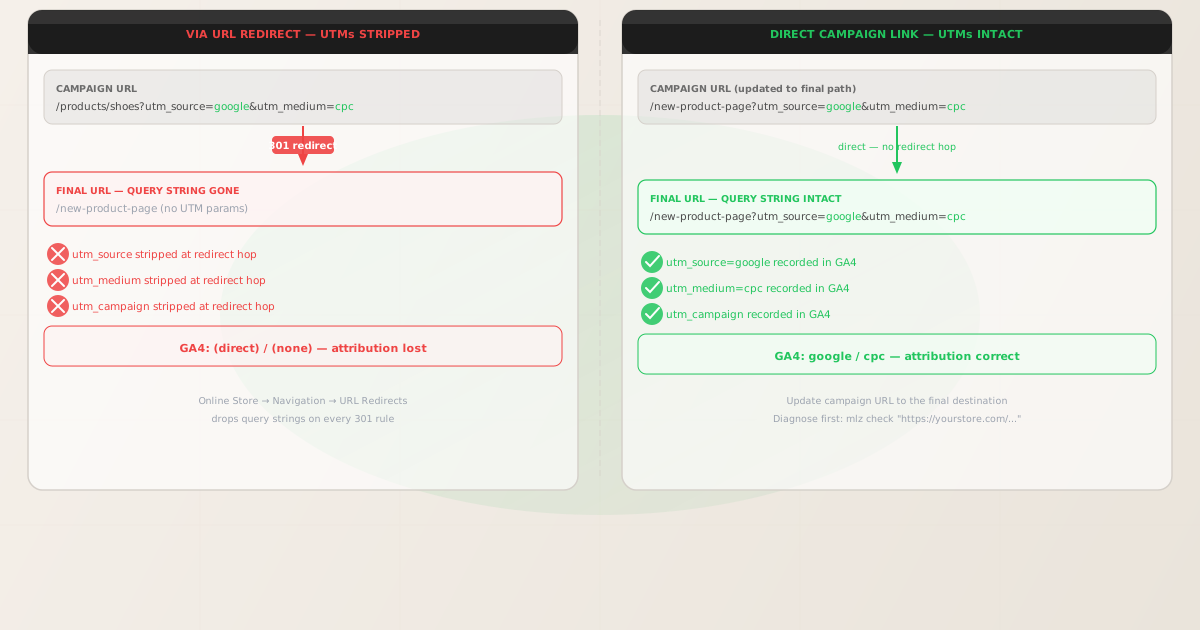
UTM parameters not tracked in Shopify is almost never a theme problem. Shopify stores are server-rendered through Liquid templates, and GA4's gtag.js reads UTM parameters directly from window.location.search when the page loads. If the query string is present in the URL delivered to the browser, attribution is recorded correctly.
When UTM parameters go missing on a Shopify store, there are three platform-level sources to investigate: URL Redirects in the Shopify admin (Online Store → Navigation → URL Redirects), custom domain redirect hops created during domain setup or migration, and third-party app redirects from loyalty, affiliate, or geo-routing apps that intercept the request before the landing page loads.
Before adjusting any Shopify settings, run mlz check from MissingLinkz against the campaign URL. MissingLinkz follows the full redirect chain and reports exactly where the query string is dropped. That diagnosis takes seconds and identifies which of the three causes applies — so you fix the right thing on the first attempt rather than guessing at theme code or GA4 configuration.
Step zero: diagnose with mlz check
Install MissingLinkz and run mlz check against the campaign URL exactly as it appears in your ad, email, or social post — including all UTM parameters:
npm install -g missinglinkz
$ mlz check "https://yourstore.com/products/shoes?utm_source=google&utm_medium=cpc&utm_campaign=q3"
If the campaign URL matches a URL redirect rule or hits a domain-level redirect, the output shows a redirect failure:
{
  "url": "https://yourstore.com/products/shoes?utm_source=google&utm_medium=cpc&utm_campaign=q3",
  "ssl": "pass",
  "redirects": "fail",
  "redirectDetails": "hop 1 (301): /products/shoes → /products/sneakers — query string stripped",
  "finalUrl": "https://yourstore.com/products/sneakers",
  "valid": false
}
A "redirects": "fail" result confirms a redirect is consuming the query string. The path in redirectDetails maps directly to a URL redirect rule or to a domain hop you can identify in Shopify settings or your app list. The finalUrl field shows where the visitor actually lands — this is the path your campaign URL should use instead.
If "redirects": "pass" but GA4 attribution is still missing, the problem is not a network redirect. Investigate your GA4 data stream configuration, whether the Shopify GA4 app is firing before or after page hydration, and whether any Shopify theme code is performing client-side navigation after the initial page load.
Cause 1: URL Redirects in the Shopify admin
Shopify's URL Redirects tool (Online Store → Navigation → URL Redirects) lets merchants create 301 redirects from old product URLs to new ones. This is a standard part of Shopify store management — whenever a product handle changes, a product is discontinued, or a collection is reorganised, merchants create redirect rules to preserve search rankings.
These redirect rules do not forward incoming query strings. A redirect from /products/old-name to /products/new-name delivers the visitor to /products/new-name with no UTM parameters. GA4 records the session as (direct)/(none).
Shopify stores accumulate URL redirect rules over time, particularly after product catalogue changes, Shopify migration from another platform, or theme updates that change URL structure. A campaign that worked against an old product URL will silently fail if that URL is now covered by a redirect rule.
The fix is to update the campaign URL to point directly to the current, final path — the finalUrl returned by mlz check. Do not remove the redirect rule (it may protect SEO equity). Update the campaign instead.
Cause 2: Custom domain redirect hops
Connecting a custom domain to a Shopify store introduces several redirect hops that can drop query strings. Shopify stores are hosted at myshop.myshopify.com by default. When you connect a custom domain, requests arriving at the myshopify.com address are redirected to the custom domain. This redirect drops the query string.
Any campaign links still using the myshopify.com address — whether from old ads, old email templates, or shared links — will lose UTM parameters at this domain-level redirect. Similarly, HTTP-to-HTTPS redirects and www-to-non-www (or non-www-to-www) redirects behave the same way: they redirect without forwarding the query string.
Confirm the canonical domain form your store uses — typically https://yourstore.com — and ensure all campaign links use that exact form. Run mlz check against each link variant to confirm which form avoids a redirect.
$ mlz check "https://myshop.myshopify.com/products/sneakers?utm_source=google&utm_medium=cpc&utm_campaign=q3"
{
  "redirects": "fail",
  "redirectDetails": "hop 1 (301): myshop.myshopify.com → yourstore.com — query string stripped",
  "valid": false
}

$ mlz check "https://yourstore.com/products/sneakers?utm_source=google&utm_medium=cpc&utm_campaign=q3"
{
  "redirects": "pass",
  "valid": true
}
Cause 3: Third-party app redirects
Shopify's app ecosystem includes apps that intercept incoming requests before the page loads. Geo-routing apps redirect visitors to region-specific store instances or subfolders. Loyalty and referral apps redirect links through their own tracking URLs. Some affiliate and A/B testing apps wrap campaign links through their own redirect infrastructure.
When one of these apps is active, a campaign link that passes cleanly to the Shopify storefront in a test environment may go through an additional redirect hop in production — and that hop drops the query string. The symptom is UTM parameters appearing to work when you test manually but going missing in GA4 for live campaign traffic.
Run mlz check against the campaign URL in production (not a development or preview environment) to capture the full redirect chain as live visitors experience it. If a third-party app redirect appears in the redirectDetails output, contact the app developer about query string forwarding configuration, or remove that app from the traffic path for campaign landing pages.
The fix: link campaign URLs to the final destination directly
For all Shopify campaign links, build the URL using the exact canonical domain and current page path — with no redirect rules, no old product handles, and no myshopify.com domain in the path. Validate the URL before any campaign launches:
$ mlz check "https://yourstore.com/products/sneakers?utm_source=google&utm_medium=cpc&utm_campaign=q3"
{
  "url": "https://yourstore.com/products/sneakers?utm_source=google&utm_medium=cpc&utm_campaign=q3",
  "ssl": "pass",
  "redirects": "pass",
  "valid": true
}
Run a full pre-launch check with mlz preflight
For any Shopify campaign landing page, run mlz preflight before the campaign launches. This validates the SSL certificate, redirect chain integrity, UTM parameter structure, Open Graph tags for social sharing, and Twitter Card tags in one command:
$ mlz preflight \
    --url "https://yourstore.com/products/sneakers" \
    --source "google" \
    --medium "cpc" \
    --campaign "q3-launch"
{
  "ready": true,
  "tracked_url": "https://yourstore.com/products/sneakers?utm_source=google&utm_medium=cpc&utm_campaign=q3-launch",
  "checks": [
    { "check": "ssl",        "status": "pass", "message": "URL uses HTTPS." },
    { "check": "resolution", "status": "pass", "message": "Destination responded with 200." },
    { "check": "redirects",  "status": "pass", "message": "No redirects detected." },
    { "check": "og_tags",    "status": "pass", "message": "All essential Open Graph tags present." }
  ],
  "recommendation": "All checks passed. Campaign link is ready to publish."
}
Auditing multiple Shopify campaign URLs
For stores with multiple active campaigns pointing to different product pages or collections, batch-validate all destination URLs before any campaign flight:
URLS=(
  "https://yourstore.com/products/sneakers?utm_source=google&utm_medium=cpc&utm_campaign=q3"
  "https://yourstore.com/collections/summer?utm_source=facebook&utm_medium=paid-social&utm_campaign=q3"
  "https://yourstore.com/pages/sale?utm_source=email&utm_medium=newsletter&utm_campaign=q3"
)

for url in "${URLS[@]}"; do
  mlz check "$url"
done
Any URL returning "valid": false is a broken campaign link that will deliver no attribution data to GA4. Identify the final destination path using the finalUrl field and update the campaign before it launches.
Shopify vs other hosted platforms
Shopify's UTM tracking architecture is identical to other server-rendered platforms: the query string is delivered to the browser intact when the final page URL is used directly, and lost when a redirect intercepts the request. The same pattern applies to WordPress with caching and redirect plugins, Squarespace with its URL Redirects tool, and Wix with its URL Redirect Manager.
The Shopify-specific risk is the rate at which URL redirect rules accumulate. Product catalogue changes, seasonal collections, discontinued SKUs, and platform migrations all generate redirect rules in the Shopify admin. A campaign created against a product URL that was valid six months ago may now hit a redirect that drops its UTMs. Running mlz check before every campaign launch — not just new campaigns — catches these silent failures before ad spend is committed.
For any campaign link validation workflow, mlz check works identically across hosted platforms — it follows the actual network hops and reports exactly where a query string is dropped, regardless of the platform.
- FAQ
- Does Shopify strip UTM parameters by default?
- No. Shopify delivers the full URL — including the query string — to the browser on every page request. GA4 reads UTM parameters from the URL on load. UTM parameters are only lost when a redirect rule, domain hop, or app intercepts the request before the page loads. Without a redirect in the path, UTMs arrive intact.
- How do I find which Shopify redirect is stripping my UTMs?
- Run
mlz checkagainst the full campaign URL. If"redirects"is"fail", the"redirectDetails"field shows the source path and destination path of the redirect. For URL redirect rules, this path maps to an entry in Online Store → Navigation → URL Redirects. For domain-level redirects (myshopify.com or www), the source domain will appear in the details. - Can I make Shopify URL Redirects pass query strings through?
- Shopify's URL Redirects tool does not support query string forwarding — you cannot write a redirect rule that appends the original query string to the destination. The correct fix is to update campaign URLs to point directly to the current final path and bypass the redirect entirely. Do not delete redirect rules that exist for SEO purposes.
- My Shopify UTMs work when I test but fail in GA4. Why?
- Testing is typically done with direct browser access to the final URL, bypassing any redirect rules or app intercepts. In production, campaign traffic arrives via the URL in the ad or email — which may hit a URL redirect rule, go through the myshopify.com domain, or pass through a third-party app. Run
mlz checkagainst the exact campaign URL used in the ad or email, not the page URL in your browser. - Does this apply to Shopify's checkout UTM tracking?
- Shopify's checkout is hosted on a separate domain (
checkout.shopify.comor a branded checkout subdomain), which creates a cross-domain boundary between the product page and the cart. This is a separate attribution issue distinct from the redirect-based UTM loss described in this article. Redirect-based UTM loss affects the campaign landing page before GA4 records the session; cross-domain checkout attribution is a different layer of the tracking stack.
Confirm your Shopify campaign URLs are redirect-free before launch
One mlz check command follows the full redirect chain and tells you whether your campaign URL will deliver UTM parameters to the final Shopify page — before a single dollar of ad spend is committed.
1,000 links/month free. No credit card.
Your API key
Save this now — it won't be shown again.
npm install -g missinglinkz
Five seconds to confirm your Shopify product page or collection is redirect-free and ready for campaign traffic.