UTM Parameters Not Tracked in Gatsby: How to Fix GA4 Attribution
Gatsby's <Link> component performs client-side navigation using window.history.pushState — the same mechanism that breaks GA4 UTM attribution in React Router, Next.js, Vue, and SvelteKit applications. When a visitor arrives at /landing?utm_source=google&utm_medium=cpc&utm_campaign=q3, Gatsby renders the initial page and gtag.js fires a page_view event with the correct UTM parameters. When they click a <Link to="/pricing">, Gatsby intercepts the click, prefetches the page data it cached at build time, and swaps the rendered content without a browser reload. gtag.js never fires again. Conversions on /pricing are attributed to (direct)/(none) in GA4, and your campaign loses all credit. MissingLinkz's mlz check command is the right first step: it follows the full redirect chain and confirms whether UTM parameters survive to the final URL, ruling out network-level stripping before you debug Gatsby's routing code. Once the network layer is clean, the fix is onRouteUpdate in gatsby-browser.js — Gatsby's official Client API hook that fires after every route change.
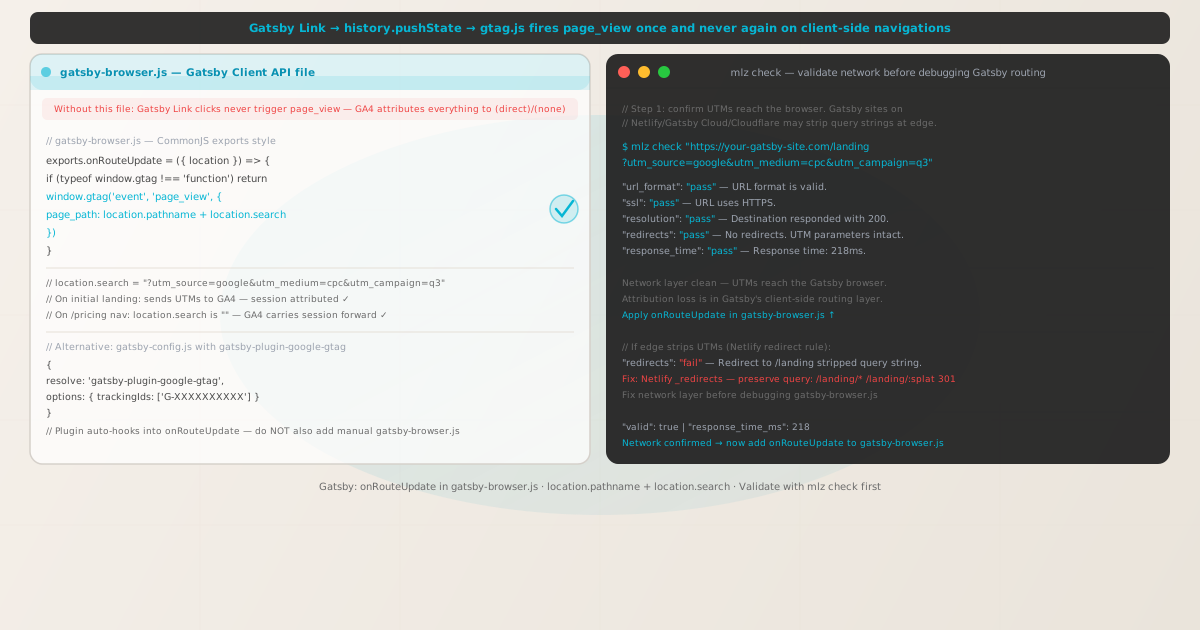
Why Gatsby breaks GA4 UTM attribution on client-side navigation
Gatsby is a React framework that builds static HTML at compile time, then hands navigation off to a client-side router at runtime. On the initial page load — whether served as static HTML from a CDN or rendered by Gatsby Cloud — the browser loads gtag.js and fires a page_view event. UTM parameters in the URL are captured and GA4 attributes the session correctly.
The problem starts when a user interacts with a <Link> component from the gatsby package. Gatsby's Link is a wrapper around its internal router that intercepts qualifying same-origin navigations. Instead of triggering a full page reload, it uses window.history.pushState to update the URL and renders the next page's component tree in place. Gatsby aggressively prefetches linked pages at build time, so these transitions feel instant.
The result: gtag.js loaded once on the initial page request, set up no listener for pushState events, and sits idle while Gatsby silently swaps pages. Every subsequent navigation is invisible to Google Analytics. If your conversion flow spans multiple pages — landing on /solutions with UTMs, then navigating to /pricing, then signing up on /signup — only the initial landing fires page_view. The conversion on /signup has no campaign data in GA4.
This behaviour applies to Gatsby 3, 4, and 5, regardless of whether you're using @reach/router (Gatsby 3/4) or React Router v6 (Gatsby 5) as the underlying router. The mechanism that causes the problem — pushState without a page reload — is the same across all versions.
Step zero: confirm the network layer isn't stripping UTMs
Before writing any gatsby-browser.js code, confirm that UTM parameters reach the browser intact. Gatsby sites commonly deploy to Netlify, Gatsby Cloud, Cloudflare Pages, or Vercel — all of which support redirect rules, headers, and edge functions that can rewrite URLs and strip query parameters before the page ever loads in a browser.
MissingLinkz's mlz check command follows every redirect hop and reports whether UTM parameters survive to the final URL:
mlz check "https://your-gatsby-site.com/landing?utm_source=google&utm_medium=cpc&utm_campaign=q3"
{
  "url": "https://your-gatsby-site.com/landing?utm_source=google&utm_medium=cpc&utm_campaign=q3",
  "valid": true,
  "checks": [
    { "check": "url_format",    "status": "pass", "message": "URL format is valid." },
    { "check": "ssl",           "status": "pass", "message": "URL uses HTTPS." },
    { "check": "resolution",    "status": "pass", "message": "Destination responded with 200." },
    { "check": "redirects",     "status": "pass", "message": "No redirects detected." },
    { "check": "response_time",  "status": "pass", "message": "Response time: 218ms." }
  ],
  "valid": true
}
All checks passing confirms UTM parameters reach the browser. The attribution problem is in Gatsby's routing layer. If you see "redirects": "fail" with a dropped query string, the problem is upstream of Gatsby. Common Netlify culprits include _redirects rules that don't preserve the query string — fix them with /landing/* /landing/:splat 301 syntax. See How to Check if a Redirect Strips UTM Parameters and UTM Parameters Stripped by Cloudflare Workers or Edge Middleware for network-layer debugging.
The fix: onRouteUpdate in gatsby-browser.js
Gatsby provides a set of Browser APIs through a special file called gatsby-browser.js (or gatsby-browser.ts for TypeScript projects) in the project root. This file is picked up by Gatsby's build system automatically — you never import it yourself. It runs only in the browser, never during server-side rendering.
The relevant API is onRouteUpdate, which fires after every route change, including the initial page load. Place this export in your project root's gatsby-browser.js:
// gatsby-browser.js (project root)
exports.onRouteUpdate = ({ location }) => {
  if (typeof window.gtag !== 'function') return

  window.gtag('event', 'page_view', {
    page_path: location.pathname + location.search
  })
}
The location parameter matches the shape of window.location: it has pathname (e.g., /landing), search (e.g., ?utm_source=google&utm_medium=cpc&utm_campaign=q3), and hash. Concatenating pathname + search gives GA4 the full path with query string on initial load. On subsequent navigations to internal routes without UTMs in the URL, location.search is empty — GA4 carries the session attribution forward automatically through its session model.
ES module syntax also works if your project uses type: "module":
// ES module syntax (if preferred)
export const onRouteUpdate = ({ location }) => {
  if (typeof window.gtag !== 'function') return
  window.gtag('event', 'page_view', {
    page_path: location.pathname + location.search
  })
}
Both styles work. Gatsby's build system accepts either CommonJS exports.onRouteUpdate or ES module export const onRouteUpdate. Choose whichever matches the rest of your gatsby-browser.js file.
Using gatsby-plugin-google-gtag (the plugin approach)
If you use Gatsby's official analytics plugin rather than a manual gtag.js installation, configure gatsby-plugin-google-gtag in gatsby-config.js. The plugin automatically hooks into onRouteUpdate and handles page_view firing on every route change — no additional gatsby-browser.js code needed.
// gatsby-config.js
module.exports = {
  plugins: [
    {
      resolve: 'gatsby-plugin-google-gtag',
      options: {
        trackingIds: ['G-XXXXXXXXXX'],
        pluginConfig: {
          head: true,                // inject in <head> rather than <body>
          respectDNT: false          // honour Do Not Track header if true
        }
      }
    }
  ]
}
- Do not combine manual gtag.js with the plugin
- If you have both a manual
<script async src="https://www.googletagmanager.com/gtag/js?id=G-XXXXXXXXXX">tag in your<html.js>or layout component ANDgatsby-plugin-google-gtagconfigured, both will firepage_viewon every route change. GA4 will receive duplicate events, inflating session counts and inflating conversion rates. Use one method or the other, not both. - Do not add onRouteUpdate in gatsby-browser.js if you use the plugin
- The plugin already hooks into
onRouteUpdateinternally. Adding your ownonRouteUpdateexport ingatsby-browser.jscreates a secondpage_viewevent on every navigation. If your analytics looks doubled, check for this overlap first. - Verify the plugin version
- Older versions of
gatsby-plugin-google-gtaghad bugs withpage_viewfiring on the initial load. Runnpm ls gatsby-plugin-google-gtagand update to the latest version if you're on a release older than 5.13.
Persisting UTMs across navigations for custom analytics pipelines
GA4's session model handles UTM attribution automatically — you don't need to forward UTMs on every route change for standard GA4 reports. However, if you're also sending events to a custom backend, a CDP like Segment, or a data warehouse, you need the original landing UTMs available throughout the session regardless of which page the user is on.
Extend gatsby-browser.js to capture UTMs from the first navigation into sessionStorage:
const UTM_KEYS = ['utm_source', 'utm_medium', 'utm_campaign', 'utm_term', 'utm_content']

exports.onRouteUpdate = ({ location }) => {
  // Fire page_view on every navigation
  if (typeof window.gtag === 'function') {
    window.gtag('event', 'page_view', {
      page_path: location.pathname + location.search
    })
  }

  // Capture UTMs on the first navigation (initial landing page)
  const params = new URLSearchParams(location.search)
  UTM_KEYS.forEach((key) => {
    const val = params.get(key)
    if (val && !sessionStorage.getItem(key)) {
      sessionStorage.setItem(key, val)
    }
  })
}
The !sessionStorage.getItem(key) guard prevents UTMs from being overwritten if a user navigates to a different campaign URL mid-session. Read the stored values with sessionStorage.getItem('utm_source') whenever you need the original attribution context in your application code.
Pre-launch validation with mlz preflight
After adding onRouteUpdate to gatsby-browser.js, validate the full campaign URL before launch. MissingLinkz's mlz preflight command builds the tracked URL, checks the redirect chain, SSL, Open Graph tags, Twitter Card metadata, and UTM parameter structure in one pass:
mlz preflight --url "https://your-gatsby-site.com/landing" --source "google" --medium "cpc" --campaign "q3-launch"
{
  "ready": true,
  "tracked_url": "https://your-gatsby-site.com/landing?utm_source=google&utm_medium=cpc&utm_campaign=q3-launch",
  "checks": [
    { "check": "ssl",          "status": "pass", "message": "URL uses HTTPS." },
    { "check": "resolution",   "status": "pass", "message": "Destination responded with 200." },
    { "check": "redirects",    "status": "pass", "message": "No redirects detected." },
    { "check": "og_tags",     "status": "pass", "message": "All essential Open Graph tags present." },
    { "check": "twitter_card", "status": "pass", "message": "Twitter Card tags configured." }
  ],
  "summary": { "total": 12, "passed": 12, "warnings": 0, "failed": 0 },
  "recommendation": "All checks passed. Campaign link is ready to publish."
}
A clean preflight result confirms the network infrastructure is solid. Add mlz preflight to your Gatsby deploy workflow — especially when shipping to new environments or adding CDN rules that could silently rewrite URLs. Run it against every campaign landing page before activating the campaign.
Frequently asked questions
- Does Gatsby automatically track route changes in GA4?
- No. Gatsby's
<Link>component performs client-side navigation viahistory.pushStatewithout a page reload.gtag.jsfirespage_viewonce when it loads on the initial page request and has no listener for Gatsby's routing events. You must addonRouteUpdateingatsby-browser.jsto firepage_viewmanually on every route change. - Where exactly does gatsby-browser.js go?
- In the root of your Gatsby project — the same directory as
gatsby-config.js,package.json, andgatsby-node.js. Gatsby's build system picks it up automatically. You do not need to import or register it anywhere. TypeScript projects can usegatsby-browser.tsinstead. - Does onRouteUpdate fire on the initial page load?
- Yes.
onRouteUpdatefires on the initial client-side render after the static HTML is hydrated. This means the first call happens withlocationpointing to the landing page URL, including any UTM parameters inlocation.search. Thepage_viewyou fire here may duplicate the automatic one thatgtag.jsfired on load — verify in GA4 DebugView and consider addingsend_page_view: falseto yourgtag('config', ...)call to suppress the automatic event. - Will this fix attribution for Gatsby's gatsby-plugin-google-gtag users?
- If you're already using
gatsby-plugin-google-gtag, do not add a manualonRouteUpdateexport togatsby-browser.js. The plugin already hooks intoonRouteUpdateinternally. Adding your own creates duplicate events. If the plugin is installed but attribution is still broken, first check whether you have a conflicting manual gtag.js installation, and whether the plugin version is up to date. - How is Gatsby's routing different from plain React with React Router?
- In a React Router app, you add the GA4 tracking hook directly in your React component tree (e.g., a component that calls
useLocation+useEffect). In Gatsby, the equivalent mechanism isgatsby-browser.js— a separate file that hooks into Gatsby's own routing lifecycle rather than React's component lifecycle. The underlying cause is identical:pushState-based navigation thatgtag.jscan't detect automatically.
Validate your Gatsby campaign links before debugging the router
Run mlz check first to confirm UTM parameters survive the network layer — then add onRouteUpdate in gatsby-browser.js to capture every client-side navigation.
1,000 links/month free. No credit card.
Your API key
Save this now — it won't be shown again.
npm install -g missinglinkz
Then: mlz check "https://your-gatsby-site.com/landing?utm_source=google&utm_medium=cpc&utm_campaign=q3"