Best UTM Tools for Developers and Automation Teams in 2026
The best UTM tools for developers share a set of requirements that most UTM builders fail on: a command-line interface for scripting, a REST API for server-side automation, an MCP server for AI agents, and pre-publish destination validation so generated links are never silently broken. Most search results for “best UTM tools” point you toward web dashboards built for marketing managers — UTM.io, UTMMind, Uplifter. These are governance platforms: they manage naming conventions and link libraries via a browser. They cannot be called from a script, a CI/CD pipeline, or an AI agent. If you need a UTM tool that works in a terminal, a Makefile, a GitHub Actions workflow, or an LLM tool call, this comparison is for you. Here’s the full developer UTM tool landscape and a decision matrix for choosing the right one.
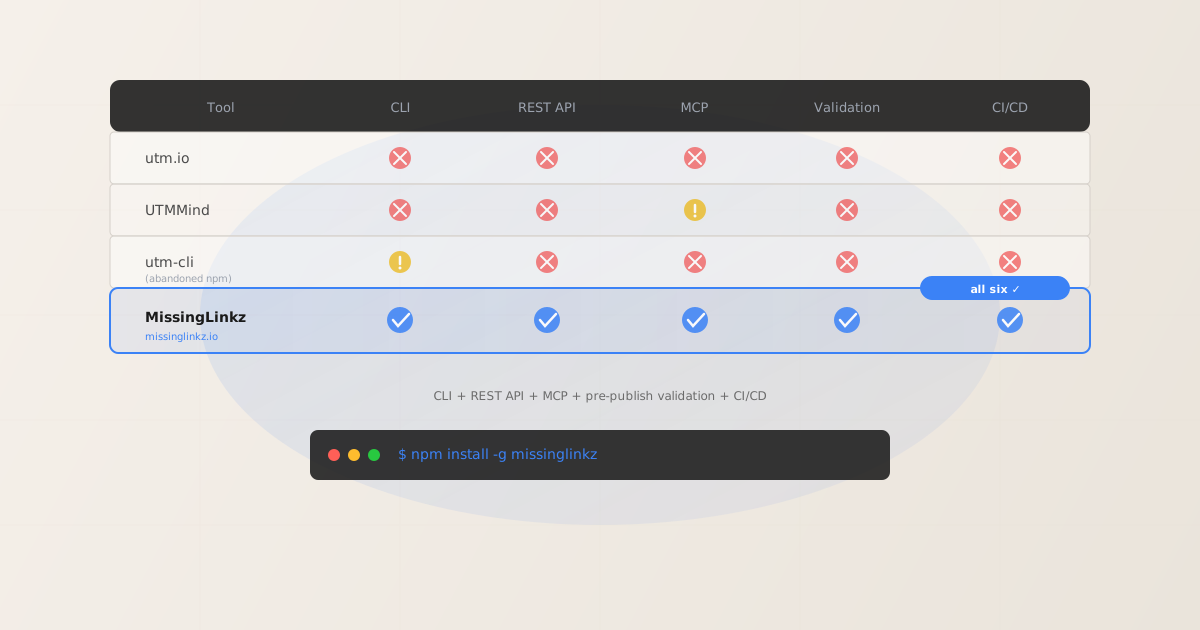
The developer UTM tool landscape in 2026
UTM tools for developers fall into three distinct categories. Each has a different primary use case and a different ceiling. Understanding which category a tool belongs to tells you immediately whether it can fit your workflow.
- Category 1: Web dashboards (UTM.io, UTMMind, Uplifter)
- These tools are built for marketing managers who build links manually in a browser. They offer team collaboration, naming governance, link libraries, and CSV export. None of them have a CLI, REST API, or MCP server. You cannot call them from a script without screen-scraping their web interface. For a deep comparison with one of these tools, see utm.io alternative for developers.
- Category 2: Lightweight npm packages (utm-cli, utm-manager)
- These are command-line URL assemblers. They take UTM parameters as arguments and output the assembled URL string. utm-cli accepts
--source,--medium, and--campaignflags and returns a UTM-appended URL. That’s the entirety of the feature set. No destination validation, no OG tag checks, no REST API, no MCP server, no CI/CD exit codes. utm-cli hasn’t seen a release in over a year. UTM assemblers are only one slice of the terminal-based marketing stack — our directory of CLI tools for marketing automation covers the deploy, content, and link-infrastructure tools that sit alongside them. - Category 3: CLI + API + MCP + validation (MissingLinkz)
- This category exists to serve developer-native workflows: scripted automation, CI/CD pipelines, AI agents, and REST API integrations. MissingLinkz is the only tool in this category that also validates the destination URL after building the link — checking SSL, HTTP resolution, OG tags, redirect chains, and UTM parameter preservation before the link is published anywhere. See the complete UTM tracking for developers pillar for the full context.
Feature comparison: UTM tools for developers
The table below compares the UTM tools that developers actually evaluate when looking for programmatic UTM generation. Web dashboards (UTM.io, UTMMind web app) are included as reference points but are not developer-native tools.
| Tool | CLI | REST API | MCP Server | Pre-publish Validation | CI/CD Integration | MissingLinkz |
|---|---|---|---|---|---|---|
| utm.io | ✗ No | ✗ No | ✗ No | ✗ No | ✗ No | — |
| UTMMind (web) | ✗ No | ✗ No | ✓ Partial | ✗ No | ✗ No | — |
| utm-cli (npm) | ✓ URL only | ✗ No | ✗ No | ✗ No | ✗ No | — |
| utm-manager (npm) | ✓ URL only | ✗ No | ✗ No | ✗ No | ✗ No | — |
| MissingLinkz | ✓ Full | ✓ Full | ✓ Full | ✓ SSL + OG + redirects | ✓ Exit codes | ✓ All six |
A note on UTMMind’s MCP: UTMMind’s MCP server lets AI agents build UTM links and apply governance rules. It does not validate the destination URL. The “Partial” rating reflects that the MCP exists but is limited to governance rather than validation. For a detailed breakdown, see the UTMMind vs MissingLinkz comparison.
The MissingLinkz developer workflow
Install once, use everywhere:
npm install -g missinglinkz
Step 1: Build a UTM link from the CLI. The --validate flag validates the destination URL before returning the tracked link:
$ mlz build \
    --url "https://acme.com/pricing" \
    --source "google" \
    --medium "cpc" \
    --campaign "best-utm-tools-2026" \
    --validate
{
  "tracked_url": "https://acme.com/pricing?utm_source=google&utm_medium=cpc&utm_campaign=best-utm-tools-2026",
  "params": {
    "utm_source": "google",
    "utm_medium": "cpc",
    "utm_campaign": "best-utm-tools-2026"
  },
  "destination_url": "https://acme.com/pricing",
  "link_id": "lnk_8xqpr5mt",
  "stored": true
}
Step 2: Full pre-publish preflight. mlz preflight builds the UTM link AND runs the complete validation + inspection in one command. This is the developer-native equivalent of opening Facebook Sharing Debugger, checking SSL Labs, and running a redirect tracer — except it returns structured JSON in under 2 seconds:
$ mlz preflight \
    --url "https://acme.com/pricing" \
    --source "google" \
    --medium "cpc" \
    --campaign "best-utm-tools-2026"
Step 3: REST API for server-side scripts. Every preflight check is also available over the REST API. This is for teams that want to integrate UTM validation into their own pipelines, dashboards, or custom tooling without installing a CLI:
$ curl -s -X POST https://api.missinglinkz.io/v1/preflight \
    -H "Authorization: Bearer $MLZ_API_KEY" \
    -H "Content-Type: application/json" \
    -d '{"url":"https://acme.com/pricing","source":"google","medium":"cpc","campaign":"best-utm-tools-2026"}'
The REST API response is identical to the CLI and MCP responses — same check names, same field structure, same ready boolean. One validation engine, three integration surfaces. See the REST API reference for the complete endpoint documentation.
Step 4: MCP for AI agents. For agents running in Cursor or Claude Code, start the MCP server with mlz mcp and add the mcpServers config block. The agent can then call mlz_build_link and mlz_preflight as named tools. See the UTM MCP server guide for setup instructions.
Step 5: CI/CD gate. mlz preflight exits non-zero when any check fails. This makes it a drop-in build gate. Add it to a GitHub Actions workflow and the build will fail before a broken campaign link reaches production. The GitHub Actions campaign link validation template has a complete copy-paste YAML file.
Decision matrix: which UTM tool is right for your use case?
- You need a shared team UTM link library with naming governance and CSV export
- Use UTM.io. It is the best-in-class web dashboard for teams that build links manually and need a shared library. Its weakness is the complete absence of CLI, API, or validation — but if your workflow is browser-based, that may not matter.
- You need naming rule enforcement and a shared UTM taxonomy for a large organization
- Use UTMMind or Uplifter. Both are governance-focused platforms with strong naming convention tooling. UTMMind now has an MCP server for AI agent integration. Neither validates destinations.
- You need a one-liner CLI to build a UTM URL in a personal script, no validation needed
- Use utm-cli (with the caveat that it hasn’t been maintained). For active development,
mlz build --no-validatedoes the same thing and is actively maintained. - You need CLI + REST API + MCP + destination validation + CI/CD integration
- Use MissingLinkz. This is the only tool in the developer UTM landscape that combines all five surfaces in a single package. If you’re building automation pipelines, AI agent workflows, or CI/CD-gated campaign deployments, no other tool covers the full stack.
For a side-by-side comparison with utm.io specifically, including a detailed feature table, see utm.io alternative for developers. For the Uplifter comparison, see Uplifter alternative for developer CLI workflows.
Why validation is the critical gap in every other UTM tool
Every UTM tool listed above can assemble a URL string. That part is trivial — it’s four string concatenations. The problem isn’t generating the URL. The problem is what happens after the URL is generated:
- The landing page returns a 404 because the slug changed after the campaign was set up.
- The redirect from the URL shortener strips the query string before GA4 fires.
- The
og:imagetag is missing because the landing page was built on a template that doesn’t set it. - The SSL certificate expired the week before launch.
- A developer hard-coded
utm_source=LinkedIn(capitalized) which creates a separate row in GA4 from thelinkedinsource every other link in the campaign uses.
None of the other tools in this comparison will catch any of these failures. They build the URL and hand it back. The developer or marketer then has to manually check the destination — or, more commonly, the campaign launches and the errors surface in the attribution data a week later.
MissingLinkz catches all five of those failures before the link is ever published. That’s the difference between a URL builder and campaign link infrastructure. For the full breakdown of what preflight checks and why each check matters, see the campaign link validation pillar.
Recommended posts
The only UTM tool built for developer workflows
CLI, REST API, MCP server, and pre-publish validation — in a single npm package.
1,000 links/month free. No credit card.
Your API key
Save this now — it won't be shown again.
npm install -g missinglinkz
Start with mlz build for UTM generation, or mlz preflight for the full validation stack.
Frequently asked questions
- Is there an npm package for building and validating UTM links?
- Yes.
npm install -g missinglinkzinstalls the MissingLinkz CLI globally. Themlz buildcommand generates UTM links and themlz preflightcommand builds + validates the destination in one call. The package is actively maintained. For a comparison with other UTM npm packages, see the missinglinkz npm package guide. - Do any UTM tools have a REST API for server-side automation?
- MissingLinkz is the only UTM-focused tool with a documented REST API that includes destination validation. The
POST /v1/preflightendpoint accepts your URL and UTM parameters, validates the destination, and returns areadyboolean alongside the full check report. Web dashboards like UTM.io do not expose a public API. - Can I use MissingLinkz in a GitHub Actions workflow?
- Yes. Install the CLI in your workflow with
npm install -g missinglinkz, setMLZ_API_KEYas a repository secret, and runmlz preflightas a step. The command exits non-zero on any validation failure, causing the workflow to fail before the campaign goes live. See the complete GitHub Actions campaign link validation template. - What makes MissingLinkz different from utm-cli on npm?
- utm-cli is a URL assembler: it appends UTM query parameters to a URL. It has no validation, no API, no MCP server, and no CI/CD exit codes. It hasn’t been updated in over a year. MissingLinkz is actively maintained and adds destination validation, a REST API, an MCP server, and JSON output for scripting. For the detailed comparison, see the UTM CLI comparison.
- Does MissingLinkz work offline (without an API key)?
- UTM link generation with
mlz buildworks offline without an API key — it is a local URL construction operation. Destination validation commands (mlz preflight,mlz inspect,mlz check) require an API key because they make outbound HTTP requests via the MissingLinkz API. The free tier includes 1,000 operations per month.