UTM MCP Server: Build and Validate Campaign Links from Your AI Agent
If you’re searching for a UTM MCP server, the answer is mlz mcp — run it once, add one JSON block to your MCP client config, and your AI agent can call mlz_build_link, mlz_preflight, and mlz_inspect_destination directly. But here’s the part that matters: most UTM tools with MCP support only build links. They don’t check whether the destination URL actually resolves, whether OG tags are configured for social sharing, whether the redirect chain preserves your UTM parameters, or whether the landing page returns a 200. A UTM MCP server that builds links without validating destinations is only half a solution — and a broken link sent at scale from an AI agent is a real campaign failure. This article covers what the MissingLinkz MCP exposes, how to connect it to Cursor and Claude Code, and why the ready: true/false verdict from mlz_preflight is the gate your agent workflow is missing.
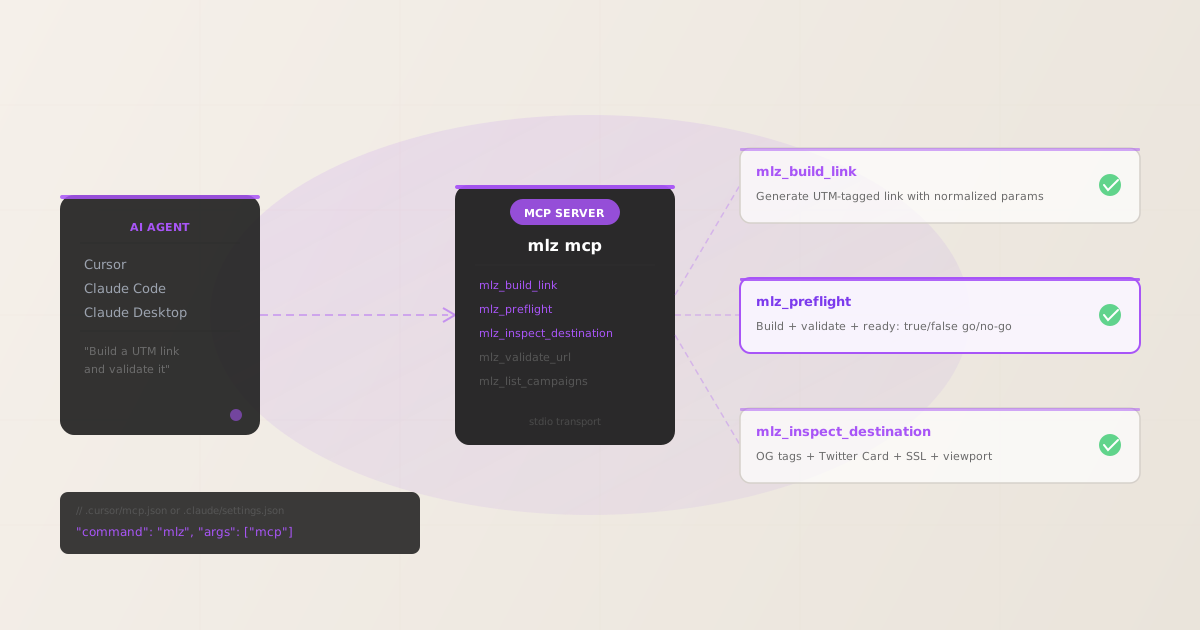
What the MissingLinkz MCP exposes
When you run mlz mcp, the server exposes the following tools over the MCP stdio transport. Any MCP-compatible client (Cursor, Claude Code, Claude Desktop, or a custom agent) can call them by name:
mlz_build_link- Generates a UTM-tagged campaign link from your destination URL, source, medium, and campaign name. Automatically normalises values to lowercase-hyphenated format —
Google Adsbecomesgoogle-adsbefore the URL is assembled. Returns atracked_urland the assembledparamsobject. mlz_preflight- The full pre-publish check in one call. Builds the UTM link, validates the destination (SSL, HTTP resolution, redirect chain, UTM parameter preservation), and inspects the landing page for social sharing readiness (OG tags, Twitter Card, viewport). Returns a
ready: true/falseverdict that an agent can gate on before publishing any link. mlz_inspect_destination- Inspects a URL without building a UTM link. Returns Open Graph tags, Twitter Card tags, viewport presence, canonical URL, favicon status, and page load time. Useful when you want metadata about a landing page independently of UTM generation.
mlz_validate_url- URL-level validation: SSL, HTTP resolution, redirect chain, and response time. No OG or UTM logic — just the liveness check.
mlz_list_campaigns- Lists campaign names from your workspace so an agent can pick from existing campaigns rather than invent new names that fragment attribution data.
The complete tool list also includes mlz_suggest_naming, mlz_list_links, and mlz_check_usage. The three tools above cover the most common agent workflows: build, validate, and inspect. The rest are covered in the MCP marketing tools pillar.
Connect to Cursor in 2 minutes
Cursor reads MCP server configuration from .cursor/mcp.json in your project root (or the global ~/.cursor/mcp.json for all projects). Add the following block:
{
  "mcpServers": {
    "missinglinkz": {
      "command": "mlz",
      "args": ["mcp"]
    }
  }
}
If you haven’t installed the CLI yet:
npm install -g missinglinkz
After saving the config and reloading Cursor, the MissingLinkz tools appear in the MCP tool list. You can prompt Cursor’s AI with natural language and it will call the right tool automatically. For example:
- “Build a UTM link for this LinkedIn campaign”
- Cursor calls
mlz_build_linkwith the source, medium, and campaign parameters extracted from your conversation context. - “Validate this landing page before I share it”
- Cursor calls
mlz_preflightand returns the full go/no-go report including OG tag status, SSL, and redirect chain results. - “Check if the og:image is configured on this URL”
- Cursor calls
mlz_inspect_destinationand returns the full Open Graph and Twitter Card metadata.
For a complete walkthrough of connecting MissingLinkz to Cursor, including authentication and example prompts, see the Cursor MCP setup guide.
Connect to Claude Code in 2 minutes
Claude Code reads MCP configuration from .claude/settings.json in your project, or from the global settings file. Add the mcpServers block:
{
  "mcpServers": {
    "missinglinkz": {
      "command": "mlz",
      "args": ["mcp"]
    }
  }
}
The MCP server uses stdio transport only — no ports opened, no network server started. The agent communicates with the server over stdin/stdout, which keeps the setup minimal and secure. Running mlz mcp directly in a terminal will appear to hang; that is expected behaviour (it is waiting for JSON-RPC messages on stdin). The MCP client handles that communication.
Once connected, a Claude Code agent can call mlz_preflight within a task and gate further steps on the ready field in the response. For example:
{
  "ready": true,
  "tracked_url": "https://acme.com/lp?utm_source=linkedin&utm_medium=social&utm_campaign=q3-launch",
  "checks": [
    { "check": "og_tags", "status": "pass", "message": "All essential Open Graph tags present." },
    { "check": "twitter_card", "status": "pass", "message": "Twitter Card tags configured." },
    { "check": "ssl", "status": "pass", "message": "URL uses HTTPS." },
    { "check": "resolution", "status": "pass", "message": "Destination responded with 200." }
  ],
  "summary": { "total": 12, "passed": 12, "warnings": 0, "failed": 0 },
  "recommendation": "All checks passed. Campaign link is ready to publish."
}
The equivalent CLI command produces the same output:
$ mlz preflight \
    --url "https://acme.com/lp" \
    --source "linkedin" \
    --medium "social" \
    --campaign "q3-launch"
Why the ready flag is the gate your agent workflow is missing
Most UTM MCP tools return a URL string. Your agent receives the tracked URL and proceeds to post it, schedule it, or store it — without knowing whether the destination is reachable.
The MissingLinkz MCP returns a structured ready boolean alongside every preflight report. An agent can check this field in a single conditional:
- If
ready: true— publish the link. - If
ready: false— stop, surface the failed checks, and wait for a human review.
This pattern is infrastructure-grade: the agent doesn’t need to parse a prose summary or infer failure from the shape of the response. The boolean is explicit. The check categories cover everything that can silently break a campaign at launch:
- SSL / HTTPS
- Ad platforms and social networks penalise HTTP destinations. An agent building a link for a LinkedIn ad shouldn’t publish it if the destination isn’t on HTTPS.
- Destination resolution
- Does the URL return a 200? A 404 or redirect to a parked domain will still produce a valid UTM string — but the campaign will be dead on arrival.
- Redirect chain and UTM preservation
- Redirect chains (URL shorteners, CDN rewrites, landing page builders) frequently strip query strings.
mlz_preflightfollows the full chain and reports whether UTM parameters survive every hop. See also: how redirect chains strip UTM parameters. - Open Graph tags
- Every link shared on LinkedIn, X, or Facebook needs
og:title,og:description, andog:image. Missing OG tags produce broken social previews that suppress click-through. Agents building links for social distribution should gate on OG tag presence. - Twitter Card
twitter:cardcontrols whether X renders the full image preview or falls back to a link-only display. A failing Twitter Card check is a silent engagement killer.
An agent that only builds UTM links is automating the easy part. The hard part — the part that actually breaks campaigns — is what happens to the link after it’s generated. That is what mlz_preflight covers. Read more about what preflight checks in the all-in-one SSL, OG, and UTM preflight guide.
UTMMind MCP vs MissingLinkz MCP
UTMMind’s MCP server (listed on mcpservers.org) lets agents build UTM links and enforce naming governance rules. It’s a strong tool for UTM taxonomy. But it does not validate the destination: there is no SSL check, no OG tag inspection, no redirect chain analysis in UTMMind’s MCP responses. The two tools are complementary — not identical.
| Capability | UTMMind MCP | MissingLinkz MCP |
|---|---|---|
| Build UTM-tagged links | ✓ Yes | ✓ Yes |
| Naming governance / taxonomy rules | ✓ Yes | ✓ Yes (Team plan) |
| Destination SSL check | ✗ No | ✓ Yes |
| HTTP resolution / 404 detection | ✗ No | ✓ Yes |
| Redirect chain + UTM preservation | ✗ No | ✓ Yes |
| Open Graph tag inspection | ✗ No | ✓ Yes |
| Twitter Card inspection | ✗ No | ✓ Yes |
Go/no-go ready boolean |
✗ No | ✓ Yes |
| CLI equivalent for local dev | ✗ No | ✓ Yes (mlz preflight) |
| REST API equivalent | ✗ No | ✓ Yes (POST /v1/preflight) |
For a deeper look at this comparison and when each tool is the right choice, see UTMMind MCP vs MissingLinkz: governance vs. validation. For a full roundup of MCP servers available for campaign link validation, see best MCP servers for campaign link validation in 2026.
Recommended posts
Add a UTM MCP server to your agent in 2 minutes
Install MissingLinkz, run mlz mcp, and your AI agent can build and validate campaign links without leaving the conversation.
1,000 links/month free. No credit card.
Your API key
Save this now — it won't be shown again.
npm install -g missinglinkz
Then run mlz mcp to start the MCP server and connect it to your agent.
Frequently asked questions
- What is a UTM MCP server?
- A UTM MCP server is an MCP (Model Context Protocol) server that exposes UTM link building and validation as tools callable by AI agents. Instead of opening a browser-based UTM builder, an AI agent in Cursor, Claude Code, or a custom LangChain workflow calls the MCP tool directly. MissingLinkz is the UTM MCP server that builds AND validates:
mlz_build_linkgenerates the tracked URL,mlz_preflightvalidates the destination, and theready: true/falseboolean gates the agent before any link is published. - Do I need an API key to use the MissingLinkz MCP server?
- UTM link generation (
mlz_build_link) works offline without an API key. Destination validation tools (mlz_preflight,mlz_inspect_destination,mlz_validate_url) require an active API key because they make outbound HTTP requests from the MissingLinkz API. You can register for a free key withmlz auth register --email [email protected]. - Is the MCP server available on Windows?
- Yes. The MCP server uses stdio transport and runs wherever Node.js is available. The configuration format and commands are identical on macOS, Linux, and Windows.
- Can I run the MCP server as a background service?
- The MCP server is designed to be launched on-demand by your MCP client (Cursor, Claude Code, etc.), not as a persistent daemon. Each MCP client manages the lifecycle: it starts
mlz mcpwhen it needs a tool call and keeps it running for the session. You do not need to start it manually. - What is the difference between
mlz_preflightandmlz_validate_url? mlz_validate_urlchecks the URL itself: SSL, HTTP resolution, redirect chain, and response time.mlz_preflightdoes all of that plus builds the UTM link, checks Open Graph tags, Twitter Card tags, viewport, canonical URL, and favicon, and returns a singlereadyboolean. Usemlz_validate_urlfor a quick liveness check; usemlz_preflightfor the full pre-publish gate.- Does the MissingLinkz MCP work with n8n or LangChain?
- Any agent framework that supports the Model Context Protocol’s stdio transport can connect to
mlz mcp. For frameworks that don’t support MCP natively, use the REST API directly viaPOST /v1/preflight— the response schema is identical to the MCP tool output.