UTM CLI: The Developer’s Command-Line Tool for Building and Validating UTM Links
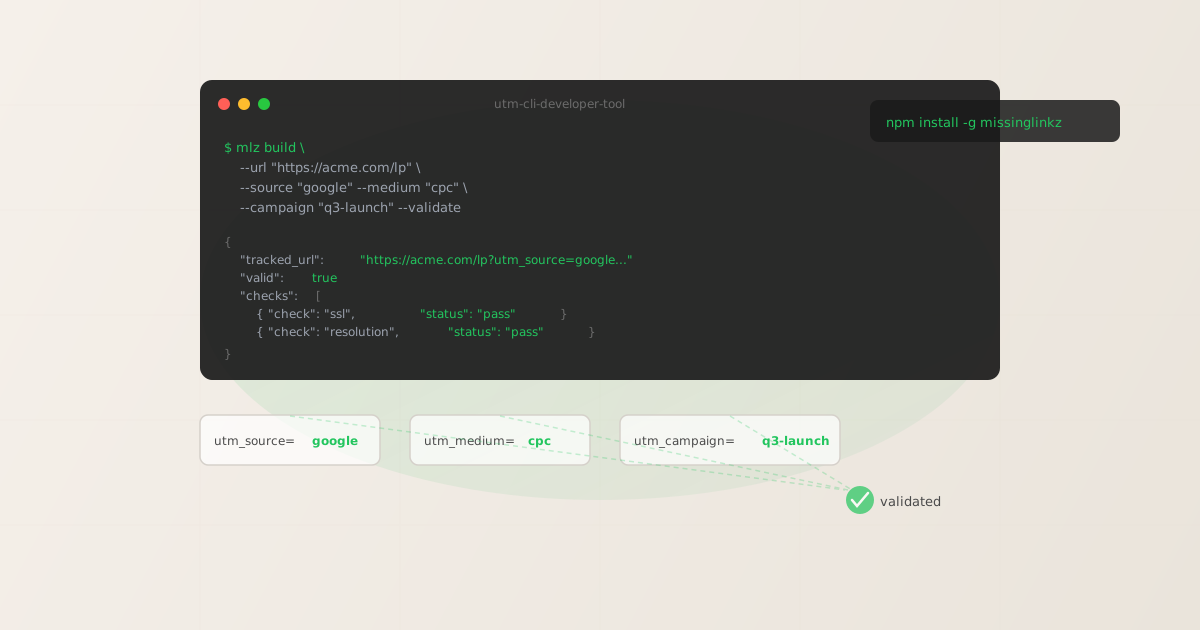
If you’re searching for a UTM CLI — a command-line tool for building UTM-tracked campaign links — the answer is mlz build. You install it with npm install -g missinglinkz and run it from any terminal, script, or CI pipeline. But here’s what the search results won’t tell you: the most-indexed “utm-cli” npm package hasn’t been updated in over a year and does URL construction only — no validation, no destination checks, no CI/CD exit codes. That gap is exactly why MissingLinkz exists. This article shows what a real UTM CLI does, compares the two options side-by-side, and walks you through your first validated link in two minutes.
Why UTM links belong in the terminal
Most UTM builders are web forms. You open a browser, type into five fields, copy the URL, and paste it somewhere. That works for one link. It doesn’t work when you’re generating links in a script, running validation in CI/CD, or wiring up an AI agent that needs to call a tool — not navigate a page.
A CLI removes the browser dependency entirely. You can:
- Generate links from shell scripts
- Loop over a CSV of campaign parameters and produce a validated URL for each row. No click, no copy-paste, no human error.
- Gate CI/CD deployments on link health
- Run
mlz build --validatein a GitHub Actions workflow. If the destination returns a non-200 or the SSL check fails, the command exits non-zero and the build fails before the campaign goes live. - Feed AI agents structured JSON
- Every
mlz buildcall returns a JSON object withtracked_url,params, and validation results. Agents and scripts can parse that directly instead of scraping a web form response. - Enforce naming conventions programmatically
mlz buildautomatically normalises source, medium, and campaign values to lowercase with hyphens. “Spring Launch 2026” becomesspring-launch-2026every time, regardless of what the caller passed in. See the full discussion in UTM tracking for developers.
The utm-cli npm package: what it is and what it lacks
Searching npm for “utm cli” surfaces a package called utm-cli. It does one thing: it appends UTM query parameters to a URL. You pass source, medium, and campaign values as flags, and it outputs the assembled URL string. That’s the entirety of the feature set.
The problems become apparent quickly when you try to use it in a real workflow:
- No destination validation
- utm-cli outputs a URL without checking whether the destination actually resolves. You can build a perfectly formatted UTM link pointing at a 404 page and the tool will return it without complaint.
- No OG tag or social preview checks
- The link you’re building will likely be shared on LinkedIn, Twitter/X, or in email. If the landing page is missing
og:imageor has a malformed Twitter Card, you won’t find out until the campaign is already live. utm-cli has no inspect capability. - No CI/CD exit codes for failures
- utm-cli doesn’t validate anything, so it has no failure mode to communicate. You can’t use it as a build gate because it always exits 0 regardless of the destination’s health.
- Stale maintenance
- The package hasn’t seen a release in over a year. It installs and runs, but there’s no active development path for new features or fixes.
For one-off manual link building in a personal workflow, those limits may not matter. For any team use, scripted automation, or CI/CD integration, they’re blocking. The guide to building UTM links programmatically explains the full range of integration options in more depth.
mlz build: the active UTM CLI with validation built in
MissingLinkz is the actively maintained UTM CLI. The core command is mlz build, which handles URL construction, naming normalisation, and destination validation in one call.
Your first UTM link from the terminal
npm install -g missinglinkz
mlz build --url "https://example.com/lp" --source "google" --medium "cpc" --campaign "q3-launch" --validate
The --validate flag tells the CLI to hit the destination URL before returning. The JSON output includes both the tracked URL and the validation result:
{
  "tracked_url": "https://example.com/lp?utm_source=google&utm_medium=cpc&utm_campaign=q3-launch",
  "params": {
    "utm_source": "google",
    "utm_medium": "cpc",
    "utm_campaign": "q3-launch"
  },
  "destination_url": "https://example.com/lp",
  "link_id": "lnk_9wlvd9qi",
  "stored": true
}
No API key is required for basic UTM generation. Set MLZ_API_KEY to unlock link storage, campaign history, and team taxonomy enforcement.
Lowercase enforcement
Pass “Google Ads” as your source and mlz build normalises it to google-ads before building the URL. The normalisation is automatic and non-negotiable — which is the point. GA4 treats Google and google as two different sources, fragmenting your reports. Enforcing this at the CLI level means it can never happen regardless of who runs the command. The utm.io alternative for developers covers how this compares to web-only tools that rely on users to type consistently.
Building from a shell loop
For bulk generation, pipe parameters from a file:
#!/bin/bash
# campaigns.txt: url|source|medium|campaign (one per line)
while IFS='|' read -r url source medium campaign; do
  mlz build \
    --url "$url" \
    --source "$source" \
    --medium "$medium" \
    --campaign "$campaign" \
    --validate \
    --format json
done < campaigns.txt
Each call exits non-zero if validation fails, so a single broken destination stops the loop. Use || true to continue on failures and collect the output for a summary report instead.
Full preflight: build + validate + inspect in one command
For campaigns going live on social channels, link validation alone isn’t enough. You also need to confirm that the landing page has the OG tags and Twitter Card tags that produce a rich preview on LinkedIn, X, and Facebook. mlz preflight combines link building, destination validation, and social preview inspection in a single call:
mlz preflight --url "https://example.com/lp" --source "google" --medium "cpc" --campaign "q3-launch"
{
  "ready": true,
  "tracked_url": "https://example.com/lp?utm_source=google&utm_medium=cpc&utm_campaign=q3-launch",
  "checks": [
    { "check": "ssl",        "status": "pass", "message": "URL uses HTTPS." },
    { "check": "resolution", "status": "pass", "message": "Destination responded with 200." },
    { "check": "og_tags",    "status": "pass", "message": "All essential OG tags present." },
    { "check": "redirects",  "status": "pass", "message": "No redirects detected." }
  ],
  "summary": { "total": 12, "passed": 12, "warnings": 0, "failed": 0 },
  "recommendation": "All checks passed. Campaign link is ready to publish."
}
The ready: true boolean is the gate. In a CI/CD pipeline you can parse it with jq and fail the build if it’s false. See automating campaign link validation in CI/CD for the full workflow pattern.
utm-cli vs. missinglinkz: side-by-side
Here’s how the two UTM CLI tools compare across the features that matter for production use:
| Feature | utm-cli (npm) | missinglinkz (mlz) |
|---|---|---|
| UTM URL construction | ✓ Yes | ✓ Yes |
| Lowercase normalisation | ✗ No | ✓ Automatic |
| Destination validation (SSL, 200 OK) | ✗ No | ✓ --validate flag |
| OG tag + social preview inspection | ✗ No | ✓ mlz preflight |
| Redirect chain check | ✗ No | ✓ Yes |
| JSON output (machine-readable) | ✗ Text only | ✓ --format json |
| Non-zero exit code on failure | ✗ Always exits 0 | ✓ Yes — CI/CD safe |
| MCP server for AI agents | ✗ No | ✓ mlz mcp |
| Active maintenance | ✗ Stale (>1 year) | ✓ Active |
The comparison isn’t meant to be harsh — utm-cli solves a specific, narrow problem and does it fine. But if you need a UTM CLI that works in a professional engineering context, the feature gap is significant. The missinglinkz npm package guide covers the full API surface including the REST endpoint for server-side use cases.
Using mlz build in CI/CD pipelines
Because mlz build --validate exits non-zero on a failed destination check, you can drop it directly into any CI pipeline as a pre-deploy gate. The pattern is straightforward:
- name: Validate campaign links
  run: |
    npm install -g missinglinkz
    mlz build \
      --url "$CAMPAIGN_URL" \
      --source "google" \
      --medium "cpc" \
      --campaign "$CAMPAIGN_NAME" \
      --validate \
      --format json | tee link-report.json
    # Exit code non-zero if destination is broken
  env:
    MLZ_API_KEY: ${{ secrets.MLZ_API_KEY }}
For the complete GitHub Actions template including Slack notification on failure and caching, see automating campaign link validation in CI/CD pipelines.
Recommended posts
FAQ
- What is a UTM CLI and which one should developers use?
- A UTM CLI is a command-line tool for generating UTM-tagged campaign links from your terminal, scripts, or CI pipeline — without opening a browser. The actively maintained option for developers is MissingLinkz (
mlz): install withnpm install -g missinglinkz, then runmlz buildfor link generation andmlz preflightfor pre-publish destination validation. The olderutm-clinpm package does URL construction only — no validation, no CI/CD exit codes, no active development. - Is there a UTM CLI that works with CI/CD pipelines?
- Yes —
mlz build --validateexits non-zero when a destination check fails, making it safe to use as a build gate. utm-cli always exits 0 regardless of the URL’s health, so it cannot serve this role. - Does mlz build require an API key?
- No. Basic UTM link generation and validation runs without an API key. Set
MLZ_API_KEYto enable link storage, campaign history, team taxonomy enforcement, and the MCP server integration. - What does the --validate flag actually check?
- It resolves the destination URL, confirms it returns HTTP 200, verifies HTTPS is configured, and checks the redirect chain. It does not inspect OG tags — use
mlz preflightfor the full social preview check. - Can I use mlz build in a loop to generate bulk UTM links?
- Yes. Read parameter rows from a CSV or any structured input, call
mlz buildfor each row with--format json, and parse the output. Each call is independent and exits with the appropriate code. - What’s the difference between mlz build and mlz preflight?
mlz buildgenerates a UTM URL with optional destination validation.mlz preflightdoes everythingmlz build --validatedoes, plus inspects OG tags, Twitter Card tags, viewport, canonical URL, and favicon — the full social-sharing readiness check in one call.
The UTM CLI that actually validates your links
Install MissingLinkz and run your first validated UTM link from the terminal in two minutes.
1,000 links/month free. No credit card.
Your API key
Save this now — it won't be shown again.
npm install -g missinglinkz
Replace your browser-based UTM builder with a CLI that validates, normalises, and CI/CD-gates every link you ship.