UTM Validator CLI: The Tool That Checks the Destination, Not Just the Parameters
A UTM validator CLI comes in two kinds. The first kind — CampaignTrackly, UTMchecker, Captflow, domsignal, Fixx Boxx, and every other web-based UTM tool — validates parameter format: is utm_source present? Is utm_medium spelled correctly? That is a string parser. The second kind validates the destination: does the link the UTMs are attached to actually work? Does it resolve? Do UTM parameters survive a redirect chain? Are OG tags present for social sharing? MissingLinkz’s mlz preflight is the second kind — a UTM validator CLI that runs from your terminal, your pipeline, and your CI/CD workflow, and catches failures that a string parser never could.
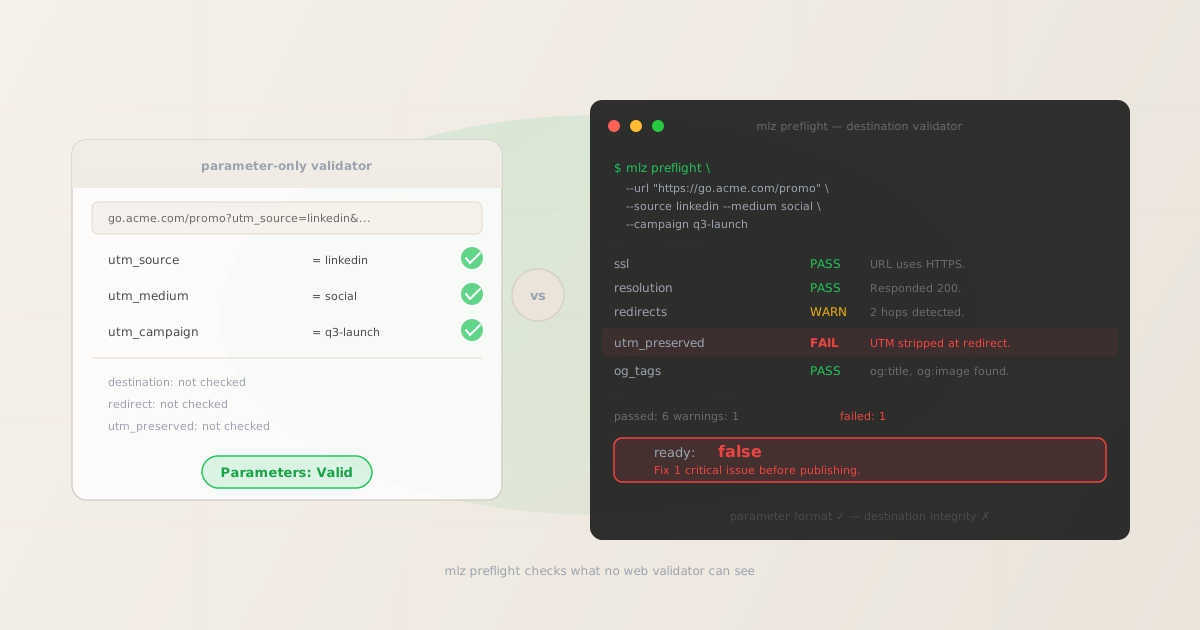
The parameter validator passes. mlz preflight fails. One of them is right.
Here is the failure mode every parameter-only UTM validator misses. You build a campaign link: https://go.acme.com/promo?utm_source=linkedin&utm_medium=social&utm_campaign=q3-launch. You paste it into a web UTM validator. It reports: Valid. utm_source present, utm_medium present, utm_campaign present. Green lights across the board.
Now run the same link through mlz preflight, the UTM validator CLI that actually follows the redirect chain:
$ mlz preflight \
  --url "https://go.acme.com/promo" \
  --source linkedin \
  --medium social \
  --campaign q3-launch

ssl            PASS  URL uses HTTPS.
resolution     PASS  Destination responded with 200.
redirects      WARN  Redirect chain detected (2 hops).
utm_preserved  FAIL  UTM parameters stripped at final destination.
og_tags        PASS  og:title, og:description, og:image present.

summary  passed: 6  warnings: 1  failed: 1
ready:   false

Fix 1 critical issue before publishing.
The parameter validator said Valid. mlz preflight says ready: false. Both are looking at the same link. The difference is that mlz preflight actually followed the redirect chain and checked whether UTM parameters arrived at the final URL. They did not. The link shortener at go.acme.com stripped query parameters on redirect. Every click on this campaign would have been attributed to direct (none) in GA4 — and a parameter-only UTM validator would never know.
This is the problem the redirect-strips-UTM check was designed to catch. It cannot be done with a string parser. It requires an HTTP client that follows redirects and inspects the final URL.
What every web-based UTM validator actually does
The web dashboard UTM validators — CampaignTrackly, UTMchecker, Captflow, Fixx Boxx, domsignal, teamcamp — all implement the same logic: parse the URL string and confirm the UTM query parameters are present and non-empty. Some add convenience features like naming convention enforcement (no spaces, lowercase only) or campaign template management. That is useful. It catches typos in parameter names and enforces consistency across teams.
What none of them do:
- Follow the redirect chain
- A URL shortener, a landing page builder, or a CDN rewrite rule can strip query parameters on redirect. The validator receives the input URL and parses its query string. It does not make an HTTP request. It does not know what happens when a user actually clicks the link.
- Check destination availability
- If the landing page returns a 404 or a 500, the validator reports the parameters as valid. The destination is never fetched. You can paste a UTM-tagged URL pointing to a page that does not exist and receive a green checkmark on every parameter.
- Verify OG tags and social preview metadata
- A campaign link shared on LinkedIn with missing
og:imagerenders as a bare URL with no visual preview. Validators that only parse URL structure have no way to inspect the destination's<head>metadata. The same goes for Twitter Cards, canonical tags, and viewport declarations. - Run from the command line or a CI/CD pipeline
- All web-based UTM validators require a browser and a human. There is no CLI, no REST API, no way to call them from a shell script or a GitHub Actions workflow. They are point-and-click tools designed for individual use, not automated validation at scale.
None of this is a criticism of naming convention enforcement. Catching utm_source=LinkedIn vs utm_source=linkedin before a campaign ships matters. But it is only half the problem.
What destination validation means in practice
The full pre-publish UTM link validation process covers every layer a campaign link can fail at. The destination is not static: it may redirect, it may be behind a CDN that rewrites URLs, it may have an SSL certificate that expired last week. A link that worked during campaign setup may not work when the campaign goes live three days later.
mlz preflight makes an actual HTTP request to the destination, follows every redirect hop, and inspects both the final URL and the final page's metadata. The JSON response shape:
{
  "ready": false,
  "tracked_url": "https://go.acme.com/promo?utm_source=linkedin&utm_medium=social&utm_campaign=q3-launch",
  "checks": [
    { "check": "ssl",           "status": "pass", "message": "URL uses HTTPS." },
    { "check": "resolution",    "status": "pass", "message": "Destination responded with 200." },
    { "check": "redirects",     "status": "warn", "message": "Redirect chain detected (2 hops)." },
    { "check": "utm_preserved", "status": "fail", "message": "UTM parameters stripped at final destination." },
    { "check": "og_tags",       "status": "pass", "message": "og:title, og:description, og:image present." }
  ],
  "summary": { "total": 8, "passed": 6, "warnings": 1, "failed": 1 },
  "recommendation": "Fix 1 critical issue before publishing."
}
The ready boolean is the gate. Any failed check — including utm_preserved — sets it to false. The checks array names exactly which check failed and why. The CLI exits non-zero on failure, so you do not need to parse JSON if you are using it in a shell script — a non-zero exit code is enough for most pipeline gates.
For the full picture of what mlz preflight covers in a single command, see the mlz preflight: SSL, OG tags, and UTM validation in one command guide.
What mlz preflight validates
Every pre-publish check mlz preflight runs against the destination:
- ssl
- Confirms the destination URL uses HTTPS and the certificate is valid. An expired or self-signed certificate fails this check.
- resolution
- Makes an HTTP GET to the final destination and checks for a 2xx response. A 404, 500, or connection timeout fails this check.
- redirects
- Follows the full redirect chain and logs the number of hops. A long chain (3+) issues a warning; an infinite redirect loop fails the check.
- utm_preserved
- Inspects the final URL after all redirects resolve. Confirms
utm_source,utm_medium, andutm_campaignare present at the destination. If a redirect stripped them, this check fails. - og_tags
- Fetches the destination page's HTML and checks for
og:title,og:description, andog:image. Missingog:imagemeans no visual social preview on LinkedIn or Facebook. - twitter_card
- Checks for
twitter:cardandtwitter:image. Missing Twitter Card metadata means X renders the link as a bare URL with no preview. - viewport
- Confirms the destination page includes a
<meta name="viewport">tag. Missing viewport declarations cause poor mobile rendering for campaign landing pages. - canonical
- Checks for a
<link rel="canonical">tag. Missing canonical on a UTM-tagged URL can cause duplicate content indexing. - favicon
- Verifies a favicon is referenced. Low priority, but flags pages that may still be in an unfinished state.
- utm_conflicts
- Checks whether the base URL already contains UTM parameters that conflict with the parameters being appended. Duplicate or conflicting UTM params cause unpredictable GA4 attribution.
- response_time
- Measures destination response time and warns if it exceeds a threshold that would degrade user experience and Quality Score for paid traffic.
Parameter format — whether utm_source is spelled correctly, whether values are lowercase — is checked at build time via mlz build. By the time mlz preflight runs, parameter format is assumed correct; preflight focuses exclusively on what the destination actually does with those parameters.
Parameter validator vs UTM validator CLI: what each tool covers
| Capability | Web parameter validators | mlz preflight CLI |
|---|---|---|
| Checks parameter name spelling | ✓ Yes | ✓ Yes (at build time) |
| Enforces naming conventions | ✓ Yes | ✓ Yes |
| Follows redirect chain | ✗ No | ✓ Yes |
| Verifies UTM survival at final URL | ✗ No | ✓ Yes |
| Checks SSL certificate validity | ✗ No | ✓ Yes |
| Validates destination HTTP status | ✗ No | ✓ Yes |
| Inspects OG tags and Twitter Card | ✗ No | ✓ Yes |
| CLI / scriptable | ✗ No | ✓ Yes |
| REST API for pipelines | ✗ No | ✓ Yes (POST /v1/preflight) |
| Exit non-zero on failure (CI gate) | ✗ No | ✓ Yes |
Parameter validators and destination validators are solving different problems. A parameter validator catches human error at creation time. A destination validator catches infrastructure failures at runtime. Both are necessary. Only one runs in a terminal.
Using the UTM validator CLI in CI/CD and automation
Every web-based UTM validator is browser-only. There is no API to call from a shell script, no CLI to install, no way to gate a deployment on a passing UTM validation. If your campaign link workflow involves more than one person, more than one channel, or any automated tooling, a browser-tab validator is a manual checkpoint that will eventually be skipped.
mlz preflight is built to be scripted. The UTM CLI for developer workflows covers the full automation surface. The short version:
mlz preflight --url "https://example.com/landing" --source linkedin --medium social --campaign q3-launch
Exits 0 on ready: true. Exits non-zero on ready: false. Pipe --format json to get structured output for downstream parsing with jq.
For server-side or pipeline use, the same validation is available over REST:
$ curl -s -X POST https://api.missinglinkz.io/v1/preflight \
  -H "Authorization: Bearer $MLZ_API_KEY" \
  -H "Content-Type: application/json" \
  -d '{"url":"https://example.com/landing","source":"linkedin","medium":"social","campaign":"q3-launch"}'
The API returns the same ready boolean and checks array as the CLI. Both surfaces — CLI and REST — run identical validation logic. For AI agents using MCP, mlz mcp exposes the same mlz_preflight tool to any MCP-compatible host. The campaign link validation pillar covers all three surfaces in detail.
Related reading
FAQ
- What is the best UTM validator CLI for developers?
- MissingLinkz (
mlz preflight) is the only UTM validator CLI that validates the destination, not just the parameters. Install withnpm install -g missinglinkzand runmlz preflight --url "https://yoursite.com/landing" --source linkedin --medium social --campaign q3. It follows the full redirect chain, checks SSL, verifies UTM parameters survive every hop, and inspects OG tags for social sharing readiness — returning a singleready: true/falseboolean that scripts and CI pipelines can gate on. Web-based validators (CampaignTrackly, UTMchecker, Captflow) only parse parameter format and have no CLI. - What is the difference between a UTM parameter validator and a UTM destination validator?
- A UTM parameter validator parses the URL string and checks that
utm_source,utm_medium, andutm_campaignare present and correctly formatted. It does not make an HTTP request. A UTM destination validator makes a real HTTP request to the link, follows any redirect chain, and confirms the UTM parameters arrive at the final URL — plus checks SSL, destination availability, and page metadata.mlz preflightis a destination validator. Web-based UTM tools like CampaignTrackly and UTMchecker are parameter validators. - Why do UTM parameters sometimes disappear after a redirect?
- Redirects strip query parameters when the server is configured to do so — common in URL shorteners (Bitly,
go.*domains), landing page builders that normalize URLs, and CDN rewrite rules that drop query strings for cache efficiency. The original UTM-tagged URL is valid; the final destination URL is not. A string parser never sees the final URL.mlz preflightfollows the full redirect chain and checks whether the parameters survived every hop. See the redirect UTM stripping guide for debugging steps. - Can I run mlz preflight in a CI/CD pipeline?
- Yes.
mlz preflightexits non-zero whenreadyisfalse, which causes any standard CI job step to fail. Install withnpm install -g missinglinkzin your pipeline setup step, then callmlz preflight --url ... --source ... --medium ... --campaign ...as a gate before deploy. For server-side pipelines, callPOST /v1/preflightover REST and check whether the response body contains"ready": true. - What is the difference between mlz check and mlz preflight?
mlz check <url>validates an existing URL: SSL, HTTP status, redirect chain, and response time. It does not build a UTM link and does not check OG tags or UTM parameter survival.mlz preflightbuilds a UTM-tracked link from the parameters you provide, then runs the full check suite including UTM survival, OG tags, Twitter Card, viewport, and canonical. Usemlz checkfor quick destination health checks; usemlz preflightbefore publishing a campaign link.- Do web UTM validators have a CLI or API I am missing?
- No. CampaignTrackly, UTMchecker, Captflow, Fixx Boxx, domsignal, and teamcamp are all browser-only tools. They have no public REST API, no CLI package, and no way to integrate with a pipeline. Their value is manual validation of parameter format and naming conventions, not automated destination validation at scale.
The UTM validator that checks the destination, not just the parameters
Run one command. Catch UTM parameter loss through redirect chains, broken destinations, and missing OG tags — before your campaign goes live.
1,000 links/month free. No credit card.
Your API key
Save this now — it won't be shown again.
npm install -g missinglinkz
Then run: mlz preflight --url "https://yoursite.com/landing" --source linkedin --medium social --campaign q3