Best MCP Server for Campaign Link Validation in 2026
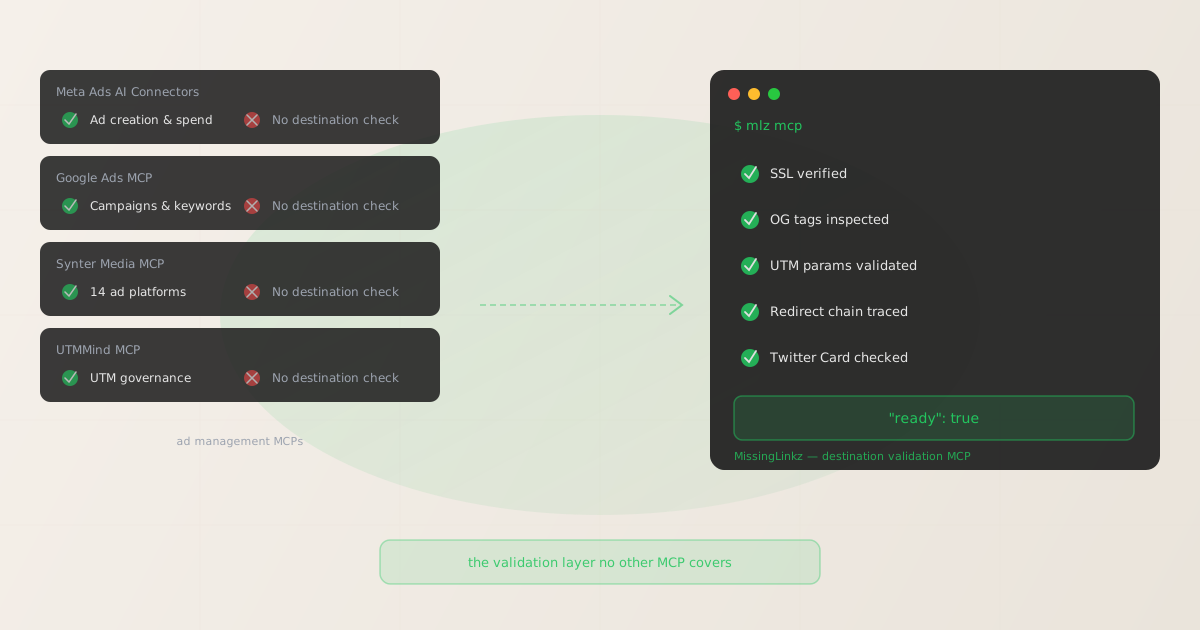
If you search "best MCP server for marketing" right now, you'll get roundups from SegmentStream, Adspirer, and syntermedia.ai — all listing ad management MCPs: Meta Ads AI Connectors, Google Ads MCP, Synter Media, and UTMMind. These tools are real and useful. Meta's MCP creates campaigns. Google's manages ad groups and keywords. Synter orchestrates spend across 14 ad platforms. UTMMind governs UTM naming conventions. What none of them do — and what every one of their roundups omits — is validate the destination URL the ad points to. None of them check whether the landing page has HTTPS. None of them verify whether OG tags are present for a rich ad preview. None of them trace whether UTM parameters survive the redirect chain. That gap is the niche MissingLinkz occupies: the best MCP server for campaign link validation in 2026 is the one actually built for it.
Why MCP matters for marketing campaign workflows
The Model Context Protocol (MCP) gives AI agents a standardized way to call external tools — instead of writing custom API integrations for every service, an agent connects to an MCP server and discovers its available tools through a uniform interface. For marketing, this matters because campaigns increasingly run through AI coding assistants like Claude Code and Cursor. An agent that can call mlz_preflight through MCP doesn't need custom code to validate a campaign link — it just calls the tool, gets a structured JSON response, and gates on the ready flag before proceeding.
The MCP marketing ecosystem has grown quickly in 2026. The practical landscape has two distinct categories of marketing MCP servers:
- Ad management MCPs
- These connect AI agents to ad platform APIs. Meta Ads AI Connectors (29 tools for campaign creation, budgets, reporting, creatives). Google Ads MCP (campaign management, keyword planning, bid adjustments). Synter Media MCP (14 ad platforms, campaign orchestration across Meta, Google, TikTok, and others). These are useful for managing active campaigns — adjusting spend, pulling performance reports, creating new ad sets without logging into each platform manually.
- Campaign link validation MCP
- This category has one tool: MissingLinkz. It validates what campaign links actually point to — the destination URL's SSL configuration, Open Graph tags, UTM parameter integrity, redirect chain behavior, and social preview readiness. This is the pre-launch check layer that runs before any ad spend is committed, regardless of which ad platform the campaign runs on.
The two categories are complementary, not competing. Ad management MCPs manage what happens inside ad platforms. The MissingLinkz MCP validates what the ad points to before it launches. For a full overview of the MCP marketing landscape, see what MCP servers are for marketing and the MCP marketing tools guide.
The ad management MCPs: what they do (and what they skip)
Each major ad management MCP covers a well-defined scope. Understanding that scope clarifies why destination validation requires a separate tool.
- Meta Ads AI Connectors (
mcp.facebook.com/ads,@meta/ads-cli) - Launched April 29, 2026. 29 tools covering ad campaign creation, ad set targeting, budget management, creative uploads, product catalog management, performance reporting, and account diagnostics. Every campaign created by the agent lands PAUSED by default — Meta's spend-protection gate. What it doesn't do: make any HTTP requests to the destination URL before creating the campaign. No SSL check. No OG tag inspection. No redirect chain tracing. The validation gap remains open until the campaign activates and Meta's delivery system fetches the destination for an ad preview — often revealing broken previews after spend has already started.
- Google Ads MCP
- Manages Google Ads campaigns programmatically: keyword planning, bid strategy adjustments, ad group management, performance reporting, and budget controls. Operates entirely within Google's ad platform — it reads and writes campaign configuration in Google Ads Manager. It does not fetch the URLs configured as final URLs or landing page URLs to verify SSL, OG tags, or UTM parameter preservation through any redirects those URLs involve.
- Synter Media MCP (syntermedia.ai)
- Cross-platform ad management across 14 ad platforms. The flagship use case is orchestrating budget allocation and campaign performance monitoring across Meta, Google, TikTok, Snapchat, Pinterest, and others from a single agent interface. Synter's tools manage ad platform API operations — they don't inspect destination URLs or validate campaign link quality. A developer using Synter to create a TikTok Ads campaign still has no programmatic way to verify the destination URL is healthy before the campaign activates.
- UTMMind MCP (mcpservers.org listing)
- UTMMind's MCP server focuses on UTM governance: naming convention enforcement, taxonomy management, and UTM link generation with defined rules. It builds UTM links according to the naming rules configured in your account. It does not validate the destination URL the UTM link points to — there is no SSL check, no OG tag inspection, no redirect chain analysis in UTMMind's MCP. Its scope is naming governance at generation time, not destination readiness at launch time.
This is not a criticism of these tools — they all do exactly what they're designed to do. The gap is structural: ad management and UTM governance tools operate on the campaign configuration layer. Destination validation operates on the URL layer. These are different problems requiring different tools.
What the destination validation gap costs
Every campaign link has four destination-side failure modes that ad management MCPs cannot detect:
- Broken ad previews from missing OG tags
- When Meta, LinkedIn, or Twitter fetches a destination URL to generate an ad preview, they read
og:title,og:description, andog:image. Missing or malformed OG tags produce blank descriptions and placeholder images in the rendered preview — visible to every user who sees the ad. This is discovered after the campaign is already live. The Meta CLI accepts any URL as a campaign destination without checking whether OG tags are present. - Untracked sessions from redirect UTM stripping
- Landing pages frequently sit behind redirect chains: vanity domains, CDN rewrites, Shopify redirect rules, URL shorteners. Any redirect that strips query strings drops all UTM parameters before GA4 or any attribution tool records the session. Every click attributed in Meta Ads Manager, Google Ads, or Triple Whale can show as Direct in your analytics tool. None of the ad management MCPs follow the complete redirect chain to verify UTM parameters survive.
- SSL rejection at delivery time
- Some ad placements — particularly programmatic display networks and certain partner placements — reject HTTP-only destinations at delivery time, not at campaign creation time. A campaign that passes initial review can fail to deliver at scale because the destination lacks HTTPS. The PAUSED default in Meta's CLI is a spend gate, not an SSL check.
- Slow page load degrading conversion rates
- A landing page responding in 4+ seconds loses a measurable percentage of paid traffic before the page finishes loading. This is diagnosable before launch, but only if something actually fetches the URL and measures the response time. No ad management MCP does this pre-launch check.
The fix is running mlz preflight before any campaign URL is submitted to an ad platform. It catches all four failure modes in a single command, returns a structured JSON ready boolean, and runs in under two seconds against any URL — regardless of which ad platform the campaign uses.
MissingLinkz MCP: what it does
The MissingLinkz MCP server exposes campaign link infrastructure tools to any MCP-compatible AI agent. Start it with a single command:
mlz mcp
The MCP tools available to connected agents include:
mlz_preflight— pre-launch campaign link check- The primary tool. Accepts a destination URL plus UTM parameters (
source,medium,campaign, optionaltermandcontent). Builds the UTM-tagged URL, validates the destination (SSL, HTTP resolution, redirects, response time), and inspects the landing page (OG tags, Twitter Cards, viewport, canonical, favicon). Returns areadyboolean plus the fullchecks[]array. A single MCP tool call gives the agent a go/no-go verdict before submitting the URL to any ad platform. mlz_build_link— UTM link generation- Generates a correctly formatted, lowercase-normalized UTM-tagged URL from the destination URL and UTM parameter values. Returns the
tracked_urlready to use as an ad destination. Applies normalization automatically: spaces become hyphens, values are lowercased, special characters stripped. mlz_inspect_destination— social preview inspection- Inspects a destination URL for social sharing readiness without building a UTM link. Returns OG tags, Twitter Card configuration, viewport, canonical URL, favicon, and page load time. Useful for checking a landing page independently of any UTM link building workflow.
mlz_validate_url— URL health check- Validates a URL's SSL configuration, HTTP resolution, redirect chain, and response time. Returns a
validboolean and the full checks array. A lightweight check when you don't need the full social preview inspection.
Here is what the mlz_preflight response looks like when called from an agent:
{
  "ready": true,
  "tracked_url": "https://example.com/landing?utm_source=linkedin&utm_medium=paid-social&utm_campaign=q3-launch",
  "checks": [
    { "check": "ssl", "status": "pass", "message": "URL uses HTTPS." },
    { "check": "resolution", "status": "pass", "message": "Destination responded with 200." },
    { "check": "redirects", "status": "pass", "message": "No redirects. UTM parameters preserved." },
    { "check": "og_tags", "status": "pass", "message": "Open Graph tags present: title, description, and image." },
    { "check": "twitter_card", "status": "pass", "message": "Twitter Card present (type: summary_large_image)." },
    { "check": "viewport", "status": "pass", "message": "Viewport meta tag present." }
  ],
  "summary": { "total": 12, "passed": 12, "warnings": 0, "failed": 0 },
  "recommendation": "All checks passed. Campaign link is ready to publish."
}
The agent reads "ready": true and proceeds with submitting the validated URL to the ad platform. When "ready": false, the specific failing checks[] entries tell the agent exactly what to surface to the user before the campaign launches.
Capability comparison: ad management MCPs vs. MissingLinkz
| Capability | Ad Management MCPs | MissingLinkz MCP |
|---|---|---|
| Ad campaign creation | ✓ Core feature | ✗ Out of scope |
| Budget & bid management | ✓ Core feature | ✗ Out of scope |
| Performance reporting | ✓ Core feature | ✗ Out of scope |
| UTM naming governance | ✓ UTMMind only | ✓ Built in + normalization |
| SSL / HTTPS verification | ✗ Not checked | ✓ Validated |
| Open Graph tag inspection | ✗ Not checked | ✓ Full inspection |
| Twitter Card validation | ✗ Not checked | ✓ Validated |
| Redirect chain analysis | ✗ Not checked | ✓ Full chain traced |
| UTM parameter preservation check | ✗ Not checked | ✓ Through full redirect chain |
| Page load time measurement | ✗ Not checked | ✓ Response time measured |
Structured ready verdict |
✗ Not available | ✓ JSON ready boolean |
| Works across all ad platforms | ✗ Platform-specific | ✓ Any URL, any platform |
| No ad account required | ✗ Requires platform auth | ✓ Free tier, any URL |
The pattern is consistent across all ad management MCPs: they control what happens inside their respective ad platforms, but they accept destination URLs as opaque strings. MissingLinkz treats destination URLs as the primary input and checks everything about what they serve.
How to connect the MissingLinkz MCP server
Install MissingLinkz globally and add it to your MCP client config. The server uses stdio transport — no ports, no network configuration, just a process that speaks JSON-RPC over stdin/stdout.
npm install -g missinglinkz
Add the following to your MCP client config file (Claude Code uses ~/.claude/mcp.json, Cursor uses .cursor/mcp.json, Claude Desktop uses its own settings file):
{
  "mcpServers": {
    "missinglinkz": {
      "command": "mlz",
      "args": ["mcp"],
      "env": {
        "MLZ_API_KEY": "your_mlz_api_key"
      }
    }
  }
}
To run MissingLinkz alongside an ad management MCP (Meta Ads, Synter, or others), add both entries to the same mcpServers object. Your AI agent will have access to campaign creation tools from the ad management MCP and destination validation tools from MissingLinkz in the same session. For detailed setup instructions for Claude Code, see how to use MissingLinkz with Claude Code. For Cursor setup, see connecting MissingLinkz to Cursor as an MCP server.
The complete pre-launch workflow with both layers
A campaign agent using both an ad management MCP and MissingLinkz has access to a complete pre-launch stack. The workflow for each campaign link:
- Generate the UTM link — call
mlz_build_linkwith the destination URL, source, medium, and campaign values. MissingLinkz normalizes the parameter values to lowercase-hyphenated format automatically, preventing case fragmentation in GA4 and attribution tools - Validate the destination — call
mlz_preflightagainst the built URL. Get back areadyboolean and a fullchecks[]array. If"ready": false, surface the specific failures to the user before proceeding - Gate on the ready flag — the agent only submits the URL to the ad platform when
"ready": true. This prevents broken OG previews, HTTP-only destinations, and UTM-stripping redirects from reaching a live campaign - Create the campaign — use the ad management MCP to create the campaign with the validated, confirmed-ready destination URL
- Monitor and optimize — use the ad management MCP to pull performance data, adjust budgets, and manage creative
Steps 1–3 take under two seconds combined. The cost of skipping them is campaign traffic that disappears into Direct in your analytics, ad previews that render broken for every user who sees the creative, and potential delivery issues from HTTPS-required placements.
For more context on where these tools sit in a broader agent marketing stack, see AI agent marketing workflows with MCP and the AI agent marketing stack.
Why MCP roundups miss the validation category
The existing MCP marketing roundups (SegmentStream's "15 Best MCP Servers for Marketers 2026", Adspirer's "10 Best Ad MCP Servers 2026") focus on ad management because that's the most visible category — Meta, Google, and Synter all launched with press coverage, and their use cases (manage ad spend, create campaigns, pull performance data) are immediately obvious to a marketing audience.
Destination validation is a pre-launch step that doesn't belong to any single ad platform. It runs against a URL before the URL enters any ad platform. It's not a Meta problem or a Google problem — it's a campaign link infrastructure problem. That's why the major MCP roundups don't list it: they're organized by platform (Meta, Google, TikTok), and validation doesn't map to a platform.
The result is that developer teams building AI-native marketing workflows find a complete picture of ad platform MCPs but no answer to: "how do I make sure the destination URL is valid before my agent submits it?" That's the gap MissingLinkz fills. For a deeper look at where these tools compare in the context of specific platforms, see the companion comparison articles: Meta Ads MCP vs campaign link validation, Synter Media MCP vs MissingLinkz, and UTMMind MCP vs MissingLinkz.
FAQ
- Is there any MCP server that does both ad management and campaign link validation?
- No. Ad management MCPs (Meta, Google, Synter) are tightly coupled to their respective ad platform APIs — they create and manage campaigns on those platforms. Campaign link validation is a URL-layer check that runs independently of any ad platform. These are different scopes served by different tools. The recommended approach is to connect both an ad management MCP and MissingLinkz to the same MCP client so your agent has access to both capabilities in the same session.
- Does MissingLinkz MCP work with any ad platform?
- Yes.
mlz_preflightandmlz_validate_urlaccept any URL and run the same checks regardless of which ad platform the link will be used on. A campaign link destined for Meta Ads, Google Ads, TikTok, LinkedIn, or any other platform passes through the same SSL, OG tags, redirect chain, and UTM parameter checks. The validation layer is platform-agnostic. - How does MissingLinkz compare to UTMMind for UTM governance?
- UTMMind focuses on UTM naming conventions and governance — defining allowed source and medium values, enforcing naming rules at link generation time. MissingLinkz validates the destination URL the UTM link points to: SSL, OG tags, redirect chain, UTM parameter preservation. Both tools can be used together: UTMMind for naming governance, MissingLinkz for destination validation. For a detailed side-by-side, see UTMMind MCP vs MissingLinkz.
- Can I use the MissingLinkz MCP alongside Meta Ads AI Connectors in the same agent session?
- Yes. Add both entries to your MCP client's
mcpServersconfig object. Claude Code, Cursor, and other MCP-compatible clients support multiple simultaneous MCP servers. Your agent will see all tools from both servers and can call them in sequence: validate withmlz_preflight, then create the campaign with Meta's tools. See Meta Ads MCP vs campaign link validation for the exact config snippet. - How is the MissingLinkz MCP different from running mlz preflight from the terminal?
- They run the same validation engine and return identical JSON output. The MCP interface is designed for AI agents —
mlz_preflightis a structured tool call that an agent can invoke programmatically and read the response from without any shell subprocess management. The CLI (mlz preflight) is designed for human-driven terminal use and CI/CD pipelines. For CI/CD integration patterns, see the GitHub Actions campaign link validation guide.
Recommended posts
Add the validation layer to your MCP marketing stack
Connect MissingLinkz MCP alongside your ad management MCPs. Every campaign link your agent builds gets a destination validation check before it reaches the ad platform — SSL, OG tags, UTM integrity, and redirect chain in one tool call.
1,000 links/month free. No credit card.
Your API key
Save this now — it won't be shown again.
npm install -g missinglinkz
Then run mlz mcp and add the config block above to your MCP client. See the MCP marketing tools guide for the full setup walkthrough.