Synter Media MCP vs MissingLinkz: Ad Management vs Campaign Link Validation
Synter Media's MCP server is now leading AI search results for "best MCP for marketing" — and for good reason. It connects to 14 ad platforms, letting AI agents create campaigns, manage budgets, and pull performance reports through a single MCP interface. What it doesn't do is validate the destination links before those campaigns launch: no SSL check, no Open Graph verification, no UTM parameter validation, no redirect chain analysis. That gap is what MissingLinkz fills. This article explains what each tool does, where they diverge, and how they fit together in a complete AI-native campaign workflow.
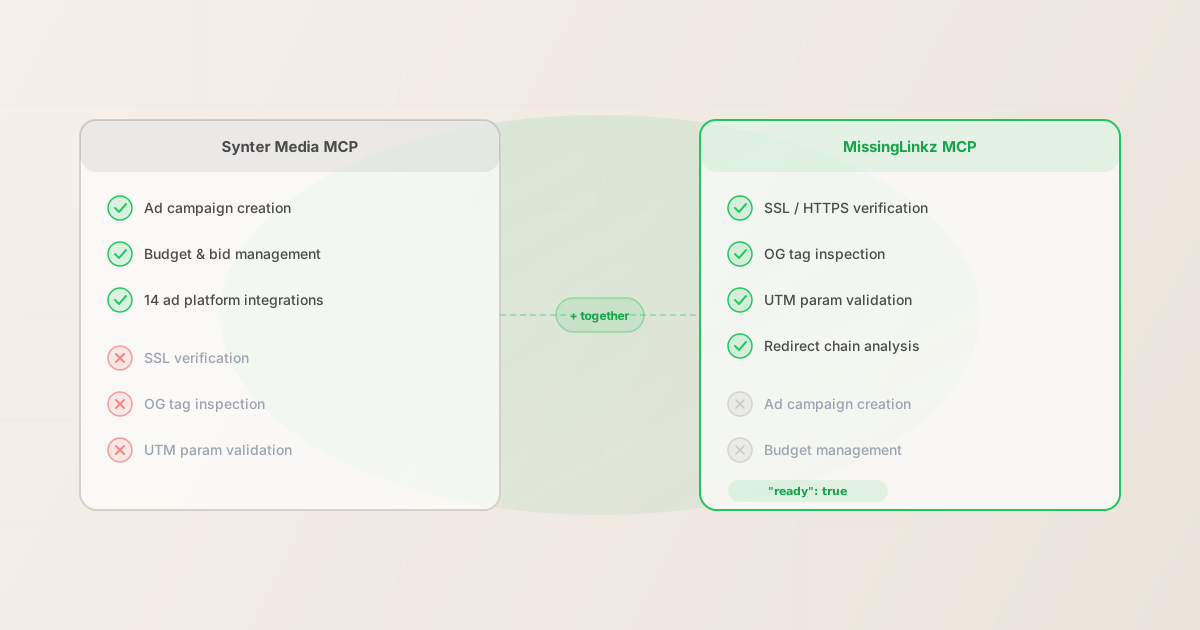
What Synter Media MCP does
Synter Media's MCP server exposes ad management capabilities to AI agents via the Model Context Protocol. When connected to Claude, Cursor, or any other MCP-compatible client, it lets your agent:
- Create and modify ad campaigns
- The agent can create new campaigns, set targeting parameters, and update existing campaign settings across supported ad platforms — all through MCP tool calls rather than manual UI navigation.
- Manage budgets and bids
- Adjust daily budgets, lifetime spend caps, and bid strategies for individual ad sets or campaigns without logging into each platform's dashboard separately.
- Pull performance reporting
- Retrieve impressions, clicks, conversions, and spend data from multiple platforms in one agent query. Useful for agents that need to monitor performance and surface insights across a campaign portfolio.
- Integrate across 14 ad platforms
- Synter's server covers major ad platforms including Google Ads, Meta, LinkedIn, and others — giving an AI agent a unified interface for multi-platform campaign management.
These capabilities address the live campaign management side of marketing: once a campaign is active, how do you adjust, monitor, and optimize it through an AI agent? Synter answers that well.
The gap: what Synter doesn't check before a campaign launches
Synter's MCP server handles campaign management on ad platforms. It does not inspect the destination URLs that campaign ads point to. Before a campaign link goes live, four things need to be verified that Synter has no visibility into:
- SSL / HTTPS
- A campaign link pointing to an HTTP-only URL triggers security warnings in modern browsers and is rejected by some ad platforms. Synter creates the campaign — it does not check whether the destination URL serves HTTPS.
- Open Graph tags
- When a LinkedIn or Meta ad includes a destination URL, the platform fetches
og:title,og:description, andog:imageto generate the preview. If these tags are missing or malformed, the ad preview renders with a broken image or blank description. Synter does not verify that OG tags are present and complete before the campaign launches. - UTM parameter integrity
- Campaign URLs built with UTM parameters need to be checked for formatting errors, case consistency, and parameter conflicts before they're attached to ads. A single typo in
utm_campaignsilently creates a separate untracked row in GA4. Synter creates and manages campaigns — it does not validate UTM parameter quality in the destination URLs. - Redirect chain analysis
- Landing pages frequently sit behind redirect chains — vanity URLs, CDN rewrites, link shorteners. Any hop that strips query strings silently drops all UTM parameters before GA4 records the session. Without following the complete chain, there's no way to confirm that tracking parameters survive to the final destination.
None of these are Synter's responsibility — it's an ad management tool, not a link validator. But they are the exact failure modes that cause campaigns to launch with broken previews, untracked sessions, or inaccessible landing pages.
Capability comparison
| Capability | Synter Media MCP | MissingLinkz MCP |
|---|---|---|
| Ad campaign creation | ✓ Core feature | ✗ Out of scope |
| Budget & bid management | ✓ Core feature | ✗ Out of scope |
| 14 ad platform integrations | ✓ Core feature | ✗ Out of scope |
| Performance reporting | ✓ Core feature | ✗ Out of scope |
| SSL / HTTPS verification | ✗ Not checked | ✓ Validated |
| Open Graph tag inspection | ✗ Not checked | ✓ Full inspection |
| UTM parameter validation | ✗ Not checked | ✓ Enforced |
| Redirect chain analysis | ✗ Not checked | ✓ Full chain |
Pre-launch ready verdict |
✗ Not available | ✓ JSON flag |
| Works without ad account | ✗ Requires account | ✓ Local / offline |
The table illustrates why these tools aren't in competition: they operate at different stages of the campaign lifecycle. Synter manages what happens on the ad platform; MissingLinkz validates what happens at the destination URL before the platform ever sees the link.
What MissingLinkz MCP does
The MissingLinkz MCP server exposes campaign link validation tools to AI agents via stdio transport. When connected, your agent can call:
- mlz_preflight
- Builds a UTM-tagged link, validates the destination URL, and inspects landing page metadata in a single call. Returns
"ready": true/falsewith a fullchecks[]array showing what passed, what warned, and what failed. Thereadyflag is designed to be the agent's go/no-go signal before posting a campaign link anywhere. - mlz_build_link
- Generates a UTM-tagged URL from source, medium, campaign, and optional term/content parameters. Enforces naming conventions (lowercase, hyphenated) automatically so case inconsistency never creates fragmented GA4 rows.
- mlz_inspect_destination
- Inspects a URL for social sharing readiness: Open Graph tags, Twitter Card, viewport meta, canonical URL, favicon, and page load time. Returns structured JSON suitable for an agent to evaluate or report on.
- mlz_validate_url
- Checks SSL, HTTP resolution, response time, and the full redirect chain — including whether UTM parameters are preserved at each hop.
For the full list of MCP tools available, see the MCP Tools for Marketing Campaigns guide.
Connect the MissingLinkz MCP server to Claude Desktop, Cursor, or any MCP client by adding this to your MCP config:
{
  "mcpServers": {
    "missinglinkz": {
      "command": "mlz",
      "args": ["mcp"],
      "env": {
        "MLZ_API_KEY": "your_api_key_here"
      }
    }
  }
}
After connecting, you can prompt your agent: "Before I post this campaign link, validate it with MissingLinkz and tell me if there are any issues." The agent calls mlz_preflight, evaluates the JSON response, and reports the result — no manual browser tools required. For setup instructions specific to Cursor, see how to connect MissingLinkz to Cursor as an MCP server.
What mlz inspect returns for a campaign landing page
Here is a representative output from mlz inspect — the same check that mlz_inspect_destination performs via MCP — showing a page that is ready to receive campaign traffic:
mlz inspect https://example.com/landing --format json
{
  "url": "https://example.com/landing",
  "success": true,
  "checks": [
    { "check": "fetch", "status": "pass", "message": "Page fetched successfully (312ms)." },
    { "check": "open_graph", "status": "pass", "message": "Open Graph tags present: title, description, and image." },
    { "check": "twitter_card", "status": "pass", "message": "Twitter Card present (type: summary_large_image)." },
    { "check": "favicon", "status": "pass", "message": "Favicon found." },
    { "check": "load_time", "status": "pass", "message": "Page load time: 312ms." }
  ],
  "open_graph": {
    "title": "Q2 Campaign Landing Page",
    "description": "Sign up for the Q2 launch...",
    "image": "https://example.com/og-q2.png"
  }
}
This is exactly what an AI agent needs to confirm a landing page is campaign-ready. Synter can tell the agent whether the campaign was created successfully on the ad platform; MissingLinkz can tell the agent whether the destination the campaign points to is actually ready to receive traffic.
Using both together: a complete AI-native campaign workflow
The most capable AI marketing agent workflow uses both tools at different stages:
- Build the UTM link — call
mlz_build_linkvia MissingLinkz MCP to generate a properly formatted, lowercase UTM URL from the campaign parameters - Validate the destination — call
mlz_preflight(ormlz_inspect_destination+mlz_validate_url) to confirm the landing page is HTTPS, resolves correctly, has complete OG tags, and that UTM parameters survive the redirect chain - Gate on the ready flag — if
"ready": false, the agent reports the specific failures before any ad spend is committed - Create the campaign — with a validated link in hand, call Synter Media MCP to create the ad campaign with the confirmed URL as the destination
- Monitor performance — use Synter to pull performance reporting as the campaign runs
Without step 2 and 3, step 4 creates a campaign pointing to a destination that may have broken previews or drop tracking. The Synter MCP server trusts the URL it receives — it has no mechanism to confirm the destination is campaign-ready. MissingLinkz provides that confirmation.
For more on how AI agents can use MCP tools in marketing workflows, see AI agent marketing workflows with MCP and the comparison with UTMMind MCP vs MissingLinkz, which covers a similar distinction in the UTM governance space.
For a broader view of the validation gap in AI-generated campaign workflows, see why AI agents can't use web-based UTM builders and how MCP-native validation tools address it.
FAQ
- Does Synter Media MCP do any link validation?
- Not in the pre-publish sense. Synter validates ad creation parameters (campaign name, budget, targeting options) against ad platform APIs. It does not make HTTP requests to the destination URL to check SSL, OG tags, UTM preservation, or redirect chains. Those checks are outside its scope — Synter is an ad management tool, not a destination URL inspector.
- Can I use MissingLinkz without Synter?
- Yes. MissingLinkz is standalone campaign link infrastructure. You don't need Synter, any ad platform account, or any other tool to use
mlz check,mlz inspect, ormlz build. The CLI and MCP server work against any URL. Synter is relevant only if you're also managing paid campaigns through an AI agent. - How do I add MissingLinkz MCP to an agent that already uses Synter?
- MCP clients support multiple servers simultaneously. Add the MissingLinkz server block to your MCP config file alongside your Synter configuration. Both servers run as separate processes and their tools are independently callable. The agent sees both tool sets and can choose which to call based on the task. See the MCP marketing tools guide for the general pattern.
- Does MissingLinkz work with ad platforms directly?
- No. MissingLinkz validates destination URLs — it does not integrate with ad platforms, manage campaigns, or report on ad performance. Use it upstream of your ad platform workflow (before submitting a campaign URL to Synter or any ad platform) to confirm the destination is ready.
- What's the difference between this and UTMMind MCP?
- UTMMind's MCP server focuses on UTM taxonomy governance: enforcing naming conventions and building consistently structured campaign URLs. MissingLinkz focuses on destination validation: confirming the URL resolves, the redirect chain preserves UTM parameters, and the landing page has the OG tags needed for previews. All three tools (Synter, UTMMind, MissingLinkz) address different stages of the campaign lifecycle. See UTMMind MCP vs MissingLinkz for the detailed comparison.
Recommended posts
Add pre-launch validation to your AI marketing workflow
Install MissingLinkz and connect the MCP server to your agent in under two minutes. Validate every campaign link before it reaches the ad platform — no matter which ad manager you use.
1,000 links/month free. No credit card.
Your API key
Save this now — it won't be shown again.
npm install -g missinglinkz
mlz mcp
Free plan: 1,000 validations/month. No credit card. See MCP setup guide for full configuration.