UTMMind MCP vs MissingLinkz: When You Need Validation, Not Just Governance
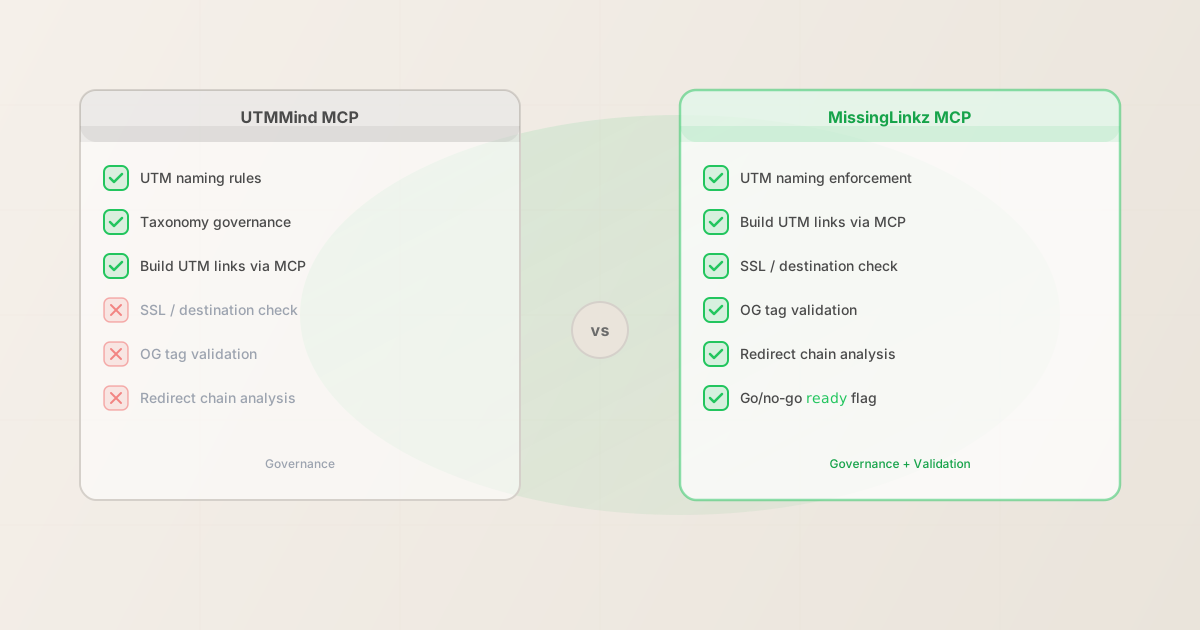
UTMMind now has an MCP server, listed on mcpservers.org, that lets AI agents build and govern UTM links through structured tool calls. It's a real capability and it covers a real need: UTM naming consistency and taxonomy enforcement. But UTMMind's MCP doesn't validate the destination. It doesn't check SSL, verify OG tags, analyze redirect chains, or return a go/no-go verdict on whether the landing page is ready to receive campaign traffic. This article explains the difference between UTM governance and pre-publish destination validation — and why agents need both.
What UTMMind's MCP server does
UTMMind is a UTM governance platform. It lets marketing teams define naming conventions — approved source values, medium taxonomies, campaign naming patterns — and enforce those conventions when links are generated. Their MCP server brings that governance into agent workflows: an AI agent connected to UTMMind's MCP can call tool functions to build UTM-tagged links and get back values that conform to your pre-defined taxonomy.
That's the right capability for the right problem. If your organization has a documented UTM taxonomy and needs to ensure every agent-generated link follows it — no rogue utm_medium=Social values mixing with utm_medium=social, no unauthorized source names — UTMMind's MCP can enforce that at the generation step.
What UTMMind's MCP does not do is touch the destination URL. Once it hands back a well-formed UTM link, its job is done. Whether that link points to a page with a broken SSL certificate, missing OG tags, or a redirect chain that strips the UTM parameters before GA4 sees them — that's outside its scope. UTMMind is a naming and governance tool, not a pre-publish validator.
The gap: destination validation
A well-named UTM link that points to a broken destination is still a broken campaign. The following failures are invisible to governance-only tools — they only become visible when you validate the destination:
- SSL and resolution failures
- The destination URL is unreachable, returns a 404, or uses HTTP instead of HTTPS. Users who click the campaign link see an error or a browser security warning. The campaign is live, spending budget, sending nobody to the intended page.
- Missing Open Graph tags
- The landing page is live but has no
og:imageorog:title. When the campaign link is shared on LinkedIn or Facebook, no preview card renders — just a bare URL. Click-through rate drops even before the first paid impression. - Redirect-based UTM stripping
- The URL shortener, CDN redirect rule, or landing page builder redirect strips UTM parameters before the browser hits the final page. GA4 attributes every visitor as "direct (none)." The campaign attribution is invisible from the first click. See the full breakdown in the redirect UTM stripping guide.
- Broken Twitter Card configuration
- The page has OG tags but no
twitter:cardmeta tag. X (Twitter) renders no preview image. An agent that builds a campaign link for an X promotion and doesn't inspect the destination will send a campaign with no visual hook to the platform most sensitive to preview quality.
None of these failures are governance problems. They can't be caught by enforcing UTM naming conventions. They require running an active HTTP check against the destination — which is what mlz_preflight does.
Feature comparison: UTMMind MCP vs MissingLinkz MCP
| Capability | UTMMind MCP | MissingLinkz MCP |
|---|---|---|
| Build UTM-tagged links | ✓ Yes | ✓ Yes |
| Enforce naming taxonomy | ✓ Yes | ✓ Yes (lowercase + hyphens) |
| Pre-defined taxonomy governance | ✓ Yes (custom rules) | ✓ Yes (convention-based) |
| SSL / destination check | ✗ No | ✓ Yes |
| Open Graph tag validation | ✗ No | ✓ Yes |
| Twitter Card check | ✗ No | ✓ Yes |
| Redirect chain analysis | ✗ No | ✓ Yes |
| UTM preservation through redirects | ✗ No | ✓ Yes |
Go/no-go ready flag |
✗ No | ✓ Yes |
| Structured JSON output | ✓ Yes | ✓ Yes |
| CLI (outside MCP) | ✗ No | ✓ Yes (mlz) |
| npm package | ✗ No | ✓ Yes |
The distinction is architectural. UTMMind is built around a governance database — your taxonomy lives in their platform, and the MCP enforces it. MissingLinkz is built around live URL validation — it runs active checks against the destination URL at the moment the agent calls the tool. Both are valuable; they solve different parts of the same problem.
What mlz_preflight returns that UTMMind's MCP cannot
When an AI agent calls mlz_preflight via MCP, it gets back a structured response the agent can act on directly. The ready boolean is the key: if it's false, the agent knows not to proceed with publishing. The checks array tells it exactly why.
{
  "ready": false,
  "tracked_url": "https://example.com/landing?utm_source=linkedin&utm_medium=social&utm_campaign=q2-launch",
  "checks": [
    { "check": "ssl", "status": "pass", "message": "URL uses HTTPS." },
    { "check": "resolution", "status": "pass", "message": "Destination responded with 200." },
    { "check": "redirects", "status": "pass", "message": "No redirects detected." },
    { "check": "og_tags", "status": "fail", "message": "og:image is missing. Social previews will not render correctly." },
    { "check": "twitter_card", "status": "pass", "message": "Twitter Card present (summary_large_image)." }
  ],
  "summary": { "total": 8, "passed": 7, "warnings": 0, "failed": 1 },
  "recommendation": "Do not publish. Add og:image before launching this campaign."
}
A governance-only tool response would look different: it would return a well-formed UTM link with no indication of whether the destination is ready. The agent would have a correctly named link and no signal about the OG tag failure. The campaign would publish with no social preview.
The ready: false flag is the part that matters for agentic workflows. An agent can be instructed to "never publish a campaign link when ready is false" — that single rule prevents a category of silent failures that governance alone can't catch.
How to connect MissingLinkz MCP in two minutes
The MissingLinkz MCP server uses stdio transport and requires no authentication for basic validation. Add this config to your MCP client:
{
  "mcpServers": {
    "missinglinkz": {
      "command": "mlz",
      "args": ["mcp"]
    }
  }
}
Install the CLI first:
npm install -g missinglinkz
Once connected, the following MCP tools are available to your agent:
- mlz_preflight
- Build a UTM-tagged link and run the full pre-publish validation suite in one call. Returns
ready,tracked_url,checks, andrecommendation. - mlz_build_link
- Generate a UTM-tagged link with naming enforcement. Stores via API if an API key is present, falls back to local generation.
- mlz_inspect_destination
- Inspect a URL for OG tags, Twitter Card, viewport, canonical, and favicon without building a tracked link. Useful when validating a page independently of the campaign build step.
- mlz_validate_url
- Validate SSL, resolution, redirects, and response time for any URL. The destination health check without the social preview layer.
For Cursor-specific setup, see the MissingLinkz Cursor MCP guide. For Claude Code setup, see the MissingLinkz Claude Code guide.
Using UTMMind and MissingLinkz together
The two tools are not competing for the same job. An agent workflow that uses both is more complete than one that uses either alone:
- Step 1: Governance (UTMMind MCP)
- The agent calls UTMMind to build a UTM link using your organization's approved taxonomy. Source values, medium conventions, and campaign naming patterns are all enforced at this step. The output is a well-formed, correctly named UTM link.
- Step 2: Destination validation (MissingLinkz MCP)
- The agent passes the built URL to
mlz_preflight. This runs SSL, OG tag, redirect, and UTM preservation checks against the destination. Ifreadyisfalse, the agent surfaces the specific failures and stops before publishing. Ifreadyistrue, the campaign is safe to proceed.
If your existing stack already uses UTMMind for governance, adding MissingLinkz as a validation step requires only the MCP config block above. The two tools operate on separate concerns and don't conflict. See the AI agent marketing workflows guide for a full walkthrough of chaining MCP tools in a campaign build-to-publish sequence.
When MissingLinkz is sufficient on its own
If your team doesn't have a formal UTM taxonomy governance requirement — you're a small team, a solo marketer, or you handle naming conventions with a style guide rather than a governed platform — MissingLinkz covers both the build and validation steps without a second tool. mlz_build_link enforces lowercase and hyphen-separated values by default, which handles the most common naming inconsistencies without requiring a custom taxonomy database.
For larger organizations with multiple teams, agencies, or clients generating campaign links independently, UTMMind's governance layer adds value that MissingLinkz's convention-based enforcement doesn't try to replicate. The decision point is whether you need custom, pre-defined taxonomy rules (UTMMind) or convention enforcement with destination validation (MissingLinkz).
For a broader look at how MissingLinkz compares to other validation and governance tools in the campaign link space, see the mlz preflight vs. other tools comparison.
Recommended posts
FAQ
- Does MissingLinkz replace UTMMind?
- No. They solve different problems. UTMMind is a governance platform that enforces custom UTM taxonomy rules across a team or organization. MissingLinkz is a campaign link infrastructure tool focused on destination validation and pre-publish readiness. If you need custom naming governance, UTMMind fills that role. If you need to know whether the destination URL is actually ready for campaign traffic, MissingLinkz fills that role. Many teams benefit from using both.
- Can I use mlz_preflight without mlz_build_link?
- Yes. If you already have a fully built UTM link from UTMMind or any other source, you can pass it to
mlz_inspect_destinationormlz_validate_urlto validate the destination independently.mlz_preflightcombines link building with validation in one call, but the validation functions are available separately. - Does MissingLinkz have a web dashboard?
- MissingLinkz is designed for programmatic use: CLI, npm package, REST API, and MCP. There is no web dashboard for link building. If you need a web-based UTM builder with a shared link library for non-technical marketers, UTMMind or a dashboard tool is the appropriate choice. If you need CLI, API, or agent integration, MissingLinkz is the tool built for that environment.
- What MCP clients work with MissingLinkz?
- Any client that supports the MCP stdio transport: Claude Desktop, Claude Code, Cursor, and custom agent implementations using the MCP SDK. The same JSON config block works across all of them. See the Cursor MCP setup guide for Cursor-specific instructions.
- What does "validation vs. governance" mean in practice?
- Governance answers: "Is this UTM link named correctly according to our conventions?" Validation answers: "Is the destination this link points to ready to receive campaign traffic?" A link can be perfectly governed (correct naming, approved taxonomy) and still point to a page with a broken SSL cert or missing OG image. Governance and validation are checks on different dimensions of the same campaign link.
Add destination validation to your MCP workflow
Install MissingLinkz, add the MCP config block, and your agent can validate SSL, OG tags, and redirect chains before any campaign link is published. Two minutes to connect, zero browser steps.
1,000 links/month free. No credit card.
Your API key
Save this now — it won't be shown again.
npm install -g missinglinkz
mlz mcp
See the full MCP tool list in the MCP Marketing Tools pillar guide.