Publish Social Media Posts with Confidence: Validate Links, Previews & Copy Before You Launch
MissingLinkz is a pre-publish campaign validator that catches broken links, inconsistent UTM naming, missing social preview cards, and truncated post copy — all before you spend a dollar on promotion. One CLI command checks everything, so your team publishes with confidence instead of crossed fingers.
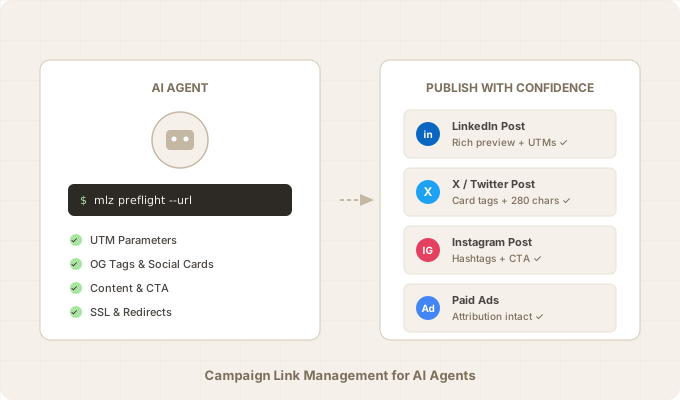
Five things that go wrong before you hit publish
Every campaign has the same failure points. They're invisible until after you've spent budget — then they show up as missing data, broken previews, and posts that get cut off mid-sentence.
- Inconsistent naming fragments your analytics
- "LinkedIn" vs "linkedin" vs "li" creates three separate traffic sources in Google Analytics. Multiply this across sources, mediums, and campaigns, and your reports become unusable. A single capitalization error can hide thousands of dollars in attribution.
- Broken destinations waste ad spend
- A 404 landing page, an expired SSL certificate, a DNS misconfiguration, or a redirect chain that strips UTM parameters — any of these silently kills your campaign. You're paying for clicks that lead nowhere.
- Missing social previews kill click-through rates
- When your landing page is missing Open Graph tags or Twitter Card meta, your links render as plain text URLs on LinkedIn, X, and Facebook. No image, no headline, no description. Click-through rates drop significantly, but nobody checks until a colleague asks "why does our link look broken?"
- Post copy gets truncated or rejected
- X allows 280 characters. LinkedIn allows 3,000. Instagram caps hashtags at 30. When your post exceeds a platform's limits, it either gets cut off mid-sentence or fails to publish entirely. And if there's no call-to-action, the post drives impressions but not conversions.
- All of it is invisible until after launch
- Broken campaign links don't throw errors. Missing OG tags don't trigger alerts. Truncated posts don't send notifications. You're making budget decisions based on reports that are missing 10-30% of the picture — and you don't even know it.
What MissingLinkz checks
MissingLinkz validates five layers of your campaign before you publish. Each layer catches a different class of failure that costs you data, clicks, or credibility.
UTM link building with naming enforcement
The mlz build command generates UTM-tagged URLs with automatic sanitization. Every parameter is lowercased, spaces become hyphens, special characters are stripped, and double hyphens are collapsed. No more "LinkedIn" vs "linkedin" splits in GA4.
mlz build --url "https://yoursite.com/spring-sale" --source linkedin --medium social --campaign spring-launch-2026
tracked_url: https://yoursite.com/spring-sale?utm_source=linkedin&utm_medium=social&utm_campaign=spring-launch-2026URL validation
The mlz check command validates that your destination actually works. It checks HTTPS/SSL, DNS resolution, redirect chains, and response time. A link to a page that returns a 404 or takes 8 seconds to load is worse than no link at all.
mlz check https://yoursite.com/spring-sale
Social preview readiness
The mlz inspect command checks whether your landing page is ready to be shared on social media. It looks for Open Graph tags (title, description, image), Twitter Card meta, viewport configuration, canonical URL consistency, and a favicon. Missing any of these means broken or blank link previews when your post goes live.
mlz inspect https://yoursite.com/spring-sale
Content validation
MissingLinkz validates your post copy against platform-specific rules before you publish. It checks character counts against platform limits, counts hashtags, and scans for a call-to-action. A post that gets truncated or lacks a CTA wastes the entire campaign effort.
- Character limits
- X (Twitter) allows 280 characters. LinkedIn allows 3,000. Posts that exceed the limit get cut off mid-sentence or fail to publish entirely.
- Hashtag limits
- Instagram caps hashtags at 30. Exceeding the limit can cause your post to fail or get suppressed by the algorithm.
- CTA detection
- MissingLinkz scans your copy for call-to-action phrases like "Sign up," "Learn more," "Get started," and "Try free." A post without a CTA drives impressions but not conversions.
The all-in-one mlz preflight command
The mlz preflight command runs every check in a single pass: builds your tracked link, validates the destination, checks social preview readiness, validates your post copy, and returns a complete report with a ready: true/false verdict. This is the command you run before every publish.
The mlz preflight command in action
Here's what a real preflight run looks like. First, a failing example — then a passing one.
Failing preflight
This post is being published to X, but the copy is 312 characters (over the 280 limit), the landing page is missing an OG image, and there's no call-to-action:
mlz preflight --url "https://yoursite.com/spring-sale" --copy "We are thrilled to announce our incredible spring sale event happening right now with amazing discounts across every single product category in our entire store including electronics furniture clothing accessories and so much more for a limited time only" --source x --medium social --campaign spring-launch-2026 --format human
PASS  ssl              URL uses HTTPS
PASS  resolution       Destination responded with 200
PASS  redirects        No redirect chain detected
PASS  response_time    Page loaded in 410ms
PASS  og_tags          Open Graph title and description present
FAIL  og_image         Missing og:image meta tag
PASS  twitter_card     Twitter Card tags configured
PASS  viewport         Viewport meta tag present
PASS  canonical        Canonical URL matches destination
PASS  favicon          Favicon found
PASS  utm_valid        All required UTM parameters present
PASS  utm_preserved    UTM parameters preserved through redirects
FAIL  char_count       312 characters (limit: 280 for x)
PASS  hashtags         0 hashtags (limit: no limit for x)
FAIL  cta_detected     No call-to-action found

12 passed, 0 warnings, 3 failed
ready: false
Passing preflight
Same campaign, but now targeting LinkedIn with copy that fits the platform and includes a CTA:
mlz preflight --url "https://yoursite.com/spring-sale" --copy "Check out our spring sale! Get 30% off all plans. Sign up today." --source linkedin --medium social --campaign spring-launch-2026 --format human
PASS  ssl              URL uses HTTPS
PASS  resolution       Destination responded with 200
PASS  redirects        No redirect chain detected
PASS  response_time    Page loaded in 320ms
PASS  og_tags          All essential Open Graph tags present
PASS  twitter_card     Twitter Card tags configured
PASS  viewport         Viewport meta tag present
PASS  canonical        Canonical URL matches destination
PASS  favicon          Favicon found
PASS  utm_valid        All required UTM parameters present
PASS  utm_preserved    UTM parameters preserved through redirects
PASS  char_count       64 characters (limit: 3,000 for linkedin)
PASS  hashtags         0 hashtags (limit: 30 for linkedin)
PASS  cta_detected     "Sign up" call-to-action found

14 passed, 0 warnings, 0 failed
ready: true
Platform rules reference
MissingLinkz validates your post copy against these platform-specific limits. Exceeding any of them means your post gets truncated, rejected, or suppressed.
- X (Twitter)
- 280 character limit. No hashtag limit enforced by the platform, but excessive hashtags reduce engagement. MissingLinkz checks character count against the 280 limit.
- 3,000 character limit for organic posts. Up to 30 hashtags recommended. MissingLinkz checks both character count and hashtag count.
- 2,200 character limit for captions. Maximum 30 hashtags per post — exceeding this can cause the post to fail or get suppressed. MissingLinkz enforces the 30-hashtag cap.
- 63,206 character limit for posts. No strict hashtag limit, but best practice is fewer than 5. MissingLinkz checks character count.
- CTA detection (all platforms)
- MissingLinkz scans for call-to-action phrases: "Sign up," "Learn more," "Get started," "Try free," "Download," "Subscribe," "Register," "Book a demo," and similar. A post without a CTA is a missed conversion opportunity.
How AI agents integrate with MissingLinkz
MissingLinkz ships with a SKILL.md file that AI agents read to understand the tool's full capabilities. Here's what that enables:
- Natural-language campaign validation
- Tell your agent: "Validate my LinkedIn post for the spring sale campaign and make sure the landing page previews correctly." The agent reads SKILL.md, maps your request to
mlz preflightwith the right flags, and returns a full validation report. No flag memorization needed. - MCP (Model Context Protocol) support
- MissingLinkz works as an MCP tool, so agents can call it directly as a structured tool rather than shelling out to the CLI. This enables tighter integration with agent frameworks that support MCP.
- Works with Claude Code, Cursor, and Windsurf
- Any agent that can read markdown documentation and execute CLI commands can use MissingLinkz. Install it globally with npm, and the agent picks up the SKILL.md spec automatically. Claude Code, Cursor, Windsurf, and Cline have all been tested.
- Full workflow in one conversation turn
- The agent can validate your post copy, check the landing page, build the tracked link, and return a ready/not-ready verdict — all in a single conversation turn. If preflight fails, the agent reports exactly what's wrong so you can fix it before publishing.
Deep dives
This page covers the full picture. Each topic below goes deeper on a specific aspect of the campaign validation workflow:
- Build UTM Links with an AI Agent
- A hands-on walkthrough of using an AI agent to generate UTM-tagged links. Covers the
mlz buildcommand, naming enforcement, multi-platform builds, and real terminal output. - Campaign Link Preflight Check
- Why you should validate your landing page before launching a campaign. Walks through all preflight checks with failing and passing examples, including the new content validation checks.
- The Cost of Broken Campaign Links
- What happens to your ad spend, attribution data, and team trust when campaign links break. Real scenarios, invisible failure modes, and how to prevent them.
- UTM Naming Conventions: The Complete Guide
- How to standardize utm_source, utm_medium, and utm_campaign so your Google Analytics data stays clean. Includes a copy-paste naming template and GA4 channel grouping alignment.
- AI Link Agents Compared: Which Ones Validate the Destination?
- How MissingLinkz compares to UTMMind, RhinoAgents, Highperformr, and other AI link building tools on the one capability that separates them: destination validation.
- Step-by-Step Guide
- Install MissingLinkz and run your first preflight check in under a minute.
For Agents
MissingLinkz is a CLI tool built for AI agents and marketing teams. Install it globally, and validate links, previews, and post copy in a single command.
npm install -g missinglinkz
Validate everything before you publish:
mlz preflight --url "https://yoursite.com/spring-sale" --copy "Check out our spring sale! Get 30% off all plans. Sign up today." --source linkedin --medium social --campaign spring-launch-2026 --format human
Read the SKILL.md for the full agent integration spec.