MissingLinkz REST API: Validate Campaign Links Programmatically
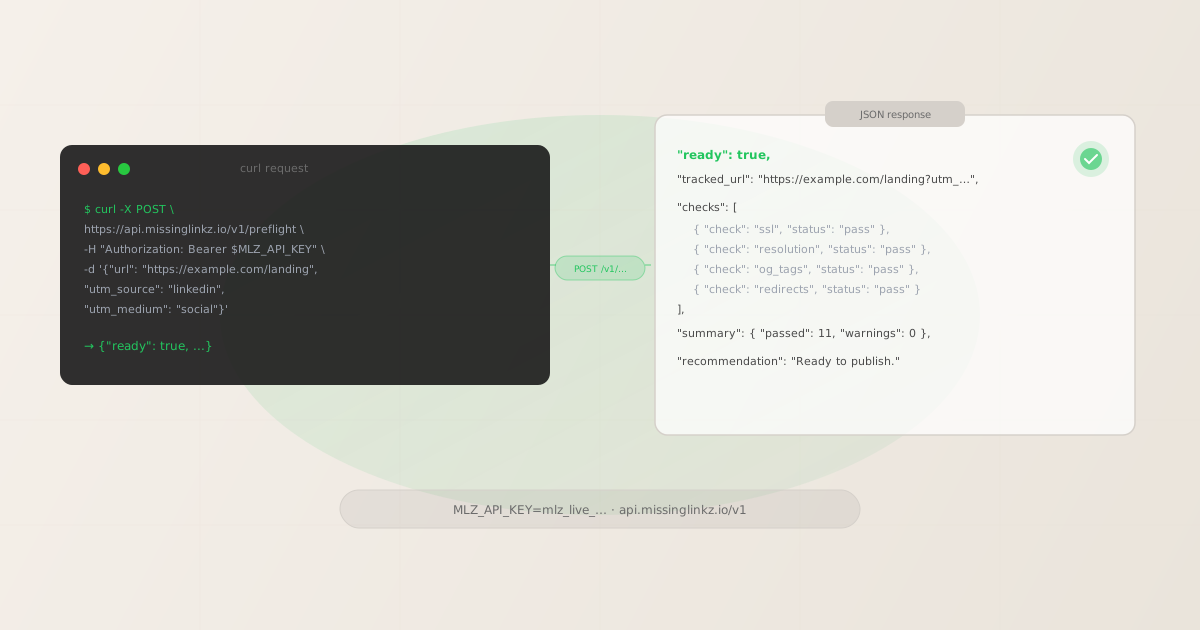
The campaign link validation REST API lets you integrate pre-publish checks directly into server-side pipelines, custom dashboards, and backend services — without installing the CLI. A single POST /v1/preflight request returns a ready boolean alongside a structured JSON report covering SSL, URL resolution, redirect chain, UTM parameter integrity, Open Graph tags, and Twitter Cards. This article is the complete reference: authentication, request shape, response schema, curl and Node.js examples, and a guide to choosing between the REST API, the CLI, and the MCP server.
REST API vs CLI vs MCP: which integration fits your use case?
MissingLinkz exposes three integration surfaces. Choosing the right one depends on where your validation logic lives:
| Use case | CLI | MCP server | REST API |
|---|---|---|---|
| Local terminal, ad-hoc checks | ✓ Best fit | ✗ Overkill | ✗ Overkill |
| GitHub Actions / GitLab CI | ✓ Good | ✗ Not designed for CI | ✓ Good |
| Server-side script or backend service | ✗ Requires Node install | ✗ Not designed for servers | ✓ Best fit |
| AI agent (Claude, Cursor, custom) | ✗ No structured tool call | ✓ Best fit | ✓ Works via API call |
| Custom dashboard or internal tool | ✗ Hard to embed | ✗ Wrong transport | ✓ Best fit |
| No Node.js on the target machine | ✗ Requires Node | ✗ Requires Node | ✓ HTTP-only |
The rule of thumb: use the CLI for local development and CI, the MCP server for AI agent tool calls, and the REST API when you need to call validation from a language or environment where installing an npm package is not practical.
Authentication
All REST API requests require an API key passed in the Authorization header as a Bearer token. Get your key by registering with the CLI:
mlz auth register --email [email protected]
Or check your existing key:
mlz auth status
Store the key as an environment variable. Every request must include:
Authorization: Bearer mlz_live_your_key_here
Content-Type: application/json
A missing or invalid key returns HTTP 401 with a JSON body of the form {"error": true, "code": "AUTH_MISSING", "message": "...", "suggestion": "..."}. The free plan includes 1,000 operations per month with no credit card required. Each preflight or inspect call counts as one operation. Quotas reset on the first of each calendar month.
POST /v1/preflight — request format
This single endpoint covers the full pre-publish validation workflow: it builds the UTM-tracked link, validates the destination URL, and inspects the landing page for social sharing readiness. The base URL is https://api.missinglinkz.io.
Required parameters
url(string)- The destination URL to validate. Must include the scheme (
https://). The URL is not required to have UTM parameters already — those are passed as separate fields and appended by the API. The same field names are used byPOST /v1/links. source(string)- The traffic source — becomes
utm_source. Examples:linkedin,google,newsletter. The API normalises values to lowercase-hyphenated format before validating — matching the same convention enforced bymlz buildin the CLI. medium(string)- The marketing medium — becomes
utm_medium. Examples:social,cpc,email. campaign(string)- The campaign name — becomes
utm_campaign. Examples:spring-launch-2026,q2-brand.
Optional parameters
term(string)- Paid search keyword — becomes
utm_term. Only needed formedium=cpccampaigns. content(string)- Content variant identifier for A/B testing — becomes
utm_content. Example:hero-cta-v2.
Minimal request example
{
  "url":      "https://yoursite.com/landing",
  "source":   "linkedin",
  "medium":   "social",
  "campaign": "spring-2026"
}
Response schema
A successful request returns HTTP 200 with a JSON body. The top-level ready boolean is the single signal your pipeline needs. Everything below it is the detail that explains why.
{
  "ready": true,
  "tracked_url": "https://yoursite.com/landing?utm_source=linkedin&utm_medium=social&utm_campaign=spring-2026",
  "link_id": "lnk_9wlvd9qi",
  "campaign_id": "cmp_kbcht77d",
  "destination_url": "https://yoursite.com/landing",
  "params": {
    "utm_source":   "linkedin",
    "utm_medium":   "social",
    "utm_campaign": "spring-2026"
  },
  "checks": [
    { "check": "url_format",    "status": "pass", "message": "URL format is valid." },
    { "check": "ssl",           "status": "pass", "message": "URL uses HTTPS." },
    { "check": "resolution",    "status": "pass", "message": "Destination responded with 200.",
      "details": { "status_code": 200, "response_time_ms": 163 } },
    { "check": "redirects",     "status": "pass", "message": "No redirects detected." },
    { "check": "response_time", "status": "pass", "message": "Response time: 163ms." },
    { "check": "utm_conflict",  "status": "pass", "message": "No existing UTM parameters on destination URL." },
    { "check": "page_load",     "status": "pass", "message": "Page loaded in 324ms." },
    { "check": "og_tags",       "status": "pass", "message": "All essential Open Graph tags present (og:title, og:description, og:image)." },
    { "check": "twitter_card",  "status": "pass", "message": "Twitter Card tags configured." },
    { "check": "viewport",      "status": "pass", "message": "Viewport meta tag present. Page is configured for mobile devices." },
    { "check": "canonical",     "status": "pass", "message": "Canonical URL matches destination." },
    { "check": "favicon",       "status": "pass", "message": "Favicon detected." }
  ],
  "summary": {
    "total": 12, "passed": 12, "warnings": 0, "failed": 0
  },
  "recommendation": "All checks passed. Campaign link is ready to publish.",
  "stored": true,
  "created_at": "2026-04-28T09:00:00.000Z"
}
Key fields to understand:
ready(boolean)- The go/no-go verdict.
truemeans all required checks passed.falsemeans at least one check failed — inspect thechecksarray for which check has"status": "fail". Warnings do not setreadyto false. tracked_url(string)- The assembled UTM-tagged URL ready to copy and publish. This is the URL with your parameters appended using the normalised values.
checks(array)- Each check object has a
checkname, astatusof"pass","warn", or"fail", a human-readablemessage, and an optionaldetailsobject with numeric data. Use the status field for programmatic gating — don't parse the message string. summary(object)- Aggregate counts:
total,passed,warnings,failed. Useful for logging or dashboarding without iterating every check.
curl example
The simplest way to call the API from the terminal or a shell script. Replace $MLZ_API_KEY with your key or export it as an environment variable.
$ curl -s -X POST https://api.missinglinkz.io/v1/preflight \
  -H "Authorization: Bearer $MLZ_API_KEY" \
  -H "Content-Type: application/json" \
  -d '{
    "url": "https://yoursite.com/landing",
    "source": "linkedin",
    "medium": "social",
    "campaign": "spring-2026"
  }' | jq '.ready, .tracked_url, .summary'
To gate a shell script on the result, check the exit code from jq -e:
RESULT=$(curl -s -X POST https://api.missinglinkz.io/v1/preflight \
  -H "Authorization: Bearer $MLZ_API_KEY" \
  -H "Content-Type: application/json" \
  -d '{"url":"https://yoursite.com/landing","source":"linkedin","medium":"social","campaign":"spring-2026"}')

echo "$RESULT" | jq '.'

if echo "$RESULT" | jq -e '.ready == true' > /dev/null 2>&1; then
  echo "Link is ready to publish."
else
  echo "Validation failed. Check the report above."
  exit 1
fi
Node.js example
For server-side JavaScript, use the built-in fetch API (Node.js 18+) or any HTTP client. No additional dependencies needed beyond what ships with modern Node.
async function validateCampaignLink(params) {
  const response = await fetch('https://api.missinglinkz.io/v1/preflight', {
    method: 'POST',
    headers: {
      'Authorization': `Bearer ${process.env.MLZ_API_KEY}`,
      'Content-Type': 'application/json',
    },
    body: JSON.stringify(params),
  });

  if (!response.ok) {
    const err = await response.json();
    throw new Error(`API error ${response.status}: ${err.error}`);
  }

  return response.json();
}

const report = await validateCampaignLink({
  url:      'https://yoursite.com/landing',
  source:   'linkedin',
  medium:   'social',
  campaign: 'spring-2026',
});

if (report.ready) {
  console.log('Ready:', report.tracked_url);
} else {
  const failed = report.checks.filter(c => c.status === 'fail');
  console.error('Validation failed:', failed);
  process.exit(1);
}
For bulk validation — checking multiple campaign links in a deployment pipeline — loop over an array and accumulate failures before deciding whether to exit:
const campaigns = [
  { url: 'https://yoursite.com/q2',     source: 'linkedin', medium: 'social',  campaign: 'q2-launch' },
  { url: 'https://yoursite.com/brand',  source: 'google',   medium: 'cpc',     campaign: 'brand-2026' },
  { url: 'https://yoursite.com/email',  source: 'mailchimp', medium: 'email',   campaign: 'newsletter-may' },
];

const results = await Promise.all(campaigns.map(validateCampaignLink));
const failures = results.filter(r => !r.ready);

if (failures.length) {
  console.error(`${failures.length} campaign link(s) failed validation`);
  process.exit(1);
}
console.log(`All ${results.length} campaign links validated.`);
Python example
For Python environments — data pipelines, marketing automation scripts, or Django/FastAPI backends — use the standard requests library:
import os
import requests
import sys

API_URL = "https://api.missinglinkz.io/v1/preflight"
API_KEY = os.environ["MLZ_API_KEY"]

def validate_campaign_link(url, source, medium, campaign, **kwargs):
    resp = requests.post(
        API_URL,
        headers={
            "Authorization": f"Bearer {API_KEY}",
            "Content-Type": "application/json",
        },
        json={
            "url":      url,
            "source":   source,
            "medium":   medium,
            "campaign": campaign,
            **kwargs,
        },
        timeout=30,
    )
    resp.raise_for_status()
    return resp.json()

report = validate_campaign_link(
    url="https://yoursite.com/landing",
    source="linkedin",
    medium="social",
    campaign="spring-2026",
)

if report["ready"]:
    print(f"Ready: {report['tracked_url']}")
else:
    failed = [c for c in report["checks"] if c["status"] == "fail"]
    print(f"Validation failed: {failed}", file=sys.stderr)
    sys.exit(1)
Error codes
Non-2xx responses indicate a problem with the request itself, not the campaign link being validated. All errors return a JSON body with error: true, a machine-readable code, a human message, and a suggestion.
| HTTP status | code | Cause |
|---|---|---|
400 |
"VALIDATION_ERROR" |
Malformed JSON body, an invalid url, or missing required fields (url, source, medium, campaign) |
401 |
"AUTH_MISSING" / "AUTH_INVALID_KEY" |
Missing, malformed, or invalid Authorization header |
429 |
"USAGE_LIMIT_EXCEEDED" |
Monthly operation quota exhausted for your plan tier |
500 |
"INTERNAL_ERROR" |
Unexpected server error — retry with exponential backoff |
A 429 response means you have reached your plan's monthly quota, not a per-second rate limit. The body includes links_used, links_limit, current_plan, and an upgrade_url. Upgrade your plan or wait for the monthly reset. Plan quotas: Free 1,000/month, Team unlimited, Enterprise unlimited.
FAQ
- Do I need an API key to call the REST API?
- Yes. Unlike the CLI (
mlz checkworks offline for URL-only validation), the REST API always requires a validAuthorization: Bearerheader. The free plan includes 1,000 operations per month — register withmlz auth register --email [email protected]to get a key immediately, no credit card required. - Can I call the REST API without installing the CLI?
- Yes. The REST API is a standalone HTTP endpoint. You only need the CLI if you want to generate API keys (
mlz auth register) or run local validation without making network calls. Once you have a key, you can call the API from any language or environment that can make HTTP POST requests. - How does the REST API compare to calling mlz preflight in CI?
- For GitHub Actions and similar CI systems,
mlz checkormlz publish-checkvia the CLI is simpler because it handles authentication, JSON output, and exit codes in one npm install step. The REST API is the better choice when your CI pipeline is in a language other than Node.js, when you're calling from a backend service that already manages HTTP clients, or when you want to avoid adding npm dependencies. See the GitHub Actions template for the CLI-based CI pattern. - What happens if the destination URL is down when I call the API?
- The API will still return
HTTP 200with a response body, but"ready": false— theresolutioncheck will show"status": "fail"with the HTTP status code returned (or a timeout error). This is the expected behavior: a destination that's down at validation time is not ready to receive campaign traffic, even if the UTM parameters are correctly formatted. - Does preflight store the link? Can I retry on failure?
- Each
POST /v1/preflightcall performs a fresh HTTP check against the destination and also builds and stores the tracked link (incrementing your quota), so repeated calls create multiple link records under the same campaign. If you only want to validate without storing a link, usePOST /v1/inspectinstead. The checks themselves have no side effects on the destination, so it's safe to retry on5xxerrors — use exponential backoff with jitter: start at 1 second, cap at 30 seconds.
Recommended posts
Start calling the REST API
Get your API key in 30 seconds, then call /v1/preflight from any environment. Free plan: 1,000 operations per month, no credit card required.
1,000 links/month free. No credit card.
Your API key
Save this now — it won't be shown again.
npm install -g missinglinkz
mlz auth register --email [email protected]
Then call POST https://api.missinglinkz.io/v1/preflight with your key. See the SKILL.md reference for the full command list.