Uplifter Alternative for Developers: CLI, API, and MCP vs. Dashboard-Only
Uplifter is a solid UTM governance tool for marketing teams who manage campaigns through a web dashboard. If you are a developer searching for an Uplifter alternative for the CLI — one you can call from scripts, CI/CD pipelines, or AI agents — Uplifter's browser-only architecture is not the right fit. This article compares the two tools factually and shows where MissingLinkz fills the gap that Uplifter leaves for programmatic workflows.
What Uplifter does well
Uplifter is a purpose-built UTM governance platform. It gives marketing teams a structured web dashboard for defining and enforcing UTM taxonomies — consistent naming conventions for sources, mediums, campaigns, and other parameters across the organization. It has templates, team sharing, approval workflows, and a clean UI for marketers who live in browsers.
For teams that need to prevent UTM naming drift across a large marketing organization — and who build every link through a web form — Uplifter does that job. This article is for a different audience: developers and marketing engineers who need to generate UTM links from scripts, validate destinations programmatically, integrate with CI/CD pipelines, or give AI agents access to UTM tooling. That is where Uplifter's architecture creates hard constraints.
Where Uplifter falls short for developer workflows
Uplifter is a web application by design. Every operation requires a browser and a human. That creates structural constraints for programmatic use:
- No CLI
- There is no
upliftercommand-line binary. You cannot build UTM links from a terminal, shell script, or cron job. Every link requires a browser session — which rules out automation, batch generation, and any workflow that needs to run without human interaction. - No REST API
- Uplifter does not expose a public REST API for link generation. You cannot POST to an endpoint from a backend service, serverless function, or CI/CD step to create a tracked URL. If your workflow runs outside a browser, Uplifter cannot participate in it.
- No MCP server
- AI agents like Claude Code, Cursor, and other MCP-compatible clients cannot use web dashboards. They need CLI tools or API endpoints they can call directly. Uplifter has no MCP server, which means agents cannot build or validate UTM links through Uplifter without a human at the keyboard. For why this matters, see why AI agents can't use UTM builders.
- No destination validation
- Uplifter generates a correctly formatted UTM URL string. It does not verify that the destination URL resolves, that SSL is configured, that UTM parameters survive any redirect chains, or that the landing page has the OG tags needed for social previews to render. Link generation and quality assurance are completely separate manual processes.
- No CI/CD integration
- Without a CLI or API, you cannot run Uplifter as a step in a GitHub Actions workflow or a pre-deploy script. Campaign link validation cannot be automated — it stays manual.
- No structured JSON output
- Uplifter's output is a web UI. There is no structured JSON that a script, monitoring system, or AI agent can consume. Every check result is visual, not programmatic.
These are architectural constraints, not missing features on a roadmap. Uplifter is designed for marketers using a browser. For the broader case of why web-dashboard tools break developer workflows, see how to build UTM links programmatically.
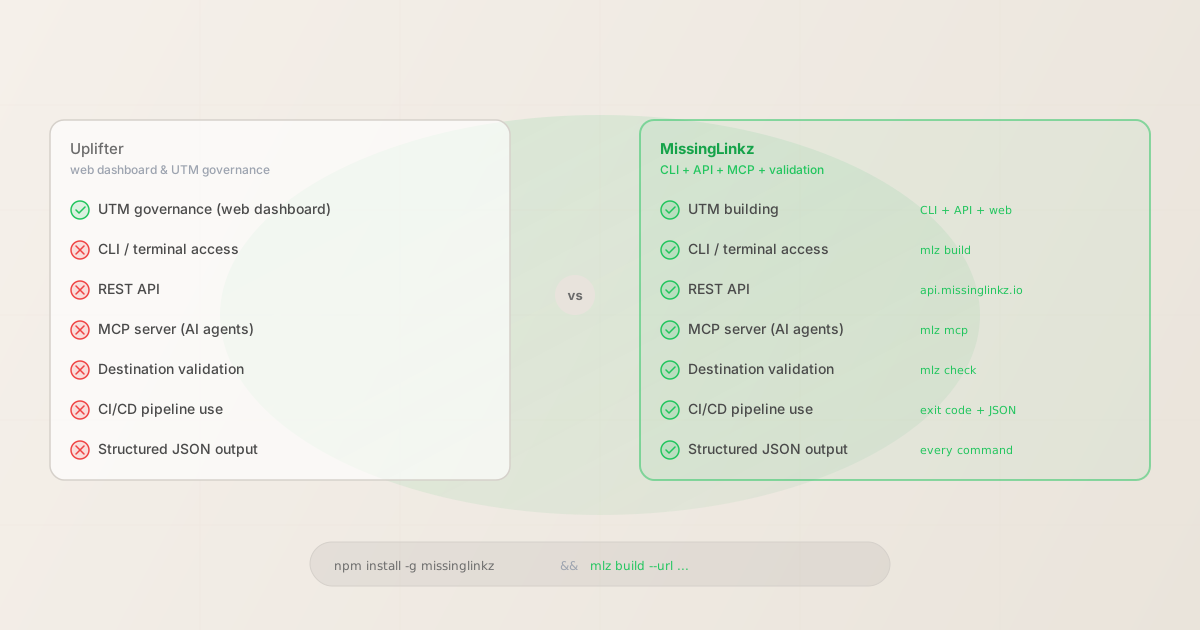
Uplifter vs. MissingLinkz: feature comparison
| Capability | Uplifter | MissingLinkz |
|---|---|---|
| UTM link building | ✓ Web dashboard | ✓ CLI + API + web |
| UTM taxonomy governance | ✓ Dashboard rules | ✓ Enforced in CLI + API |
| CLI access | ✗ Not available | ✓ mlz build |
| REST API | ✗ No public API | ✓ api.missinglinkz.io |
| MCP server (AI agents) | ✗ Not available | ✓ mlz mcp |
| Destination validation (SSL, resolution) | ✗ None | ✓ mlz check |
| OG tag / social preview check | ✗ None | ✓ mlz inspect |
| CI/CD pipeline integration | ✗ Not possible | ✓ Exit code + JSON output |
| Structured JSON output | ✗ None | ✓ Every command |
| Offline UTM generation | ✗ Requires browser + internet | ✓ No API key needed |
| npm package | ✗ None | ✓ npm install -g missinglinkz |
For a similar comparison with utm.io — another popular web-only UTM tool — see utm.io alternative for developers. For the validation comparison that covers what mlz preflight checks vs. what other tools miss, see how mlz preflight catches what other tools miss.
What the MissingLinkz CLI looks like in practice
Install once, build links immediately — no browser, no login:
npm install -g missinglinkz
mlz build --url "https://acme.com/spring-offer" --campaign "spring-2026" --source "linkedin" --medium "social"
Output:
{
  "tracked_url": "https://acme.com/spring-offer?utm_source=linkedin&utm_medium=social&utm_campaign=spring-2026",
  "params": {
    "utm_source": "linkedin",
    "utm_medium": "social",
    "utm_campaign": "spring-2026"
  },
  "destination_url": "https://acme.com/spring-offer",
  "created_at": "2026-04-21T08:32:11.010Z",
  "link_id": "lnk_7tvmq4xr",
  "stored": true
}
No browser required. Structured JSON you can parse in any script. Add --validate to gate link generation on destination health. For bulk link generation from a CSV or shell loop, see the programmatic UTM link building guide.
Destination validation: the step Uplifter skips
Building a correctly formatted UTM URL does not guarantee the campaign link works. The destination might return a 404. The redirect chain might strip UTM parameters before GA4 records the session. The landing page might be missing OG tags, causing blank social previews when the link is shared on LinkedIn or X.
Uplifter does none of these checks. mlz check handles the URL health layer, and mlz inspect handles the social preview layer:
mlz check "https://acme.com/spring-offer"
{
  "url": "https://acme.com/spring-offer",
  "valid": true,
  "checks": [
    { "check": "url_format", "status": "pass", "message": "URL format is valid." },
    { "check": "ssl", "status": "pass", "message": "URL uses HTTPS." },
    { "check": "resolution", "status": "pass", "message": "Destination responded with 200.", "details": { "status_code": 200, "response_time_ms": 241 } },
    { "check": "redirects", "status": "pass", "message": "No redirects detected." }
  ],
  "status_code": 200,
  "response_time_ms": 241
}
Run mlz check before or after building, or use mlz build --validate to gate link generation on destination health. For the all-in-one approach — build, validate SSL, inspect OG tags in one command — use mlz preflight. The exit code is non-zero on failure, making it safe for CI/CD use.
When to stick with Uplifter
Uplifter is the right tool when your team's primary requirement is UTM governance through a browser dashboard — defining naming rules, enforcing conventions across a marketing team, and tracking who built which links through an approval-style web workflow. If your marketing team is large, distributed, and needs governance tooling with team roles and templates, Uplifter addresses that problem well.
MissingLinkz is the right choice when any of these are true:
- You need to generate links from scripts, CI jobs, or scheduled tasks
- You want to validate destination URLs before a campaign goes live
- You are connecting an AI agent (Claude Code, Cursor, or similar) to UTM tooling via MCP
- You want JSON output you can parse in code, pipe to Slack, or gate a deploy on
- You need OG tag and social preview validation as part of the same workflow
Both tools can coexist. Some teams use Uplifter for the governance layer — ensuring naming conventions are documented and enforced across the marketing org — while using MissingLinkz for the programmatic validation layer that runs before links are published. They solve adjacent problems.
FAQ
- Does MissingLinkz enforce UTM naming conventions like Uplifter?
- MissingLinkz enforces lowercase naming on all UTM parameters (a common source of GA4 data fragmentation) and provides a campaign taxonomy system via
mlz campaigns. For teams that need a full web-based governance UI with approval workflows and role management, Uplifter serves a different audience. MissingLinkz's enforcement is code-level — if you build the link with the CLI or API, naming rules are applied automatically. - Is there a free plan?
- Yes. MissingLinkz's free plan includes 1,000 links/month with no credit card required. UTM generation works offline without an account — just install the CLI and run
mlz build. An account is only required for link storage, campaign history, and API access. - Can I use both Uplifter and MissingLinkz together?
- Yes. A common pattern: Uplifter handles the governance policy and marketer-facing link management, while MissingLinkz handles the programmatic validation and developer-facing workflow. They do not conflict — they operate at different layers of the campaign link process.
- How does MissingLinkz compare to utm.io for developers?
- The comparison is similar: utm.io is web-only with no API or CLI. For a direct feature comparison, see utm.io alternative for developers. Both utm.io and Uplifter follow the same dashboard-first model. MissingLinkz follows a CLI-first, API-native model.
- What is the MCP server in MissingLinkz?
- The MCP server lets AI agents (Claude Code, Cursor, and other MCP-compatible clients) call MissingLinkz tools directly — building UTM links, validating destinations, and inspecting OG tags without human interaction. Start it with
mlz mcpand add the config block to your agent's MCP settings. Neither Uplifter nor utm.io offer this. For Cursor-specific setup, see connecting MissingLinkz to Cursor via MCP.
Recommended posts
The Uplifter alternative built for developer workflows
Install MissingLinkz and build your first UTM link from the terminal in under 30 seconds. No browser required. CLI, REST API, and MCP server included.
1,000 links/month free. No credit card.
Your API key
Save this now — it won't be shown again.
npm install -g missinglinkz
Free plan: 1,000 links/month. No credit card. See all commands in the SKILL.md reference.