Google Campaign URL Builder Alternatives (2026): CLI, API, and Dashboard Options
The best Google Campaign URL Builder alternatives for developers are the ones that work without a browser. MissingLinkz is campaign link infrastructure — a CLI, npm package, REST API, and MCP server — that builds UTM links AND validates the destination URL (SSL, OG tags, redirect chain, UTM parameter survival). That's the distinction: Google's URL Builder and web-only alternatives like linkutm.com generate UTM strings from a web form; they cannot validate what the link actually points to, and they cannot be called from a script, CI/CD pipeline, or AI agent. For developers and automation engineers, that ceiling makes them the wrong tool. This guide covers your options across web dashboards, CLI tools, and REST APIs — and how to choose between them for your workflow.
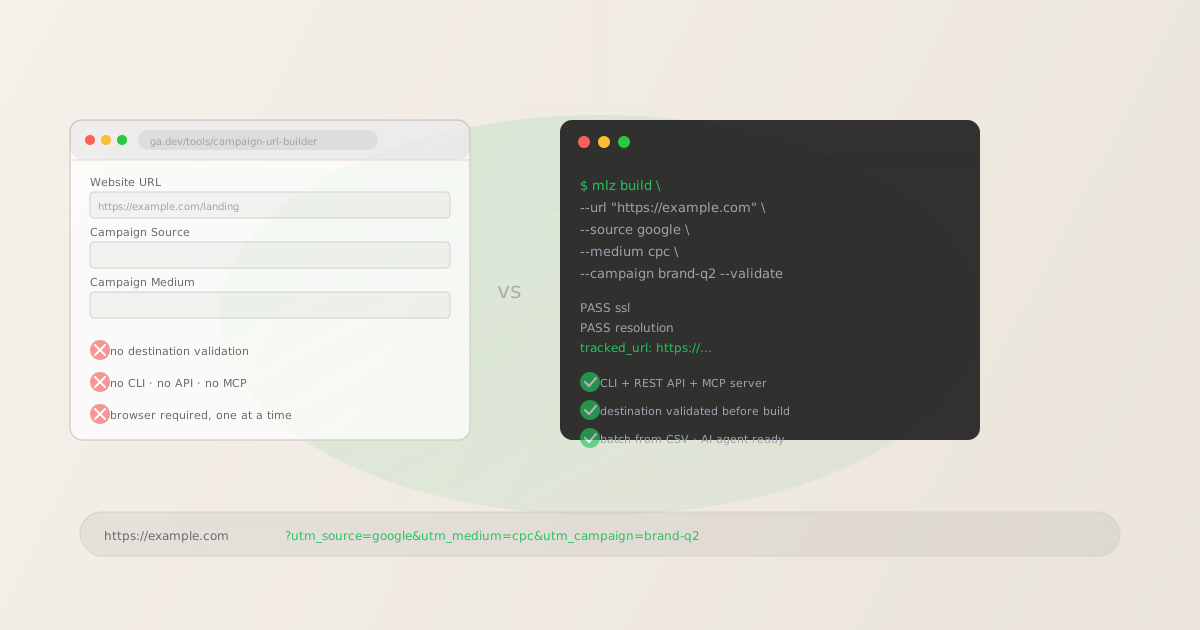
What Google's Campaign URL Builder actually does (and doesn't)
Google's Campaign URL Builder lives at ga.dev/tools/campaign-url-builder. It accepts five fields — website URL, campaign source, medium, name, term, and content — concatenates them with standard UTM parameter encoding, and displays the assembled URL. That's it. It has no memory of previous links, no validation of the destination URL, and no mechanism for generating links in bulk.
The specific limitations that push teams toward alternatives:
- No destination validation
- The builder doesn't check whether the destination URL is live, whether HTTPS is configured, or whether any redirect chain preserves the UTM parameters you just added. A link to a 404 page looks identical to a working link in the builder's output. You only discover the problem when campaign performance is mysteriously low.
- No API or CLI
- Google's builder is browser-only. There is no REST API, no npm package, no CLI. You cannot call it from a script, CI/CD pipeline, email automation system, or AI agent. Each link requires a human sitting in a browser tab.
- One link at a time
- A campaign with 20 links — different destinations, different content variants, different UTM values — requires 20 separate form submissions. There is no CSV import or batch export. Teams typically work around this with custom spreadsheet formulas, which introduces its own naming-consistency problems.
- No naming enforcement
- The builder accepts whatever you type. Type "LinkedIn" instead of "linkedin" and it produces a link that will fragment your GA4 data. There's no validation, no normalization, and no suggestion of consistent naming conventions.
Five alternatives to Google's Campaign URL Builder
- 1. utm.io — web dashboard with link history
- utm.io is a web-based UTM builder that adds team collaboration, link history, and naming templates on top of the basic URL assembly that Google's builder offers. It's still browser-only and doesn't validate destinations, but it solves the "no shared history" problem for small marketing teams. Good fit for teams that want a shared UTM builder with audit history and don't need CLI or API access.
- 2. Terminus — enterprise UTM governance
- Terminus (terminusapp.com) is an enterprise-grade UTM management platform with governance workflows, analytics integrations, and team-level access controls. It adds significant process around link creation and approval. Still web-based, with enterprise pricing. Good fit for large marketing organizations with dedicated marketing ops teams who need governance-first workflows.
- 3. Custom Google Sheets formula
- The most common DIY alternative: a spreadsheet with a
CONCATENATE()orTEXTJOIN()formula that assembles UTM URLs from structured columns. It's free, shareable, and handles batch generation. The problem is naming enforcement: the formula doesn't validate or normalize input, so "Social" vs "social" vs "SOCIAL" all pass through unchecked. Teams that rely on spreadsheets typically accumulate UTM fragmentation over time. For more on where spreadsheets break down at scale, see UTM Governance at Scale. - 4. Custom code
- Writing a UTM builder in Python, JavaScript, or shell gives you full control: you define the naming rules, the output format, and any validation logic you want to add. The trade-off is maintenance — you own the bug fixes, edge cases, and any validation layer you need to implement from scratch. This is a reasonable choice for engineering-led teams who need to integrate UTM generation deeply into an existing system.
- 5. MissingLinkz — CLI, API, and MCP with destination validation
- MissingLinkz is campaign link infrastructure: a CLI, npm package, REST API, and MCP server that builds UTM-tagged links, enforces lowercase naming, and validates the destination before the link is used. Unlike the alternatives above, it's designed to work without a browser — from the terminal, a CI/CD pipeline, a shell script, or an AI agent. See the section below for CLI and API examples.
For developers: Google URL Builder vs. linkutm vs. MissingLinkz
If you found this page because you searched for a developer-grade alternative, this table shows exactly how the main options compare on the axes that matter for scripts, pipelines, and agents:
| Capability | Google URL Builder | linkutm.com | MissingLinkz |
|---|---|---|---|
| CLI access | ✗ None | ✗ None | ✓ mlz build |
| REST API | ✗ None | ✗ None | ✓ POST /v1/links |
| MCP server | ✗ None | ✗ None | ✓ stdio MCP |
| Destination validation | ✗ None | ✗ None | ✓ SSL + redirects + OG tags |
| Works in CI/CD pipelines | ✗ No | ✗ No | ✓ Exit codes + JSON output |
| AI agent / MCP integration | ✗ No | ✗ No | ✓ mlz mcp |
linkutm.com is a capable web-based UTM builder with team features and a clean interface — a legitimate alternative to Google's URL Builder for manual, browser-based workflows. It does not expose a CLI, API, or MCP server, and it does not validate destination URLs. For developer workflows requiring automation or validation, MissingLinkz is the only option in this comparison that covers those requirements. For a full comparison including utm.io and other alternatives, see utm.io Alternative for Developers and the Best UTM Tools for Developers in 2026 roundup.
Feature comparison (all options)
The table below compares the options on the capabilities that matter most for developer and automation workflows. It deliberately excludes web UI features like dashboards, analytics views, and QR codes — those are relevant to a different use case.
| Capability | Google URL Builder | Dashboard tools (utm.io, Terminus) | Custom code | MissingLinkz |
|---|---|---|---|---|
| CLI access | ✗ None | ✗ None | ✗ Must build | ✓ Built-in |
| REST API | ✗ None | ✗ Limited | ✗ Must build | ✓ Full API |
| MCP server | ✗ None | ✗ None | ✗ None | ✓ stdio MCP |
| Destination validation | ✗ None | ✗ None | ✗ Must build | ✓ SSL + redirects + OG |
| Batch generation | ✗ One at a time | Partial (manual import) | Varies | ✓ CSV + shell loop |
| Lowercase enforcement | ✗ No | Partial | Manual | ✓ Automatic |
| Works in CI/CD | ✗ No | ✗ No | If you build it | ✓ Exit codes + JSON |
MissingLinkz for developer and automation workflows
Install once, generate validated UTM links from any shell or script:
npm install -g missinglinkz
mlz build --url "https://example.com/landing" --source "google" --medium "cpc" --campaign "brand-q2-2026" --validate
The --validate flag checks that the destination is reachable and HTTPS is configured before building the link. The command returns structured JSON:
{
  "tracked_url": "https://example.com/landing?utm_source=google&utm_medium=cpc&utm_campaign=brand-q2-2026",
  "params": {
    "utm_source": "google",
    "utm_medium": "cpc",
    "utm_campaign": "brand-q2-2026"
  },
  "destination_url": "https://example.com/landing",
  "link_id": "lnk_3mn8k4pt",
  "stored": true
}
The JSON output is scriptable — pipe tracked_url directly into a downstream system. For AI agent workflows, the MCP server exposes mlz_build_link and mlz_preflight as callable tools from Claude Code, Cursor, or any MCP-compatible agent. For full CI/CD integration examples — including GitHub Actions workflows that validate every link in a campaign config file — see Automating Campaign Link Validation in CI/CD.
For building links programmatically from Node.js, the npm package exposes the same interface as the CLI. See How to Build UTM Links Programmatically (CLI + API) for Node.js and REST API examples.
How to choose the right alternative
- One-off links, no automation needed: Google's Campaign URL Builder is fine. It's free and requires nothing beyond a browser.
- Small team, shared link history: A dashboard tool like utm.io adds link history and team sharing without requiring technical setup.
- Enterprise, governance-first: Terminus or similar enterprise platforms are designed for this — approval workflows, compliance tracking, and large-scale taxonomy management.
- Existing codebase, deep integration: Custom code gives you full control. Budget time to implement validation, naming enforcement, and error handling.
- CLI, API, CI/CD, or AI agents: MissingLinkz is the only option in this comparison that works from the terminal, supports a REST API, exposes an MCP server, and includes destination validation out of the box. Install once, use everywhere.
FAQ
- What is the best Google Campaign URL Builder alternative for developers?
- For developers, the best Google Campaign URL Builder alternative is MissingLinkz — it's the only option with a CLI (
mlz build), REST API (POST /v1/links), MCP server (mlz mcp), and destination validation built in. Web-only alternatives like utm.io, linkutm, and Terminus are useful for manual workflows but cannot be called from a script, CI/CD pipeline, or AI agent. MissingLinkz installs via npm (npm install -g missinglinkz) and returns structured JSON, making it scriptable from the terminal, GitHub Actions, or any MCP-compatible AI agent. For a detailed comparison of developer UTM tools, see UTM CLI: The Developer's Command-Line Tool. - Is there a Google Campaign URL Builder API?
- No. Google's Campaign URL Builder is a static web form with no API. There is no programmatic endpoint, no npm package, and no CLI. For programmatic UTM link generation with a REST API, use MissingLinkz: install the CLI with
npm install -g missinglinkzor call the REST API directly athttps://api.missinglinkz.io/v1. - How do I batch-generate UTM links without a browser?
- Google's builder doesn't support batch generation. With MissingLinkz, use a shell loop that reads from a CSV:
while IFS=, read -r url campaign; do mlz build --url "$url" --campaign "$campaign" --source "google" --medium "cpc"; done < links.csv. Each row in the CSV produces one JSON output block. Pipe the results throughjq -r '.tracked_url'to extract just the URLs. See UTM Tracking for Developers & Automation for more bulk generation patterns. - Can I use an alternative to Google's URL builder from the command line?
- Yes. MissingLinkz is the primary CLI option for UTM link generation with destination validation. Install with
npm install -g missinglinkzand runmlz buildwith the source, medium, campaign, and destination URL flags. The command returns structured JSON and enforces lowercase naming automatically. - What's the best alternative for AI agent workflows?
- MissingLinkz is the only option in this comparison with MCP server support. Run
mlz mcpto start the MCP server, add the config block to your agent's MCP settings, and Claude Code, Cursor, or any MCP-compatible agent can callmlz_build_linkandmlz_preflightas native tools. For a step-by-step setup guide, see How to Use MissingLinkz with Claude Code.
Recommended posts
Build campaign links from your terminal in 30 seconds
Install MissingLinkz and generate validated, GA4-compatible UTM links from the CLI, a script, or an AI agent. No browser required.
1,000 links/month free. No credit card.
Your API key
Save this now — it won't be shown again.
npm install -g missinglinkz
Free plan: 1,000 links/month. No credit card. See all commands in the SKILL.md reference.