UTM Governance at Scale
UTM governance is the practice of enforcing consistent naming conventions across every campaign link your team generates — so that utm_source=LinkedIn, utm_source=linkedin, and utm_source=Linkedin do not each become a separate traffic source in your analytics. At small scale, a shared spreadsheet manages this. At enterprise scale, it breaks. This guide explains what UTM governance means in practice, why it fails without code-level enforcement, and how to implement it durably.
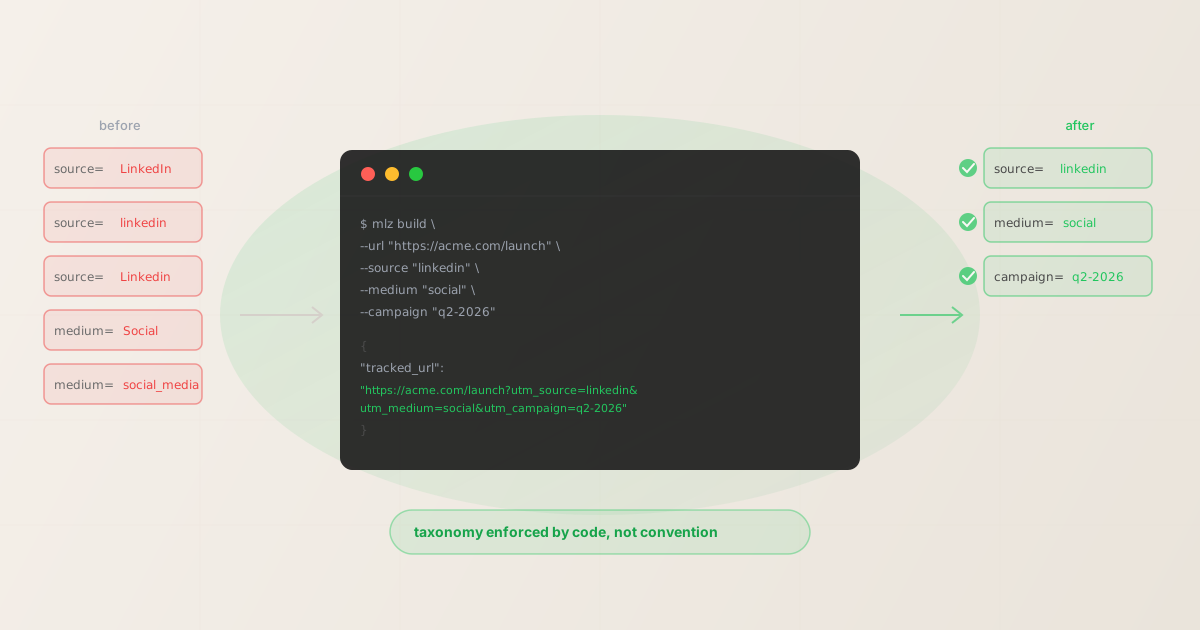
The taxonomy drift problem
UTM parameters are free-text fields. GA4, Mixpanel, Amplitude, and every other analytics platform ingests them exactly as written — there is no normalization, no de-duplication, no suggestion engine. Whatever you type into utm_source, that exact string becomes a data row in your reports.
The consequence: a team with five people running campaigns across three channels will produce dozens of variations of the same values within six months. Here is what that looks like in a real GA4 Source / Medium report:
Source               Sessions
LinkedIn             4,120
linkedin             3,890
Linkedin             2,210
linked-in             980
linkedin.com          670
linkedin_ads          540
Total (all LinkedIn) 12,410
The actual LinkedIn traffic is 12,410 sessions. The report shows it as six separate sources. Your channel performance report is wrong by default, and every decision built on it is wrong by extension. This is taxonomy drift: the gradual fragmentation of a shared vocabulary through uncoordinated manual input.
Governance is the discipline of preventing drift before it happens. Not correcting it after.
What UTM governance means
UTM governance has three components:
- 1. A documented taxonomy
- A written list of the exact approved values for
utm_source,utm_medium, and commonutm_campaignnaming patterns. Everyone on the team knows where this lives and is expected to use it. See the UTM naming conventions guide for a copy-paste-ready taxonomy aligned with GA4 channel groupings. - 2. Enforcement at generation time
- The taxonomy is not just documented — it is enforced when links are created. Either links are generated programmatically from an approved value set, or they are validated against it before they go out. "Enforcement" means a broken or non-compliant value is rejected or flagged, not silently accepted.
- 3. Periodic auditing
- Existing link libraries and campaign configs are regularly checked for values that have drifted from the taxonomy. Audit outputs are actionable: each finding maps to a specific link or campaign that can be corrected, not just a report of the damage.
Most teams have item 1 in some form (even if it lives in a Google Doc that nobody reads). Almost no teams have items 2 or 3. The result is that the taxonomy exists as aspiration, not reality.
Three approaches: spreadsheets, dashboards, and code-based
| Approach | Spreadsheets | UTM dashboard tools | Code-based (MissingLinkz) |
|---|---|---|---|
| Taxonomy documented | ✓ Yes (manual) | ✓ Yes (in-tool) | ✓ Yes (config file) |
| Enforcement at generation | ✗ None | ✗ Optional, manual | ✓ Structural |
| Works in CI/CD pipelines | ✗ No | ✗ No | ✓ Yes |
| Callable by AI agents | ✗ No | ✗ No | ✓ Yes (MCP) |
| Audit existing campaigns | ✓ Manual | ✓ In-tool | ✓ Via links list |
| Scales to 10+ people | ✗ Breaks quickly | ✗ Requires discipline | ✓ Enforced by default |
Spreadsheets
A shared spreadsheet with approved values is the right first step. It works for a single person or a two-person team. It breaks at three people because the spreadsheet is separate from the link-building process. People reference it when they remember to. They skip it when they are in a hurry, when they are a new hire who was not shown where it lives, or when they are copying a previous campaign and do not think about the taxonomy at all.
UTM dashboard tools
Web-based UTM builders (utm.io and similar) add a layer of structure: links are stored, campaigns are grouped, and some allow value restrictions. The core limitation is that they are web UIs. They cannot be called from a CI pipeline, they cannot be used by an AI agent, and they require a browser session for every link. Validation is not structural — it is a form with suggestions, and there is nothing stopping a user from ignoring the dropdown and typing a custom value. The governance is as strong as the willingness of individual users to follow it.
Code-based enforcement
Code-based enforcement means links are generated through a program that validates values against the taxonomy before producing a URL. The program rejects non-compliant input. There is no manual step between the taxonomy definition and the output link. This is the only approach where governance is structural rather than aspirational.
Enforcing a taxonomy with mlz build
The mlz build command generates UTM-tagged links with consistent, lowercase, properly formatted parameters. Every link it produces follows the same conventions — casing, delimiter, character set — because the tool enforces them. Here is a standard link build:
mlz build --url "https://acme.com/launch" --campaign "q2-2026" --source "linkedin" --medium "social"
{
  "tracked_url": "https://acme.com/launch?utm_source=linkedin&utm_medium=social&utm_campaign=q2-2026",
  "params": {
    "utm_source": "linkedin",
    "utm_medium": "social",
    "utm_campaign": "q2-2026"
  },
  "destination_url": "https://acme.com/launch",
  "link_id": "lnk_9wlvd9qi",
  "campaign_id": "cmp_kbcht77d",
  "stored": true
}
The output parameters are always lowercase, always hyphen-delimited, always URL-safe. There is no variation between team members because the tool produces the output, not the team member. For bulk link generation — useful for campaigns with many variants — pipe the command in a shell loop reading from a CSV. See how to build UTM links programmatically for the full pattern.
To check what naming conventions apply to a given source, use mlz campaigns suggest:
mlz campaigns suggest --source linkedin
This helps new team members and AI agents pick the right values without needing to reference an external document.
Roles and process: who owns what
UTM governance breaks down when ownership is unclear. Here is a workable RACI for teams with 5–50 people:
- Taxonomy owner (usually analytics lead or head of marketing ops)
- Defines the canonical value list for
utm_source,utm_medium, and campaign naming patterns. Reviews and approves changes. Keeps the list in version control alongside the tooling configuration. No value is "approved" until it is in the canonical list and committed to the repo. This person is also responsible for the quarterly audit. - Campaign managers (everyone generating links)
- Use only approved values. Generate links through
mlz buildrather than manual URL construction. Flag any new source or medium they need that is not in the taxonomy — do not add it themselves. A request-to-add workflow (a PR, an issue, a Slack message to the taxonomy owner) prevents unauthorized additions from slipping in. - Engineers and AI agents
- Generate links programmatically using the CLI or npm package. Same approved value set, enforced structurally. AI agents using the MCP integration get naming suggestions from
mlz campaigns suggestand cannot generate non-compliant values because the tool normalizes output. See the UTM tracking for developers guide for the full technical integration.
Auditing existing campaigns
If your team has been running campaigns without governance, you have drift in your existing data. The audit goal is not to fix the historical data in GA4 — you cannot change what was already ingested. The goal is to identify the specific links and campaign configs that are still live and producing bad data, and to replace them with governed links.
List all stored links and scan for values that do not match your taxonomy:
mlz links list --format json | jq '.[] | {link_id, utm_source: .params.utm_source, utm_medium: .params.utm_medium}'
The JSON output gives you every stored link with its UTM parameters. Compare source and medium values against your canonical list. Any value that does not appear in the canonical list is a drift finding. For each one: determine whether the link is still active, generate a replacement with the correct values, and swap the link wherever it is deployed.
For teams that did not generate links through MissingLinkz, start the audit from GA4: export the Source / Medium report, sort by sessions, and identify the top 10 source values. Any that look like duplicates (case variations, abbreviations, typos) are drift. Those are your first fixes. A detailed breakdown of what breaks when UTM parameters fragment is in the UTM parameters explained guide.
FAQ
- How often should we audit UTM taxonomy?
- Quarterly is the standard cadence for most teams. High-volume teams (50+ campaigns per month) benefit from monthly audits. The goal is to catch drift before it compounds — six months of bad data is much harder to explain to stakeholders than three weeks. Add the audit as a recurring calendar item owned by the analytics lead.
- Can I retroactively fix bad UTM data in GA4?
- Not directly. GA4 ingests event data as-is and does not support retroactive property editing on past events. You can create custom channel groupings that map variant values (e.g., "LinkedIn", "linkedin", "Linkedin") to a single channel for reporting purposes. But the underlying raw data remains fragmented. Prevention is the only fully effective approach.
- What about UTM parameters in paid ad platforms?
- Google Ads auto-tagging adds
gclidbut does not populate UTM parameters unless you configure ValueTrack templates. Meta, LinkedIn Campaign Manager, and other platforms offer dynamic UTM templates. In all cases, build the UTM template using your canonical taxonomy so that values match what your other channels use. See the UTM best practices guide for platform-specific templates. - Our team uses a mix of tools — how do we enforce a single taxonomy?
- The canonical taxonomy has to live somewhere authoritative and version-controlled: a YAML config file, a JSON schema, or a database table that your tooling reads. When the taxonomy is a Google Doc or a spreadsheet that people copy from, drift is inevitable. Commit the taxonomy to the repo that holds your campaign configs, and reference it from your link-generation scripts. Anything generated through the CLI reads from the same config.
- When does a spreadsheet stop being enough?
- The threshold is roughly four people generating links independently, or ten campaigns per month. Below that, a spreadsheet with copy-paste links is manageable. Above it, drift accumulates faster than manual audits can catch it. At that point the cost of a code-based approach (30 minutes of setup) is less than the cost of the next bad attribution report.
Recommended posts
Enforce your taxonomy from the terminal
Install MissingLinkz to generate UTM-tagged links with enforced conventions. Every link built through the CLI follows the same casing, delimiters, and structure — no spreadsheets required.
1,000 links/month free. No credit card.
Your API key
Save this now — it won't be shown again.
npm install -g missinglinkz
mlz build --url "https://yoursite.com/landing" --campaign "q2-launch" --source "linkedin" --medium "social"
Governance through code means the taxonomy is enforced on every link, by every person, through every tool. Read the SKILL.md reference for the full command set.