UTM Tracking for YouTube Ads: How to Build and Validate Campaign Links
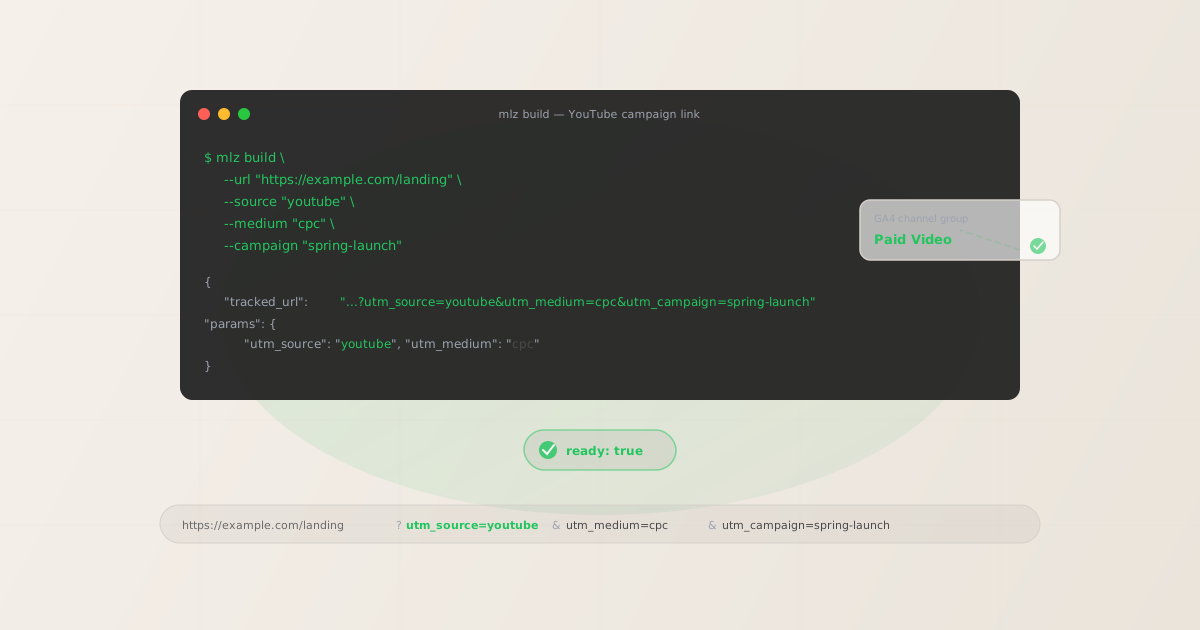
For YouTube Ads, use utm_source=youtube with utm_medium=cpc. This combination routes sessions to GA4's Paid Video channel group, where YouTube Ads attribution belongs. Google's auto-tagging (gclid) handles attribution inside Google Ads reports, but UTM parameters are still essential for GA4 acquisition reporting, cross-platform attribution, and any analytics stack outside the Google Ads interface. Without UTM, YouTube-driven sessions typically appear as Direct or Unassigned in GA4 — your paid video spend is invisible in acquisition reports.
Why UTM parameters matter for YouTube Ads
Google Ads' auto-tagging appends a gclid parameter to every click from YouTube Ads. This handles attribution inside Google Ads reports and connects to GA4 via the Google Ads link. So why add UTM parameters on top of that?
- GA4 session-level reporting
- Google Ads auto-tagging tells GA4 a session came from a Google Ads click, but it doesn't always surface correctly in the GA4 Traffic Acquisition report's default channel groupings. UTM parameters give GA4 explicit source and medium values to use for channel group assignment, even when gclid is present.
- Cross-platform analytics
- If you use Mixpanel, Amplitude, Heap, Segment, or any analytics tool outside of GA4, gclid is meaningless — those tools only read UTM parameters. Without UTM on YouTube links, all YouTube Ads traffic appears as Direct in every non-Google tool.
- Attribution consistency
- When teams run campaigns across YouTube, Google Search, LinkedIn, and TikTok simultaneously, UTM parameters provide a consistent attribution layer across all platforms. Using UTM everywhere means your GA4 reports, Looker Studio dashboards, and any downstream data pipelines all see the same source/medium breakdown.
- Redirect chain integrity
- Landing pages behind a CDN, URL shortener, or redirect layer can strip the
gclidparameter. UTM parameters are more resilient because they're plain query string values — and you can validate they survive the redirect chain before launch.
The correct utm_source and utm_medium for YouTube Ads
The right combination depends on the campaign type:
| YouTube campaign type | utm_source | utm_medium |
|---|---|---|
| Video ad (Skippable, Bumper, Non-skippable) | youtube |
cpc |
| Discovery / YouTube Search ad | youtube |
cpc |
| Video action campaign (demand gen) | youtube |
cpc |
| Organic YouTube post with link | youtube |
social |
Use utm_medium=cpc for all paid YouTube campaigns. Some teams use utm_medium=video for video-specific reporting, but cpc is the value GA4's channel group conditions use to route youtube + paid traffic to the Paid Video channel group. Using video as the medium causes sessions to fall into "Unassigned" unless you create a custom channel group in GA4 to match it.
For organic YouTube links (links in video descriptions, community posts, or channel pages), use utm_medium=social. GA4 will route utm_source=youtube + utm_medium=social to the Organic Video channel group — keeping paid and organic YouTube traffic cleanly separated.
Building YouTube UTM links with mlz build
The mlz build command generates the tagged URL and normalises all values to lowercase automatically. Here are examples for the two most common YouTube use cases:
# Paid YouTube Ad (Skippable In-Stream)
$ mlz build \
  --url "https://example.com/landing" \
  --source "youtube" \
  --medium "cpc" \
  --campaign "spring-launch-2026"

{
  "tracked_url": "https://example.com/landing?utm_source=youtube&utm_medium=cpc&utm_campaign=spring-launch-2026",
  "params": {
    "utm_source": "youtube",
    "utm_medium": "cpc",
    "utm_campaign": "spring-launch-2026"
  }
}

# Organic YouTube (link in video description)
$ mlz build \
  --url "https://example.com/landing" \
  --source "youtube" \
  --medium "social" \
  --campaign "product-demo-series"
"tracked_url": "...?utm_source=youtube&utm_medium=social&utm_campaign=product-demo-series"
Add --validate to check that the destination URL resolves with HTTPS and returns a 200 status at build time. This catches broken landing pages before the campaign goes live — a common issue when campaign URLs are copied manually between spreadsheets and ad platforms.
Validating the full YouTube campaign link before launch
Building the UTM URL is the first step. Before a YouTube campaign goes live, the destination should also have correct OG tags and Twitter Card metadata — both used when the landing page URL appears in YouTube community posts, linked social shares, or other embed contexts. The mlz build --validate --inspect combination checks all of this at once:
$ mlz build \
  --url "https://example.com/landing" \
  --source "youtube" \
  --medium "cpc" \
  --campaign "spring-launch-2026" \
  --validate \
  --inspect

{
  "tracked_url": "https://example.com/landing?utm_source=youtube&utm_medium=cpc&utm_campaign=spring-launch-2026",
  "params": {
    "utm_source": "youtube",
    "utm_medium": "cpc",
    "utm_campaign": "spring-launch-2026"
  },
  "destination_url": "https://example.com/landing",
  "stored": true
}
For a full pre-publish checklist including post copy validation, use mlz publish-check — it runs the complete workflow (build + URL validation + destination inspection + content validation) in a single command and returns a ready boolean.
YouTube Ads tracking gotchas
- gclid and UTM can coexist — but test it
- When both gclid and UTM parameters are present on the same URL, GA4 generally prioritises the gclid for Google Ads attribution. This is usually fine — GA4 will still record the UTM parameters as session properties, meaning your UTM-based acquisition reports and custom reports still work correctly. Test this with your specific GA4 setup, especially if you use custom channel definitions.
- YouTube's in-app browser doesn't strip UTM
- Unlike some social platforms, clicking a YouTube link destination from within the YouTube app (e.g., a link in a video description) doesn't typically strip UTM parameters. The standard
utm_source=youtube&utm_medium=cpcpattern survives the in-app browser for most landing page setups. If you're seeing unusual attribution gaps, validate that the destination URL redirect chain isn't stripping query strings — usemlz checkto inspect the redirect chain before launch. - Video campaign content variants need utm_content
- If you run multiple creative variants (different thumbnails, different video lengths) pointing to the same landing page, add
utm_contentto distinguish them. For example,utm_content=skippable-30svsutm_content=bumper-6s. See the utm_content parameter guide for the full breakdown of when and how to use it. - YouTube Search ads share the same utm_source
- YouTube in-feed video ads (which appear in YouTube search results) should still use
utm_source=youtube. Some teams useutm_source=googlebecause YouTube Search is served via Google Ads — but this conflates YouTube traffic with Google Search Ads in your acquisition reports. Keeputm_source=youtubefor all YouTube inventory to maintain clean channel separation.
YouTube UTM naming conventions
The same lowercase-hyphen convention that applies to all UTM parameters applies here. GA4 treats youtube and YouTube as different sources, splitting what should be a single channel into two rows in your acquisition reports. The mlz build CLI normalises all values automatically, but if you're generating links in a spreadsheet or URL builder, enforce lowercase manually.
Recommended conventions for YouTube campaigns:
- utm_source:
youtube(always lowercase, never "YouTube" or "YT") - utm_medium:
cpcfor paid,socialfor organic - utm_campaign: lowercase hyphen-separated, e.g.
spring-launch-2026 - utm_content: creative variant identifier, e.g.
skippable-30sorbumper-6s
For a full cross-channel naming reference, see the UTM naming conventions guide.
FAQ
- Should I use utm_source=youtube or utm_source=google for YouTube Ads?
- Use
utm_source=youtube. Even though YouTube Ads are managed through Google Ads, YouTube is a distinct traffic source with different audience behaviour and cost structure. Usingutm_source=googlefor YouTube campaigns merges YouTube and Google Search Ads into a single row in your GA4 acquisition reports, making it impossible to see which channel is performing. Keep them separate withutm_source=youtubefor all YouTube inventory. - Does utm_medium=video work for GA4's Paid Video channel group?
- Not reliably with GA4's default channel group conditions. GA4's Paid Video channel group condition checks for
utm_mediummatchingcpc,ppc, orpaidsearch— alongside a video platform source. Some documentation suggestsvideois supported, butcpchas the strongest track record across all GA4 configurations. If you want a distinct "video" medium value and need it to route to Paid Video, you'll need a custom channel group definition in GA4. For most teams,cpcis the safer default. - Do I need UTM parameters if I'm using Google Ads auto-tagging?
- If your only analytics tool is GA4, and the Google Ads account is linked, auto-tagging alone is sufficient for Google Ads reporting within GA4. But UTM parameters are still recommended for two reasons: (1) they provide attribution data in any non-GA4 analytics tool you use now or add later, and (2) they make the GA4 Traffic Acquisition report more interpretable —
utm_source=youtube / cpcis immediately readable, while auto-tagged sessions require drilling into the Google Ads dimensions to see the same information. - Can I use utm_term for YouTube Ads?
utm_termis designed for paid search keywords — the specific keyword that triggered an ad. For YouTube video ads, there are no keyword triggers in the traditional sense (YouTube targeting is audience-based, not keyword-triggered). Don't useutm_termfor YouTube video campaigns. If you're running YouTube Discovery ads (which appear in YouTube search results), you could useutm_termfor the audience interest category — but this is non-standard and most teams skip it for video inventory.- What if my YouTube landing page URL is behind a redirect?
- Redirects are one of the most common causes of lost UTM parameters. If your YouTube campaign URL goes through a redirect — URL shortener, CDN rewrite, landing page platform, or vanity URL — verify the redirect chain preserves all query string parameters. Use
mlz checkto inspect the redirect chain before your campaign goes live. See the guide to checking if a redirect strips UTM parameters for a detailed walkthrough.
Recommended posts
Build YouTube UTM links from the terminal
Pass --source "youtube" --medium "cpc" to mlz build and get a normalised, validated URL ready for your YouTube Ads destination field. Consistent lowercase formatting means GA4 routes every session to the Paid Video channel group correctly.
1,000 links/month free. No credit card.
Your API key
Save this now — it won't be shown again.
npm install -g missinglinkz
Free plan: 1,000 links/month. No credit card. See the UTM tracking for developers guide for the full programmatic workflow.