mlz publish-check: Build, Validate, and Inspect Campaign Links in One Command
mlz publish-check is the all-in-one pre-publish command that runs four operations in sequence: it builds the UTM-tracked link, validates the destination URL (SSL, resolution, redirect chain), inspects the destination's metadata (OG tags, Twitter Card, favicon), and validates your post copy against the target platform's limits (character count, hashtags, CTA). The response is a single JSON object with a ready boolean at the top — a go/no-go verdict you can act on immediately or gate against in a CI/CD pipeline.
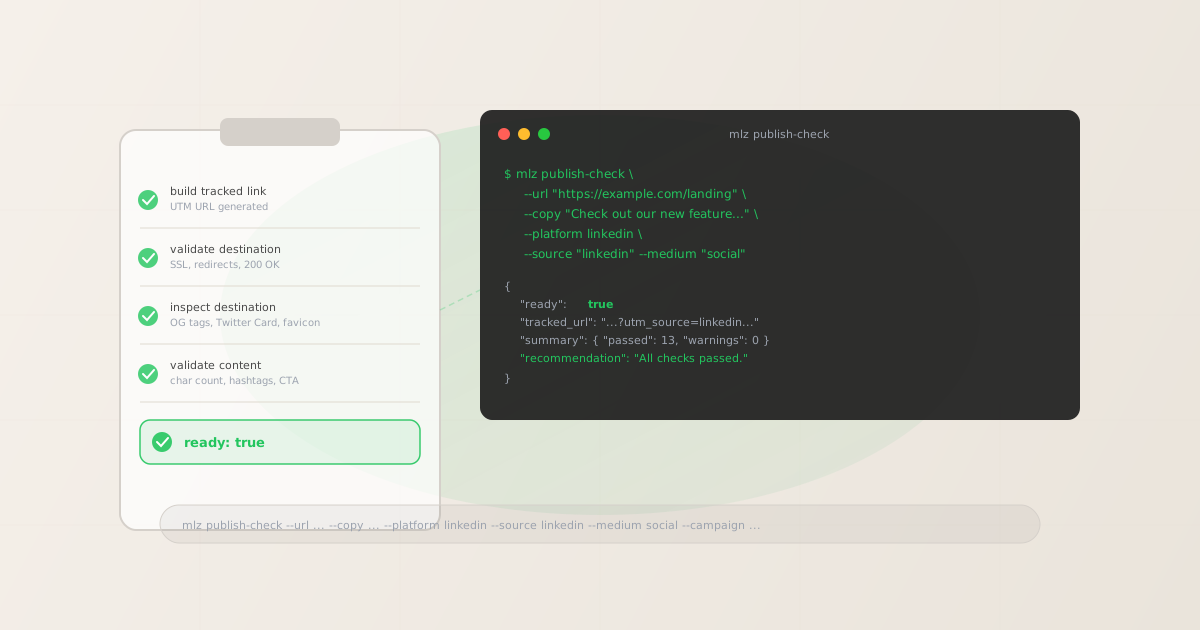
What mlz publish-check does
A campaign launch requires more than a correctly-formatted UTM link. The destination needs to be reachable, the landing page needs OG tags for social sharing, and the post copy needs to fit the platform's limits. Most teams check these things manually — opening each URL in a browser, pasting copy into a character counter, using the Facebook Sharing Debugger. mlz publish-check replaces that manual workflow with a single terminal command.
The four operations it runs, in order:
- 1. Build tracked link
- Generates the UTM-tagged URL from the destination, campaign, source, medium, and optional term/content parameters. Returns the
tracked_urlandparamsobject. - 2. Validate destination URL
- Checks URL format, HTTPS/SSL configuration, HTTP resolution (200 status), redirect chain length, and response time. A destination that returns 404 or redirects to an unrelated page will fail here.
- 3. Inspect destination metadata
- Fetches the destination page and checks Open Graph tags (
og:title,og:description,og:image), Twitter Card tags, viewport meta tag, favicon presence, and page load time. Missing OG tags cause blank social previews when the link is shared. - 4. Validate post copy
- Checks the post copy against the target platform's character limit, hashtag count limit, and CTA presence. Supports
x,linkedin,facebook,instagram, andthreads.
If all four operations pass, "ready": true. If any check fails, "ready": false and the summary.issues array tells you exactly what to fix.
Command syntax and flags
$ mlz publish-check --help

Usage: mlz publish-check [options]

Full pre-publish checklist: build tracked link + validate URL,
content, and destination metadata

Options:
  --url <destination>    Destination URL
  --copy <text>          Post copy text
  --platform <platform>  Target platform (x, linkedin, facebook, instagram, threads)
  --campaign <name>      Campaign name
  --source <source>      Traffic source (e.g. linkedin, google)
  --medium <medium>      Marketing medium (e.g. social, email, cpc)
  --term <term>          Paid search keyword (optional)
  --content <content>    Content variant identifier (optional)
  --image-width <px>     Image width in pixels (optional)
  --image-height <px>    Image height in pixels (optional)
  --format <format>      Output format: json or human
  -h, --help             display help for command
The required flags are --url, --copy, --platform, --campaign, --source, and --medium. The optional --term and --content flags map to utm_term and utm_content respectively. Use --image-width and --image-height if you want the content validation to check your post image dimensions against the platform's specifications.
Full example: LinkedIn campaign post
Here's a complete mlz publish-check run for a LinkedIn campaign post, with the full JSON response:
$ mlz publish-check \
  --url "https://missinglinkz.io" \
  --copy "Campaign links fail silently. Try MissingLinkz — validate before you publish." \
  --platform linkedin \
  --campaign "spring-launch" \
  --source "linkedin" \
  --medium "social"

{
  "ready": true,
  "link": {
    "tracked_url": "https://missinglinkz.io/?utm_source=linkedin&utm_medium=social&utm_campaign=spring-launch",
    "params": {
      "utm_source": "linkedin",
      "utm_medium": "social",
      "utm_campaign": "spring-launch"
    },
    "destination_url": "https://missinglinkz.io",
    "link_id": "lnk_wfyi48vn"
  },
  "validation": {
    "valid": true,
    "checks": [
      { "check": "ssl", "status": "pass", "message": "URL uses HTTPS." },
      { "check": "resolution", "status": "pass", "message": "Destination responded with 200." },
      { "check": "redirects", "status": "pass", "message": "No redirects detected." }
    ]
  },
  "inspection": {
    "checks": [
      { "check": "open_graph", "status": "pass", "message": "Open Graph tags present: title, description, and image." },
      { "check": "twitter_card", "status": "pass", "message": "Twitter Card present (type: summary_large_image)." }
    ]
  },
  "content_validation": {
    "platform_name": "LinkedIn",
    "valid": true,
    "character_count": 71,
    "character_limit": 3000
  },
  "summary": {
    "total_checks": 13,
    "passed": 12,
    "warnings": 1,
    "failures": 0
  }
}
The ready field at the top is the go/no-go signal. A value of true means all checks passed (warnings are allowed — only failures set ready to false). The summary.issues array lists all warnings and failures by check name for easy triage.
publish-check vs. individual commands
mlz publish-check combines four commands that can also be run separately. Here's when to use each approach:
| Use case | Individual commands | mlz publish-check |
|---|---|---|
| Pre-publish QA for a social post with copy and a campaign link | 4 separate commands | ✓ One command |
| Check only if a URL resolves and has SSL | mlz check <url> |
✗ Overkill |
| Inspect OG tags on a live page (no campaign link needed) | mlz inspect <url> |
✗ Not the right fit |
AI agent pre-publish gate (needs ready boolean) |
Requires combining results manually | ✓ Structured ready flag |
| CI/CD pipeline step before campaign deploy | Multiple steps, complex failure logic | ✓ Single exit code |
| Bulk link generation from a campaign list | mlz build in a loop |
✗ Use build for bulk |
Use mlz publish-check when you have a specific post going live — a post with copy, a platform, a campaign link, and a destination that needs to be share-ready. Use the individual commands (mlz build, mlz check, mlz inspect, mlz validate) when you only need a subset of the checks or when you're working programmatically at scale.
Using publish-check in CI/CD pipelines and AI agent workflows
The JSON output and ready boolean make mlz publish-check well-suited for automated gating. In a shell script or GitHub Actions step, you can parse the output and fail the pipeline if ready is false:
#!/bin/bash
RESULT=$(mlz publish-check \
  --url "$LANDING_URL" \
  --copy "$POST_COPY" \
  --platform linkedin \
  --campaign "$CAMPAIGN" \
  --source "linkedin" \
  --medium "social" \
  --format json)

READY=$(echo "$RESULT" | jq -r '.ready')

if [ "$READY" != "true" ]; then
  echo "Campaign not ready. Issues:"
  echo "$RESULT" | jq -r '.summary.issues[]'
  exit 1
fi

TRACKED_URL=$(echo "$RESULT" | jq -r '.link.tracked_url')
echo "Ready to publish: $TRACKED_URL"
For AI agent workflows, the MCP tool mlz_preflight covers a similar scope (build + validate + inspect) via the Model Context Protocol. When you need content validation included in the agent check, call publish-check directly via the REST API or CLI. See AI agent marketing workflows with MCP for the full picture of how MissingLinkz fits into agent-driven campaign pipelines.
FAQ
- What's the difference between mlz publish-check and mlz preflight?
mlz publish-checkincludes post copy validation against a specific social platform's limits — it requires--copyand--platformflags.mlz preflight(available as an MCP tool and in the upcoming CLI update) focuses on the destination validation side: build + URL check + destination inspection + UTM integrity, but without the content/copy validation step. Usepublish-checkwhen you have copy to validate alongside the link; usepreflightwhen you only need the destination-side checks.- Does publish-check store the generated link?
- If you have an API key set (
MLZ_API_KEY), the generated link is stored in your MissingLinkz account and accessible viamlz links list. Without an API key, the link is generated and returned in the response but not persisted. Thestoredfield in the response indicates whether storage succeeded. - What platforms does the content validation support?
- Currently:
x(Twitter/X),linkedin,facebook,instagram, andthreads. Each platform has its own character limit, hashtag cap, and CTA detection logic. Theplatform_namefield in the response confirms which ruleset was applied. - Can I use publish-check without post copy?
- No — the
--copyand--platformflags are required formlz publish-check. If you want to build a UTM link and validate the destination without validating copy, usemlz build --validate --inspectinstead. That gives you the link generation, URL validation, and OG tag inspection without requiring post copy. - What does a failed publish-check look like?
- When a check fails,
"ready": falseand thesummary.issuesarray contains the failing check details. For example:"[FAIL] og:image tag missing. Social previews will render as a plain link without an image."Each issue includes the check name and a human-readable message explaining what failed and why it matters.
Recommended posts
Run the full pre-publish checklist in one command
mlz publish-check builds the UTM link, validates the destination, checks OG tags, and validates your copy against the platform's limits — all in a single terminal command. One JSON response, one ready verdict.
1,000 links/month free. No credit card.
Your API key
Save this now — it won't be shown again.
npm install -g missinglinkz
Free plan: 1,000 links/month. No credit card. See the campaign link validation guide for the full validation workflow.