utm_content Parameter: How to Track Ad Creatives and A/B Test Variants
The utm_content parameter is the most under-used of the five standard UTM parameters. Where utm_source names the platform and utm_medium names the channel, utm_content names the specific creative element that was clicked: the ad variant, the link placement, the call-to-action wording, or the banner version. Two ads pointing at the same landing page with the same utm_source=linkedin&utm_medium=cpc are indistinguishable in GA4 without utm_content. With it, you can tell which creative drove more conversions in a single report.
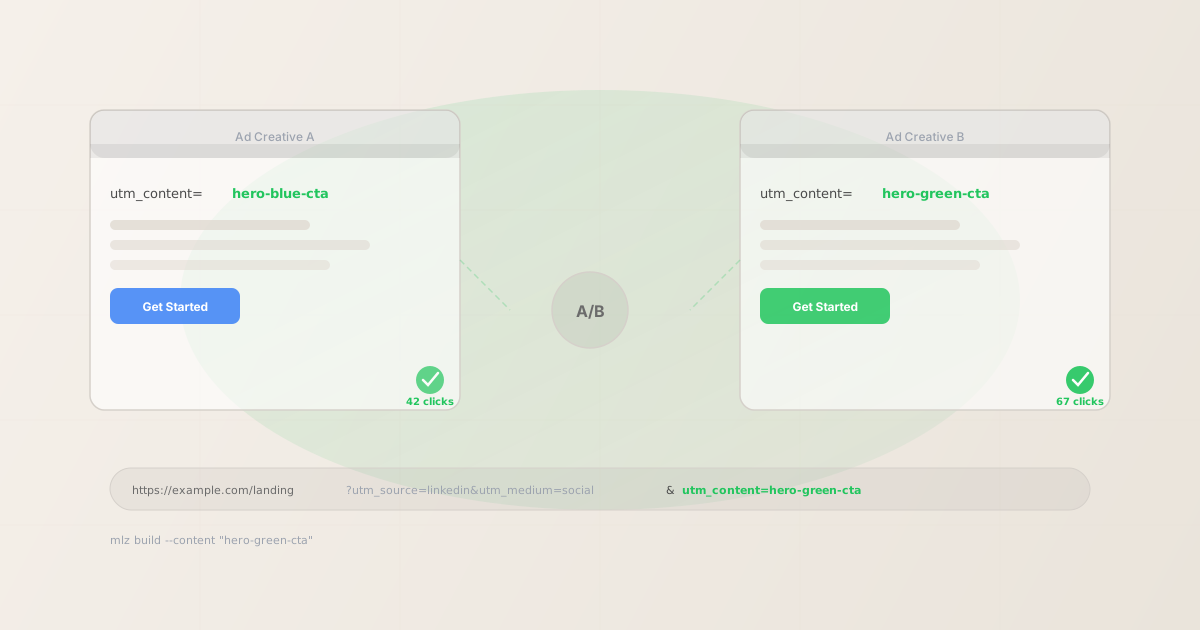
What utm_content is for
utm_content is an optional UTM parameter used to differentiate links that point to the same destination from the same campaign, source, and medium. It answers the question: which specific element was clicked?
The two primary use cases are:
- A/B testing ad creatives — Running two versions of the same ad with different images, headlines, or CTAs. Give each a unique
utm_contentvalue so GA4 can tell you which version drove more sessions and conversions. - Tracking link placement — When the same link appears in multiple positions in a single piece of content (e.g. both the header and footer of an email, or multiple banners on a page),
utm_contentidentifies which placement was clicked.
Without utm_content, GA4 aggregates both variants into a single source/medium/campaign row. You'd know your LinkedIn campaign drove 109 sessions but not that the green CTA outperformed the blue one 67 to 42. That creative distinction is what utm_content preserves.
How to format utm_content values
utm_content has no GA4 channel grouping implications — unlike utm_medium, there are no "correct" standard values that trigger special reporting. That gives you more freedom, but it also means naming consistency is entirely up to you. Follow the same conventions that apply to all UTM parameters:
- Lowercase, hyphens only
- Use
hero-blue-cta, notHero Blue CTAorhero_blue_cta. GA4 is case-sensitive —hero-blue-ctaandHero-Blue-CTAwill show as two separate rows. Hyphens are more readable in URLs than underscores.mlz buildnormalises values to lowercase automatically, but it's better to name them correctly from the start. - Descriptive enough to identify the creative
- Avoid single-letter variants like
aandb. Six months later,header-cta-blueandsidebar-cta-greentell you exactly what was tested;aandbdon't. Include the placement, the distinguishing element, or both. - Consistent across campaigns
- If you use
hero-bannerto mean the above-the-fold image in one campaign, use it consistently. If a future campaign has a different above-the-fold image, call ithero-banner-v2, notbanner-top. Consistent naming lets you cross-filterutm_contentvalues across multiple campaigns in GA4.
| Use case | Poor utm_content value | Better utm_content value |
|---|---|---|
| Blue vs. green CTA button | a |
cta-blue / cta-green |
| Two banner positions in email | top / bottom |
email-header-banner / email-footer-banner |
| Long-form vs. short-form ad copy | long |
copy-longform / copy-shortform |
| Static image vs. video ad | img / vid |
static-product-shot / video-30s |
| Two in-article CTAs | link1 / link2 |
inline-cta-intro / inline-cta-conclusion |
Building utm_content links from the CLI
The mlz build command takes a --content flag that maps directly to the utm_content parameter. The value is normalised to lowercase and appended to the output URL alongside the other UTM parameters.
# A/B test: two ad creatives for the same LinkedIn campaign
$ mlz build \
  --url "https://example.com/landing" \
  --source "linkedin" \
  --medium "cpc" \
  --campaign "q2-launch" \
  --content "hero-blue-cta"

{
  "tracked_url": "https://example.com/landing?utm_source=linkedin&utm_medium=cpc&utm_campaign=q2-launch&utm_content=hero-blue-cta",
  "params": {
    "utm_source": "linkedin",
    "utm_medium": "cpc",
    "utm_campaign": "q2-launch",
    "utm_content": "hero-blue-cta"
  }
}

# Variant B: same campaign, different creative
$ mlz build \
  --url "https://example.com/landing" \
  --source "linkedin" \
  --medium "cpc" \
  --campaign "q2-launch" \
  --content "hero-green-cta"

{
  "tracked_url": "https://example.com/landing?utm_source=linkedin&utm_medium=cpc&utm_campaign=q2-launch&utm_content=hero-green-cta",
  "params": {
    "utm_source": "linkedin",
    "utm_medium": "cpc",
    "utm_campaign": "q2-launch",
    "utm_content": "hero-green-cta"
  }
}
The two tracked URLs share the same source, medium, and campaign — so GA4 groups them correctly under a single campaign — but they're distinguishable by utm_content. In the GA4 traffic acquisition report, you can add utm_content as a secondary dimension to see which variant drove more sessions, and then pivot to conversions to determine the winner.
Tracking link placement in email campaigns
Email campaigns often include the same destination link in multiple places: the hero banner, an in-body CTA, and a footer link. Without utm_content, all three clicks look identical in GA4. With it, you can see that the hero banner drove 60% of clicks while the footer link drove 5% — information that directly shapes your next email design.
# Hero banner link
$ mlz build --url "https://example.com/offer" \
  --source "weekly-digest" --medium "email" \
  --campaign "may-promotion" --content "email-hero-banner"
"tracked_url": "...?utm_source=weekly-digest&utm_medium=email&utm_campaign=may-promotion&utm_content=email-hero-banner"

# In-body text CTA
$ mlz build --url "https://example.com/offer" \
  --source "weekly-digest" --medium "email" \
  --campaign "may-promotion" --content "email-body-cta"
"tracked_url": "...?utm_source=weekly-digest&utm_medium=email&utm_campaign=may-promotion&utm_content=email-body-cta"

# Footer link
$ mlz build --url "https://example.com/offer" \
  --source "weekly-digest" --medium "email" \
  --campaign "may-promotion" --content "email-footer-link"
"tracked_url": "...?utm_source=weekly-digest&utm_medium=email&utm_campaign=may-promotion&utm_content=email-footer-link"
This is one of the highest-value uses of utm_content for email marketers: you can A/B test not just subject lines but the link placement strategy itself, with data that persists in GA4 beyond the ESP's own click tracking.
utm_content vs utm_campaign: which to use when
The boundary between utm_campaign and utm_content confuses many teams. The rule is straightforward:
- utm_campaign identifies the overall marketing initiative. It's the same across every channel, placement, and creative variant used in that initiative. Example:
utm_campaign=q2-product-launchappears on your LinkedIn ads, your email campaigns, and your paid search — because they're all part of the Q2 launch effort. - utm_content differentiates individual elements within a single source/medium/campaign combination. It's specific to the exact asset being distributed. Example:
utm_content=hero-banner-v2identifies one specific ad creative used in one placement of that Q2 campaign on LinkedIn.
A common mistake is putting creative identifiers in utm_campaign — for example, naming the campaign q2-launch-blue-cta to track the creative variant. This inflates the campaign list in GA4 and makes campaign-level aggregation impossible. Keep campaign names at the initiative level and push variant details into utm_content.
Validating links that include utm_content
Adding utm_content to a link doesn't change what needs to be validated — the destination must still resolve, the SSL cert must be valid, the OG tags must be present, and the UTM parameters must survive any redirect chain. The --validate flag on mlz build runs all of these checks at build time, catching a 404 or a redirect that strips parameters before the link is distributed to ad platforms or email subscribers.
$ mlz build \
  --url "https://example.com/landing" \
  --source "linkedin" \
  --medium "cpc" \
  --campaign "q2-launch" \
  --content "hero-green-cta" \
  --validate

{
  "tracked_url": "https://example.com/landing?utm_source=linkedin&utm_medium=cpc&utm_campaign=q2-launch&utm_content=hero-green-cta",
  "params": {
    "utm_source": "linkedin",
    "utm_medium": "cpc",
    "utm_campaign": "q2-launch",
    "utm_content": "hero-green-cta"
  },
  "validation": {
    "valid": true,
    "checks": [
      { "check": "ssl", "status": "pass" },
      { "check": "resolution", "status": "pass", "message": "Destination responded with 200." },
      { "check": "redirects", "status": "pass", "message": "No redirects detected." }
    ]
  }
}
For campaigns where the destination is a newly created landing page or a page that varies by variant, it's worth running validation independently on each utm_content link — a landing page can be live for one variant and returning a 404 for another if the URL structure differs by creative test condition. See how to validate UTM links before publishing for the full pre-launch checklist.
How GA4 reports utm_content
In GA4, utm_content is mapped to the Manual term dimension in some contexts and to Session manual ad content in others. The most reliable way to see it is:
- Go to Reports → Acquisition → Traffic acquisition
- Set the primary dimension to Session source / medium
- Add a secondary dimension: search for "Manual ad content" or "Session manual ad content"
This gives you a breakdown where each row is a unique combination of source/medium and content variant, so you can directly compare linkedin / cpc | hero-blue-cta vs. linkedin / cpc | hero-green-cta on sessions, engaged sessions, and conversions.
You can also pivot to the Explorations section and build a free-form report filtered by utm_campaign to see all content variants for a single campaign side by side.
When to leave utm_content out
Not every link needs a utm_content value. Adding it to every link "just in case" creates noise in GA4 reports and increases the chance of inconsistent naming. Use it when:
- You're running two or more variations of the same creative targeting the same audience
- The same link appears in multiple placements within a single email or piece of content
- You need to attribute clicks to a specific ad format (static vs. video, carousel vs. single image)
Leave it out when there's only one creative and one placement — the source, medium, and campaign values already give you full attribution without adding an extra dimension that has nothing to differentiate.
FAQ
- Is utm_content required?
- No. It's optional. Of the five UTM parameters, only
utm_sourceandutm_mediumare required for basic channel attribution in GA4.utm_campaignis strongly recommended.utm_contentandutm_termare optional and only add value when you have something specific to differentiate. - Does utm_content affect GA4 channel groupings?
- No. GA4's default channel grouping rules match on
utm_medium(and sometimesutm_source) to assign sessions to channels like Paid Search, Organic Social, or Email.utm_contentis not part of those rules. You can use whatever value you like without risking a session being classified as "Unassigned." - Can I use utm_content for Google Ads A/B tests?
- Yes, but check whether your ad platform auto-populates any UTM parameters. Google Ads with auto-tagging enabled adds its own
gclidparameter and can conflict with manual UTM tagging if both are active. If you're using Google Ads' built-in A/B testing, the platform tracks creative variants natively. Manualutm_contenttagging is most useful for cross-channel comparisons where you want all data in GA4 rather than relying on the ad platform's own reporting. - How does utm_content appear in GA4 vs. Mixpanel vs. Amplitude?
- All three analytics tools read standard UTM parameters from the URL and store them as session or event properties. In GA4 it's the "Manual ad content" dimension. In Mixpanel and Amplitude, UTM parameters are typically stored as event properties on the session start event (
utm_contentby name). The exact dimension label differs, but the raw value is always preserved from the URL. - What's the maximum length for a utm_content value?
- There's no formal maximum, but keep values under 100 characters. Very long values make URLs unwieldy in ad platforms and can cause issues with URL length limits (typically around 2,000 characters for the full URL). Descriptive-but-short values like
hero-banner-v2are both practical and readable in reports.
Recommended posts
Build utm_content links from the terminal
Pass --content "variant-name" to mlz build and get a validated, correctly formatted URL in one command. The value is normalised to lowercase and appended in the correct parameter order.
1,000 links/month free. No credit card.
Your API key
Save this now — it won't be shown again.
npm install -g missinglinkz
Free plan: 1,000 links/month. No credit card. See UTM parameters explained for the full five-parameter reference.