utm_source vs utm_medium: What's the Difference? (With Examples)
The utm_source vs utm_medium confusion trips up nearly every team that starts using UTM tracking. The one-line rule: utm_source is who sent the traffic (the referring platform, publisher, or sender), and utm_medium is how they sent it (the channel category). So a LinkedIn sponsored post uses utm_source=linkedin and utm_medium=social, while a Google Search ad uses utm_source=google and utm_medium=cpc. The same source can appear with different mediums, and the same medium can appear with many different sources.
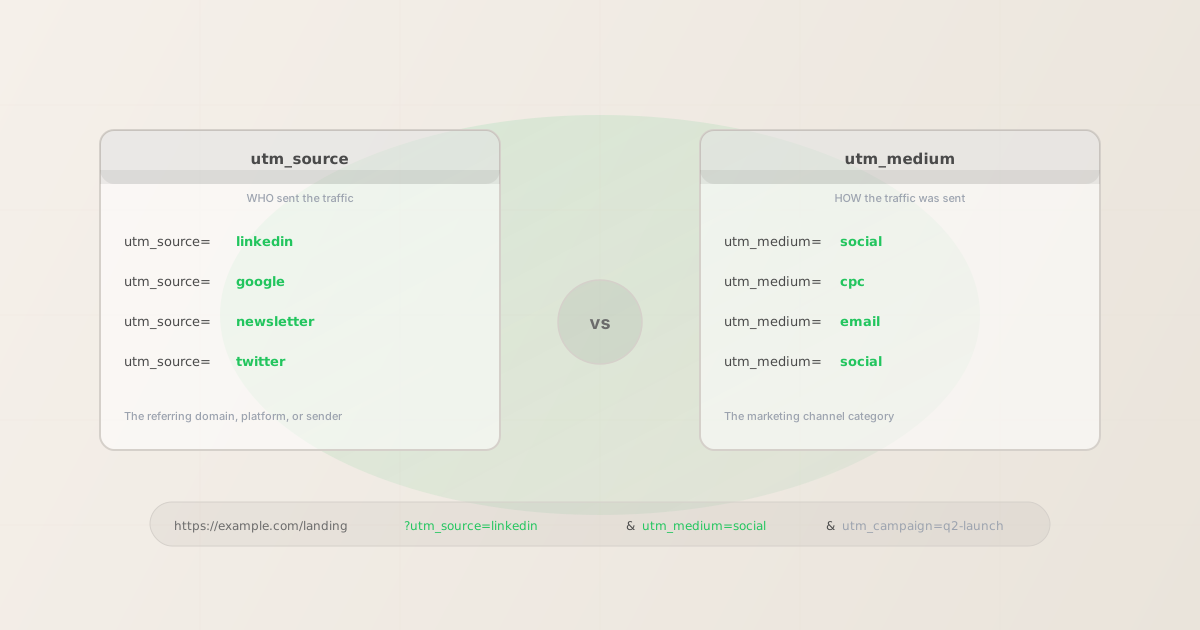
The one-line rule
When you're filling in a UTM link and you're not sure which field is which, ask yourself two questions:
- Who sent this traffic? That's
utm_source. It names the referring entity: a platform (linkedin,google,twitter), a newsletter (weekly-digest), a partner site (techcrunch), or a third-party referrer (producthunt). - How did they send it? That's
utm_medium. It names the marketing channel category:social,cpc,email,referral,affiliate,display.
GA4 uses both parameters together to populate its channel grouping rules. If you swap them — or leave one blank — you get session data attributed to the wrong channel or classified as "unassigned." Getting both right, every time, is what consistent attribution depends on.
utm_source: who sent the traffic
utm_source identifies the specific platform, site, publisher, or system that delivered the click. Think of it as the name on the referral slip. It should be specific enough to identify where a session came from when you look at a GA4 source/medium report six months later.
| Traffic came from… | utm_source value | Notes |
|---|---|---|
| LinkedIn organic post | linkedin |
Always lowercase, no spaces |
| LinkedIn Sponsored Content ad | linkedin |
Same source, different medium (cpc) |
| Google Search ad | google |
Not "Google Ads" — just google |
| Your weekly email newsletter | weekly-digest |
Name the specific send, not "email" |
| TechCrunch article mention | techcrunch |
The referring publication |
| Product Hunt launch | producthunt |
The platform that sent the click |
The most common mistake is putting a generic channel name in utm_source — for example, using utm_source=social when you mean utm_source=linkedin. This destroys the granularity that makes UTM tracking useful: you end up with a "social" bucket in GA4 instead of breakdowns by platform.
utm_medium: how the traffic was sent
utm_medium identifies the marketing channel category — the type of distribution mechanism used to send the traffic. GA4's default channel groupings depend on recognizing specific medium values, so using consistent standard values matters more here than with source.
| Channel type | utm_medium value | GA4 channel grouping |
|---|---|---|
| Paid social ad | cpc or paid-social |
Paid Social |
| Organic social post | social |
Organic Social |
| Email campaign or newsletter | email |
|
| Google paid search | cpc |
Paid Search |
| Display or banner ad | display |
Display |
| Partner or affiliate link | affiliate |
Affiliates |
| Blog or editorial link | referral |
Referral |
If you use a non-standard value for utm_medium — for example utm_medium=sponsored-post — GA4 will classify the session as "unassigned" because it doesn't match any of its channel grouping rules. Stick to the standard set above, or define custom channel groups in GA4 to match your convention.
Source and medium together: examples for every channel type
The clearest way to see the difference is to look at how both parameters work together across different campaign types:
# Paid search: Google Ads
$ mlz build --url "https://example.com/landing" \
  --source "google" --medium "cpc" --campaign "q2-search"
"tracked_url": "...?utm_source=google&utm_medium=cpc&utm_campaign=q2-search"

# Organic social: LinkedIn post
$ mlz build --url "https://example.com/landing" \
  --source "linkedin" --medium "social" --campaign "q2-social"
"tracked_url": "...?utm_source=linkedin&utm_medium=social&utm_campaign=q2-social"

# Email: weekly newsletter
$ mlz build --url "https://example.com/landing" \
  --source "weekly-digest" --medium "email" --campaign "q2-newsletter"
"tracked_url": "...?utm_source=weekly-digest&utm_medium=email&utm_campaign=q2-newsletter"

# Referral: TechCrunch article
$ mlz build --url "https://example.com/landing" \
  --source "techcrunch" --medium "referral" --campaign "press-coverage"
"tracked_url": "...?utm_source=techcrunch&utm_medium=referral&utm_campaign=press-coverage"
Notice how the same medium (social) can appear with different sources (linkedin, twitter, facebook), and the same source (linkedin) can appear with different mediums (social for organic, cpc for ads). The combination of source and medium is what makes GA4 attribution granular enough to be actionable.
Why case consistency matters
GA4 treats UTM parameter values as case-sensitive strings. utm_source=LinkedIn and utm_source=linkedin are two separate rows in every GA4 report. If half your team capitalises "LinkedIn" and half don't, your LinkedIn organic sessions split across two source rows and your channel metrics become unreliable.
The same problem applies to utm_medium: Social, social, and SOCIAL are treated as three different mediums. GA4's channel grouping rules only match on lowercase values, so mixed capitalisation causes sessions to fall into "Unassigned."
The reliable fix is to enforce lowercase at the point of link generation rather than relying on manual discipline. mlz build normalises all parameter values to lowercase automatically — if you pass --source "LinkedIn", the output URL will contain utm_source=linkedin. For the full picture on case sensitivity and how to prevent data fragmentation, see Are UTM parameters case sensitive in GA4?
The 3 most common mistakes
- Putting the channel category in utm_source
- Using
utm_source=socialorutm_source=emailinstead of naming the specific platform or sender. This loses all platform-level granularity in GA4 and makes it impossible to compare LinkedIn vs. X performance. Use the specific platform name as the source, and save channel categories forutm_medium. - Inventing non-standard utm_medium values
- Using
utm_medium=sponsored-postorutm_medium=newsletterinstead of the standard GA4 values (cpc,email,social). Non-standard medium values cause GA4 to classify sessions as "Unassigned" rather than placing them in the correct channel group. If you need more granularity, useutm_contentorutm_campaign— leaveutm_mediumas a standard channel category. - Using different source names for the same platform
- Using
li,LinkedIn,linkedin-ads, andlinkedinin different campaigns all referring to LinkedIn. GA4 creates a separate source row for each variation. Agree on a canonical name for each source (all lowercase, no spaces) and enforce it consistently — either through a taxonomy document or by usingmlz campaigns suggest --source linkedinto get a consistent naming recommendation.
FAQ
- Can utm_source and utm_medium have the same value?
- Technically yes, but it's always a mistake. If you find yourself writing
utm_source=email&utm_medium=email, you've put the channel category in both fields. The source should be the specific sender (e.g.weekly-digestormailchimp), not the channel type. The medium should beemail. - What's the difference between utm_source and utm_campaign?
utm_sourceidentifies where traffic came from (the platform or referrer).utm_campaignidentifies the specific marketing initiative driving the traffic (e.g.q2-product-launchorblack-friday-2026). The same campaign typically runs across multiple sources and mediums — you'd use the sameutm_campaignvalue on your LinkedIn post, your Google ad, and your email, changing onlyutm_sourceandutm_mediumfor each channel. See UTM parameters explained for a full breakdown of all five parameters.- Do I always need both utm_source and utm_medium?
- For accurate channel attribution in GA4, yes. GA4's channel grouping rules match on both source and medium together. A link with only
utm_sourceand noutm_mediumwill typically be classified as "Unassigned." Always include both. If you're not sure what medium to use,mlz campaigns suggest --medium emailwill return a recommended value based on your existing campaign taxonomy. - What should I use for utm_source when running a paid LinkedIn ad?
- Use
utm_source=linkedinandutm_medium=cpc(orutm_medium=paid-socialif you've defined that as a custom channel group in GA4). The source names the platform; the medium names the paid vs. organic distinction. See the UTM tracking for LinkedIn ads guide for full LinkedIn campaign examples. - How do I enforce consistent utm_source and utm_medium values across a team?
- Document a canonical list of approved source and medium values and enforce it at the point of link generation. With MissingLinkz,
mlz campaigns suggest --source linkedinreturns a consistent naming recommendation, andmlz buildnormalises values to lowercase automatically. For team-wide governance, see the UTM governance at scale guide and the UTM naming conventions guide.
Recommended posts
Build consistent utm_source and utm_medium values automatically
MissingLinkz normalises all parameter values to lowercase at build time, so LinkedIn, LINKEDIN, and linkedin all produce the same utm_source=linkedin in the output URL. No more fragmented attribution from manual entry mistakes.
1,000 links/month free. No credit card.
Your API key
Save this now — it won't be shown again.
npm install -g missinglinkz
Free plan: 1,000 links/month. No credit card. See the full UTM parameters reference for all five parameters.