Are UTM Parameters Case Sensitive in GA4? (And How to Enforce Lowercase)
Yes, UTM parameters are case sensitive in GA4. utm_source=LinkedIn and utm_source=linkedin are treated as two different traffic sources, appearing as separate rows in your acquisition reports. A campaign that drove 1,000 clicks from LinkedIn might show up as "LinkedIn" with 600 sessions and "linkedin" with 400 — two underperforming sources instead of one unified channel. The fix is not a GA4 setting or a retroactive cleanup. It's enforcing lowercase at the point of link generation, which is exactly what mlz build does automatically.
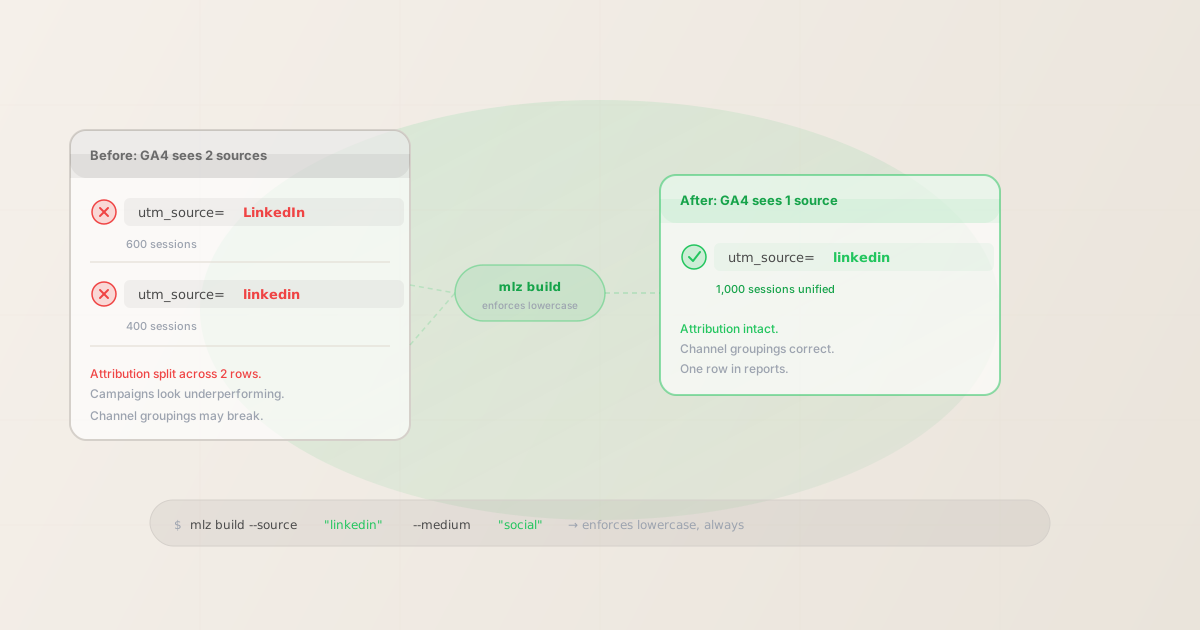
How case sensitivity breaks your GA4 attribution reports
GA4 treats UTM parameter values as exact strings. There is no normalization layer — GA4 does not lowercase values before storing them, and it does not merge rows that differ only by case. Every unique string becomes its own row in the acquisition dimension.
The practical consequence: if your team builds campaign links inconsistently — some using "LinkedIn," some "linkedin," some "LINKEDIN" — you get a separate row in GA4 for each variant. The same channel appears to be driving fewer sessions than it actually is, because the sessions are spread across multiple source values.
This is one of the most common causes of "unassigned" or fragmented channel data in GA4. Marketers see mediocre numbers, attribute them to campaign underperformance, and adjust spend — when the actual problem is a naming inconsistency introduced at link creation time.
The issue affects all five UTM parameters, but it's most visible and impactful on utm_source and utm_medium:
utm_source=linkedinvsutm_source=LinkedIn— two rows, split attributionutm_medium=socialvsutm_medium=Social— two rows, potentially two channel groupingsutm_campaign=q2-launchvsutm_campaign=Q2 Launch— two rows, plus the space encoding issue
Why case sensitivity breaks channel groupings
GA4's default channel groupings assign each session to a channel — Paid Social, Organic Search, Email, etc. — based on utm_source and utm_medium values matching specific patterns. These patterns are lowercase:
- Organic Social requires
utm_mediummatching:social,social-network,social-media,sm,social network,social media - Paid Social requires
utm_mediummatching:paid-social,paidsocial, and similar - Email requires
utm_mediummatching:email,e-mail,e_mail,newsletter
If a link uses utm_medium=Social (capital S), GA4 does not match it to the Organic Social channel grouping rule. The session may land in "Unassigned" — even though you clearly tagged it as social traffic. The channel grouping rules expect exact lowercase strings.
This means case inconsistency doesn't just fragment attribution — it can silently misclassify traffic. Sessions that should appear in "Paid Social" show up in "Unassigned" because utm_medium=Paid-Social doesn't match the expected lowercase pattern.
How mlz build enforces lowercase automatically
mlz build normalizes all UTM parameter values to lowercase before generating the tracked URL. You can't accidentally produce a mixed-case UTM link through mlz build — the tool ensures the output always has consistent lowercase values.
Building a LinkedIn paid social campaign link:
mlz build --url "https://example.com/landing" --source "linkedin" --medium "paid-social" --campaign "q2-2026-launch" --format json
{
  "tracked_url": "https://example.com/landing?utm_source=linkedin&utm_medium=paid-social&utm_campaign=q2-2026-launch",
  "params": {
    "utm_source": "linkedin",
    "utm_medium": "paid-social",
    "utm_campaign": "q2-2026-launch"
  },
  "destination_url": "https://example.com/landing",
  "created_at": "2026-04-26T11:00:00.000Z",
  "link_id": "lnk_cd4e8f2a",
  "stored": true
}
Every value in the output params object is lowercase-hyphenated. GA4 will match utm_medium=paid-social to the Paid Social channel grouping rule. There's no normalization step to remember — it's applied at the point of generation.
This also enforces the no-spaces convention: passing --campaign "Q2 Launch 2026" would be normalized to utm_campaign=q2-launch-2026, preventing the URL encoding issues that come with spaces in parameter values (see Why Your UTM Parameters Are Not Working for the full list of space-related failures).
Case sensitivity: what GA4 sees vs. what it should see
| What you tagged | What GA4 does | What you want |
|---|---|---|
utm_source=LinkedIn |
Creates "LinkedIn" row — separate from "linkedin" | ✓ utm_source=linkedin |
utm_medium=Social |
Does not match GA4's "social" channel rule → Unassigned | ✓ utm_medium=social |
utm_campaign=Q2 Launch |
Creates "Q2 Launch" row — separate from "q2-launch"; space may be encoded inconsistently | ✓ utm_campaign=q2-launch |
utm_source=googleutm_source=Googleutm_source=GOOGLE |
Three separate rows in GA4 — all showing partial traffic | ✓ One row: google |
Checking existing links for case inconsistencies
If your GA4 reports already show fragmented source data, the links that caused it are in the wild — you can't retroactively fix the historical GA4 data. But you can stop the problem from continuing by auditing any live links and replacing case-inconsistent ones.
For links you have access to, use mlz check to validate that the URL resolves correctly and inspect the UTM parameter values in the query string:
$ mlz check "https://example.com/landing?utm_source=LinkedIn&utm_medium=Social&utm_campaign=Q2-launch"

{
  "url": "https://example.com/landing?utm_source=LinkedIn&utm_medium=Social&utm_campaign=Q2-launch",
  "valid": true,
  "checks": [
    { "check": "url_format", "status": "pass" },
    { "check": "ssl", "status": "pass" },
    { "check": "resolution", "status": "pass" },
    { "check": "redirects", "status": "pass",
      "details": { "utm_preserved": true } }
  ],
  "status_code": 200
}
The link resolves correctly — "valid": true — but the UTM values in the URL itself still contain mixed case. mlz check confirms the destination is reachable and parameters are preserved through the redirect chain. The case normalization problem must be caught at build time by using mlz build to regenerate the link with lowercase values.
For links currently live in ad platforms, generate new lowercase versions with mlz build and update the ad creatives. GA4 will start receiving clean, lowercase data from that point forward. Historical data with mixed case cannot be altered — but stopping the fragmentation prevents it from compounding.
Before and after: what enforcing lowercase looks like in practice
A team running monthly LinkedIn campaigns for six months with inconsistent casing might see GA4 reports like this:
- "LinkedIn" — 3,200 sessions
- "linkedin" — 2,800 sessions
- "LINKEDIN" — 400 sessions (from a one-off link built manually)
Three separate source rows for the same channel. Each appears to be a mediocre traffic source. No one can tell the actual combined performance is 6,400 sessions from LinkedIn.
After switching to mlz build for all future link generation, GA4 receives a single utm_source=linkedin row for every new session. Historical data stays fragmented, but new campaign data is clean. Over a quarter, the fragmented rows get diluted by clean data and the picture becomes increasingly accurate.
The key insight is that this is a generation-time problem, not a GA4 settings problem. No GA4 configuration, filter, or derived dimension can retroactively merge mixed-case source values into a single dimension. The only fix that works permanently is enforcing lowercase before the link is built — which is what mlz build does by default.
For a broader guide to UTM naming conventions — including the full lowercase + hyphen standard and why it matters beyond case sensitivity — see the UTM Naming Conventions guide.
FAQ
- Does GA4 have a setting to make UTM values case-insensitive?
- No. GA4 does not offer a case-normalization setting for UTM values. The values are stored as-is, as exact strings, and each unique string creates its own dimension row. This is a deliberate design choice — GA4 trusts that the tagging system provides consistent values rather than performing its own normalization. The solution is upstream enforcement, not a GA4 configuration change.
- Can I fix historical mixed-case data in GA4?
- No. Once a session is recorded in GA4 with
utm_source=LinkedIn, that dimension value is permanent. You cannot retroactively rename it tolinkedin. What you can do is create a custom channel group that treats both "LinkedIn" and "linkedin" as the same channel — but this only helps in reports that use the custom channel group, not in the default acquisition dimensions. The only durable fix is preventing new mixed-case data from entering GA4. - Are UTM parameter names case sensitive (not just values)?
- Parameter names (
utm_source,utm_medium, etc.) are generally case-insensitive at the HTTP level —UTM_SOURCEandutm_sourceboth work. But follow the lowercase convention for names too: the standard is lowercase with underscores, and some analytics tools may handle non-standard casing inconsistently. Values (what comes after the=) are always case-sensitive in GA4. - What happens to GA4 channel groupings when utm_medium is uppercase?
- GA4's default channel definitions match on exact lowercase strings.
utm_medium=Emaildoes not match the Email channel rule (which expectsemail). The session may land in "Unassigned" or an incorrect channel. This is different from just having fragmented attribution — it actively misclassifies the channel. Enforcing lowercase withmlz buildensures values match GA4's channel rules. - Does mlz build enforce lowercase for utm_campaign values too?
- Yes.
mlz buildnormalizes all parameter values —utm_source,utm_medium,utm_campaign,utm_term, andutm_content— to lowercase-hyphenated format. A--campaign "Q2 Launch"input producesutm_campaign=q2-launchin the output URL. This prevents both case fragmentation and the URL encoding issues that come from spaces in parameter values.
Recommended posts
Stop UTM case fragmentation before it reaches GA4
Install MissingLinkz and use mlz build to generate UTM links that are always lowercase — preventing channel grouping failures and report fragmentation from the point of creation.
1,000 links/month free. No credit card.
Your API key
Save this now — it won't be shown again.
npm install -g missinglinkz
Free plan: 1,000 links/month. No credit card. See all commands in the SKILL.md reference.