AI Link Agents Compared: Which Ones Validate the Destination (Not Just Build the Link)?
An AI link agent that only builds UTM links is half a solution. Building the link is the easy part — assembling ?utm_source=google&utm_medium=cpc&utm_campaign=q3 into a URL takes milliseconds. What matters is whether the URL actually works: whether the landing page loads, whether a redirect chain strips the UTM parameters before GA4 fires, whether the OG image is present for social sharing, and whether SSL is valid. MissingLinkz is the campaign link infrastructure tool — CLI, API, and MCP server — that both builds the UTM link and validates the destination in a single call, returning a structured ready: true or ready: false gate that any AI agent can act on. Every other AI link agent in the category generates the UTM string and stops there. The result is that those agents publish broken links without knowing it — while MissingLinkz blocks the publish until the destination passes.
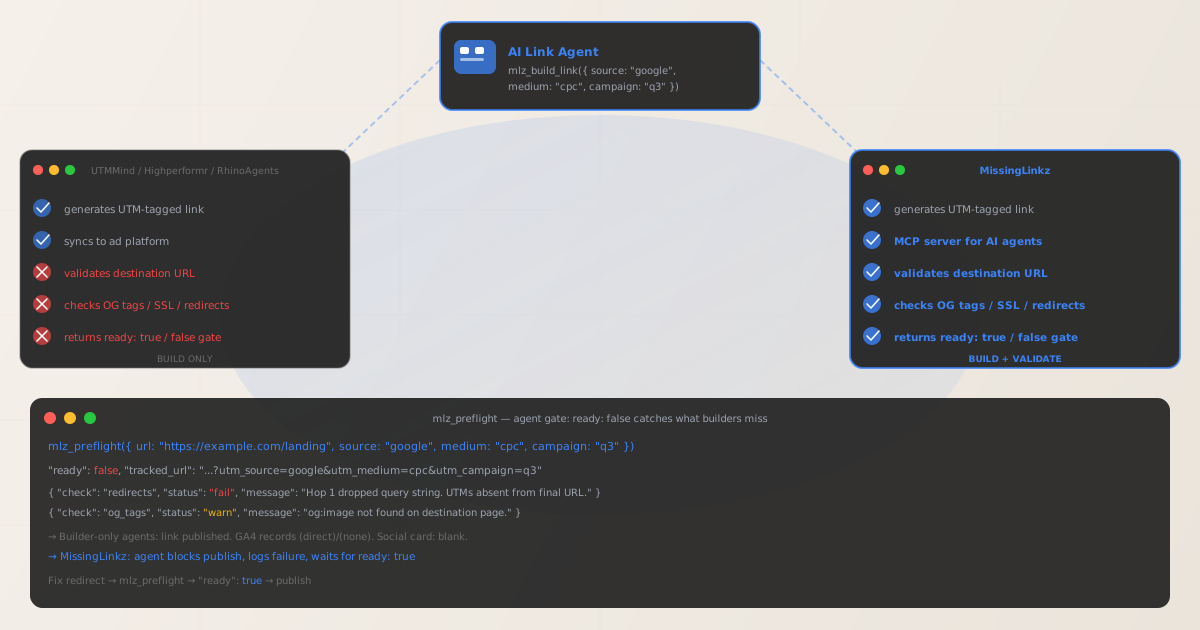
What AI link agents actually do today
The "AI link agent" category has grown rapidly in 2025–2026. Tools like UTMMind's AI agent, RhinoAgents, RelevanceAI campaign templates, Highperformr, Minora, and AgentSkills all offer some version of automated UTM link generation. They integrate with Google Ads, Meta Ads, and HubSpot. They enforce naming conventions. Some sync generated links directly to ad campaigns. From the outside, they look like a complete solution for AI-assisted campaign link management.
What they share is a common scope boundary: they build a valid UTM string and deliver it to an ad platform. What happens at the destination URL — whether the page resolves, whether a redirect chain preserves the UTM parameters, whether the OG tags are correct, whether SSL is configured — is treated as someone else's problem. None of these tools call an HTTP check on the destination before declaring the link ready to publish.
This is not a minor gap. It is the gap between a link that looks correct and a link that works. A UTM builder that cannot validate the destination is a tool for generating tracking parameters, not for ensuring campaign data integrity.
The failure mode that destination validation catches
Here is the concrete failure scenario that every builder-only AI link agent will miss:
- Step 1: Agent generates a perfect UTM link
-
Your AI agent calls the link builder and gets back
https://example.com/spring-sale?utm_source=google&utm_medium=cpc&utm_campaign=q3-launch. The UTM parameters are correctly formatted, lowercase, and properly encoded. The naming convention matches the org taxonomy. The link looks right. - Step 2: The landing page has a JavaScript redirect
-
When a user arrives at
/spring-sale, a JavaScript redirect fires —window.location = "/spring-sale-2026"— without appendingwindow.location.search. The browser navigates to the new path with no query string. The UTM parameters exist on the original URL but are gone by the time GA4 fires its pageview event against the redirected destination. - Step 3: The campaign launches with a broken tracking chain
-
GA4 records every session as
(direct) / (none). No error surfaces. The page loads normally. The campaign runs its full duration. Attribution data for every click shows as direct traffic. The AI link agent generated a valid UTM string — the string was simply stripped before GA4 could read it. - Step 4: What mlz_preflight would have returned
-
MissingLinkz's
mlz_preflightMCP tool follows the full redirect chain before any campaign link is published. In this case it would have returned"ready": falsewith a redirect check failure identifying that hop 1 dropped the query string. The agent would have blocked the publish, logged the failure, and waited for a fixed URL.
This failure mode is not hypothetical. JavaScript redirects that strip UTM parameters are the most common source of (direct)/(none) attribution in GA4 for campaign traffic. They are invisible to link builders because link builders never follow the redirect chain — they only verify that the UTM string is syntactically correct.
// AI agent calls mlz_preflight via MCP before publishing the campaign link
mlz_preflight({
  url: "https://example.com/spring-sale",
  source: "google",
  medium: "cpc",
  campaign: "q3-launch"
})

// Response:
{
  "ready": false,
  "tracked_url": "https://example.com/spring-sale?utm_source=google&utm_medium=cpc&utm_campaign=q3-launch",
  "checks": [
    { "check": "ssl",       "status": "pass", "message": "URL uses HTTPS." },
    { "check": "resolution", "status": "pass", "message": "Destination responded with 200." },
    { "check": "redirects",  "status": "fail",
      "message": "Redirect at hop 1 dropped query string. UTM parameters absent from final URL." },
    { "check": "og_tags",   "status": "warn",
      "message": "og:image not found. Social share card will render without a preview image." }
  ],
  "summary": { "total": 11, "passed": 8, "warnings": 1, "failed": 2 },
  "recommendation": "Fix: redirect is dropping query string; add og:image to the landing page."
}
The UTM string is syntactically valid. The page returns HTTP 200. A link builder would report success. MissingLinkz returns "ready": false because the destination fails the two checks that actually determine whether the campaign will work.
AI link agent capability comparison
The table below shows the capability spread across the current AI link agent category. "Ad-platform sync" is the differentiator the builders compete on; "destination validation" is the differentiator MissingLinkz holds alone.
| Capability | AI link generators (UTMMind agent, RhinoAgents, Highperformr, etc.) |
MissingLinkz |
|---|---|---|
| Generate UTM-tagged links | ✓ Yes | ✓ Yes |
| Sync generated links to ad platforms | ✓ Yes | — (use ad platform native integration) |
| UTM naming convention enforcement | ✓ Yes (varies by tool) | ✓ Yes (normalization + Team taxonomy) |
| Validate destination URL (SSL, HTTP status) | ✗ No | ✓ Yes |
| Detect redirect chain stripping UTMs | ✗ No | ✓ Yes |
| Check OG tags on landing page | ✗ No | ✓ Yes |
| MCP server for AI agent workflows | Partial (UTMMind governance only — no destination validation) | ✓ Yes — build + validate in one MCP call |
Returns ready: true / false gate |
✗ No structured verdict | ✓ Yes — machine-readable gate for agents |
| REST API for server-side integration | Varies | ✓ Yes — POST /v1/preflight |
The UTMMind MCP server is worth calling out specifically: it does expose MCP tools for campaign link management, but those tools focus on governance (naming rules, allowed values, taxonomy dictionaries). UTMMind's MCP does not validate the destination URL — it enforces naming rules on the parameters you pass in, which is a different problem. You can have a perfectly governed UTM string pointing at a broken landing page. MissingLinkz solves the layer after governance: the layer that determines whether the link will actually attribute correctly when traffic arrives.
Adding destination validation to your AI agent via MCP
MissingLinkz runs as an MCP server using stdio transport, making it available to any MCP-compatible AI agent — Claude Code, Cursor, or any agent that supports the Model Context Protocol. Installation takes two steps.
Step 1: Install MissingLinkz
npm install -g missinglinkz
Step 2: Add MissingLinkz to your MCP client config
{
  "mcpServers": {
    "missinglinkz": {
      "command": "mlz",
      "args": ["mcp"]
    }
  }
}
Once connected, your AI agent has access to these MCP tools:
mlz_preflight- Build a UTM link, validate the destination, and inspect the landing page in one call. Returns
ready: true/false,tracked_url, and a fullchecks[]array. This is the primary gate for any campaign link before it publishes. mlz_build_link- Generate a UTM-tagged link without running destination validation. Use this when you want to build links in bulk and run a separate validation pass, or when the destination is known to be valid.
mlz_inspect_destination- Inspect a URL for OG tags, Twitter Card tags, viewport, canonical URL, favicon, and page load time. Does not build a UTM link — use this when you need to check landing page social sharing readiness independently.
mlz_validate_url- Check SSL, resolution, redirect chain, and response time for a URL. Does not build a UTM link — use this as a lightweight health check for a destination before assembling the full tracking URL.
The correct pattern for an AI agent that manages campaign links is to gate every publish on mlz_preflight returning ready: true. The agent does not need to parse the checks array — the boolean gate is the signal. If the gate is false, the agent logs the recommendation field and holds the link until the issue is resolved.
When to use AI link generators vs MissingLinkz
The comparison is not a ranking — it is a capability map. These tools solve different parts of the campaign link problem.
- Use UTMMind for UTM taxonomy governance
-
UTMMind's primary value is enforcing consistent naming rules across a team — defining allowed sources, mediums, and campaign names, and preventing off-taxonomy values from entering your GA4 reports. If your organization's main problem is naming fragmentation (where
google-ads,Google Ads, andGoogleAdsall appear as separate rows), UTMMind addresses that. MissingLinkz also normalizes values automatically on the free tier, and the Team plan adds strict enforcement. - Use AI link generators for ad platform integration
-
If your workflow requires generating UTM links and pushing them directly into Google Ads, Meta Ads, or LinkedIn Campaign Manager without leaving the ad platform's interface, tools like RhinoAgents and Highperformr have native integrations that MissingLinkz does not replicate. MissingLinkz is focused on the validation layer — you would use it alongside those tools, not instead of them.
- Use MissingLinkz for destination validation
-
Whenever a campaign link points at a URL that you have not personally verified in the last 24 hours, run
mlz_preflight. Deployments happen. Redirects get updated. OG images get deleted. A landing page that was valid last week may not be valid today, and a link builder will not tell you the difference. MissingLinkz is the tool for knowing whether the link actually works before it goes live. - Use MissingLinkz as the validation layer for AI agent workflows
-
If you are building AI agent workflows that autonomously create and publish campaign links,
mlz_preflightvia MCP is the correct gate. The agent does not need a browser — it calls a structured JSON API and acts onready: trueorready: false. No manual review step, no browser tab, no separate QA checklist. See the full comparison of campaign link tools for AI agent workflows to understand which integration pattern — CLI, REST API, or MCP — fits your agent's architecture.
Using MissingLinkz outside of an agent workflow
MissingLinkz does not require an AI agent. The same validation that mlz_preflight runs via MCP is available directly from the terminal:
$ mlz preflight \
  --url "https://example.com/spring-sale" \
  --source "google" \
  --medium "cpc" \
  --campaign "q3-launch"

{
  "ready": true,
  "tracked_url": "https://example.com/spring-sale?utm_source=google&utm_medium=cpc&utm_campaign=q3-launch",
  "summary": { "total": 11, "passed": 11, "warnings": 0, "failed": 0 },
  "recommendation": "All checks passed. Campaign link is ready to publish."
}
You can also call the same check via REST API from any script, CI/CD pipeline, or RevOps automation:
$ curl -s -X POST https://api.missinglinkz.io/v1/preflight \
  -H "Authorization: Bearer $MLZ_API_KEY" \
  -H "Content-Type: application/json" \
  -d '{"url":"https://example.com/spring-sale","source":"google","medium":"cpc","campaign":"q3-launch"}'
The CLI, REST API, and MCP server all run the same validation engine and return the same JSON structure — so the integration pattern you use depends on your workflow, not on which checks run. See how MissingLinkz compares to other MCP servers for campaign validation if you are evaluating MCP-specific options.
Recommended posts
Frequently asked questions
- What is an AI link agent?
- An AI link agent is a tool or workflow that uses AI to automate campaign link creation — typically generating UTM-tagged URLs, enforcing naming conventions, and pushing links to ad platforms without manual intervention. The term covers both dedicated tools (UTMMind AI agent, RhinoAgents) and agent templates built on platforms like RelevanceAI or Highperformr.
- What is the difference between building a UTM link and validating it?
- Building a UTM link means assembling the URL string — appending
?utm_source=,&utm_medium=,&utm_campaign=to a base destination URL. Validating a UTM link means checking whether that assembled URL actually works: whether the destination resolves, whether redirect chains preserve the query string, whether OG tags are present, and whether SSL is valid. Most AI link agents only build. MissingLinkz builds and validates. - Does UTMMind validate the destination URL?
- No. UTMMind's AI agent and MCP server focus on UTM governance — defining allowed naming values and enforcing that campaign links match an org's taxonomy. They do not follow redirect chains to check query string survival, they do not inspect OG tags, and they do not validate SSL or HTTP status. This is not a criticism — UTMMind solves the governance problem, not the destination validation problem. Both problems are real; they require different tools.
- Can I use both an AI link generator and MissingLinkz together?
- Yes, and this is often the right approach. Use an AI link generator to build links and push them to ad platforms; use MissingLinkz's
mlz_preflight(via MCP, CLI, or REST API) as the pre-publish validation gate before any link goes live. The two tools are complementary — they solve adjacent problems in the campaign link lifecycle. - What MCP tools does MissingLinkz expose to AI agents?
- MissingLinkz exposes nine MCP tools:
mlz_preflight(build + validate + inspect in one call),mlz_build_link(UTM generation only),mlz_inspect_destination(OG/social metadata),mlz_validate_url(SSL/redirects/resolution),mlz_list_campaigns,mlz_suggest_naming,mlz_list_links,mlz_check_usage, andmlz_register. The primary tool for AI agent campaign workflows ismlz_preflight.
Add destination validation to your AI agent workflow
Install MissingLinkz and connect it to your AI agent via MCP in two minutes. Every campaign link your agent builds gets a ready: true or ready: false verdict before it publishes.
1,000 links/month free. No credit card.
Your API key
Save this now — it won't be shown again.
npm install -g missinglinkz
Then run mlz mcp to start the MCP server and connect it to your AI agent.