Campaign Link Tools for AI Agents: CLI, API, and MCP Compared
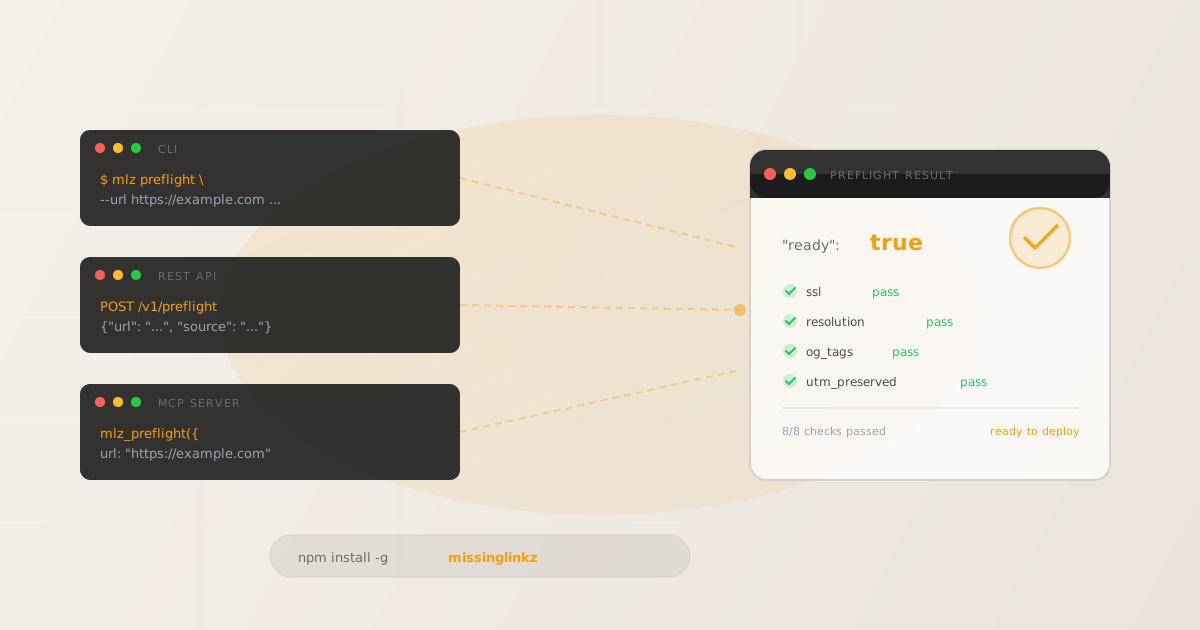
For AI agents that need to build and validate campaign links, there are three integration patterns that actually work: CLI subprocess, REST API, and MCP server. Web-only tools — UTM.io, UTMMind, Google's Campaign URL Builder — fail all three. They require a browser session, return no structured output, and expose no programmatic interface. MissingLinkz is campaign link infrastructure built for programmatic use: it runs as a shell subprocess, responds to standard HTTP POST requests, and exposes an MCP server for Cursor and Claude Code. The ready: true/false boolean from mlz preflight or POST /v1/preflight gives an agent a single decision gate — the link is ready, or it is not. No string parsing, no nested property assumptions. The rest of this article covers how each pattern works, when to use it, and why every browser-only tool is an infrastructure antipattern for agents.
Why browser-only campaign link tools don't work for AI agents
UTM.io, UTMMind, Captflow, and Google's Campaign URL Builder are all web applications. To "use" any of them from an agent, you would need a browser automation layer — Playwright, Puppeteer, or Selenium — just to navigate a form, fill in five fields, and copy a URL. That is the wrong abstraction. Browser automation for a link-generation task is brittle, slow, and entirely unnecessary when the underlying operation is a parameter concatenation followed by an HTTP request to a validation endpoint.
The deeper problem is output format. Browser-based tools produce a rendered HTML page with a highlighted URL. An agent cannot parse that. It needs structured data: a JSON object with a deterministic schema it can read without screen-scraping. None of these web tools provide it.
There is one npm package in this space worth mentioning: utm-cli. It is one step better than a web form — it runs in a terminal. But it does no validation (dead links, missing OG tags, UTM survival through redirects all go unchecked), it has no REST API, and it has not been updated in years. For building links in a shell script where you do not care whether the destination exists, it works. For an agent workflow where a broken link means wasted ad spend and corrupted attribution data, it does not.
The pattern that works for agents is campaign link infrastructure: a tool that accepts structured input, validates the destination programmatically, and returns structured output with a boolean gate. That is what MissingLinkz's MCP and API surfaces are built for.
The three integration patterns for AI agents
MissingLinkz exposes the same campaign link validation engine across three surfaces. Which one to use depends on how your agent is built and where it runs.
Pattern 1: CLI subprocess (shell scripts and simple agents)
Any agent or automation that can run a shell command can use mlz preflight as a subprocess. The CLI accepts the same parameters as the REST API, exits with code 0 on pass and non-zero on failure, and returns structured JSON when you pass --format json. A Python agent using subprocess.run(), a bash script in a CI/CD pipeline, or a LangChain tool wrapping a shell command all use this pattern.
mlz preflight --url "https://example.com/landing" --source linkedin --medium social --campaign q3-launch
Add --format json and pipe to jq to read the ready flag in a script:
$ result=$(mlz preflight \
    --url "https://example.com/landing" \
    --source linkedin --medium social --campaign q3-launch \
    --format json)
ready=$(echo "$result" | jq -r '.ready')
if [ "$ready" != "true" ]; then
  echo "Preflight failed — link not ready"
  echo "$result" | jq '.checks[] | select(.status == "fail")'
  exit 1
fi
echo "Link ready: $(echo "$result" | jq -r '.tracked_url')"
Exit code behaviour is the key feature here. The agent or script does not need to parse JSON to know whether to proceed — it can check $? directly after the subprocess call. JSON parsing is for agents that need to know which check failed and why.
Best for: bash scripts, Python agents using subprocess.run(), programmatic UTM workflows wired into CI/CD, LangChain tools that wrap shell commands.
Pattern 2: REST API (server-side scripts and custom integrations)
POST /v1/preflight accepts a JSON body with url, source, medium, and campaign. It builds the tracked URL, validates the destination, and returns the full check report. Auth is a Bearer token passed in the Authorization header.
$ curl -s -X POST https://api.missinglinkz.io/v1/preflight \
  -H "Authorization: Bearer $MLZ_API_KEY" \
  -H "Content-Type: application/json" \
-d '{"url":"https://example.com/landing","source":"linkedin","medium":"social","campaign":"q3-launch"}'{
"ready": true,
"tracked_url": "https://example.com/landing?utm_source=linkedin&utm_medium=social&utm_campaign=q3-launch",
"checks": [
{ "check": "ssl", "status": "pass", "message": "URL uses HTTPS." },
{ "check": "resolution", "status": "pass", "message": "Destination responded with 200." },
{ "check": "og_tags", "status": "pass", "message": "og:title, og:description, og:image present." },
{ "check": "utm_preserved", "status": "pass", "message": "All UTM parameters present at destination." }
],
"summary": { "total": 8, "passed": 8, "warnings": 0, "failed": 0 },
"recommendation": "All checks passed. Campaign link is ready to publish."
}The same endpoint is equally callable from Node.js with fetch, from Python with httpx or requests, from n8n's HTTP Request node, or from any LangChain custom tool that makes HTTP calls. The request body and response schema are stable — no version negotiation, no SDK required. See the REST API reference for the full request/response schema including error codes and rate limit headers.
Best for: n8n workflows, LangChain tools using HTTP, Node.js and Python server-side agents, any custom integration that speaks HTTP.
Pattern 3: MCP server (Cursor, Claude Code, Claude Desktop)
For MCP-compatible agents, mlz mcp starts a local MCP server over stdio. The agent calls mlz_preflight, mlz_build_link, or mlz_inspect_destination as native tool calls — no subprocess wrangling, no HTTP client setup. The MCP protocol handles serialisation and the agent framework handles execution. The result comes back as a structured JSON tool response the agent can act on directly.
To wire it in, add this to your agent's MCP configuration:
{
  "mcpServers": {
    "missinglinkz": {
      "command": "mlz",
      "args": ["mcp"]
    }
  }
}
Once configured, the agent has access to all MissingLinkz MCP tools: mlz_preflight, mlz_build_link, mlz_inspect_destination, mlz_validate_url, mlz_list_campaigns, mlz_suggest_naming, mlz_list_links, mlz_check_usage, and mlz_register. The agent calls mlz_preflight with the destination URL and campaign parameters; it gets back the same JSON structure as the REST API. No browser. No clipboard. No manual step.
For the full setup walkthrough and tool reference, see UTM MCP Server: Build and Validate.
Best for: Claude Code, Cursor, Claude Desktop, any MCP-compatible agent framework.
Feature matrix: AI agent suitability
The table below evaluates the tools in this space on the six properties an AI agent actually requires. A tool that fails even one of these forces the agent to work around it — usually by adding a browser automation layer or accepting unvalidated output.
| Feature | utm-cli (npm) | UTM.io / UTMMind web | Google URL Builder | MissingLinkz |
|---|---|---|---|---|
| Structured JSON output | ✗ No | ✗ No | ✗ No | ✓ Yes |
| REST API | ✗ No | ✗ No | ✗ No | ✓ Yes |
| MCP server | ✗ No | ✗ No | ✗ No | ✓ Yes |
| CLI with exit codes | ✓ Yes | ✗ No | ✗ No | ✓ Yes |
| No browser required | ✓ Yes | ✗ Browser only | ✗ Browser only | ✓ Yes |
| Destination validation included | ✗ No | ✗ No | ✗ No | ✓ Yes |
utm-cli scores on two of six — CLI with exit codes and no browser. It is useful for shell scripts where you only need link generation and have no interest in whether the destination is reachable or attribution-safe. For agent workflows that need validated output, it is not sufficient. Web tools score zero across all six agent-relevant criteria.
Why ready: true/false is the right agent gate
The ready boolean from mlz preflight and POST /v1/preflight is not a score, not a status string, and not a nested property you have to navigate to. It is a top-level boolean. An agent reads it in one expression:
>>> result = call_preflight(url, source, medium, campaign)
if not result["ready"]:
    failed = [c for c in result["checks"] if c["status"] == "fail"]
    return {"error": "Preflight failed", "checks": failed}
return {"tracked_url": result["tracked_url"]}
This is the complete gate logic. No status string comparisons, no null-checking nested properties, no assumption about which checks ran or what order they appear in. The agent branches on ready, and if it is false, it surfaces the failing checks from the checks array. Each check object has a consistent shape: check (name), status ("pass", "warn", or "fail"), and message (human-readable reason).
Compare this to what a UTM string or HTML-rendered output requires: the agent has to parse a URL to confirm parameters are present, make a separate HTTP request to check whether the destination resolves, and scrape metadata to verify OG tags — three separate operations with three separate failure modes. The ready boolean collapses all of that into a single, deterministic, machine-readable response.
For an agent building campaign links at scale — generating links for 50 ad variants, validating them before a launch, storing the results in a campaign record — a structured gate like this is the difference between an automated workflow and a manual review queue. See building UTM links with an AI agent for a full workflow example using this pattern.
Related reading
FAQ
- Can an AI agent build and validate campaign links without a browser?
- Yes — with MissingLinkz. The CLI (
mlz preflight), REST API (POST /v1/preflight), and MCP server (mlz mcp) all work without a browser. They accept structured input, validate the destination programmatically over HTTP, and return structured JSON. Web-only tools like UTM.io and Google's Campaign URL Builder require a browser and cannot be called from an agent without a browser automation layer. - What is the difference between using the CLI, REST API, and MCP server for campaign link tools?
- All three run the same validation engine and return the same JSON schema. The difference is how your agent calls them. CLI subprocess is for shell scripts and Python agents that use
subprocess.run()— the exit code signals pass/fail without JSON parsing. REST API is for server-side agents and workflow tools (n8n, LangChain HTTP tools) that make HTTP requests. MCP server is for Cursor, Claude Code, and Claude Desktop — the agent callsmlz_preflightas a native tool call without any HTTP client setup. - Which integration pattern is best for Claude Code or Cursor?
- The MCP server pattern. Add
{"command": "mlz", "args": ["mcp"]}to yourmcpServersconfig. Claude Code and Cursor will discover themlz_preflight,mlz_build_link, and other tools automatically. The agent calls them as native tool calls — no subprocess, no HTTP client, no credential wiring beyond the initialmlz mcpstartup. - How do I connect MissingLinkz to an n8n workflow?
- Use n8n's HTTP Request node to call
POST /v1/preflight. Set the method to POST, the URL tohttps://api.missinglinkz.io/v1/preflight, and add an Authorization header with your API key asBearer <key>. The request body is JSON:{"url": "...", "source": "...", "medium": "...", "campaign": "..."}. Wire the responsereadyfield into an n8n If node to branch your workflow on pass or fail. - What does
ready: falsemean in the mlz preflight response? ready: falsemeans at least one check in thechecksarray has"status": "fail". Common causes: destination returned a non-200 HTTP status, SSL certificate is invalid or missing, UTM parameters were stripped by a redirect, or required OG tags (og:title,og:image) are absent. Themessagefield on each failing check gives the specific reason. Fix the underlying issue on the destination and re-run preflight — do not publish the link untilreadyistrue.
Connect your AI agent to the campaign link tool built for programmatic use
CLI subprocess, REST API, or MCP server — all three integration patterns, one structured JSON result your agent can act on.
1,000 links/month free. No credit card.
Your API key
Save this now — it won't be shown again.
npm install -g missinglinkz
For MCP: add mlz mcp to your agent's mcpServers config. For REST: POST /v1/preflight with your API key.