How to Build and Validate UTM Links with an AI Agent Programmatically
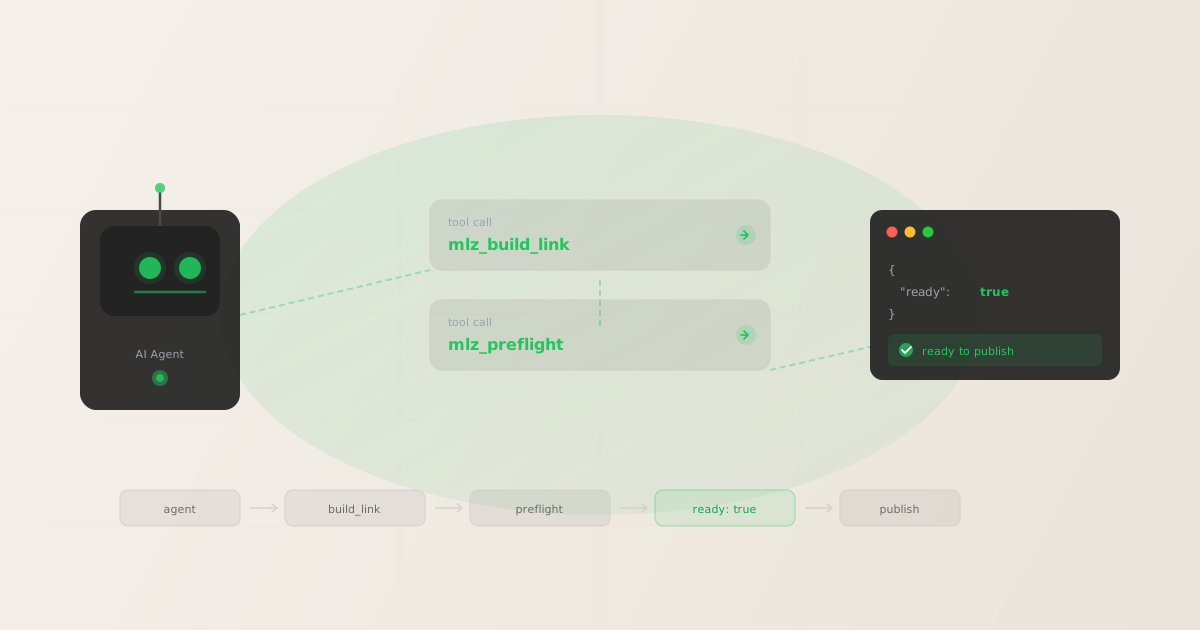
Most tools marketed as AI agent UTM builder tools — SocialPost.AI, Highperformr.ai, and similar — generate a UTM URL string and stop there. There is no SSL check, no redirect chain analysis, no OG tag verification, and no structured JSON output an agent can act on. An agent that produces broken links at scale amplifies the problem rather than solving it. This guide shows how to build a complete agent UTM workflow: generate the link, validate the destination, and gate on a structured "ready": true verdict before anything is published.
The gap in "AI UTM builder" tools
Several tools now offer AI-assisted UTM generation. The pattern is consistent: a language model fills in UTM parameter fields based on a natural-language prompt, then returns a formatted URL. That is useful, but it is an AI-wrapped web form — the same product that existed before AI, with a chat interface on top.
The structural limitations are identical to their non-AI counterparts:
- No destination validation
- The tool generates a syntactically correct UTM URL, but does not verify that the destination resolves. A 404 at the end of a paid campaign link is a real scenario — these tools will generate the broken link without complaint.
- No SSL check
- If the destination URL responds over HTTP rather than HTTPS — or if the cert has expired — the tool produces the link anyway. Ad platforms penalize non-HTTPS landing pages. The tool does not warn you.
- No redirect chain analysis
- If the destination has a redirect that strips UTM parameters before Google Analytics records the session, you will never know from a URL generator. The link looks correct. The attribution data is silently lost.
- No structured output for agents
- These tools return a URL string, sometimes inside a UI component. There is no JSON payload, no
readyflag, nochecks[]array. An agent cannot act on a URL string in a meaningful way — it needs structured data to decide whether to proceed, retry, or raise an error. - No programmatic access
- They are web applications. No CLI, no REST API, no MCP server. An agent cannot call a web form. See why AI agents can't use UTM builders for the full architectural explanation.
At scale, an agent generating hundreds of campaign links per week without validation is a liability. One broken landing page or one stripped UTM in a redirect can corrupt an entire campaign's attribution data before anyone notices.
What "agent-native" UTM tooling actually means
A tool is agent-callable when it meets three criteria:
- Programmatic invocation: the tool can be called without a browser — via CLI, REST API, or MCP server. The agent invokes a function, not a form.
- Structured JSON output: the tool returns data an agent can parse and act on. A URL string is not enough. The agent needs field-level results: which checks passed, which failed, what the recommendation is.
- A clear go/no-go verdict: the output includes a single boolean field (
"ready") that the agent can use to gate downstream actions. Ifreadyisfalse, the agent can inspectchecks[]to understand why.
MissingLinkz is built around this model. Every interface — CLI, REST API, MCP server — returns the same structured JSON. The mlz_build_link and mlz_preflight MCP tools give agents direct, browser-free access to campaign link infrastructure. For a broader look at where this fits in an agent marketing stack, see building UTM links with an AI agent and the programmatic UTM link building guide.
The two-step pattern: build then validate
The recommended pattern for any agent workflow is two sequential tool calls: mlz_build_link to generate the tracked URL, then mlz_preflight to validate the destination. The agent gates publication on the ready field in the preflight response.
Step 1 — build the link:
{
  "tracked_url": "https://missinglinkz.io/?utm_source=linkedin&utm_medium=social&utm_campaign=spring-launch",
  "params": {
    "utm_source": "linkedin",
    "utm_medium": "social",
    "utm_campaign": "spring-launch"
  },
  "destination_url": "https://missinglinkz.io",
  "created_at": "2026-04-22T09:15:00.000Z",
  "link_id": "lnk_9wlvd9qi",
  "stored": true
}
Step 2 — run preflight on the tracked_url from the build response:
{
  "ready": true,
  "tracked_url": "https://missinglinkz.io/?utm_source=linkedin&utm_medium=social&utm_campaign=spring-launch",
  "checks": [
    { "check": "og_tags", "status": "pass", "message": "All essential Open Graph tags present." },
    { "check": "twitter_card", "status": "pass", "message": "Twitter Card tags configured." },
    { "check": "ssl", "status": "pass", "message": "URL uses HTTPS." },
    { "check": "resolution", "status": "pass", "message": "Destination responded with 200." }
  ],
  "summary": { "total": 12, "passed": 12, "warnings": 0, "failed": 0 },
  "recommendation": "All checks passed. Campaign link is ready to publish."
}
When ready is true, the agent can proceed. When it is false, the agent reads checks[] to find the failing check and can either surface the error to the user or attempt a corrective action. The pattern is identical whether the agent uses MCP or the REST API.
Using the MCP server in an agent workflow
The MCP server is the recommended interface for AI agents like Claude Code or Cursor. Start it with mlz mcp and add the following block to your agent's MCP configuration:
{
  "mcpServers": {
    "missinglinkz": {
      "command": "mlz",
      "args": ["mcp"]
    }
  }
}
Once connected, the agent has access to mlz_build_link, mlz_preflight, mlz_inspect_destination, and mlz_validate_url as first-class callable tools. A sample agent interaction looks like this:
User: Build a campaign link for our spring launch landing page, LinkedIn social.

Agent: Calling mlz_build_link...
"tracked_url": "https://example.com/?utm_source=linkedin&utm_medium=social&utm_campaign=spring-launch"
"link_id": "lnk_9wlvd9qi"

Agent: Running preflight validation on the destination...
Calling mlz_preflight...
"ready": true
"summary": { "passed": 12, "warnings": 0, "failed": 0 }

Agent: All 12 checks passed. Your campaign link is ready to publish:
https://example.com/?utm_source=linkedin&utm_medium=social&utm_campaign=spring-launch
The agent never opens a browser. It receives structured JSON at each step and makes a gated decision. For a deeper walkthrough of this pattern across different agent frameworks, see AI agent marketing workflows with MCP.
REST API approach: Python
If you are building an agent loop outside of an MCP-compatible client, the REST API gives you the same two-step pattern over HTTP. Here is a minimal Python example that iterates a list of campaign configs, builds each link, runs preflight, and gates publication on the ready field:
import requests

API_BASE = "https://api.missinglinkz.io/v1"
HEADERS = {"Authorization": "Bearer <YOUR_API_KEY>", "Content-Type": "application/json"}

campaigns = [
    {"url": "https://example.com/spring", "campaign": "spring-launch", "source": "linkedin", "medium": "social"},
    {"url": "https://example.com/demo",   "campaign": "spring-launch", "source": "email",    "medium": "newsletter"},
]

for c in campaigns:
    build_resp = requests.post(f"{API_BASE}/build", json=c, headers=HEADERS).json()
    tracked_url = build_resp["tracked_url"]

    preflight_resp = requests.post(f"{API_BASE}/preflight", json={"url": tracked_url}, headers=HEADERS).json()

    if preflight_resp.get("ready"):
        print(f"READY   {tracked_url}")
    else:
        failed = [ch for ch in preflight_resp.get("checks", []) if ch["status"] == "fail"]
        print(f"BLOCKED {tracked_url} — {failed[0]['check']}: {failed[0]['message']}")
The loop exits cleanly for each link with either READY or BLOCKED plus the specific failing check. Wire this into a campaign briefing workflow, a CMS publish step, or a scheduled batch job without modification.
REST API approach: Node.js
The same two-step pattern with the native fetch API:
const API_BASE = "https://api.missinglinkz.io/v1";
const HEADERS = { "Authorization": "Bearer <YOUR_API_KEY>", "Content-Type": "application/json" };

async function buildAndValidate(campaign) {
  const built = await fetch(`${API_BASE}/build`, {
    method: "POST", headers: HEADERS, body: JSON.stringify(campaign),
  }).then(r => r.json());

  const preflight = await fetch(`${API_BASE}/preflight`, {
    method: "POST", headers: HEADERS, body: JSON.stringify({ url: built.tracked_url }),
  }).then(r => r.json());

  return { tracked_url: built.tracked_url, ready: preflight.ready, checks: preflight.checks };
}

// Usage
const result = await buildAndValidate({
  url: "https://example.com/spring", campaign: "spring-launch",
  source: "linkedin", medium: "social",
});
console.log(result.ready ? `Ready: ${result.tracked_url}` : `Blocked: ${result.checks.find(c => c.status === "fail")?.check}`);
Drop buildAndValidate into any Node.js agent loop, serverless function, or CI/CD step. The return value is always a plain object with tracked_url, ready, and checks[] — structured data your agent can reason about.
Interpreting the ready flag
When "ready": true, every check passed. The link is safe to publish. When "ready": false, at least one check failed and the checks[] array tells you exactly which one — and why.
Common failure patterns and what they mean:
"check": "ssl"— status: fail- The destination URL does not use HTTPS, or the TLS certificate is invalid or expired. Do not publish. Ad platforms penalize non-HTTPS landing pages, and browsers show security warnings to visitors.
"check": "resolution"— status: fail- The destination returned a non-200 status code (typically 404 or 5xx). The page does not exist or the server is down. Publishing this link will send paid traffic to a broken page.
"check": "og_tags"— status: fail or warn- One or more required Open Graph tags (
og:title,og:description,og:image) are missing. Social platforms will render blank or low-quality previews, reducing click-through rates on LinkedIn and X posts. See the campaign link validation guide for the full list of checks and what each one means. "check": "redirect_chain"— status: warn- The destination has one or more redirects. A warning here does not block publication, but you should verify that UTM parameters survive the redirect chain. A redirect that strips query parameters will silently break attribution.
Build your agent's decision logic directly on the ready boolean. Reserve checks[] inspection for the branch where ready is false — use it to surface a meaningful error message rather than a generic failure.
AI-wrapped form vs. agent-native: what's different
| Capability | AI-wrapped form tools | MissingLinkz (agent-native) |
|---|---|---|
| UTM URL generation | ✓ Via web UI | ✓ CLI + API + MCP |
| Destination validation | ✗ None | ✓ SSL, resolution, OG tags, redirects |
| Structured JSON output | ✗ URL string only | ✓ Full JSON with ready flag + checks[] |
| MCP server (agent tool calls) | ✗ Not available | ✓ mlz mcp |
| REST API | ✗ No public API | ✓ api.missinglinkz.io/v1 |
| Go/no-go verdict | ✗ None | ✓ "ready": true/false |
| CI/CD / batch pipeline use | ✗ Requires browser | ✓ CLI exit code + JSON |
FAQ
- Can I use the MissingLinkz API without an account?
- UTM generation via the CLI works without an account — install
missinglinkzand runmlz build. The REST API and link storage require an account. The free tier includes 1,000 links/month with no credit card required. Preflight validation via the API is included in the free tier. - What checks does mlz_preflight run?
- Preflight runs up to 12 checks depending on the destination: SSL/TLS validity, destination resolution (HTTP status code), redirect chain analysis, UTM parameter survival through redirects, Open Graph tag presence and completeness, Twitter Card tag presence, viewport meta tag, and others. Each check returns a structured
{ "check", "status", "message" }object in thechecks[]array. - How is this different from calling mlz_build_link alone?
mlz_build_linkgenerates the tracked URL and stores it. It does not touch the destination.mlz_preflightmakes live HTTP requests to the destination to verify it is healthy, correctly configured, and ready for traffic. Build gives you the link. Preflight tells you whether the link is safe to use. Always run both before publishing.- Does this work with any AI agent framework?
- The MCP server works with any MCP-compatible client: Claude Code, Cursor, Claude Desktop, and any framework that implements the Model Context Protocol. The REST API works with any HTTP client in any language — Python, Node.js, Ruby, Go, shell scripts. If you can make a POST request, you can use the MissingLinkz API. For a detailed setup guide for specific agents, see AI agent marketing workflows with MCP.
Recommended posts
The agent-native UTM workflow
Install MissingLinkz and get structured JSON output — with validation — from the first command. No browser, no form, no broken links published at scale.
1,000 links/month free. No credit card.
Your API key
Save this now — it won't be shown again.
npm install -g missinglinkz
Or use the REST API directly: curl -X POST https://api.missinglinkz.io/v1/preflight — Free plan: 1,000 links/month. No credit card required.