UTM Tracking for Pinterest Ads: How to Build and Validate Campaign Links
For Pinterest Ads, use utm_source=pinterest with utm_medium=cpc for Promoted Pins and paid campaigns. Unlike Google Ads, Pinterest has no auto-tagging mechanism that integrates directly with GA4 — UTM parameters are your only source of attribution data in GA4 for Pinterest-driven traffic. Without them, Pinterest clicks typically appear as Direct or are attributed to pinterest.com as a referrer (not as a Paid Social channel). Using the correct utm_medium=cpc value ensures GA4 routes Promoted Pin sessions to the Paid Social channel group, keeping paid Pinterest spend visible and separate from organic Pin traffic.
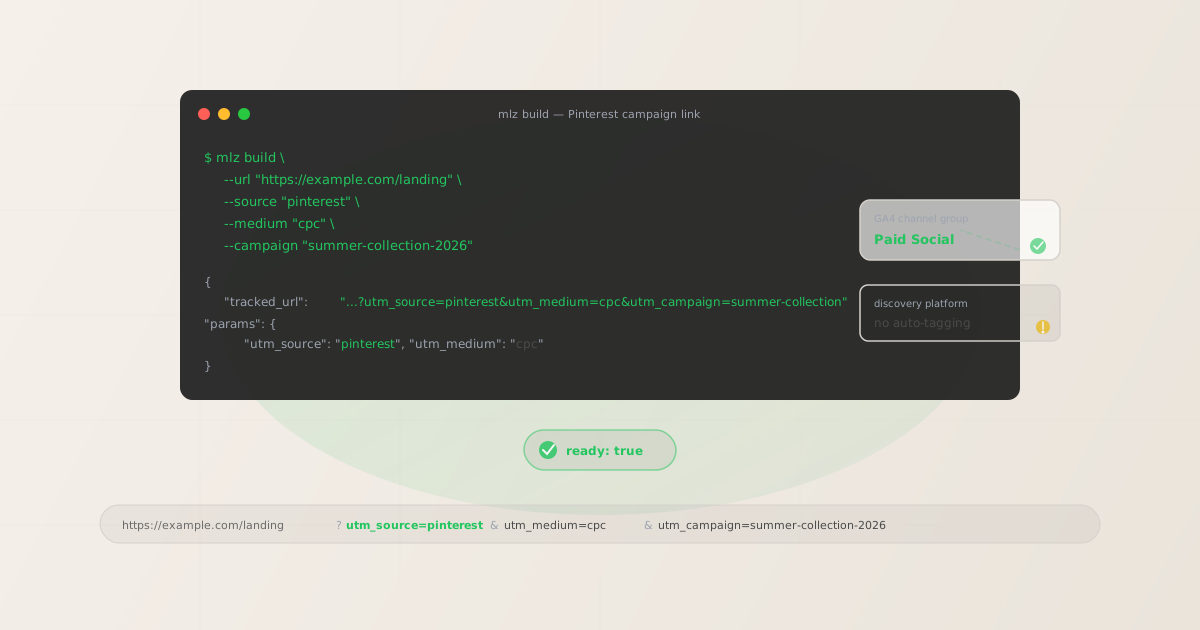
Why UTM parameters matter for Pinterest Ads
Pinterest is a discovery platform, not a direct-response social network. Users often save Pins and click through days or weeks later — making accurate, persistent attribution more important than on platforms with shorter purchase cycles. Despite this, Pinterest has no native auto-tagging equivalent to Google's gclid that pipes structured source and medium data into GA4. The practical result:
- GA4 sees Pinterest as a referral, not a paid channel
- Without UTM parameters, GA4 typically attributes Pinterest clicks as referral traffic from
pinterest.comrather than as Paid Social. This means your paid Pinterest spend blends into your organic referral row in the Traffic Acquisition report — making ROAS calculations unreliable without a separate data export from Pinterest Analytics. - Pinterest Analytics and GA4 don't sync natively
- Pinterest Analytics reports clicks, saves, and conversions through its own interface. That data lives inside Pinterest Ads. UTM parameters are the bridge that brings Pinterest campaign performance into your GA4 setup, Looker Studio dashboards, or any other analytics platform that reads standard query string attribution.
- Paid vs. organic Pinterest traffic must be separated
- If you post organic Pins pointing to the same landing pages as your Promoted Pins, UTM is the only way GA4 can tell the difference.
utm_medium=cpcon Promoted Pins vs.utm_medium=socialon organic Pins creates a clean paid/organic split in your acquisition reports. - Long attribution windows need accurate tracking
- Pinterest has a 30-day click and 30-day engagement attribution window by default — users save a Pin today and click through a month later. UTM parameters survive in the saved URL and are recorded when the user eventually clicks through, as long as the destination URL and any redirect chain preserve the query string.
The correct utm_source and utm_medium for Pinterest Ads
Pinterest campaigns span several formats and objectives. The source is always pinterest; the medium depends on whether the campaign is paid or organic:
| Pinterest campaign type | utm_source | utm_medium |
|---|---|---|
| Promoted Pin (Standard) | pinterest |
cpc |
| Shopping Ad (Product Pin) | pinterest |
cpc |
| Video Pin Ad | pinterest |
cpc |
| Carousel Ad | pinterest |
cpc |
| Organic Pin with link | pinterest |
social |
Use utm_medium=cpc for all paid Pinterest campaigns. GA4's default Paid Social channel group condition requires a paid medium indicator (cpc, ppc, paid, or similar) paired with a recognised social platform source like pinterest. Some teams use utm_medium=paid-social for Pinterest — this works if you create a custom channel group rule in GA4 to match it, but cpc is the safest default for compatibility with GA4's built-in channel definitions.
For organic Pins with links in the Pin description or profile, use utm_medium=social. GA4 routes utm_source=pinterest&utm_medium=social to the Organic Social channel group.
Building Pinterest UTM links with mlz build
The mlz build command generates the tagged URL and normalises all values to lowercase automatically. Pinterest campaigns often run across multiple ad groups with the same landing page — use --content to differentiate ad group or creative variants without creating separate campaigns:
# Promoted Pin (paid)
$ mlz build \
  --url "https://example.com/summer-collection" \
  --source "pinterest" \
  --medium "cpc" \
  --campaign "summer-collection-2026"

{
  "tracked_url": "https://example.com/summer-collection?utm_source=pinterest&utm_medium=cpc&utm_campaign=summer-collection-2026",
  "params": {
    "utm_source": "pinterest",
    "utm_medium": "cpc",
    "utm_campaign": "summer-collection-2026"
  }
}

# Carousel Ad with creative variant tracking
$ mlz build \
  --url "https://example.com/summer-collection" \
  --source "pinterest" \
  --medium "cpc" \
  --campaign "summer-collection-2026" \
  --content "carousel-lifestyle"
"tracked_url": "...?utm_source=pinterest&utm_medium=cpc&utm_campaign=summer-collection-2026&utm_content=carousel-lifestyle"
Add --validate to check that the destination URL resolves with HTTPS and returns a 200 status at build time. This is especially useful for Pinterest Shopping Ads, where product landing page URLs change frequently as inventory updates.
Validating Pinterest campaign links before launch
Before a Pinterest campaign goes live, the destination landing page should also pass an OG tag inspection. Pinterest pulls og:image, og:title, and og:description when a user saves a Pin or when the platform generates a Rich Pin preview. A missing og:image or an image that doesn't meet Pinterest's dimension requirements (minimum 600×900px for standard Pins) will cause Rich Pin previews to render poorly — or fall back to a plain link without a visual preview. Use mlz build --validate --inspect to check both URL validity and destination metadata in one pass:
$ mlz build \
  --url "https://example.com/summer-collection" \
  --source "pinterest" \
  --medium "cpc" \
  --campaign "summer-collection-2026" \
  --validate \
  --inspect

{
  "tracked_url": "https://example.com/summer-collection?utm_source=pinterest&utm_medium=cpc&utm_campaign=summer-collection-2026",
  "params": {
    "utm_source": "pinterest",
    "utm_medium": "cpc",
    "utm_campaign": "summer-collection-2026"
  },
  "destination_url": "https://example.com/summer-collection",
  "stored": true
}
The --inspect flag checks OG tags, Twitter Card tags, viewport, canonical URL, favicon, and page load time. A failed og:image check is a clear signal that your Pin will render without a visual preview on Pinterest — worth fixing before the campaign budget starts running. For a complete pre-publish workflow including post copy validation, use mlz publish-check.
Pinterest Ads tracking gotchas
- Pinterest's epik cookie tracks clicks but doesn't replace UTM
- Pinterest uses an
epikquery parameter (a cross-device attribution cookie) to power Pinterest's own Conversions API and conversion reporting. This is similar to Meta'sfbclidin concept — it feeds data back into Pinterest Ads for internal reporting but does not pass structured source/medium data to GA4 or other analytics platforms. UTM parameters remain the only way to get Pinterest attribution into GA4. - pin.it short links and UTM parameter survival
- Pinterest generates
pin.itshort URLs for all Pins. When you set a destination URL on a Pin (paid or organic), Pinterest stores the full URL including UTM parameters — and thepin.itredirect passes them through to the destination. The risk, as with all redirect chains, is what happens after thepin.ithop: a redirect on your own infrastructure can strip parameters. Validate the destination URL chain withmlz checkbefore launch, especially if your landing page uses a CDN or redirect. - Pinterest in-app browser and GA4 session attribution
- Clicks from the Pinterest mobile app open in Pinterest's in-app browser before routing to the destination. In most configurations, UTM parameters survive this transition — they're part of the URL that Pinterest passes to the in-app browser. The more common attribution issue is that Pinterest's long attribution window (30 days) means a session that occurs weeks after the initial Pin save may not have the UTM parameters in the URL if the user navigated to the page via a bookmark or direct return visit.
- Shopping Ads require per-product URL validation
- Pinterest Shopping Ads pull product URLs from your product catalog feed. When products update frequently, URLs can change and existing UTM-tagged links may break or point to 404 pages. Run periodic validation on your Shopping Ad destination URLs —
mlz checkcan detect 404s and redirect errors in your product landing page URLs as part of a scripted batch check.
Pinterest UTM naming conventions
Pinterest traffic fragmentation in GA4 happens the same way it does on every other platform: inconsistent casing. pinterest and Pinterest and PINTEREST all appear as different sources in GA4's acquisition reports. The mlz build CLI normalises all values to lowercase automatically — if you generate links manually or via a spreadsheet, enforce lowercase.
Recommended conventions for Pinterest campaigns:
- utm_source:
pinterest(always lowercase — never "Pinterest" or "PIN") - utm_medium:
cpcfor Promoted Pins and all paid formats,socialfor organic Pins - utm_campaign: lowercase hyphen-separated, e.g.
summer-collection-2026 - utm_content: creative or ad group identifier, e.g.
carousel-lifestyleorvideo-30s
For a full cross-channel naming reference, see the UTM naming conventions guide. For the GA4 case sensitivity details that explain why this matters, see Are UTM parameters case sensitive in GA4?
FAQ
- Should I use utm_medium=cpc or utm_medium=paid-social for Pinterest Ads?
- Use
utm_medium=cpcfor reliable routing to GA4's default Paid Social channel group. GA4's built-in channel group conditions for Paid Social check for a social source (likepinterest) combined with a paid medium indicator — andcpcis the most reliably matched paid indicator in GA4's default definitions. Usingutm_medium=paid-socialcan work but requires a custom channel group rule in GA4 to match it correctly. If you want a more descriptive medium and don't mind maintaining a custom channel group,paid-socialis a reasonable choice — butcpcis safer for most setups. - Does Pinterest have something like Google's gclid auto-tagging?
- No. Pinterest has an
epikcookie that helps with cross-device attribution within Pinterest's own Conversions API, but it does not integrate with GA4 the way Google's gclid does. There is no mechanism by which Pinterest Ads automatically sends structured source and medium data to GA4. UTM parameters are the only way to get Pinterest campaign data into GA4 and other analytics platforms. - How do I track Pinterest Shopping Ads with UTM parameters?
- For Shopping Ads (Product Pins), add UTM parameters to the product destination URLs in your product catalog feed. Most catalog feeds support a custom parameter field or URL suffix. Set it to
?utm_source=pinterest&utm_medium=cpc&utm_campaign=[campaign-name]. Pinterest's product catalog feed accepts UTM parameters directly in thelinkfield. If you generate a large number of product URLs programmatically,mlz buildaccepts the destination URL as a flag and outputs the full tagged URL that you can write back to your catalog CSV. - Will UTM parameters survive Pinterest's 30-day attribution window?
- UTM parameters are stored as part of the URL attached to a Pin. When a user saves a Pin and clicks through 30 days later, the UTM parameters are part of the URL that Pinterest sends to the destination page — so they will be present when GA4 records the session. The attribution window applies to Pinterest's own reporting for ad spend and conversion counting. GA4 records the session at the moment of the click with the UTM parameters present at that time.
- How do I validate that my Pinterest landing page has the right OG image dimensions?
- Pinterest requires a minimum image size of 600×900px (2:3 ratio) for standard Pins and 1000×1500px for max-width Pins. While
mlz inspectchecks whetherog:imageis present and resolvable, it reports the image URL rather than pixel dimensions. To validate dimensions, usemlz inspectto confirm the OG image is present and loads correctly, then check image dimensions separately with a browser tool or image validation script. See the OG tag validation for campaign links guide for a full validation workflow.
Recommended posts
Build Pinterest UTM links from the terminal
Pass --source "pinterest" --medium "cpc" to mlz build and get a normalised, validated URL ready for your Promoted Pin destination field. Lowercase formatting means GA4 routes every session to the Paid Social channel group correctly — and --validate --inspect confirms the destination is live and OG tags are present before your campaign starts spending.
1,000 links/month free. No credit card.
Your API key
Save this now — it won't be shown again.
npm install -g missinglinkz
Free plan: 1,000 links/month. No credit card. See the UTM tracking for developers guide for the full programmatic workflow.