UTM Tracking for Braze: How to Build and Validate Campaign Links
UTM tracking for Braze uses utm_source=braze for all outbound communications from the platform, utm_medium=email for Braze email Campaigns and Canvas steps, and utm_medium=sms for Braze SMS sends. Braze is an enterprise customer engagement platform (formerly Appboy) used by major B2C brands across Email, SMS, Push Notifications, In-App Messages, Web Push, WhatsApp, and Content Cards. Its Canvas builder enables multi-step automated journeys with branching logic, delays, and A/B testing — meaning a single campaign initiative may have dozens of individual message steps, each requiring a distinct utm_content value for proper attribution in GA4. Braze's native Link Management can auto-append UTM parameters at the workspace level, but it applies the same source and medium to every send — it cannot set per-campaign utm_campaign slugs, so teams building campaign-specific tracking still need to construct URLs manually before pasting them into the Braze message editor. The most efficient approach is to generate each tracked URL with mlz build --source braze --medium email --campaign your-campaign --validate before opening the Braze composer, so every link is validated and stored before it enters any Canvas step or Campaign template.
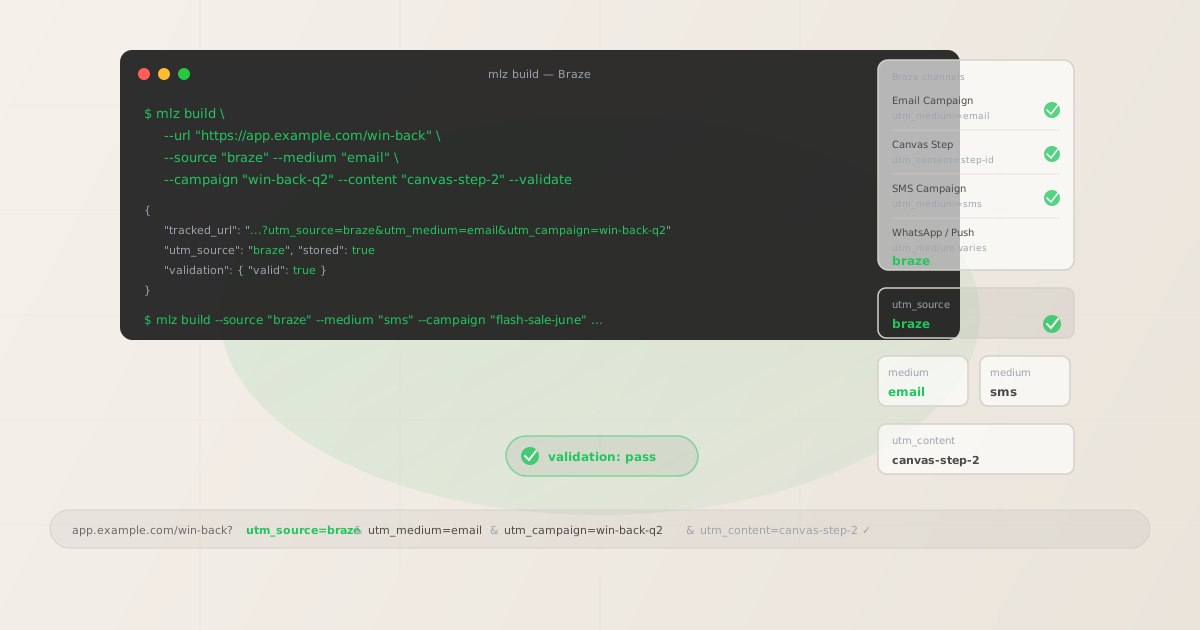
The correct utm_source and utm_medium for Braze
Use utm_source=braze — lowercase, the platform name — for all outbound communications sent from the Braze platform regardless of channel. The source value identifies the sending platform; channel assignment in GA4 is handled by utm_medium. Use utm_medium=email for all Braze email Campaigns and Canvas steps that send email messages with outbound links. Use utm_medium=sms for all Braze SMS Campaigns and Canvas SMS steps.
Some Braze teams use the app or workspace name instead of braze as the utm_source — for example utm_source=acme-app or utm_source=my-brand. This is a common source of fragmentation: your GA4 data ends up with multiple source rows for what is actually a single sending platform, making it impossible to evaluate total Braze-driven traffic across a date range without building custom segments. Standardise on utm_source=braze across your entire team and document it in your UTM naming conventions guide before any Braze sends go live.
| Send type | utm_source | utm_medium | Correct? |
|---|---|---|---|
| Email Campaign | braze |
email |
✓ Yes |
| Canvas step (email) | braze |
email |
✓ Yes |
| SMS Campaign | braze |
sms |
✓ Yes |
| Any send | acme-app |
email |
✗ No — splits attribution by workspace name |
| Any send | braze |
braze |
✗ No — routes to Unassigned in GA4 |
GA4's default channel grouping assigns sessions to the Email channel when utm_medium=email is present and to the SMS channel when utm_medium=sms is present, regardless of source value. All Braze email sends appear under the Email channel in GA4's channel reports, with braze as the source dimension that lets you filter Braze-specific traffic from other email platforms. For SMS traffic, the SMS channel grouping in GA4 requires utm_medium=sms — any other medium value sends SMS sessions to Unassigned or Other.
Braze Canvas — UTM tracking for multi-step journeys
Canvas is Braze's multi-step journey builder. A single Canvas can contain dozens of steps across multiple channels — email sends, SMS sends, push notifications, in-app messages, wait delays, audience splits, and A/B experiment steps. Each Canvas step that sends an email with an outbound link is a distinct touchpoint: to determine which step in a Canvas journey drove a conversion in GA4, each step needs a unique utm_content value.
Without per-step utm_content identifiers, GA4 aggregates all sessions from all Canvas steps into a single campaign dimension row. A win-back Canvas with five email steps over 30 days will appear as one block of traffic under utm_campaign=win-back-q2 — it is impossible to determine whether the day-1 re-engagement email or the day-30 final discount offer drove the majority of return conversions. Build tracked URLs for every Canvas step that sends an email with an outbound link before configuring the Canvas in Braze.
# Win-back Canvas — step 1: day-1 re-engagement email
$ mlz build \
  --url "https://app.example.com/win-back" \
  --source "braze" \
  --medium "email" \
  --campaign "win-back-q2" \
  --content "canvas-step-1-day1" \
  --validate

{
  "tracked_url": "https://app.example.com/win-back?utm_source=braze&utm_medium=email&utm_campaign=win-back-q2&utm_content=canvas-step-1-day1",
  "params": {
    "utm_source": "braze",
    "utm_medium": "email",
    "utm_campaign": "win-back-q2",
    "utm_content": "canvas-step-1-day1"
  },
  "link_id": "lnk_abc12345",
  "stored": true
}

# Win-back Canvas — step 2: day-7 discount offer
$ mlz build \
  --url "https://app.example.com/win-back" \
  --source "braze" \
  --medium "email" \
  --campaign "win-back-q2" \
  --content "canvas-step-2-day7-discount" \
  --validate

{
  "tracked_url": "https://app.example.com/win-back?utm_source=braze&utm_medium=email&utm_campaign=win-back-q2&utm_content=canvas-step-2-day7-discount",
  "stored": true
}

# Win-back Canvas — step 3: day-30 final offer
$ mlz build \
  --url "https://app.example.com/win-back" \
  --source "braze" \
  --medium "email" \
  --campaign "win-back-q2" \
  --content "canvas-step-3-day30-final" \
  --validate

{
  "tracked_url": "https://app.example.com/win-back?utm_source=braze&utm_medium=email&utm_campaign=win-back-q2&utm_content=canvas-step-3-day30-final",
  "stored": true
}
Paste each tracked URL into the link destination for the corresponding Canvas step's email CTA. For Canvas steps that include A/B experiment variants, add a variant identifier to utm_content as well: canvas-step-2-variant-a and canvas-step-2-variant-b. This lets GA4 show you not just which Canvas step drove more sessions, but which variant within that step performed better — without relying solely on Braze's built-in reporting, which does not tie Canvas step performance to downstream GA4 conversion events like purchases or signups.
Braze uses Liquid templating for personalisation in message content — subscriber names, product recommendations, loyalty points, dynamic copy. UTM parameters are static strings, not Liquid variables. They must be built into the URL before pasting into the Braze message editor. Do not attempt to set UTM parameter values using Liquid — Braze Liquid runs server-side at send time, but UTM parameters in a URL are read by the destination page, not by Braze. Build the complete tracked URL with mlz build and paste the tracked_url value as a static string into the link field in the Braze editor.
Braze native link management vs. manual UTM tracking
Braze includes a native Link Management feature in workspace settings. When enabled, it automatically appends UTM parameters to all outbound links across all Campaigns and Canvases in the workspace. This is useful for teams that want a baseline of attribution without configuring every link manually — but it has a critical limitation that makes it insufficient for campaign-specific analytics.
Braze's native Link Management applies the same UTM values to all sends in the workspace: it can set a workspace-level utm_source and utm_medium, but it cannot set a per-campaign utm_campaign slug. Every Campaign and Canvas step in the workspace receives the same parameter values. In GA4, all Braze traffic aggregates under a single source/medium row — you cannot distinguish between a win-back campaign, a new user onboarding Canvas, and a promotional newsletter Campaign because they all carry the same UTM values.
The practical implication: Braze's native Link Management is useful as a fallback to ensure no link is ever sent without at least utm_source=braze and utm_medium=email, but it is not a substitute for per-campaign UTM tracking. Teams that need campaign-level and step-level attribution — which is the majority of enterprise Braze users — need to build each tracked URL manually using mlz build with --campaign and --content flags set per initiative, then paste the returned tracked_url into each Braze Campaign or Canvas step. Use Braze Link Management as a safety net, not as the primary attribution mechanism.
Braze Link Aliasing and redirect chain validation
When Braze Link Aliasing is enabled in a workspace, Braze wraps all outbound links in email messages with a Braze-managed redirect URL. This wrapping enables Braze's native click tracking: when a recipient clicks a link, the click is recorded by Braze's click tracking infrastructure before the redirect delivers the recipient to the original destination URL. The wrapped link looks something like https://click.braze.com/track?... instead of the original tracked URL.
This redirect chain creates a UTM preservation risk. If Braze's click-tracking redirect strips query string parameters before forwarding the request to the destination — or if the redirect chain passes through an intermediate URL that drops the query string — your UTM parameters arrive at the destination page intact at build time but are never recorded by GA4 because they were stripped in transit. The session lands on the destination page without UTM parameters and is attributed to direct or organic traffic in GA4 despite being a Braze email click.
Validate any Braze Link Aliasing redirect chain with mlz check before your campaign goes live:
# Validate that a Braze-wrapped link preserves UTM parameters
$ mlz check "https://click.braze.com/track?url=https%3A%2F%2Fapp.example.com%2Fwin-back%3Futm_source%3Dbraze%26utm_medium%3Demail%26utm_campaign%3Dwin-back-q2"

{
  "url": "https://click.braze.com/track?url=...",
  "ssl": true,
  "status": "200",
  "redirects": [
    "https://click.braze.com/track?url=...",
    "https://app.example.com/win-back?utm_source=braze&utm_medium=email&utm_campaign=win-back-q2"
  ],
  "utm_preserved": true
}
Inspect the redirects array in the mlz check response and confirm that the final URL in the chain contains all five UTM parameters that were present in the original tracked URL. If the final URL is missing utm_source, utm_medium, or utm_campaign, the Braze click-tracking redirect is stripping query parameters and your GA4 attribution is broken. In that case, contact Braze support to verify Link Aliasing configuration, or review whether the destination server is performing a redirect from HTTP to HTTPS or from a non-www to www domain that is dropping the query string before GA4 fires.
SMS sends in Braze route through Twilio or similar SMS providers and may include a Braze-managed short link for click tracking. The fully tracked URL — with all UTM parameters — must be complete before configuring the link in the Braze SMS message composer. Build the full tracked URL with mlz build --source braze --medium sms --campaign your-campaign --validate, confirm it resolves correctly with mlz check, then paste the returned tracked_url into the Braze SMS link field. The short-link wrapping that Braze applies for SMS click tracking happens after the link is set in the composer — your UTM parameters must already be present in the destination URL before that wrapping occurs.
Braze UTM tracking gotchas
- Some teams use the workspace or app name as utm_source instead of "braze"
- Braze is a multi-workspace platform used by large B2C organisations that may have separate workspaces for different regions, product lines, or business units. A common mistake is setting
utm_sourceto the workspace name or app identifier —utm_source=acme-us,utm_source=acme-emea,utm_source=my-mobile-app— rather than the platform namebraze. This fragments attribution: GA4 shows multiple source rows that each represent traffic from the Braze platform, but none of them is identifiable as Braze without knowing the internal naming convention. Standardise onutm_source=brazefor all workspaces and useutm_campaignor a custom dimension to distinguish workspace-level or region-level sends if that segmentation is needed. - Braze's native Link Management does not set per-campaign utm_campaign values
- Braze's Link Management feature in workspace settings can auto-append UTM parameters to all links but applies the same values workspace-wide. There is no option to configure per-Campaign or per-Canvas utm_campaign values through Link Management. Teams that rely entirely on Braze Link Management for UTM tracking will find all Braze traffic aggregated under a single source/medium/campaign combination in GA4 — losing all campaign-level and step-level attribution. Use
mlz build --campaign "your-campaign-slug" --content "step-identifier"to generate campaign-specific and step-specific tracked URLs, then paste them into each Campaign and Canvas step individually. - UTM parameters in Braze are static strings — Liquid templating cannot set UTM values dynamically
- Braze's Liquid templating language is used to personalise message content with subscriber attributes, product data, loyalty balances, and dynamic copy blocks. It is a server-side rendering system that runs when Braze constructs the message at send time. UTM parameters in a destination URL are read by the destination web server (and by the GA4 gtag.js snippet on the landing page) — not by Braze. Attempting to use Liquid variables to set UTM parameter values will result in literal Liquid syntax appearing in the URL (e.g.,
utm_campaign={{canvas_name}}) rather than resolved values. Build every tracked URL as a complete static string usingmlz buildbefore opening the Braze editor, and paste thetracked_urlvalue directly into the link destination field. - Braze Link Aliasing redirect chains can silently strip UTM parameters
- When Braze Link Aliasing is enabled for email click tracking, every outbound link is wrapped in a Braze redirect URL. If the destination domain performs its own redirect — from HTTP to HTTPS, from a non-www to www variant, or through a marketing automation landing page system that rewrites the URL — the redirect chain can strip query string parameters before GA4 fires. The result is that the Braze click is tracked by Braze (the click.braze.com redirect is followed) but GA4 attributes the session as direct because the UTM parameters were dropped before the GA4 tag loaded. Run
mlz checkagainst the full Braze-wrapped URL and verify that the final URL in the redirect chain contains your UTM parameters intact. - Canvas A/B variants need distinct utm_content values — not just distinct utm_campaign values
- Braze Canvas experiment steps allow A/B testing of message content, timing, or channel within a single Canvas step. If both variants of a Canvas experiment step use the same tracked URL, GA4 cannot distinguish which variant drove more conversions — you will see one aggregated data point in GA4 for what is actually two distinct message variants. Build separate tracked URLs for each variant using distinct
utm_contentvalues:canvas-step-2-variant-aandcanvas-step-2-variant-b. This lets you cross-reference Braze's variant performance data with GA4's downstream conversion data to validate Braze's conversion window against GA4's attribution model.
Braze UTM naming conventions
Recommended UTM parameter values for Braze, aligned with GA4 default channel groupings and a lowercase-hyphenated taxonomy:
- utm_source:
braze— always, for all sends from all Braze workspaces and channels. Never use the workspace name, app identifier, or domain variant. This is the single most important convention to enforce: document it, enforce it, and audit for it quarterly usingmlz build --source brazeto generate standardised links. - utm_medium:
emailfor all Braze email Campaigns and Canvas email steps.smsfor all Braze SMS Campaigns and Canvas SMS steps. For push notification clicks that open a deep link to a web URL (rare — push typically opens the app, not a web browser),pushis technically correct but most teams omit push entirely from UTM schemas since push clicks do not generate GA4 web sessions. Never useutm_medium=braze— it routes sessions to Unassigned in GA4's default channel grouping. - utm_campaign: Lowercase, hyphenated, initiative-level slug. For Canvases: the journey name and optionally a date qualifier —
win-back-q2,onboarding-2026,lapsed-users-h1. For one-off Campaigns: the specific send initiative —product-launch-june,flash-sale-q3,holiday-promo-dec. Avoid using the internal Braze Campaign or Canvas ID as the utm_campaign value — use a human-readable slug that is meaningful in GA4 reports without needing to cross-reference Braze's internal campaign database. - utm_content: Per Canvas step with a primary CTA:
canvas-step-1-day1,canvas-step-2-day7-discount,canvas-step-3-day30-final. Per A/B variant:canvas-step-2-variant-a,canvas-step-2-variant-b. For one-off Campaigns with multiple CTAs:hero-cta,secondary-product-link,footer-cta. For Campaigns with a single CTA, utm_content may be omitted or set to a brief identifier likeprimary-cta. - utm_term: Optional for Braze. Consider using utm_term to pass audience segment identifiers when the same Canvas is run against multiple distinct segments:
utm_term=high-value-lapsed,utm_term=low-value-lapsed. This provides segment-level breakdowns in GA4 without requiring separate Canvas instances per segment.
See the UTM naming conventions guide for the full cross-platform reference and the UTM tracking for developers guide for programmatic generation, validation pipelines, and MCP integration for AI agent workflows.
FAQ
- Should I use utm_source=braze or the name of my Braze workspace?
- Use
utm_source=braze. The utm_source value identifies the sending platform — Braze — not the internal workspace name or app identifier. Using a workspace name creates separate GA4 source rows for each Braze workspace, fragmenting attribution and making it impossible to report on total Braze-driven traffic without building custom segments. If you need to distinguish traffic by Braze workspace or region, use a custom GA4 dimension or encode the workspace inutm_campaign— not inutm_source. Runmlz build --source brazeto always output the normalised source value. - Does Braze's native Link Management replace manual UTM tracking?
- No. Braze's Link Management feature applies the same UTM values to every link in every Campaign and Canvas in the workspace — it cannot set a per-campaign
utm_campaignslug or a per-Canvas-steputm_contentvalue. If you rely solely on Braze Link Management for UTM attribution, all Braze traffic in GA4 aggregates under a single source/medium combination with no campaign-level or step-level breakdowns. Use Link Management as a safety net for any links you miss, but build per-campaign tracked URLs withmlz build --campaign "your-slug" --content "step-id"for all Campaigns and Canvas steps that need campaign-level attribution. - How do I track which Canvas step drove a conversion in GA4?
- Use a unique
utm_contentvalue for each Canvas step that sends an email with an outbound link. Before configuring any Canvas in Braze, define content identifiers for all email steps:canvas-step-1-day1,canvas-step-2-day7-discount,canvas-step-3-day30-final. Runmlz build --source braze --medium email --campaign "your-canvas-slug" --content "step-identifier" --validatefor each step, then paste the returnedtracked_urlinto the link destination for the corresponding Canvas step's email CTA. GA4 attributes sessions and conversions to individual Canvas steps through the utm_content secondary dimension. - My Braze Link Aliasing is enabled — how do I know if UTM parameters are being preserved?
- Run
mlz checkagainst the Braze-wrapped link URL after you have configured the link in the Braze editor and previewed the email to get the wrapped click.braze.com URL. Inspect theredirectsarray in the response and confirm that the final destination URL contains yourutm_source,utm_medium, andutm_campaignparameters. If they are absent in the final URL, the redirect chain is stripping query parameters — check whether the destination domain redirects HTTP to HTTPS or non-www to www before the GA4 tag loads, and ensure those redirects preserve the query string. - How should I track Braze Canvas A/B test variants in GA4?
- Build separate tracked URLs for each variant of a Canvas experiment step, using distinct
utm_contentvalues:mlz build --source braze --medium email --campaign "your-canvas" --content "step-2-variant-a" --validateand a corresponding call with--content "step-2-variant-b". Paste each tracked URL into the link field for the corresponding variant in Braze's Canvas experiment step. In GA4, filter by utm_campaign to isolate the Canvas, then use utm_content as a secondary dimension to compare session counts, engagement rate, and conversion rate between variants — cross-referencing Braze's own variant reporting with downstream GA4 conversion data.
Recommended posts
Build Braze campaign links from the terminal
Pass --source "braze", --medium "email", --campaign "your-canvas-slug", and --content "canvas-step-identifier" to mlz build to generate a normalised, validated tracked URL for each Braze Canvas step or Campaign CTA. For Canvas A/B variants, build separate tracked URLs per variant using distinct --content values. Run mlz check against Braze-wrapped Link Aliasing URLs to confirm the redirect chain preserves UTM parameters before any send goes live.
1,000 links/month free. No credit card.
Your API key
Save this now — it won't be shown again.
npm install -g missinglinkz
Free plan: 1,000 links/month. No credit card. See the UTM tracking for developers guide for the full programmatic workflow including API and MCP integration.